Gltf-blender-io: .glb file size increases by 5x on export
Hi
I have a .glb obtained where the texture information is embedded in the .glb itself. I wanted to use Blender to adjust the origin of the mesh and export it out again into a .glb file without any other change. The exported file's size now increases by 5 times.
I have attached the original .glb file and the blender settings that I had used. Can somebody tell me why the blender output is 5 times larger ?
Files: Original .glb file - 38 MB (inside
original.zip
original.zip)

 v-prgmr
All 18 comments
Well I can't export your file with the default settings (OOMs; apparently 8GB is not enough...), but I can probably explain it.
original.glb is pretty simple. Here's the important bits
````json5
"meshes": [
{
"primitives": [
{
"attributes": {
"POSITION": 0,
"COLOR_0": 1
},
"indices": 2
}
]
}
],
"accessors": [
{
"count": 978164,
"type": "VEC3",
"componentType": 5126, // float32
},
{
"count": 978164,
"type": "VEC4",
"normalized": true,
"componentType": 5121 // ubyte
},
{
"count": 5862603,
"type": "SCALAR",
"componentType": 5125 // uint32
}
]
````
So right away we see
- there are no NORMALs. This exporter will write NORMALs by default, but we can turn that off with the "Geometry > Normals" option in the export dialogue.
- the COLOR_0s are stored as normalized bytes. This exporter always writes them as floats, so the exporter's will be 4x larger than the original's.
Okay, so let's export with "Geometry > Normals" turned off (my computer can manage that much). We get a 49 M file. Here's the important bits
json5
  "meshes": [
    {
      "primitives": [
        {
          "attributes": {
            "POSITION": 0,
            "COLOR_0": 1
          },
          "indices": 2
        }
      ]
    }
  ],
  "accessors": [
    {
      "count": 978164,
      "type": "VEC3"
      "componentType": 5126,  // float32
    },
    {
      "count": 978164,
      "type": "VEC4"
      "componentType": 5126,  // float32
    },
    {
      "count": 5862603,
      "type": "SCALAR"
      "componentType": 5125,  // uint32
    }
  ],
We can see accessors 0 and 2 are the same. Accessor 1 holds the vertex colors and it is 978164 × 4 × 4 bytes = 15 MB long. Like I said before, this is 4 times longer than original.glb, so if we knock off 3/4 of this, 11 MB, we would go down from 49 MB to the same 38 MB as original.glb.
That accounts for the whole difference.
 scurest
on 5 Aug 2020
scurest
on 5 Aug 2020
Okay, so let's export with "Geometry > Normals" turned off (my computer can manage that much). We get a 49 M file.
I got a 180MB file doing this... I probably need to pull the newest addon version though. This seems larger than it should be, based on the data types...

the COLOR_0s are stored as normalized bytes.
I guess we could consider switching to UNSIGNED_BYTE? Not sure we ever need FLOAT for vertex colors.
@v-prgmr the quickest workaround here would be to use gltfpack and re-optimize the model after exporting. That will bring it down even smaller than the original, but you will need to disable Geometry -> Normals as @scurest suggests above.
Before:

After:

 donmccurdy
on 5 Aug 2020
donmccurdy
on 5 Aug 2020
^that said I should mention that gltfpack does require that whatever viewer you're going to use the model in supports glTF's KHR_mesh_quantization extension. Most viewers should, though.
donmccurdy
on 5 Aug 2020
@donmccurdy Maybe uint16? Since the colors are in linear space and we probably want >= the precision of 8-bit sRGB. (Might hurt using it for non-color data though.)
scurest
on 5 Aug 2020
Ah, great point.
Still, I think this model is coming out larger than 3x attributes at FLOAT precision should require, like maybe we've got extra padding between vertices? I don't think I have time to dig into it further at the moment though, maybe after we have some of the open PRs (like https://github.com/KhronosGroup/glTF-Blender-IO/pull/1120) merged.
donmccurdy
on 5 Aug 2020
You mean with normals on? The reason its probably so big with normals is that original.glb has no normals. Therefore, according to the spec, it is flat shaded, and the importer imports it as flat shaded. Therefore when you re-export it, every vert will get split into a new vert for every poly its in.
scurest
on 5 Aug 2020
@v-prgmr Oh, I noticed your screenshot does have "Geometry > Normals" off. You might want to use the 2.91 alpha from http://builder.blender.org/ if you're not already, that might make a difference.
scurest
on 5 Aug 2020
You mean with normals on?
Nope, with normals off there's still a big difference:
Before:

After:

Disclaimer: I'm synced to some 2.90 version from June... 2.91 alpha is very likely better.
donmccurdy
on 5 Aug 2020
Probably fixed by #1023.
scurest
on 5 Aug 2020
Thank you @scurest and @donmccurdy for your quick responses.
@donmccurdy , I can confirm that I got a ~178 MB file too on exporting without the normals, but with the Vertex colors and Materials turned on. I can check with the latest version and confirm once again if I am arriving at 49MB.
Thanks for the heads up with gltfpack 👍🏽
@scurest , another thing I noticed is that the exported model also has ~4x number of vertices that the original.glb has.
v-prgmr
on 5 Aug 2020
@scurest , the latest alpha version doesnt explode the file size. The new file size increases by 6MB but I see that its because of the precision of the colors. This will be looked into in the future releases, right?
v-prgmr
on 5 Aug 2020
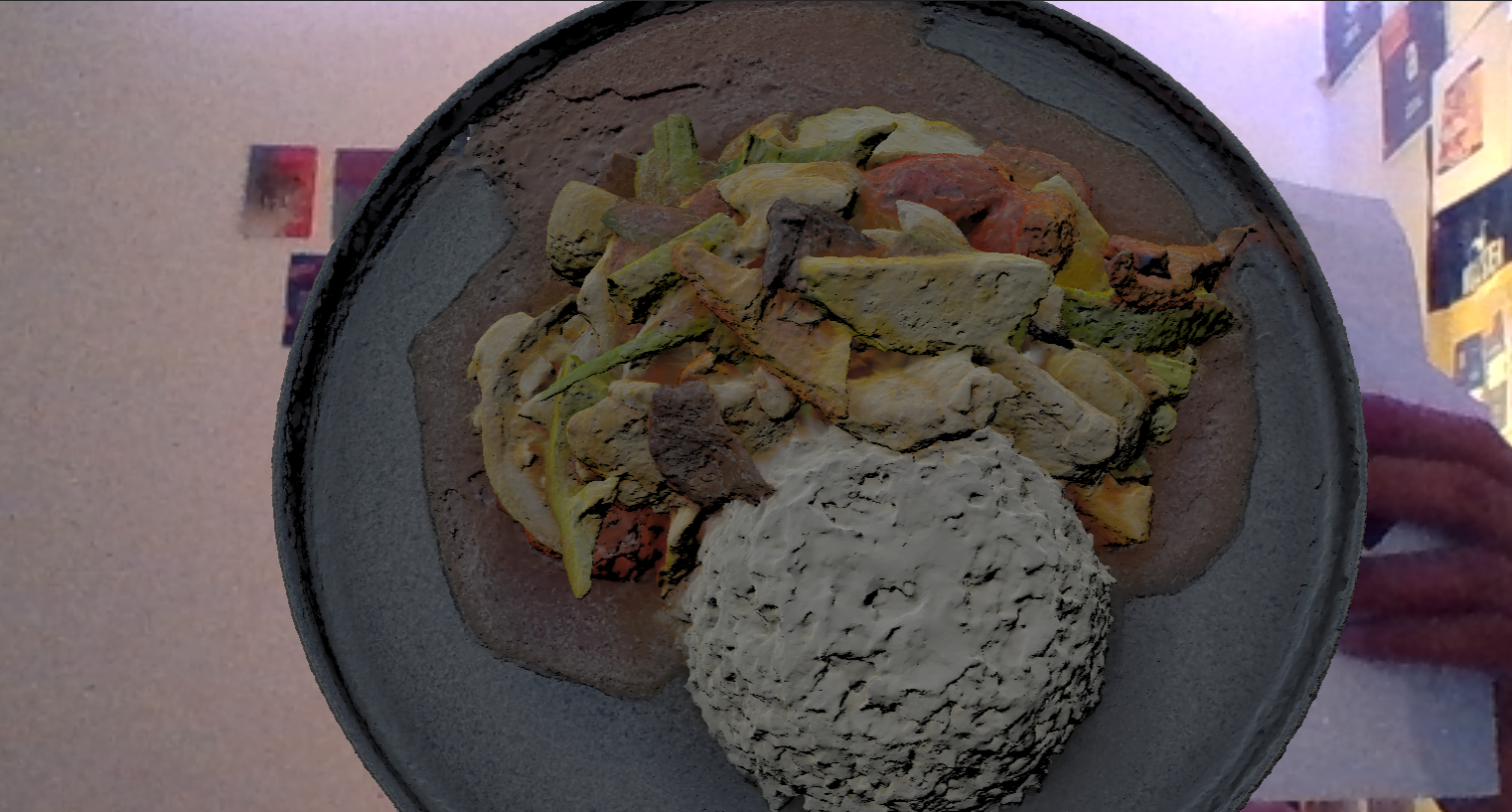
@donmccurdy Another interesting thing I stumbled upon is, when I export a .glb model using blender as mentioned above (without normals, but only vertex colors and normals) and deploy the model using aframe AR, my model is shaded (ugly shadows at the faces) based on the vertices (or faces, i am not sure). But at the same time when I try to generate the same .glb model which was converted using "facebookincubator/FBX2glTF" https://github.com/facebookincubator/FBX2glTF/releases?fbclid=IwAR1xpY62KoPCuZZSCLMyhzkESm6i9HFQiraLVll9jd0IS53xSGa0j_Mp7mc, from .fbx, and deploy in aframe, the model is not shaded anymore (i.e. no shading/ ugly shadows,)
Shaded result:
Non-shaded result:
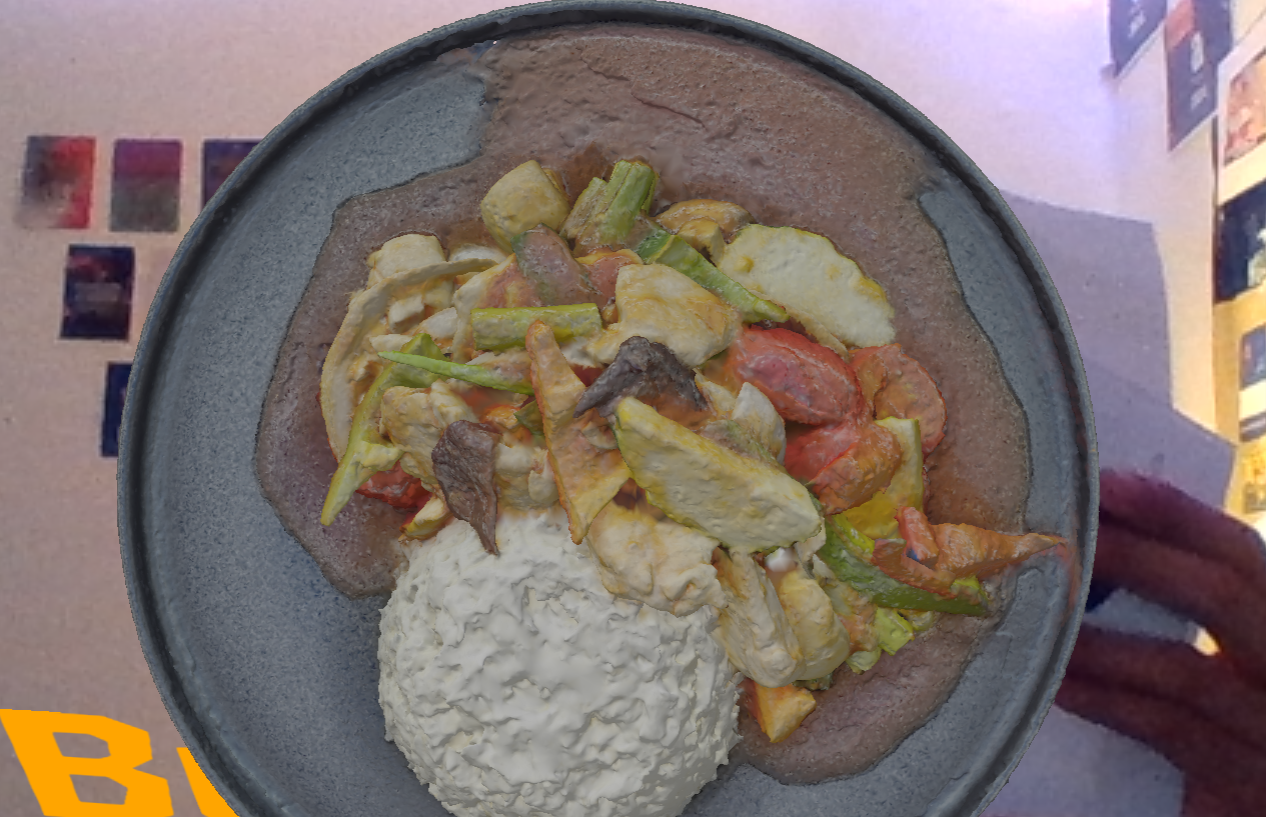
Do you know why this behavior happens?
v-prgmr
on 6 Aug 2020
Would need to compare the .glb models, but a guess: are you exporting with the material option completely disabled? Or if not, is metallic=1 in the material settings? In either case, you'd need IBL lighting to get a fully-lit render in A-Frame. It's usually best to keep metallic=0 if you're not sure, lighting is easier then.
donmccurdy
on 6 Aug 2020
I couldnt compare the .glb files because the one from Blender is gibberish (unreadable in notepad). I exported with Materials option enabled.
v-prgmr
on 6 Aug 2020
I'm not sure how to help with that question without access to the models, sorry.
donmccurdy
on 13 Aug 2020
@donmccurdy I have the same issue, glb and gltf are way more bigger in size than fbx ..
you can examine the objects here:
https://drive.google.com/drive/folders/1MTPa1tfsz9DB7Ao6o8QXohiFE9CGllpq?usp=sharing
 mshamaseen
on 14 Aug 2020
mshamaseen
on 14 Aug 2020
@mshamaseen could you share the original .blend, as well? Note that the "glTF Embedded" option is less efficient than the other two glTF format options, it's best to compare .glb if you care about file size.
For others, here's the analysis of the .glb shared above:
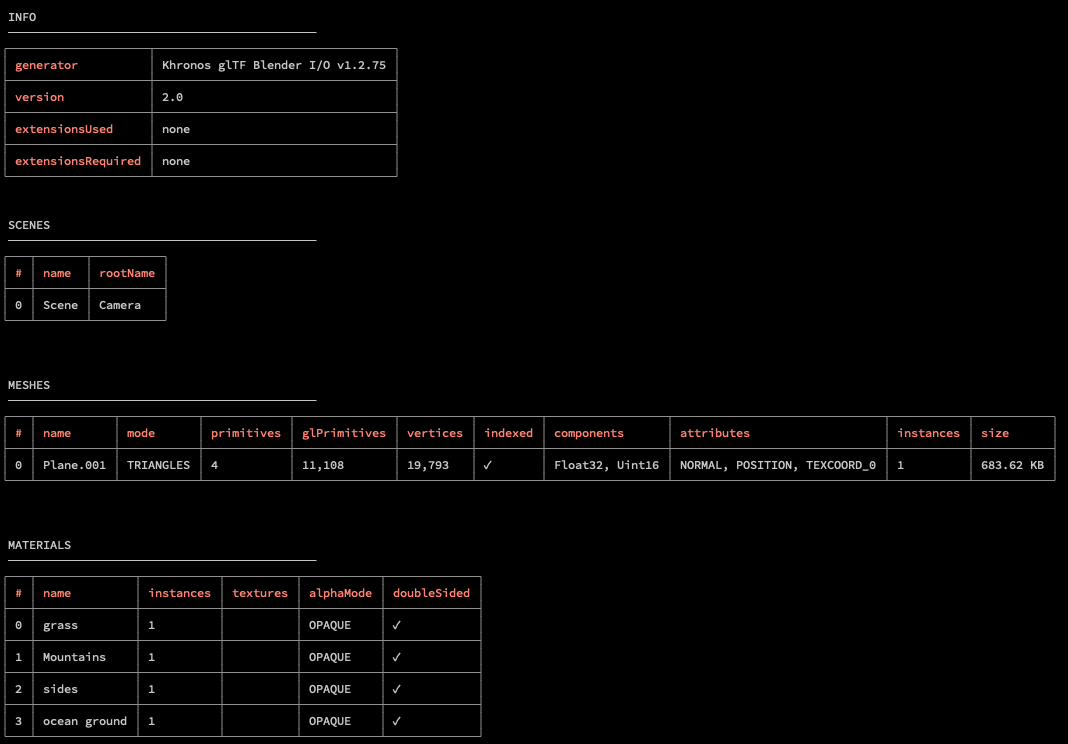
The number of vertices is a bit lower when exporting from 2.90 for me, but not a lot lower, I think most of the difference is the inclusion of normals, maybe? I can't tell if the FBX contains them. But the model shouldn't need either, so if you disable export of normals and UVs you'll get a file that's just 270kb as .glb, smaller than the .fbx. Going one further than that, you can run this model through the gltfpack tool to bring it down to just 100kb, without any visual difference that I can see.
donmccurdy
on 14 Aug 2020
I've included the blend file in the same driver here:
https://drive.google.com/drive/folders/1MTPa1tfsz9DB7Ao6o8QXohiFE9CGllpq?usp=sharing
I found out that it was exporting the camera and the lamp with the exportation, even though in the include section I didn't check the camera and the light checkboxes :\
I used "export selection" to export the mesh only (it would be great if there were export meshes only option like fbx exporter).
anyway, now it is lighter than fbx even with including the Normals.
mshamaseen
on 14 Aug 2020
Related issues
 viperscape
·
3Comments
viperscape
·
3Comments
 cstfan
·
4Comments
scurest
·
4Comments
cstfan
·
4Comments
scurest
·
4Comments
 KannebTo
·
3Comments
KannebTo
·
3Comments
 dsinni
·
3Comments
dsinni
·
3Comments
Most helpful comment
Would need to compare the
.glbmodels, but a guess: are you exporting with the material option completely disabled? Or if not, is metallic=1 in the material settings? In either case, you'd need IBL lighting to get a fully-lit render in A-Frame. It's usually best to keep metallic=0 if you're not sure, lighting is easier then.