Gltf-blender-io: None of the Blender visibility options affect export of objects
Describe the bug
Typical production scenes contain objects that have visibility toggled, either for scene view or rendering or both.
However, none of those settings affect object export; I understand that GLTF does not specify a way to state "visibility" per object, but expectation would clearly be that e.g. "hide in rendering" would prevent an object from getting exported instead of needing to either hunt down and delete all hidden objects, or make selection sets for export that will get outdated once new objects are added.
To Reproduce
Steps to reproduce the behavior:
- Create a Cube
- Create a monkey
- Change all 3 visibility options of the Cube to "hidden"
- Export as GLB

Expected behavior
Cube does not exist in export
Actual behaviour
Cube exists in export

.blend file/ .gltf
GLB-Visibility-Issues.zip
Version
- OS: [e.g. macOS, linux]
- Blender Version [e.g. 2.82, 2.83, or build date]
Additional context
I think there was some discussion around this in #602, however the discussion there was around explicitly exporting hidden objects. Given there's at least 3 different ways of specifying visibility in Blender I'd hope that one of them at least could be used for determining if an object is exported, if necessary with an export option.
 hybridherbst
All 10 comments
Speaking as a user, I would be strongly against making this the default behaviour. "Hiding" an object is by nature a temporary and shallow change in the scene (if I wanted it permanently gone from the viewport, I'd just delete it); the hidden objects are still part of the scene, and especially since there are no fewer than three different types of visibility toggles in Blender, it seems like it'd be arbitrary, unintuitive, and unnecessary to transparently hide parts of the scene based off of one of three similar flags.
This seems like the type of feature that could easily kill half an hour of my time, just from trying to figure out why some objects in my scene aren't being exported correctly. ("Is it because of multi-user data? Modifiers? N-Gons? Proxies and links? Curve data types? Negative or high-exponent transforms? Dynamic topology? Vertex data? File corruption? Etc?") That would likely either end in a clunky workaround like switching to a different format or re-appending the entire scene into a new file, or leave a lot of additional uncertainty about whether future exports will work correctly. (E.G. "Are the visibility toggles on modifiers also treated the same way? What if I export explicitly selected objects, but some of those objects have their Render visibility disabled? Are there other settings that will make the exporter 'helpfully' decide that I don't want to include an element in the scene?")
Having objects that you meant to be hidden get exported has an easy and obvious fix: You just deselect those objects.
Having objects that are part of the scene fail to be exported will probably cause far more headaches: You have to choose between figuring out if something's wrong with your scene, switching to a different exporter and format, or going on a bug-hunt in the exporter's behaviour, all of which will require additional work(arounds).
I'm pretty sure that the desired behaviour can already be achieved anyway, at least in all cases except for the "Render" visibility toggle. Blender does not select objects that aren't visible in the viewport, so just press A to select everything and restrict your export to the selected set.
TL;DR: This can already be done by combining "Selected Objects" with "Select All", because Blender only selects visible objects. Please don't try to helpfully assume user preferences by transparently removing objects based off of one of three object toggles, which are all similar, are often temporary, have different meanings and uses depending on context, and are easy to forget about.
 will-ca
on 23 Jul 2020
will-ca
on 23 Jul 2020
"Disable in Renderer" is a very intentional operation that affects rendering outcome. It would be what I'd prefer as way to disable stuff from export. I agree that the first one, the mere "eye symbol / temp visibility", is not a good option.
For me, it's exactly the other way around to what you describe - working in complex projects and processes, usually as part of a team, I want to be able to open a file (very probably being created by someone else), and re-export, and not worry about "ok I need to select this and that, to reproduce what someone else had as result in the past". I want to open a file and export, done, with all intentional choices someone made on that file, same as I want to open a file and press "render" and have a consistent result.
hybridherbst
on 23 Jul 2020
"Disable in Renders" could be pretty useful to support I guess, but I think it would still be confusing if there weren't a very clear checkbox and tooltip to toggle and explain it in the export dialog (including mentioning whether it also applies to modifiers).
A lot of the times where I've used this GLTF exporter, it's to create an interactive snapshot of an in-progress project, or to create an interactive diagram illustrating the features of a finished design, or some some other situation where I explicitly want to include objects that won't show up in the final export (or in a render)— hence why automatically leaving out objects from the scene seems very counterintuitive and potentially frustrating to me. I suspect that may be more prevalent depending on workflow? Projects where the final target isn't a F12 EEVEE render (like individual assets and physical items) may have a less strong correlation between the "Disable in Renders" setting and wanting objects to be hidden in a GLTF export.
Anyway, I suppose those are our two respective use cases.
will-ca
on 24 Jul 2020
My suggestion is to have a look on other exporter (for example FBX), and stick to same behaviour
 julienduroure
on 25 Jul 2020
julienduroure
on 25 Jul 2020
Relevant previous discussions around this:
https://github.com/KhronosGroup/glTF-Blender-Exporter/issues/272
https://github.com/KhronosGroup/glTF-Blender-IO/issues/107#issuecomment-442939836
One note, blender exporters are pretty random in my experience, all behaving different. (fbx is notably very broken, but that's a different story.) If someone is able to chime in and say "this is ground truth for how exporters should behave" that would be awesome, to make gltf exporter an even better one.
Maybe @emackey and @donmccurdy want to chime in, two years later than the last discussion :)
hybridherbst
on 25 Jul 2020
I've been thinking about this lately. The first commit of my PR #1126 actually uses the visibility flag, but I backed that out in the second commit after observing what other exporters do.
I tested some other exporters (OBJ, COLLADA, and STL) in Blender 2.83 and by default they will export all objects, even those not visible and not renderable. So, we can't have a visibility filter as the default behavior for glTF.
I'm still wondering if it would be OK to add an option for this, such as an "Export Visible" checkbox or similar, that would exclude the hidden objects. I find that the typical workflow of hitting "select all" prior to each and every export does get tedious, and is easily forgotten when one is iterating on a glTF model export. It would be better to have an export flag that could be saved with the project, I believe.
 emackey
on 25 Jul 2020
emackey
on 25 Jul 2020
I tested some other exporters (OBJ, COLLADA, and STL) in Blender 2.83 and by default they will export all objects, even those not visible and not renderable.
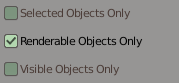
OTOH the Alembic, USD, and X3D exporters are the opposite, and do not export the hidden Cube by default.
The USD and Alembic exporters have options relating to this.
USD:
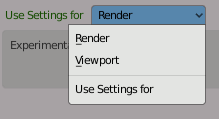
Alembic:
 scurest
on 25 Jul 2020
scurest
on 25 Jul 2020
I'd actually love if the outcome of this is some kind of agreement on "best practices for blender exporters"!
I definitely like those options on Alembic and USD exporters as they make the choice explicit. I'd be totally fine with default being "just export everything" if I can choose the behavior and save it with the file.
hybridherbst
on 25 Jul 2020
Let open a thread on devtalk.blender.org to discuss about it with other blender dev.
I am AFK for 1 week, will do it when I will be back. (Except if someone did it before me )
julienduroure
on 25 Jul 2020
This feature/option has been requested for three years by now, what is blocking it? There is absolutely no downside as @will-ca is trying to imply, just don't use that option if you don't like it.
 kungfooman
on 6 Mar 2021
kungfooman
on 6 Mar 2021
Related issues
 WindyDarian
·
5Comments
WindyDarian
·
5Comments
 dsinni
·
3Comments
julienduroure
·
3Comments
dsinni
·
3Comments
julienduroure
·
3Comments
 UX3D-nopper
·
3Comments
UX3D-nopper
·
3Comments
 donmccurdy
·
3Comments
donmccurdy
·
3Comments
Most helpful comment
OTOH the Alembic, USD, and X3D exporters are the opposite, and do not export the hidden Cube by default.
The USD and Alembic exporters have options relating to this.
USD:
Alembic: