Gltf-blender-io: Make "combined texture names" optional
Is your feature request related to a problem? Please describe.
Yes. I'm using images with alpha channel (so alpha is not in a separate file).
So I'm not very happy when the exporter gives me absurd names like "image_image_png.png"
Some example:
Source images: https://i.imgur.com/jzFn376.png
Images generated by the exporter: https://i.imgur.com/cRrnQGN.png
Describe the solution you'd like
Add an option (checkbox) to disable the "combined texture names" feature.
Describe alternatives you've considered
Alternative 1: Do not combine image names when they are the same image.
Alternative 2: Do not include alpha channel image name into "combined texture name".
Additional context
https://github.com/KhronosGroup/glTF-Blender-IO/blob/9dde650dc77fd1a1c9552a2773f0c3533f70683c/addons/io_scene_gltf2/blender/exp/gltf2_blender_gather_image.py#L219
 vergol
All 9 comments
I can't trigger this. Can you post a .blend file or instructions to trigger it?
 scurest
on 5 Apr 2020
vergol
on 12 Apr 2020
scurest
on 5 Apr 2020
vergol
on 12 Apr 2020
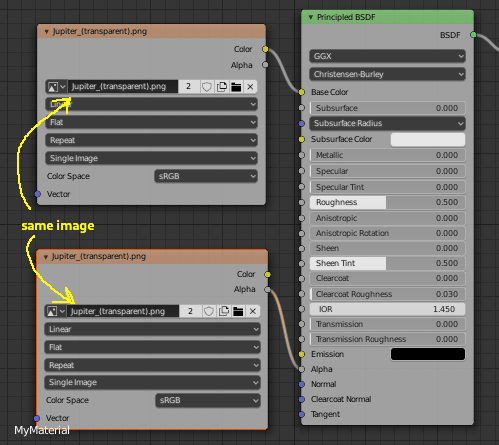
The reason this happens is you are using two different images (both pointing at the same backing file) instead of one image.
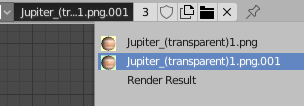
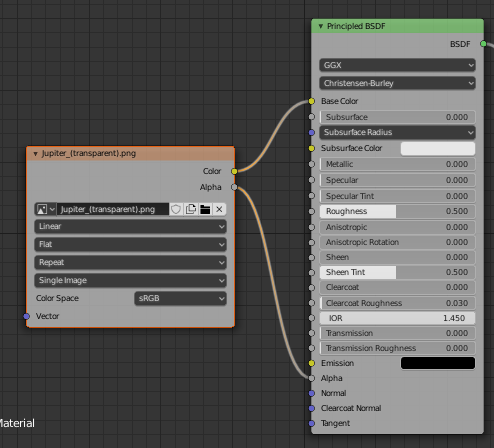
If you use one image (either by setting the same image on both Image Texture nodes, or by using one Image Texture node), you'll get a normal file name.
scurest
on 12 Apr 2020
I see, but still can't understand it. It's the same file, right? Just another instance in Blender. But GLTF writes it to 2 different files.
Also for some reason it changes the name of the texture inside the model.
So as a result - 2 .png files and only one referenced in .gltf...
When exporting same object to .fbx or .obj, there are no any problems with texture names.


So can we make an option to disable this feature?
vergol
on 12 Apr 2020
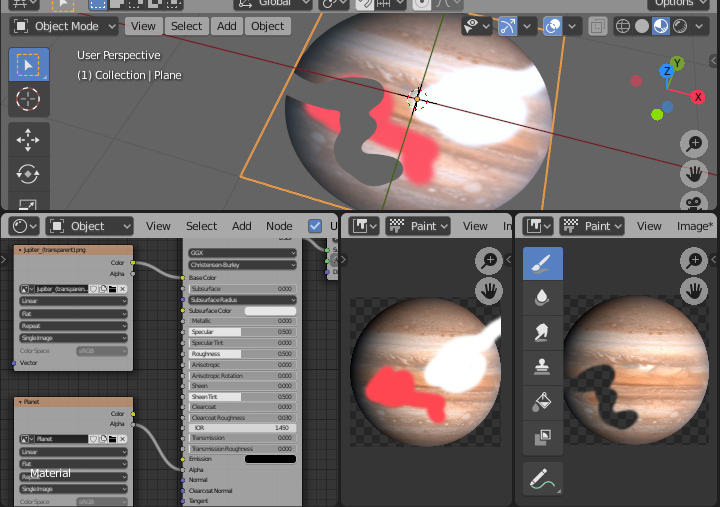
It's the same file, right?
But its not the same _image_. For example, if you have two images you can draw on top of them and they will be different, even though they have the same backing file. The exported glTF will reflect what you see in Blender.
But GLTF writes it to 2 different files.
Also for some reason it changes the name of the texture inside the model.
Not sure what you mean. It only creates one .png for me.
scurest
on 12 Apr 2020
One minor change that I guess would fix this...
If the exported image comes from exactly one Blender image, we already try to use that image's filename
We could change this so it checks if _all_ the Blender images being combined have the same filename, and try to use that.
scurest
on 12 Apr 2020
Yes, my mistake. It creates only 1 file.
Thanks for the explanation.
Sometimes it's not expected and it changes the texture name.
It happens wide often for me when Blender creates copies of same texture with that ".001", ".002" at the end, when I'm importing from other model formats.
I don't know how to implement this as I'm not familiar with Blender API.
Maybe check if file path is identical, and also check if both images do not have any image effects applied (like that drawing effect)?
vergol
on 12 Apr 2020
1025 should fix your image name problem. Can you test it?
Maybe check if file path is identical, and also check if both images do not have any image effects applied (like that drawing effect)?
Yeah, maybe we should come up with a better way of deciding if there's only "one image" being combined (currently it requires literally one Blender image). You'll also have degraded performance when using two images since the exporter thinks it has to combine the channels instead of knowing it can just copy over the existing file. That's more involved than just doing the filenames though...
scurest
on 12 Apr 2020
I tested and it works.
vergol
on 13 Apr 2020
Related issues
 rainclaws
·
3Comments
rainclaws
·
3Comments
 spiraloid
·
3Comments
spiraloid
·
3Comments
 donmccurdy
·
3Comments
donmccurdy
·
3Comments
 dsinni
·
3Comments
dsinni
·
3Comments
 UX3D-nopper
·
3Comments
UX3D-nopper
·
3Comments