Gltf-blender-io: Multiple Animations Not Working
Hello all. I use Three.js and much to my dismay, they totally dumped their proprietary JSONLoader. I am now attempting to re-export hundreds of models using the gltf-blender exporter.
I did not created the blend files myself as I am not a modeler/animator. My partner and I paid for these as we are not proficient at blender at all (which is another reason why this is so stressful).
Problem is, multiple animations are not exporting as they did in the three-io exporter.
This attached blend file for example would work 100% as intended if I selected the object and changed the armature to rest and exported as json file in the three-io exporter. I would get my selected mesh and 9 expected animations and everything was groovy.
I am now in the gltf-blender-io getting a full scene (which I guess I can parse out and find the object I want in code, so that's fine, though honestly I would like an option so it just exports what I select and nothing more). But most importantly, I am only getting one animation (probably due to the way my (now MIA) animator set it up.
Can someone please help =[
 titansoftime
All 37 comments
I am now in the gltf-blender-io getting a full scene...
We plan to address this in https://github.com/KhronosGroup/glTF-Blender-IO/issues/192.
But most importantly, I am only getting one animation...
The documentation for this exporter is still in progress, here: https://developer.blender.org/D4082. The relevant thing to note is that exporting multiple animations requires that each animation be associated with its object in at least one way:
glTF allows multiple animations per file, with animations targeted to particular
objects at time of export. To ensure that an animation is included, either (a)
make it the active Action on the object, (b) create a single-strip NLA track,
or (c) stash the action.
By default Blender Actions are just free-floating objects that aren't associated with an object.... other than guessing (and potentially exporting a lot of unwanted data) I haven't found a better automatic solution. We may add or accept PRs for other options in the future.
 donmccurdy
on 8 Jan 2019
donmccurdy
on 8 Jan 2019
I use Three.js and much to my dismay, they totally dumped their proprietary JSONLoader.
Aside, I thought this was meant to remain available, despite being deprecated? e.g. JSONLoader can be used but the Geometry class it creates has to be upgraded with BufferGeometry.fromGeometry() before rendering?
donmccurdy
on 8 Jan 2019
Eh, so what you are saying is that the attached blend file is not set up correctly for this to work?
If so, does that mean I am going to have to get someone to fix it?
If so, I am royally screwed as my animator is completely mia and I can barely use blender.
titansoftime
on 8 Jan 2019
Aside, I thought this was meant to remain available, despite being deprecated? e.g. JSONLoader can be used but the Geometry class it creates has to be upgraded with BufferGeometry.fromGeometry() before rendering?
No they completely dumped it, super insane (super pissed off), and all they say is "sorry". Yea I did what you said and did the fromGeometry on my skinned meshes and everything worked fine. Wreckless abandon, which sucks because I spent literally thousands of dollars on animations.
titansoftime
on 8 Jan 2019
I see, I think you mean the threejs JSON Blender exporter was removed? Whereas the JSON loader was removed from core but is still around. But yeah, you want to keep the ability to re-export your .blend files understandably..
Eh, so what you are saying is that the attached blend file is not set up correctly for this to work?
Let me check on this file and get back to you in 1-2 days.
donmccurdy
on 8 Jan 2019
donmccurdy
on 8 Jan 2019
I think they completely removed the JSONLoader as well. I can't find it in examples/js/loaders or /utils or anything. I see the AssimpJSONLoader, but I've never used that before or really know what the difference is.
And YESSSS!!! to mrdoob/three.js#15547
I appreciate your time and help, thank you.
Also, here is another test file ( I have many).
titansoftime
on 8 Jan 2019
I think they completely removed the JSONLoader as well.
Nope, it's here:
https://github.com/mrdoob/three.js/blob/dev/examples/js/loaders/deprecated/LegacyJSONLoader.js
But be aware that https://github.com/mrdoob/three.js/pull/15314 removed the Geometry support for skinned meshes. This change landed in R99.
 Mugen87
on 8 Jan 2019
Mugen87
on 8 Jan 2019
But be aware that mrdoob/three.js#15314 removed the Geometry support for skinned meshes. This change landed in R99.
Thanks, I always convert to BufferGeometry prior to rendering. Thanks for helping me find the loader.
titansoftime
on 8 Jan 2019
@titansoftime would you be able to share one or two of the JSON files, for https://github.com/mrdoob/three.js/issues/15547?
donmccurdy
on 8 Jan 2019
Absolutely, these are the three-io json exports of the above blend files.
titansoftime
on 9 Jan 2019
Are you handling textures separately somehow? I see references to them in the Blender files but they aren't embedded I think, and the JSON files don't seem to reference textures at all. Ignoring materials for now..
I can export multiple animations from Blender after "Pushing Down" each action into an NLA track. That's pretty easy (one button click per animation), and could even be scripted if necessary. Or arguably could be handled by this exporter .. we've discussed it in the past but didn't have a great solution. But the more important issue is that our exporter doesn't seem to be writing these armatures correctly – they come out pretty distorted. That's a bug we'll need to fix here, and I'm not sure how much work it involves.
https://github.com/mrdoob/three.js/issues/15547 is looking pretty promising. Both of your test files are converting OK in my WIP script, with a few minor issues that I can fix in the script. The resulting glTF files import correctly to Blender and animate fine, except that they show distortion if I try to re-export them (due to the same bug mentioned above).
donmccurdy
on 11 Jan 2019
Are you handling textures separately somehow?
Yes I handle my materials in a custom fashion. Which kind of brings me to another point. In the JSONLoader, I can just access the geometry and add my material and create the mesh. Is there a way to do that with the GLTFLoader? I really don't need it creating everything behind the scenes.
I can export multiple animations from Blender after "Pushing Down" each action into an NLA track. That's pretty easy (one button click per animation), and could even be scripted if necessary.
Ha, yea I don't even know how to do that (I'm sure I could figure it out). Being done automatically in the exporter would be awesome, but maybe some people would not want that?
But the more important issue is that our exporter doesn't seem to be writing these armatures correctly
I'm honestly confused why it exports the armature as a 3d object at all. Not really sure what to do with it. The JSONLoader does no such thing. I assumed I would just have to parse through the gltf.scene and add the SkinnedMesh to the scene, but the SkinnedMesh and a bone group (also confusing) are children of the Armature (at least for one of my blend files). If I add the SkinnedMesh to the scene without the Armature as a parent, the model is distorted. I don't really want rogue 3d objects in the scene.
Edit* By removing the bones from the armature and adding them to the skinned mesh, I was able to remove the mesh from the armature object and add it directly to the three.js scene which is exactly what I wanted, so all good here. Distortion issue remains.
Not sure if it helps, but here are my test pages.
JSON:
https://www.titansoftime.com/adrian.html
GLTF:
https://www.titansoftime.com/gltf.html
mrdoob/three.js#15547 is looking pretty promising.
SUPER looking forward to this =] Thank you.
I am hoping this all works out. My old animator HATED the three-io blender exporter. Said it made it very difficult to do basic humanoid animations. Maybe this one will solve that =]
titansoftime
on 11 Jan 2019
Or arguably could be handled by this exporter
I really think an exporter should absolutly not change any data during export.
 julienduroure
on 11 Jan 2019
julienduroure
on 11 Jan 2019
I really think an exporter should absolutly not change any data during export.
I agree. Figuring out the "push down" thing was simple enough.
titansoftime
on 11 Jan 2019
So I removed all actions from the mesh on the NLA thing, now they are just on the armature.
I am getting similar (tho slightly better idle animation for some reason) on my test page compared to your viewer.
https://www.titansoftime.com/gltf.html (uploader now works [gltf only, no gltb]
Multiple animations are now working (minus crazy disturbing distortion).
Still think that its weird that the armature is being exported at all. Would assume (i know.. i know..) that the animations/bones etc. would attach to the skinned mesh and only that would export.
Edit* Ok so you can push the animations to the mesh itself...however this does not seem to work. The animations must be on the armature in order to play (tested in both yours and my viewer).
titansoftime
on 11 Jan 2019
I really think an exporter should absolutly not change any data during export.
Didn't meant to suggest creating NLA tracks, but just changing the criteria by which the exporter decides which actions to export, and which objects they're attached to. See https://github.com/KhronosGroup/glTF-Blender-Exporter/pull/166 for discussion. But it doesn't seem necessary in this case, so I'm happy to leave this as-is.
In the JSONLoader, I can just access the geometry and add my material and create the mesh. Is there a way to do that with the GLTFLoader?
We're trying to allow something like that here: https://github.com/mrdoob/three.js/pull/15508, although it's definitely a bit more self-service in terms of recreating the skeleton.
Still think that its weird that the armature is being exported at all. Would assume (yes tricky to do) that the animations/bones etc. would attach to the skinned mesh and only that would export.
The animations aren't considered to be attached to anything in glTF, they sit alongside the scene and can potentially affect multiple objects. We use the NLA tracks to identify which Actions to export and what they affect. If you have two NLA tracks with the same names on different objects, you should get a single merged animation out that affects both. Blender's concepts are quite different from engines', so this is a bit of a compromise to give enough artistic control.
As for the bones, I can see where having them be children of the skinned mesh would be more intuitive... it may be tricky to change here, and from previous discussions skeletons being children of the scene root seem to be most widely-compatible, and arguably giving engines more freedom to attach them as needed later. I think you could move the bones under the mesh at runtime, but can't really test that with the current skinning distortion. :) But the three.js JSON->glTF converter should give you bones as children of the mesh instead.
For now, I think the main action needed here is fixing the skinned deformation.
donmccurdy
on 11 Jan 2019
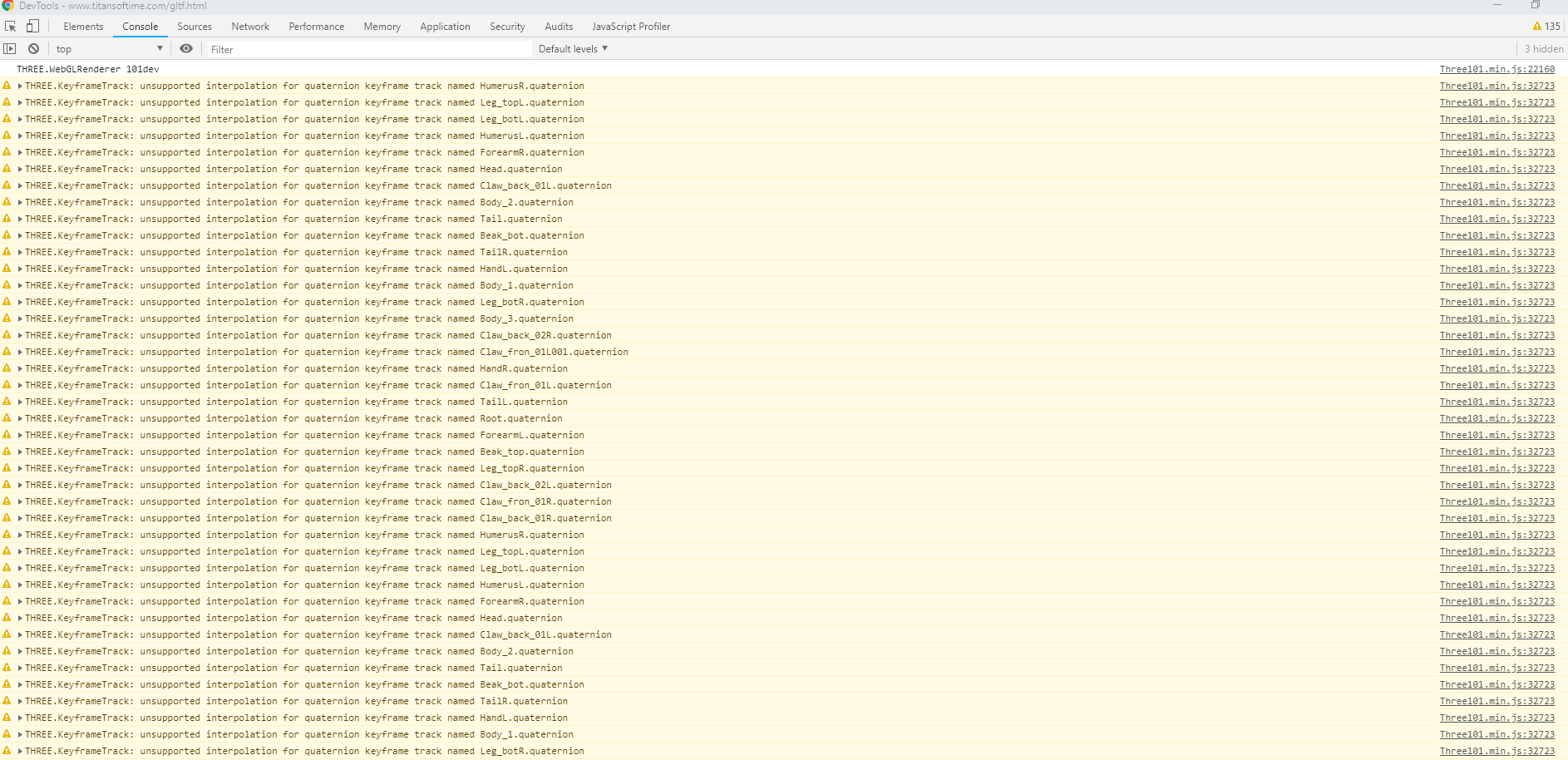
I'm sure you've noticed. But these are the errors I am getting.
btw (unrelated), tried the glb export, same distortion issue but LOVE that small file size =]
titansoftime
on 11 Jan 2019
I think those are harmless, albeit very noisy — see https://github.com/mrdoob/three.js/issues/15416.
donmccurdy
on 11 Jan 2019
although it's definitely a bit more self-service in terms of recreating the skeleton.
Yea, not sure about that. I mean, it's fine I can deal with it, only thing is its a little odd to have to unload all those autocreated materials (even though I clicked off the materials checkbox in the blender exporter params). But meh, at least its workable.
The animations aren't considered to be attached to anything in glTF
That's what I figured which is why its a little confusing why the animations don't work when pushed down to the mesh instead of armature (in your viewer as well). Confused here.
My hope ( and i don't expect anyone to cater to my specific needs =] ), is to be able to parse through the gltf.scene and grab my SkinnedMesh, pull it out of the gltf.scene and add it to the three.js scene (and dispose of any autocreated what-have-you that I do not need). The whole armature being a required Object3D parent is kinda throwing me off. Although, I suppose I could just grab the armature along with its children and use that, however I will have to modify my code to accommodate this new setup.
For now, I think the main action needed here is fixing the skinned deformation.
For sure.
titansoftime
on 11 Jan 2019
I think those are harmless, albeit very noisy — see mrdoob/three.js#15416.
Perhaps, thought maybe it was related. FYI the JSONLoader SkinnedMeshes do not throw these errors.
Edit* Was thinking, in my actual game where there can be over a hundred skinned meshes that get loaded into a scence, this noise will get quite insane.
titansoftime
on 11 Jan 2019
That's what I figured which is why its a little confusing why the animations don't work when pushed down to the mesh instead of armature (in your viewer as well). Confused here.
I'm not sure.. Do they play in Blender when 'active' on the mesh, rather than the armature? If so, it's probably something we should fix in the exporter. But I wouldn't want to encourage people to push down NLA tracks in a place where Blender can't actually play them. In any case, I don't think this will help you reorganize the armature/bones – even with no animation they'll still be in the same place in the scene.
My hope ( and i don't expect anyone to cater to my specific needs =] ), is to be able to parse through the gltf.scene and grab my SkinnedMesh, pull it out of the gltf.scene
This is untested code, but in theory you'll be able to do something like this after the PR...
loader.createParser((parser) => {
  const node = parser.json.nodes.find((node) => node.mesh !== undefined);
  const mesh = await parser.getDependency( 'mesh', node.mesh );
  const rootBone = await parser.getDependency( 'node', node.skin );
  const animations = await parser.getDependencies( 'animation' );
  mesh.add( rootBone );
  scene.add( mesh );
});
... but somehow nothing with skinning is ever quite that easy, so i imagine there will be a bit more required.
donmccurdy
on 11 Jan 2019
n any case, I don't think this will help you reorganize the armature/bones – even with no animation they'll still be in the same place in the scene.
True. Good point. However it may confuse ppl that their animations pushed to the mesh instead of the armature do not work (seemingly). Edit* Confirmed that animations do not play in blender when pushed to the mesh.
... but somehow nothing with skinning is ever quite that easy, so i imagine there will be a bit more required.
By far the most frustrating thing I have dealt with in this project.
Your expertise and work are not taken for granted. Thank you.
titansoftime
on 11 Jan 2019
BTW, I've tried both Push Down and Stash. Both have the same distortions.
titansoftime
on 11 Jan 2019
AHA!
Checking "Always Sample Animations" (defaulted to off) fixes the distortion issue. No idea why, but hey, it works =]
BUT, the file size increased from 470KB to 4MB, which of course will not work.
titansoftime
on 11 Jan 2019
Oh that's good to know! Seems like that might provide clues for the cause of the issue yes, thanks.
donmccurdy
on 11 Jan 2019
Ok, so "Always Sample Animations" makes it better, but not 100%.
JSON:
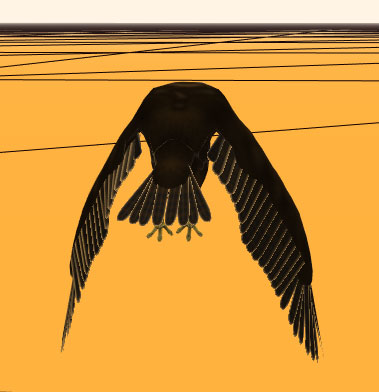
GLTF:
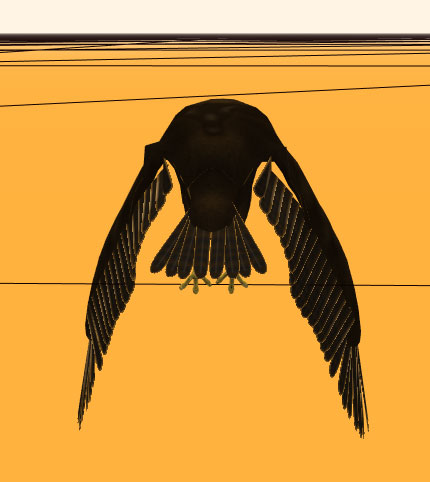
titansoftime
on 12 Jan 2019
Probably not the correct thread for this, but I just remembered... the three-io blender exporter also added a buffergeometry export option. Skinning was not supported in this mode, but I figured that your converter should be able to work with these as well. they have a type of "BufferGeometry" in the files metadata.
Example file: pot.zip
titansoftime
on 13 Jan 2019
Should I close this? The reported issue turned out to be user error due to not reading instructions (granted those instructions probably should be in the three.js docs somewhere).
However the real issue of the exporter creating distorted animations did come up here and there is still some relevant information on that in this thread.
Will leave it up to you guys. Close if desired.
titansoftime
on 31 Jan 2019
Let's keep it open for now, we need to fix the skinning deformation issues and the sample models here are helpful for that. Thanks!
donmccurdy
on 31 Jan 2019
If you have two NLA tracks with the same names on different objects, you should get a single merged animation out that affects both.
I wanted to do exactly that - but sadly I get duplicate animations. Blender version 2.80 (2019-07-29) Mac
 acmoles
on 14 Aug 2019
acmoles
on 14 Aug 2019
@acmoles this is not implemented yet.
julienduroure
on 14 Aug 2019
@julienduroure Thanks, good to know
acmoles
on 15 Aug 2019
I am not too familiar with Blender, but I also have an issue with importing and exporting multiple animations.
Let's take the Soldier.glb from the Three.js repo.
https://github.com/mrdoob/three.js/blob/dev/examples/models/gltf/Soldier.glb
Soldier.zip
When opening it in this GLTF Viewer (https://gltf-viewer.donmccurdy.com/), then I see 4 animations: TPose, Idle, Walk and Run.

However, when I import it to Blender 2.80 and look at the NLA tracks, there are tons of weirdly named animations instead:

When I export it from Blender (without changing anything) and look at it in GLTF Viewer, there are then those weirdly named animations instead of the prior TPose, Idle, Walk and Run.

Is this the same issue as described here before? Should I do something differently to get the correct animations into and back out from Blender for GLTF files?
 jee7
on 4 Sep 2019
jee7
on 4 Sep 2019
@jee7 I'm not sure – could you open a new issue?
donmccurdy
on 4 Sep 2019
Done. #652.
jee7
on 4 Sep 2019
Seems the original bug report is now solve. Can I close this ticket, or I missed something?
julienduroure
on 13 Sep 2019
Related issues
 WindyDarian
·
5Comments
WindyDarian
·
5Comments
 rainclaws
·
3Comments
rainclaws
·
3Comments
 Quinten123
·
5Comments
Quinten123
·
5Comments
 Nehon
·
5Comments
Nehon
·
5Comments
 Ali-RS
·
3Comments
Ali-RS
·
3Comments