Gltf-blender-io: Supporting occlusionTexture in Blender 2.8
I'm struggling to decide how to handle AO (occlusionTexture) in Blender 2.8. Overall the move to Principled BSDF is great, but it has no AO input.
One option would be to adopt a convention such that a disconnected Image Texture node, used in the same material as a Principled BSDF node, will automatically be treated as AO if (a) the node is named "AO", or (b) the node uses a texture suffixed with "_ao". Presumably the Importer and Exporter could use the same convention.
Other ideas? In general I don't want to hack glTF features into this exporter when Blender doesn't support them, but AO is a pretty critical feature...
 donmccurdy
All 42 comments
If we do it, we should do it the "correct" way. Even the node tree gets complex, the visual output should be correct. Please have a look at the glTF node group from the former exporter.
 UX3D-nopper
on 2 Dec 2018
UX3D-nopper
on 2 Dec 2018
I'm aware that the glTF node group in the former exporter had an occlusion socket, but the Principled BSDF node does not... what would you consider to be the correct way? Even with a complex node tree, I'm not sure how to create that.
If it can't be done otherwise, a method with _no_ output (e.g. a disconnected Image Texture) is better than a method with _incorrect_ output (e.g. AO mixed into the baseColor input). Then at least users can bake AO in Blender and export the generated texture.
donmccurdy
on 2 Dec 2018
With correct I mean, that we rebuild the glTF AO formula with Cycles nodes. Actually, the old node group did do this.
UX3D-nopper
on 2 Dec 2018
Is it possible to rebuild the AO formula without rebuilding the rest of the PBR shader? It appears to me that AO must be an input to calculations made inside the Principled BSDF node. It doesn't seem realistic to ask users to recreate this, and I'd prefer not to bring back a custom node just for AO...

donmccurdy
on 2 Dec 2018
It happens after PBR and you do not need all of it:
occludedColor = mix(color, color * sampledOcclusionValue, occlusionStrength);
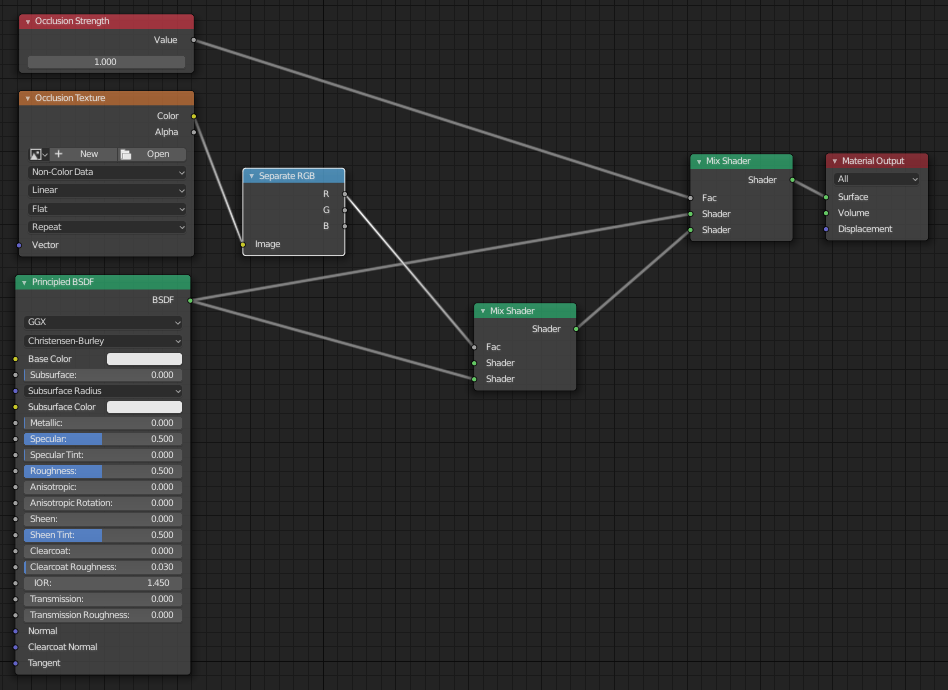
UX3D-nopper
on 2 Dec 2018
Unfortunately I don't think that's the correct formula. This will cause AO to affect both direct and indirect light, where it should be affecting only indirect sources. See https://github.com/KhronosGroup/glTF/issues/915#issuecomment-441393788, the spec itself may even be unclear.
As an illustration:

Suppose that surface is #00ff00 and the AO texture is 1 at the inner edge, exaggerated for effect. With an indirect light source and a direct light source (the spotlight) I should see some color wherever the spotlight cone reaches, because an AO value of 1 eliminates only the indirect light contribution. In the node graph you show above, I believe the spotlight will be incorrectly occluded.
donmccurdy
on 2 Dec 2018
Until now, we were just using IBL. In this case, the formula is correct.
For dynamic lights, baked AO is incorrect in any case. I thought you just needed a setup to export.
UX3D-nopper
on 3 Dec 2018
It is common to use dynamic lights alongside baked AO; the idea is that the AO should only affect the IBL, and the dynamic lights add extra depth.
But yes, we just need a setup to export, hence the suggestion of disconnected nodes with particular names. Your suggestion may be just as good, I guess that means we would assume anything multiplied against the Principled BSDF output is AO?
/cc @emackey any ideas on this?
donmccurdy
on 3 Dec 2018
If you use dynamic lights and baked AO, you can do dynamic lights after the IBL and the AO calculation. But still, the AO for dynamic lights is incorrect.
UX3D-nopper
on 3 Dec 2018
Note about importer:
Currently, occlusion map is imported (for example if images need to be packed), but not used in node tree.
 julienduroure
on 3 Dec 2018
julienduroure
on 3 Dec 2018
@donmccurdy I'm struggling with finding a good balance here. You've linked to some strong arguments for separating the effects of AO from those of punctual light sources (otherwise they can't light up the cracks, even when shining directly in).
That said, the current ecosystem doesn't do a good job of embracing this. Scott Nagy's PBR shader multiplies AO after the PBR math, and is still listed as our official reference shader implementation, at least until UX3D releases the new reference implementation. I don't know if UX3D's implementation will change this or not (probably it would be good if it did, but does that require an update to the spec?)
For uniform-color ambient light, as assumed by one of the older papers you linked to, AO is perfect because it simply multiplies by the uniform color. But for IBL, AO is imperfect, because the typical IBL contains baked-in area lights and other non-uniformities. So a simple occlusion percentage per pixel is not enough to describe which parts of an IBL are visible from within a given crevice on a model. At best, it's a useful approximation.
Even so, AO can have a hugely positive effect, particularly on geometrically detailed, solid-color geometry. So we do need to add it, but it's not obvious where.
Your suggestion may be just as good, I guess that means we would assume anything multiplied against the Principled BSDF output is AO?
I think we can key off that "Separate RGB" node that pulls the red channel out of an image. If we find one of those nodes, multiplying the Prinicpled node by the red channel of any image, it is probably safe for the purpose of glTF export to treat that as the Occlusion image.
Here's a typical set of textures from Substance Painter, hooked up in this manner. It's still more complex that what we want, but what we want is an AO input on the Principled Node. Would this be OK as an interim solution?

 emackey
on 3 Dec 2018
emackey
on 3 Dec 2018
FWIW, I applied the above node setup to our default aircraft model, and it looks fine in Eevee, although it does have the baked-in dark spots from the occlusion map. But I don't think there's any way to separate those given Blender's existing node system, as IBL and punctual lights are both calculated in the single Principled node, and one would need access to that particular node's internals to change it or separate it.
Even so, the exported glTF would have the occlusion channel listed separately, so external viewers could choose to handle the punctual lights differently from the IBL if they were able to.
emackey
on 3 Dec 2018
As soon as you use dynamic lights, u should also do dynamic ambient occlusion. Otherwise, as already mentioned, you do get these artifacts.
Still, in the reference viewer we could do the dynamic contribution after the IBL - but still the baked ambient occlusion looks weird.
UX3D-nopper
on 3 Dec 2018
As soon as you use dynamic lights, u should also do dynamic ambient occlusion. Otherwise, as already mentioned, you do get these artifacts.
These aren't artifacts — dynamic lighting and baked AO can be complementary. I'm quite confident it is intended that ambient occlusion affects indirect light and not direct light. From the glTF spec:
"Higher [occlusion] values indicate areas that should receive full indirect lighting and lower values indicate no indirect lighting."
And:
"The occlusion map [indicates] areas of indirect lighting."
From Unity:
"Ambient occlusion (AO) approximates how much ambient lighting (lighting not coming from a specific direction) can hit a point on a surface."
Blender is a great tool for baking AO for applications that can't do it dynamically, which is expensive many situations. We need a way to export that baked AO. Whether the user can see the baked AO in Blender at all is secondary, to me, since Principled BSDF materials don't support it. It seems to be up for debate whether AO should even affect IBL: https://github.com/KhronosGroup/glTF/issues/1427... I think that could be done either way.
donmccurdy
on 4 Dec 2018
Another datapoint from the Filament docs:
The ambientOcclusion property defines how much of the ambient light is accessible to a surface point. It is a per-pixel shadowing factor between 0.0 (fully shadowed) and 1.0 (fully lit). This property only affects diffuse indirect lighting (image-based lighting), not direct lights such as directional, point and spot lights, nor specular lighting.
donmccurdy
on 4 Dec 2018
@donmccurdy Let's separate this issue from the spec issue. The spec issue can be used to discuss the concern of how occlusion should best be applied (and I think I agree with your points in that regard).
But this issue should be focused on Blender. Regardless of the outcome of the spec issue, we still need a way to import & export the occlusion channel via the Blender-IO project here. Given that there's no such input on the Principled BSDF node in 2.80, we'll need a mechanism such as one of the node graphs presented above to enable export & import.
So for the purpose of enabling this, I think a mix shader at the end might be the way to go, at least until some future date when the Blender devs might decide to add an occlusion input on the Principled BSDF node itself.
emackey
on 7 Dec 2018
Yeah, I agree we don't need to solve the spec issue here.
Aside, the Eevee FAQ (https://code.blender.org/2018/03/eevee-f-a-q/, from March) claims that an AO input will be added for Principled BSDF. I don't know whether that's still true.
My feeling is that if there is no correct way to render AO currently, it may be better to support import/export in a way that does not involve rendering at all. For example, a disconnected Image Texture node with a magic name, such as AO or OCCLUSION. If the importer creates that, and the exporter writes it, then at least users can bake AO using Blender and write it out. I can live with the mix shader at the end, but the render result will be somewhat incorrect... it also sounds a bit messy to parse, e.g. when combined with an Emissive node.
donmccurdy
on 8 Dec 2018
My concern about the disconnected node is that it's going to be too misleading. How do we explain to artists that they need to create a specially-named disconnected node, that does nothing in Blender but has influence on the output?
I think the direct-light rendering artifacts would be a smaller issue. Nowadays the most realistic lighting comes from HDR IBLs, not point lights. Also, Blender would not be alone in these artifacts: At least part of our ecosystem is based on the glTF-WebGL-PBR project, including Cesium 1.50 and STK 11.5, as well as ports of that PBR project to Vulkan and Direct3D. All of these would handle AO the same way as placing the mix node after the Principled node in Blender. Offhand I don't know how Babylon and ThreeJS render this channel. Of course, Cesium and STK could be changed to new behavior in future versions, but I would like to see the spec issue and the reference viewer embrace these changes first.
One interesting outlier is the "Principled" custom node group from the Blender-Exporter project for 2.79. That node group mixed Occlusion into the base color, and fed that into the Principled BSDF node's base color input. This doesn't seem in-line with anything else I know of.
However, the older non-principled custom node group, from the same project, put together Specular and Diffuse BSDF nodes in a frame named "Lambert Cook Torrance", and multiplied occlusion onto the end of that, just prior to adding in Emissive, matching what happens in glTF-WebGL-PBR and derived projects.
Long story short, I agree that it would be desirable to avoid occluding punctual lights, but, I'm concerned that at current & legacy parts of our ecosystem aren't showing that to users now. If users are offended by the "dirty cracks" artifact today, their only choice is to tone down the strength of the baked occlusion, until we get some fixes rolled out. Likewise, Blender could see this fix deployed in a future release as well, after baked occlusion gets added as a texture input on the Principled BSDF node.
So for Blender 2.80, my vote is still a "Mix Shader" attached to an image is treated as occlusion, and an "Add Shader" attached to the Emission node is treated as the emissive channel.
emackey
on 10 Dec 2018
That node group mixed Occlusion into the base color, and fed that into the Principled BSDF node's base color input.
Let's not do that. 😓
At least part of our ecosystem is based on the glTF-WebGL-PBR project, including Cesium 1.50 and STK 11.5, as well as ports of that PBR project to Vulkan and Direct3D. All of these would handle AO the same way as placing the mix node after the Principled node in Blender. Offhand I don't know how Babylon and ThreeJS render this channel.
Ambient occlusion affects only indirect light in threejs; and IBL is at least partially considered indirect light AFAIK. BabylonJS provides an option with which the effect of AO on analytic light scan be adjusted; I'm not sure whether their glTF loader uses that option.
Unity also has an option for this:
By default, AO does not affect direct lighting. Use this slider to enable it. It is not realistic, but it can be useful for artistic purposes.
So for Blender 2.80, my vote is still a "Mix Shader" attached to an image is treated as occlusion, and an "Add Shader" attached to the Emission node is treated as the emissive channel.
Ok, I'm happy with that. For good measure we should probably also allow numeric inputs, not just Image Texture nodes:
- Image Texture
- number
- Image Texture * number
donmccurdy
on 11 Dec 2018
Yes, perhaps those could be used to adjust occlusionStrength in the output. Is that what you meant?
emackey
on 11 Dec 2018
Yep! Or similarly emissiveFactor.
donmccurdy
on 11 Dec 2018
A bit late to this party, but I did notice that 2.8 has an Ambient Occlusion node under Input. Could that potentially help with the organization of the node graph?
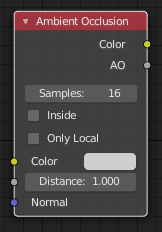
 dsinni
on 11 Dec 2018
dsinni
on 11 Dec 2018
Unfortunately I think that node is used to control the influence of Blender's built-in AO rendering — there is no socket for an Image Texture or other baked data. 😕
donmccurdy
on 11 Dec 2018
@dsinni Yeah, I got excited when I first found that thing, but sadly it's not used for a pre-baked occlusion channel like we need here.
@julienduroure @UX3D-nopper Are you guys OK with what Don and I have been discussing here? Could this be added to your development roadmap?
emackey
on 11 Dec 2018
Bummer. Figured it might not be what was required, but wanted to make sure in case it slipped through the cracks.
I had hopes that an image texture could be linked through Color.
dsinni
on 11 Dec 2018
Think this approach mkes sense but I think this feature is up to the community to be implemented.
UX3D-nopper
on 12 Dec 2018
Occlusion is part of the core glTF 2.0 material, and was supported by the previous exporter. I'm confused why it would be left out of the planning for 2.80, or left up to community contributions.
emackey
on 12 Dec 2018
The previous exporter could easily support all glTF parameters, as we did have a custom node tree.
This exporter already supports a quite complex node tree for incoming and outgoing nodes to the Principled BSDF.
If we would need to support occlusion - in combination with all other features - the exporter would need to handle a node graph like Don posted before.
At start, we agreed on supporting only basic node trees e.g. for textures.
UX3D-nopper
on 12 Dec 2018
In my opinion, it would be much easier, if the Blender folks would add the glTF 2.0 node to the standard set of shader nodes.
UX3D-nopper
on 12 Dec 2018
In my opinion, it would be much easier, if the Blender folks would add the glTF 2.0 node to the standard set of shader nodes.
Totally agree! Sadly that will not happen in 2.80.
emackey
on 12 Dec 2018
@julienduroure Can u ask the guys at Blender, if they are open to add glTF 2.0 shader node?
UX3D-nopper
on 12 Dec 2018
I think we could even already have it:
As a plugin, you normally can plug in "everywhere" in Blender.
Why not have a menu item, glTF shader node, where dynamically a glTF 2.0 node group is created?
UX3D-nopper
on 12 Dec 2018
Are glTF 2.0 materials fundamentally so different from Principled BSDF, other than AO? If there were significant inconsistencies in the materials such that Blender Principled BSDF materials cannot accurately-enough match the glTF 2.0 spec I could be convinced that glTF-specific nodes would be a worthwhile addition. But otherwise, I'm much more interested in exporting native Blender features to native glTF than in asking Blender artists to use new format-specific materials, when Principled BSDF is already new, well-supported, and a rather good fit for glTF..
The problem as I see it is that Blender has very nicely-designed workflow for _baking_ AO, and no mechanism at all for using or exporting that AO, except to export the image on its own. If we're going to ask a favor of the Blender developers, I'd prefer to ask them to (a) allow AO input to Principled BSDF, or (b) provide some other mechanism of identifying a texture as a source of baked AO.
donmccurdy
on 13 Dec 2018
The handling of the emission is already an ugly hack in my humble opinion. Adding a node group like in the previous version wouldn't be that bad. You could then e.g. simply plug the baked textures in there for export. And if the glTF node group doesn't exist in the material or a value / texture isn't configured there the exporter can still fall back to the Principled BSDF.
 mmolch
on 5 Feb 2019
mmolch
on 5 Feb 2019
@mmolch The old pbr node group still works in this project. The exporter looks for built-in nodes like Principled BSDF and Emission first, and when they're not found, it will fall back and look for the custom glTF node.
The newer system is meant to more closely match what Blender artists are already doing when they're not interacting with glTF: To use emission, they need to place an emission node, that's the primary means of accomplishing that in Blender without glTF. But certainly if your end goal is fine control over the glTF output, the custom node offers that in a more centralized fashion.
emackey
on 5 Feb 2019
@emackey Thank you for the reply. I was able to export the occlusion texture by adding that node group (although only as a separate texture). Generally speaking, I'd like to have a node group that does nothing with the only purpose to be able to override (or add) some selected settings from the principled shader for export.
mmolch
on 6 Feb 2019
@mmolch I've been thinking about that. Would normal users understand how to use such a thing? Would they be confused by a node that only had inputs, but no body and no outputs?
It turns out that already works, un-intentionally, if you use exactly the same names as the existing custom node and a few of its input fields. The exporter code is just looking for those names and seeing what's connected to the inputs. The exporter doesn't care at all if Blender actually makes use of the inputs or not, or if you're using the official glTF node or not. It's just looking for a custom node of a specific name, and an input field within that node of a specific name, matching the published names on the glTF node.
emackey
on 6 Feb 2019
@emackey I think it would work. Users aren't stupid after all. And if the node group would be called something like "glTF Export Adjustments" it would be pretty clear what it does. And if a node is connected to a value it's taken and otherwise it's skipped. What does the current implementation do if there are several Emission shaders? It's good to try to figure out as much as possible without the user having to care about it, but a structure that maps directly into glTF to explicitely say it what you want would be worth to have in my humble opinion.
mmolch
on 8 Feb 2019
I am reading the thread... and so still pretty confused about the conclusion.
Basically I am using Blender 2.80 latest beta. Still using the Principle Shader node and then exporting to GLTF... but then found the issue like stated: no Occlusion slot. So how would be the right way so that the GLFT output correctly brings occlusion map?
Is there a special GLTF shader node now for Blender?
 enzyme69
on 20 May 2019
enzyme69
on 20 May 2019
@enzyme69 Any custom node with the correct name (glTF Settings) and input (Occlusion) will do. The importer will create such a node automatically if you import something with an occlusion map, such as the Water Bottle sample model.
I still plan to update the documentation, but a number of important things changed in Blender this past week (including some new input fields on Principled BSDF, new double-sided handling, and what looks like some new/removed alpha channel options from Saturday), and it seems wise to wait for it to settle down.
emackey
on 20 May 2019
@emackey
There is (only in Eevee) a Specular BSDF node that does have an ambient occlusion socket. Maybe it could be used instead of the principled BSDF
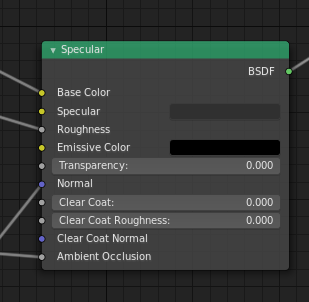
 benthillerkus
on 1 Sep 2019
benthillerkus
on 1 Sep 2019
@ogierm Thanks. We considered that node, but it's using the spec/gloss PBR workflow, which is an alternative to what now appears to be the more popular PBR workflow of metal/rough. We needed a solution for metal/rough PBR in Blender 2.80, and ultimately we went with a custom node for it.
The result is documented here in Blender Manual. Essentially a custom node group called glTF Settings is created, with an Occlusion input on it. The glTF format expects the red channel to contain the occlusion map.
The glTF importer will create a custom node if one doesn't already exist by this name, when importing an occlusion map. Here's a link to the Python code that does it.
emackey
on 3 Sep 2019
Related issues
donmccurdy
·
3Comments
julienduroure
·
3Comments
 Quinten123
·
4Comments
Quinten123
·
4Comments
 rainclaws
·
3Comments
rainclaws
·
3Comments
 KannebTo
·
3Comments
KannebTo
·
3Comments
Most helpful comment
Are glTF 2.0 materials fundamentally so different from Principled BSDF, other than AO? If there were significant inconsistencies in the materials such that Blender Principled BSDF materials cannot accurately-enough match the glTF 2.0 spec I could be convinced that glTF-specific nodes would be a worthwhile addition. But otherwise, I'm much more interested in exporting native Blender features to native glTF than in asking Blender artists to use new format-specific materials, when Principled BSDF is already new, well-supported, and a rather good fit for glTF..
The problem as I see it is that Blender has very nicely-designed workflow for _baking_ AO, and no mechanism at all for using or exporting that AO, except to export the image on its own. If we're going to ask a favor of the Blender developers, I'd prefer to ask them to (a) allow AO input to Principled BSDF, or (b) provide some other mechanism of identifying a texture as a source of baked AO.