Gltf-blender-io: `Emission` materials not exporting, throwing Traceback
I've been testing the IO exporter with certain materials/shaders, and I've run into issues with the Emission shader.
I'm using the latest Blender 2.8 Beta and have tried the following node configurations with no luck:


Errors:

I'm relatively new to material/shader node configurations in Blender, but from what I've seen, I was under the impression that at least one of the above would work with the IO exporter. If not, please let me know what I'm doing wrong so I can test properly.
Thanks and keep up the great work!
 dsinni
All 15 comments
Fixed here: https://github.com/KhronosGroup/glTF-Blender-IO/commit/50654eaf0cb62889cab711762f1b5355f2776b1c
Following node setup export is now working again:

 UX3D-nopper
on 30 Nov 2018
UX3D-nopper
on 30 Nov 2018
Thanks, @UX3D-nopper! I'll give it a go in the next build.
dsinni
on 30 Nov 2018
Is now merge with Blender repo, will be available next build
 julienduroure
on 1 Dec 2018
julienduroure
on 1 Dec 2018
I just tried this in the latest Blender 2.8 Beta 0f5b53ba4dc build and still having issues using all of the above node configurations.

dsinni
on 1 Dec 2018
This had been merged with blender repo this morning, this is not available yet in build of Nov. 30th.
It will be available in next build, probably tomorrow morning
julienduroure
on 1 Dec 2018
I just tried with the latest build from Dec. 3rd, using @UX3D-nopper's node configuration. No export error this time so that's good, but the glTF validator is throwing an error:
ARRAY_LENGTH_NOT_IN_LIST | Invalid array length 4. Valid lengths are: (3). | /materials/0/emissiveFactor
Node configuration:

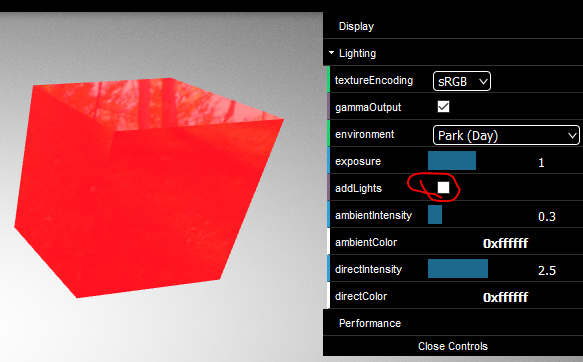
Note that the material is affected by light; I'm not sure if that is the intended result. Should emissive materials still be affected by light in this way?
With lights applied:

Without lights applied:
Blender version:
dsinni
on 3 Dec 2018
If you make the base color black it won’t be affected by lights. Otherwise emissive is added to the normal PBR output. Same should be true in Blender I think. Think of it as a PBR material that also emits (some) light.
 donmccurdy
on 3 Dec 2018
donmccurdy
on 3 Dec 2018
Ah, that does make sense. I think I was just used to using the glTF Metallic Roughness PBR nodes, and I don't remember that being a requirement there.
The validator error still does seem to be an issue, however.
ARRAY_LENGTH_NOT_IN_LIST | Invalid array length 4. Valid lengths are: (3). | /materials/0/emissiveFactor
dsinni
on 3 Dec 2018
Is now merged with blender 2.8 repo
julienduroure
on 3 Dec 2018
I'm not sure if this is the correct place for this, but I think it is worth noting that, currently, even if you disconnect the Principled BSDF shader, Blender 2.8 or the exporter still seems to include it, presumably on export.
Disconnected with Roughness: 0:

Gloss:

Disconnected with Roughness: 1:

Matte:

If the Principled BSDF shader's Base Color is a color other than black, the results are more obvious.
I've been noticing a bit of node/shader weirdness in the Blender Beta, so not sure which is responsible in this case.
dsinni
on 4 Dec 2018
I'm not sure if this is the correct place for this, but I think it is worth noting that, currently, even if you disconnect the
Principled BSDFshader, Blender 2.8 or the exporter still seems to include it, presumably on export.
@dsinni The glTF 2.0 format does not contain a node graph. It has specific slots for specific textures and values, such as a base color texture, ORM texture, Normal, and Emissive texture, and corresponding strength/factor values that can be used to control those settings when no texture is present.
So, the exporter attempts to analyze your node graph, to figure out what textures and what values are to be placed in the glTF material. The glTF importer will construct a new Blender node graph from scratch based on the values in the glTF material.
The Blender Principled BSDF node accepts separate, grayscale values for roughness and metallic values. So when the importer finds a glTF ORM texture, it automatically creates a "Separate RGB" node, such that it can pull roughness out of the green channel, and metallic out of the blue channel, and send them into the Principled node individually. We're still working on what to do about the Occlusion map (red channel), as there's no hookup for it on the Principled node.
 emackey
on 5 Dec 2018
emackey
on 5 Dec 2018
Thanks for that info, @emackey!
So, the exporter attempts to analyze your node graph, to figure out what textures and what values are to be placed in the glTF material. The glTF importer will construct a new Blender node graph from scratch based on the values in the glTF material.
I think I follow for the most part, but does that mean that in the exporter's analysis of the node graph, it doesn't necessarily discern between connected and disconnected nodes?
What I find odd is that the settings from the Principled shader are being used even if it's not connected to the rest of the graph, rather than defaulting to whatever the glTF default is, if there is one. Is that intentional?
The Blender Principled BSDF node accepts separate, grayscale values for roughness and metallic values. So when the importer finds a glTF ORM texture, it automatically creates a "Separate RGB" node, such that it can pull roughness out of the green channel, and metallic out of the blue channel, and send them into the Principled node individually.
Interesting. So does that mean that Separate RGB should not appear in the node graph at all since it is automatic? Or were you referring specifically to the importer? I'm mostly interested in the exporter at this time.
Will the ORM texture still need to be produced with image editing software as it did with the previous glTF Metallic Roughness PBR nodes, or is there another way to handle that now?
We're still working on what to do about the Occlusion map (red channel), as there's no hookup for it on the Principled node.
Ah, okay. I _was_ wondering how that would be handled.
dsinni
on 6 Dec 2018
does that mean that in the exporter's analysis of the node graph, it doesn't necessarily discern between connected and disconnected nodes?
It follows links where it needs to, for example to detect which image nodes are connected to which sockets on the Principled node. But I doubt it pays much attention to whether the Principled node itself is plugged into an output or not. That's something that could potentially be fixed, but, is that a common use case for Blender artists, to leave such a dangling node there?
So does that mean that
Separate RGBshould not appear in the node graph at all since it is automatic? Or were you referring specifically to the importer?
I meant the importer, specifically, places that node there on import, otherwise Blender can't understand the contents of the glTF ORM texture. I believe the exporter will kind of reverse-engineer the node hookups there to see which channel is being sourced from where.
But the exporter should also be willing to take for example a pair of grayscale images, separately connected (one to roughness, and one to metallic), and blend them together into a combined image for glTF. This case wouldn't require a special node, because the exporter is well aware of how glTF specifies its textures to be packed.
emackey
on 6 Dec 2018
That's something that could potentially be fixed, but, is that a common use case for Blender artists, to leave such a dangling node there?
Not high priority, but I would vote for fixing this eventually — can definitely imagine an artist wanting to create both unlit and PBR versions of an asset for different devices, and swapping a node socket seems like a very reasonable way to do that.
donmccurdy
on 6 Dec 2018
Thanks, @emackey!
So, just for clarification:
- A
Separate RGBnode should _not_ be needed in order to export Metallic/Roughness. - Using an image editor such as GIMP or Photoshop should no longer be required to combine the RGB of the ORM texture as this will be done automatically by the exporter.
Is this correct?
EDIT: Sorry, it seems we went off on a tangent from the main issue, but Metallic/Roughness appears to be working in the latest Blender build! (Look, Ma! No image editor!) So I'm thinking my questions have been answered.

In addition to @donmccurdy's point, users may also keep around a few different variations of the shader(s) with different settings disconnected in the same node graph. I sometimes do this when I find a combination I like, but still want to experiment, so it may not be all that extraordinary.
It's possible that the connected shader would completely override the disconnected; I haven't tested that yet, but I'd imagine it's better to rule it out by limiting to what is actually connected.
dsinni
on 6 Dec 2018
Related issues
UX3D-nopper
·
4Comments
 Nehon
·
5Comments
Nehon
·
5Comments
 capnm
·
5Comments
capnm
·
5Comments
 rainclaws
·
3Comments
rainclaws
·
3Comments
 scurest
·
4Comments
scurest
·
4Comments
Most helpful comment
Fixed here: https://github.com/KhronosGroup/glTF-Blender-IO/commit/50654eaf0cb62889cab711762f1b5355f2776b1c
Following node setup export is now working again:
