Gliden64: Zelda MM Beneath Graveyard Tiling floor textures wrong
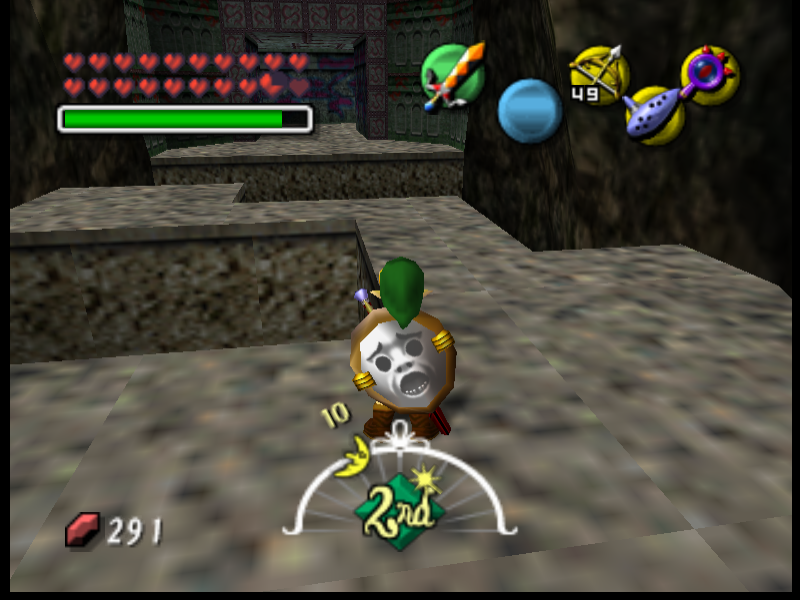
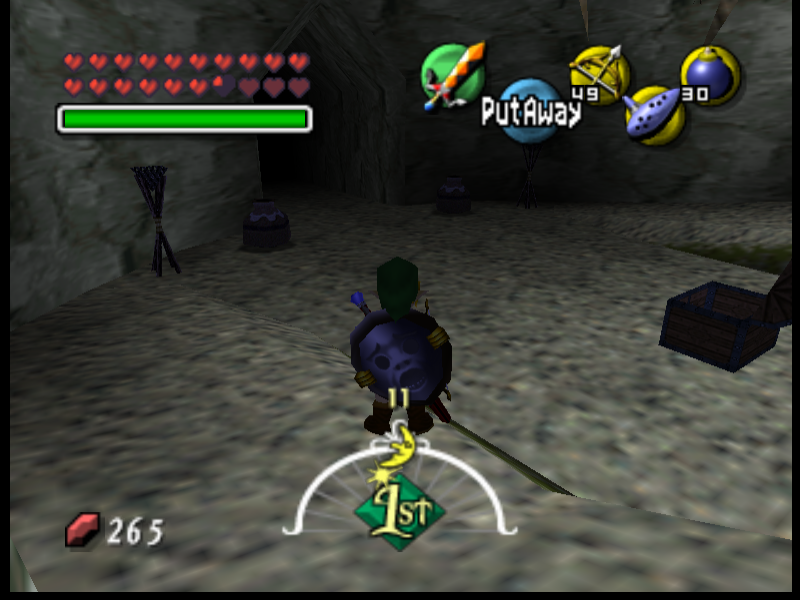
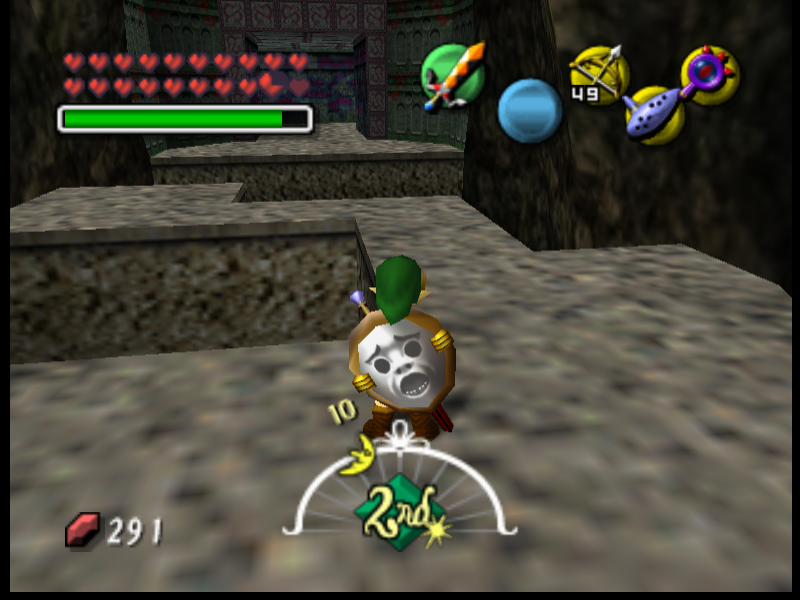
In Majora's Mask, Beneath the Graveyard, the floor textures don't seem to be blending/bluring/merging/tiling correctly in latest GLideN64 rev build. I'm using version GLideN64-de754772. I notice on Public Release 4.0, this doesn't seem to be an issue, so I guess this is a regression. Playing on latest PJ64 dev. Here are some screenshots of what I'm talking about.
GLideN64-de754772 incorrect tiling:

GLideN64 Public Release 4.0 correct tiling:
 IronYoshi64
All 18 comments
Please give me a savestate from this place.
 gonetz
on 17 Dec 2019
gonetz
on 17 Dec 2019
Sure! Here is 2 saved states for beneath the graveyard. One for 1st night area, and one for the 2nd night area, so you can see both areas. For Zelda Majora's Mask (U) [!] version.
zelda mm beneath graveyard night 1.pj.zip
zelda mm beneath graveyard night 2.pj.zip
IronYoshi64
on 17 Dec 2019
Thanks!
The regression caused by commit 2d712f2ae0
It is bad news since this commit changes a lot.
gonetz
on 18 Dec 2019
You are welcome! Also bad news? You mean that fixing this 1 issue will cause so many other things to be broken now, or what do you mean?
IronYoshi64
on 18 Dec 2019
I mean that it will be hard to find what exactly caused that regression because lots of things had been changed.
gonetz
on 19 Dec 2019
I mean that it will be hard to find what exactly caused that regression because lots of things had been changed.
Ah, I get you. Yeah a lot has changed from 4.0. Technically, if you have every single build from right after 4.0 to where it is now, I can test this for you! Seriously, I have the time! I can just make a good save state in the area and keep hot swapping builds to see when it got messed up and with what build that caused it. If you can point me to where I can get them, or if you attach a zip file to me or something with all the builds, I can do this for you! :)
IronYoshi64
on 19 Dec 2019
He knows what change caused this and linked the commit. He is saying that alot of code was changed in the commit that brought this issue. Breaking down that commit won't be easy
 weinerschnitzel
on 19 Dec 2019
weinerschnitzel
on 19 Dec 2019
I found the algorithm in AngryLions code, the function doing wrap and mirror is tcmask() . Here is a piece of it, with some explanations added.
if (tile[num].mask_s) // if mask_s is not 0
    {
        if (tile[num].ms) // if mirror is enabled
        {
            wrap = *S >> tile[num].f.masksclamped; /* Check mirror bit: if mirror is needed */
            wrap &= 1;                             /*  wrap will contain 1 otherwise 0  */
            *S ^= (-wrap);   /* Thus (-wrap) contains 0 or -1 = 0xff.....ff.
                                         The xor inverts the bits of S if mirror is enabled and does nothing otherwise. */
        }
        *S &= maskbits_table[tile[num].mask_s];  /* Mask the lower bytes. If mirror was enabled
                                                         invert + wrap becomes the mirrored coordinate. Otherwise it just wraps. */
    }
The most difficult part to emulate in GLSL without bitwise operations is the inversion by xor. This could be done by using the following property of the inverted non-normalized coordinate: inverted + original = 2^mask -1. Therefore, you can get the inverted version in glsl by doing inverted = mod(-original-1, 2^mask).
A couple of considerations:
- If you want to use normalized coordinates you need to be careful with the wrapping boundary, specially for mirroring. For example with a mask of 3, a coordinate of 8 should be mirrored to 7. Thus the boundary where the simmetry happens is
7.5not8. Similarly,-1should mirror to0so the boundary is-0.5. Unless you normalize by adding0.5first. I believe it would be simpler to clamp mirror and wrap non-normalized coordinates and then normalize in the texture filter to lookup the textures. - You need to be careful with texture coordinates near the boundary. In the example above with bilinear filtering, a texcoord of
7.6will mirror to7.4and then filter between texel 7 and texel 8. This can result into trouble if texel 8 actually exists and contains garbage. Instead the following should be done:
- Save the fractional part 0.6.
- Mirror and wrap integral part 7 and next value 8. Result is 7 and 7 if mirror or clamp is enabled, 7 and 0 if wrapping.
- Mix the mirrored texels using fractional part 0.6.
I hope this helps.
 standard-two-simplex
on 19 Dec 2019
standard-two-simplex
on 19 Dec 2019
I briefly checked graveyard tiling issue.
The floor texture does not use mirroring, only wrapping. Texture size is 32x32, mask is 5, tile size is 128x128. Clamping is enabled, thus the texture can be wrapped 4 times by S and T. Old code made the wrapping in software: texture of tile size, that is 128x128, was filled with texture data and used for the floor. There were no boundary problems with bilinear filtering because there were no boundaries - texture was large enough to cover polygons entirely. New code loads 32x32 texture and wraps it in hardware. I guess it causes the texture boundary problem with bilinear filtering mentioned by @standard-two-simplex. Axi suggested a way to avoid it. I need to find how to implement it.
gonetz
on 22 Dec 2019
Strange.
I don't think the second boundary problem (harder to solve) should appear when hardware wrap is on and you're wrapping at the end of the texture.
Perhaps the first one might affect this case, but I am quite skeptical.
standard-two-simplex
on 23 Dec 2019
Since clamping is enabled for the floor texture, GL wrap mode for this texture is WRAP_CLAMP_TO_EDGE.
When a texel on an edge of the texture is filtered, texture filtering shader is trying to fetch neighbor texels, but their coordinates are clamped instead of being wrapped. I tried to add wrapping to texture filtering shader, but it causes new issues.
gonetz
on 4 Jan 2020
This problem is very nasty. It is regression, so I tried to fix it asap.
I made several attempts to fix it, but failed to find a bug-free solution.
The problem is clear. I described it in my previous message https://github.com/gonetz/GLideN64/issues/2155#issuecomment-568235639
Physical texture size is 32x32. "Virtual" tile size is 128x128.
When texture coordinate is greater than 32, it is wrapped.
However, when texture coordinate is greater than 128, it is clamped.
OpenGL fixed functionality can't do limited wrapping. It can either clamp or wrap.
So this logic implemented in a shader. The shader correctly clamp-wrap-mirror texture coordinate.
Then this coordinate passed to texture filter. Texture filter needs to fetch neighbor texels to filter the current one.
When texel to filter lies on texture's edge, texture coordinates of its neighbors are out of texture bound and if they are less than 128 they must be wrapped. Texture filter does not use clamp-wrap-mirror shader for texture coordinates of neighbor texels. GL_TEXTURE_WRAP parameter is set to CLAMP_TO_EDGE, so hardware just clamps the coordinates. It causes the issue with tiling.
The obvious solution is to apply clamp-wrap-mirror shader for texture coordinates of neighbor texels.
I made it in ed5e475 and 0d522ee. It indeed fixed this problem with tiling because the shader correctly wraps coordinates of texels in texture filter. Unfortunately, it led to issue #2163. The problem is with mirroring textures. Offset from current texel to its neighbors should be calculated differently for mirroring textures. There are several cases:
- normalized texture coordinate is negative and odd
- normalized texture coordinate is negative and even
- normalized texture coordinate is positive and odd
- normalized texture coordinate is positive and even
Implementation of that logic in texture shader will make it monstrous.
I guess, this logic is somehow implemented in hardware because texture filtering of mirroring textures works correctly when clamp-wrap-mirror shader is not used for neighbor texels.
I tried to find a lighter solution, but all my ideas led to regressions somewhere.
So I postpone this task for now. It must be fixed, new public version can't be released with that issue unsolved. However, I spent too much time on it already with no results. May be someone else will find an acceptable solution.
I'm switching on other tasks.
gonetz
on 1 Feb 2020
The issue is fixed by standard-two-simplex, see #2202
Please test this branch:
https://ci.appveyor.com/project/gonetz/gliden64/build/artifacts~~
gonetz
on 11 Apr 2020
The test branch updated. New build:
https://ci.appveyor.com/project/gonetz/gliden64/builds/32143657/artifacts
gonetz
on 14 Apr 2020
The test branch updated. New build:
https://ci.appveyor.com/project/gonetz/gliden64/builds/32143657/artifacts
Ok. When I get more time, I will test that new version.
IronYoshi64
on 14 Apr 2020
Ok, I have tested the new build. It does indeed fix this issue here.
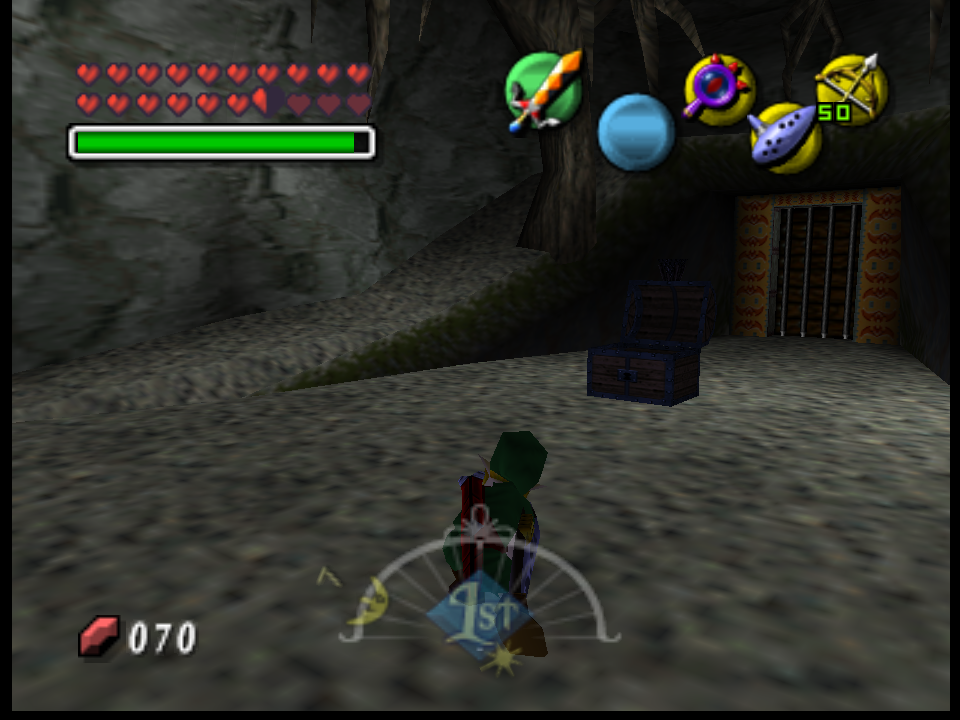
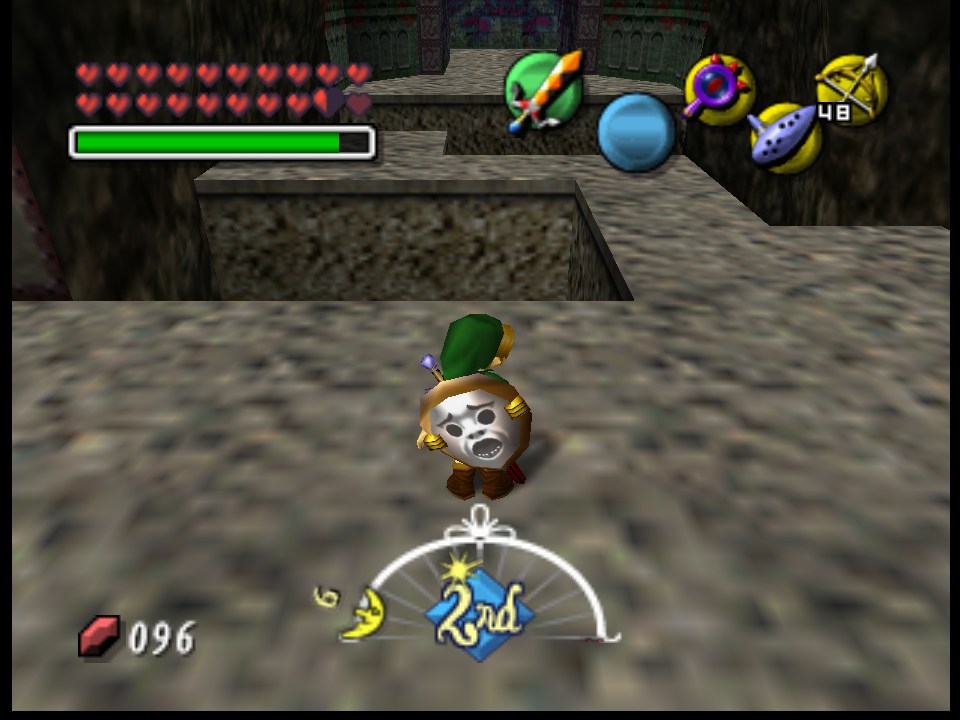
But sadly, it creates another small issue in the game. Certain textures that do not suppose to have a sharp/nearest filter on them, has them. I notice it seems to be more on the ground textures that have the wrong texture filtering.
Here is a few screenshots i took of the wrong sharpening of some textures:
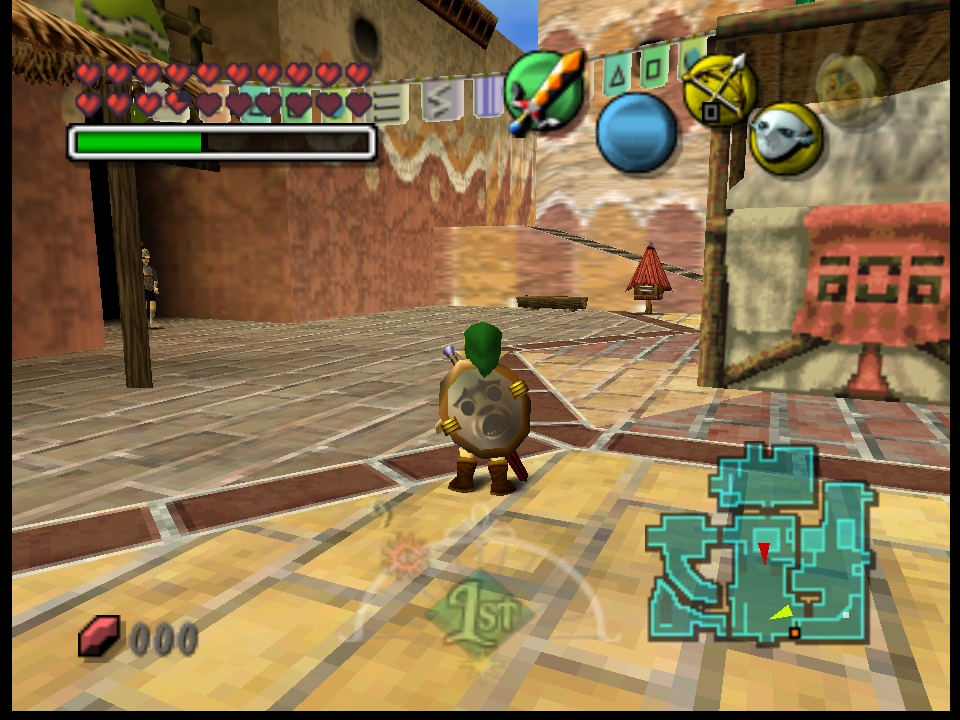
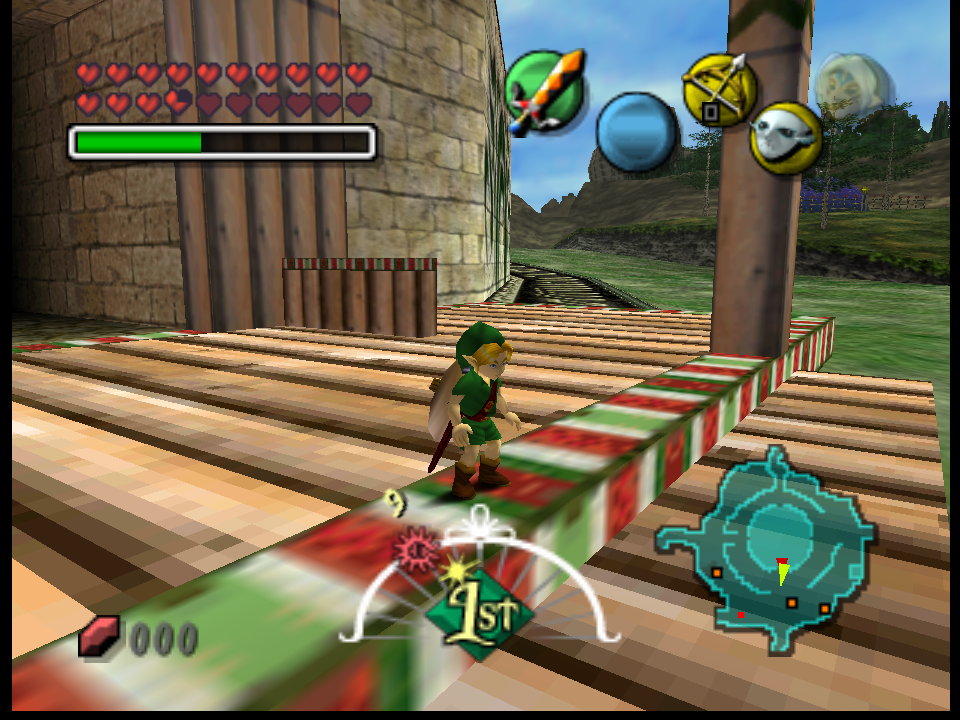
Also I only tested Majora's Mask USA with this build.
IronYoshi64
on 15 Apr 2020
Thanks for the report @IronYoshi64. And good eye!
I didn't notice that with LoD disabled, fake mipmapping should use bilinear filter. Fixed in 26f047a8b77c6b6767cf4f852a5a9f02bf65ca79.
https://ci.appveyor.com/project/gonetz/gliden64/builds/32205023/artifacts
standard-two-simplex
on 15 Apr 2020
The original issue is fixed.
gonetz
on 11 May 2020
Related issues
standard-two-simplex
·
20Comments
 maximemoring
·
17Comments
maximemoring
·
17Comments
 Roggieh123
·
7Comments
Roggieh123
·
7Comments
 olivieryuyu
·
12Comments
olivieryuyu
·
12Comments
 IceLancerSR
·
15Comments
IceLancerSR
·
15Comments
Most helpful comment
Ah, I get you. Yeah a lot has changed from 4.0. Technically, if you have every single build from right after 4.0 to where it is now, I can test this for you! Seriously, I have the time! I can just make a good save state in the area and keep hot swapping builds to see when it got messed up and with what build that caused it. If you can point me to where I can get them, or if you attach a zip file to me or something with all the builds, I can do this for you! :)