Gliden64: Paper Mario - Some nice and sharp; Some blurry & badly processed (Textures)
I'm having this issue where in the game, some text of the same type will be perfectly sharp and some other will be either blurry or badly processed like I was using a bad texture enhancer when I'm not.
Tried enabling and unabling every single option, changed resolutions, refresh rates, and it seems like using a texture enhancer is the only thing that overwrites the poor default texture handling (even then you can notice a difference in quality)
Using latest GLideN64 (Public Release 4.0) on Project64 2.2.0.3
Only using multiples of native resolution (see screenshot, currently using native x4)

You can see here the perfect example.
Blurry: The "x" and numbers show up perfectly sharp, but everything else doesn't
Badly processed: The numbers show up perfectly sharp yet the "/" and letters don't, and end up with this extra wide, wierdly high resolution border.
Options:

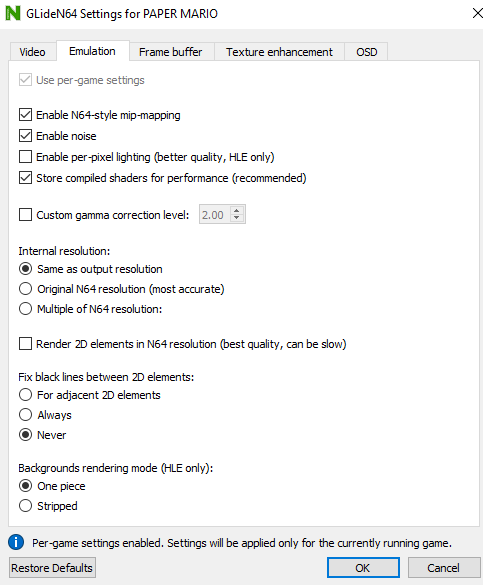

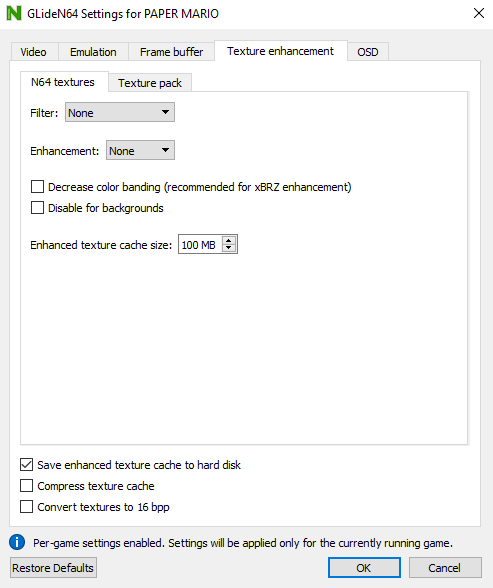
Texture packs is also off and never touched OSD
 maximemoring
All 17 comments
That's why I wish there was an option to force point-filtering.
 oddMLan
on 25 Aug 2019
oddMLan
on 25 Aug 2019
Is point filtering some kind of embedded texture enhancement?
maximemoring
on 26 Aug 2019
No, it was an option that the predecesor to this plugin (Glide64) had. Basically it would force all textures to use nearest neighbor instead of bilinear. Including those that are normally filtered on console.
There's a ticket report already open for it #574
oddMLan
on 26 Aug 2019
Oh wow, 4 years ago...
maximemoring
on 26 Aug 2019
oddMLan is right in one point - blurry textures are filtered ones; sharp textures are not filtered.
Proper emulation of texture filtering is tricky (impossible?) in non-native resolutions.
 gonetz
on 26 Aug 2019
gonetz
on 26 Aug 2019
Try Enable halos removal. That improves the text in some cases.
 Jj0YzL5nvJ
on 26 Aug 2019
Jj0YzL5nvJ
on 26 Aug 2019
@gonetz I've tried every resolution and I can certainly assure you I can tell when I'm not using a multiple of native resolution. Using multiples of native resolutions shouldn't magically make textures ugly. I mean, why are a lot of textures totally fine? The entire intro's backgrounds aren't filtered, neither is the water or some of the building's textures, some text isn't filtered, etc.
@Jj0YzL5nvJ I have said already that I have tried every option. No, it doesn't fix this as this isn't a halos issue, but a texture filtering one.
maximemoring
on 26 Aug 2019
There is a line in the .ini file that is called texture\bilinearMode= with default "1", but it seems this is a bogus/unused line, as changing this (to 0, -1 or 2) doesn't seem to do anything. And if deleted, the file is recreated with that back to 1.
maximemoring
on 26 Aug 2019
Look here, almost nothing except the 3D model's textures and the red/gold drapes are perfectly unfiltered. I don't see how that was tricky? I mean using multiples of native res is basically doing the work for you at this point.
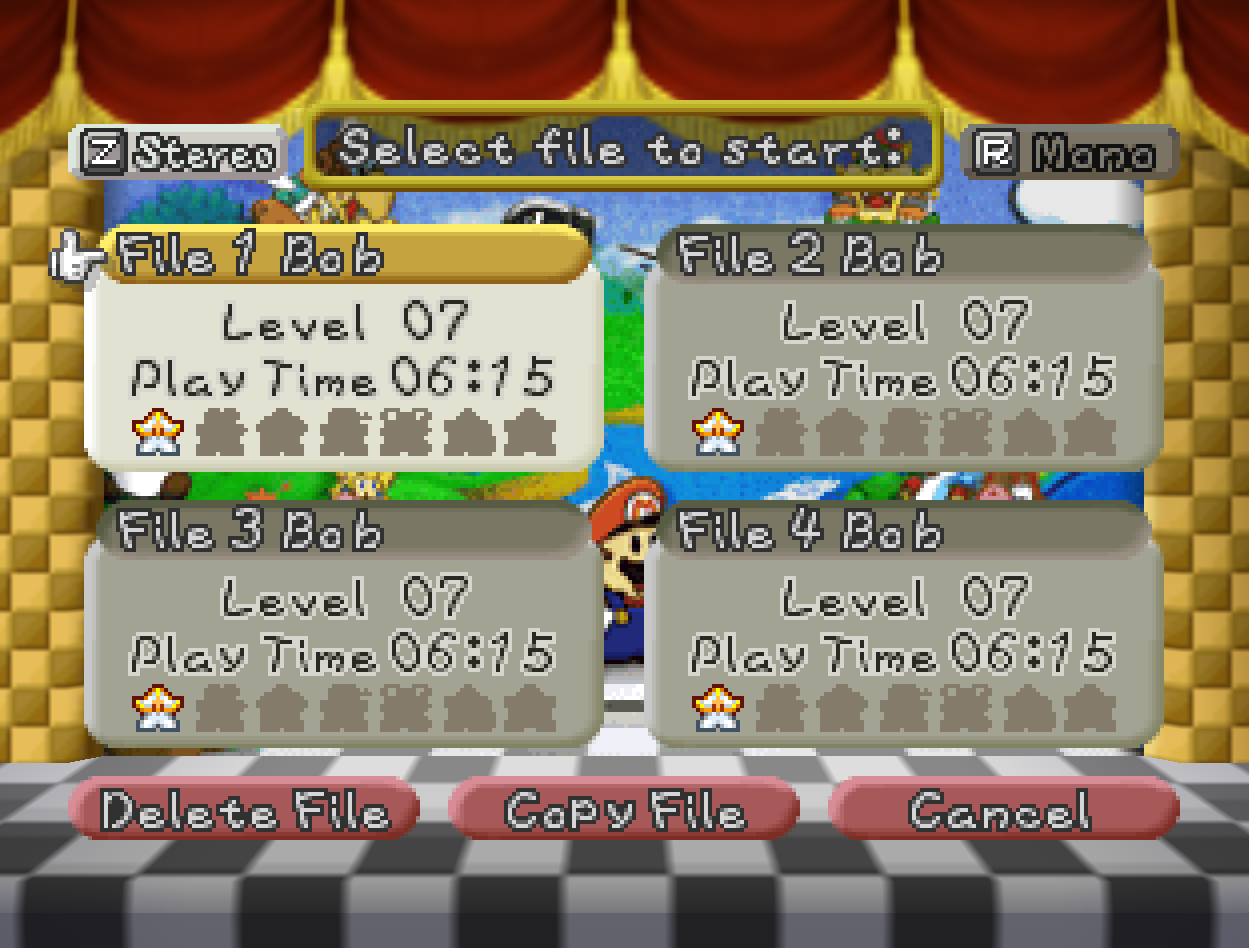
Is it really too much to ask to have the option to not use bilinear filtering? Even just making the INI file's argument used by the dll for power users would be appreciated.
maximemoring
on 26 Aug 2019
Source of problems with texture filtering in hi-res is obvious: small texture was designed to be applied to low-res polygon, but actually is used for large polygon. For point-sampling it is not a problem - in case of multiples of native res we will just get larger pixels. But filtering works differently for small and for large polygons, especially on image borders. The smaller a texture, the more chances that the result will look somehow wrong.
There is a line in the .ini file that is called texture\bilinearMode= with default "1"
This setting switches between normal 4-points bilinear filtering and 3-points one used by N64 (bilinearMode=0). The difference is not obvious but visible.
Is it really too much to ask to have the option to not use bilinear filtering?
No, it is not hard. But it is hack, and I dislike to add more hacks.
gonetz
on 27 Aug 2019
IMO, it is as much of a hack as the rest of texture enhancement options, external shaders, or widescreen. It can enhance the playing experience, or break it. But I think it is a good option to have for games that were mostly designed in 2D (there are many in the N64 catalog). Not to mention, it gives 3D games a cool PSX-like aesthetic (for those that like it).
oddMLan
on 27 Aug 2019
No, it was an option that the predecesor to this plugin (Glide64) had.
Semi-correction, you actually could also do this in earlier builds of GLideN64. There was no way to set it in the GUI but using "BilinearMode=3" would force nearest neighbor. Sometime between 597f7a2 and c5c0fbe something changed and this stopped working.
 darkychao
on 1 Sep 2019
darkychao
on 1 Sep 2019
I would like to ask more clearly for that option to be available, not necessarily on the interface, as I can understand the complaints about things not looking right with it on might be annoying, but at the very least have that BilinearMode=3 work, or something similar.
maximemoring
on 1 Sep 2019
The mish mash in 2D games is really annoying.
There is already a long discussion about it here:
https://github.com/gonetz/GLideN64/issues/1788
 Papermanzero
on 6 Sep 2019
Papermanzero
on 6 Sep 2019
Until this is done, I will be using Angrylion's RDP Plus plugin, as with an AMD Ryzen 7 2700X with 16 threads, it's a walk in the park. (PJ64 uses at most 30% of CPU time) It does exactly what I want which is point filtering while seemingly forcing a multiple of native resolution when maximizing the window.
Yes, that plugin doesn't scale render resolution, and I wish I could have it both ways, but until point/nearest neighbor filtering is available, this won't be possible and I'd rather have a fully pixelated look than a half-and-half blurry mess.
maximemoring
on 6 Sep 2019
I'd also really like to see nearest neighbor added. Bilinear is the first thing I disable in literally every emulator since it just smudges everything. Being forced to use it with this nice plugin is a shame. Angrylion's RDP Plus puts out a great sharp image but even with the latest build, it's too taxing with certain games and lacks a lot of features of this plugin.
 Nomadsx
on 16 Sep 2019
Nomadsx
on 16 Sep 2019
I'd also like to add that I would love for this option to be implemented, can't stand blurry textures or bilinear filtering. I understand having filtering is the authentic experience but the option for those that would like to emulate games totally unfiltered would be extremely appreciated. All GLideN64 needs is an option for force point-sampled filtering like Glide64 had. Games like Mischief Makers and Paper Mario suffer greatly from the inconsistency of blurred and sharp textures. Just makes the whole experience look very ugly.
Here's Mischief Makers running with force point-sampled on Glide64 Final. Looks how it should, with sharp unfiltered pixels on all objects and surfaces:
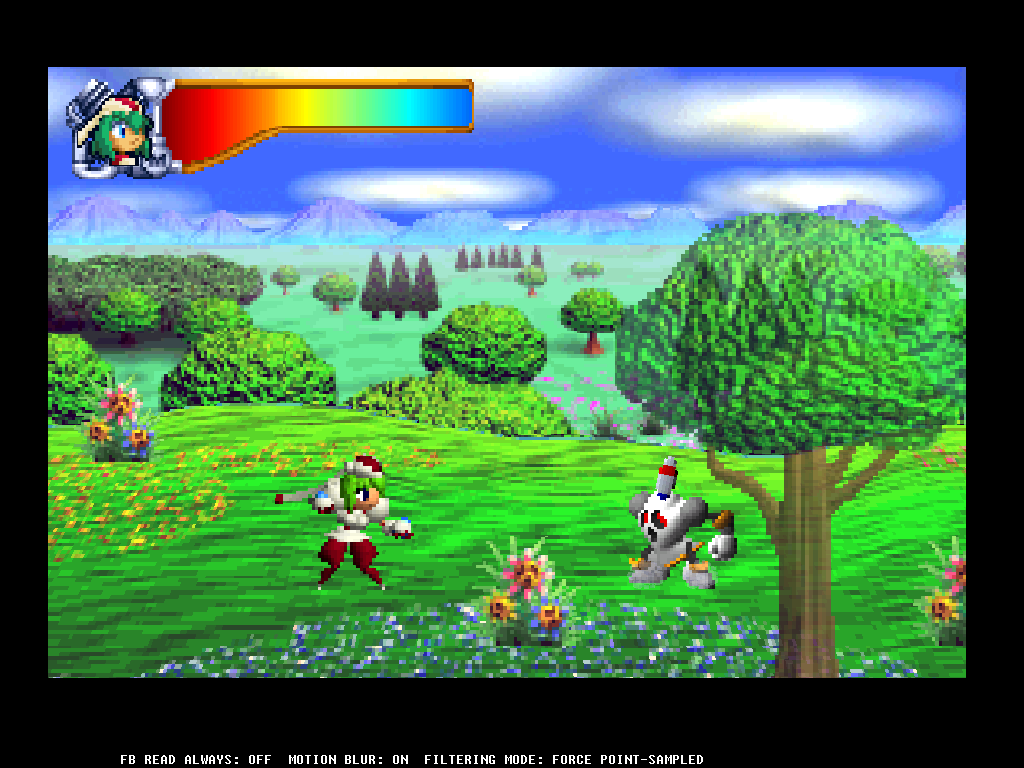
But the problem using Glide64 is you cant crop or overscan the image. So for games like Mischief Maker you are stuck with a pretty small display area with big black bars all around.
Here it is on GLideN64 4.0 using N64 style 3 point. A bunch of objects and surfaces have ugly blurred textures with visible tile seams:

Now I did manage to randomly find an old build of GLideN64 (rev.365838e) that let me disable the filtering. This allowed me to crop the image a bit to get a slightly larger display area. However the cropping method in the older builds is nowhere near as versatile as the overscan method in 4.0 which lets you cut out any unwanted screen space with total control.
So basically in an ideal world we would have an updated version of 4.0 with the option to turn off all filtering and/or enable force point-sampled filtering on all objects and surfaces. I've seen quite a few people requesting this who also hate the blurry smeared look of bilinear filtering so it would really be appreciated.
Besides this one snag it’s a fantastic plugin that easily provides the best graphical experience by far!
 AlterSpectrum
on 31 Jan 2020
AlterSpectrum
on 31 Jan 2020
Related issues
gonetz
·
10Comments
 Roggieh123
·
7Comments
gonetz
·
14Comments
Roggieh123
·
7Comments
gonetz
·
14Comments
 Dorzalty
·
20Comments
Dorzalty
·
20Comments
 ImSpecial
·
10Comments
ImSpecial
·
10Comments
Most helpful comment
IMO, it is as much of a hack as the rest of texture enhancement options, external shaders, or widescreen. It can enhance the playing experience, or break it. But I think it is a good option to have for games that were mostly designed in 2D (there are many in the N64 catalog). Not to mention, it gives 3D games a cool PSX-like aesthetic (for those that like it).