Gliden64: UVs are shifted by about half a texel
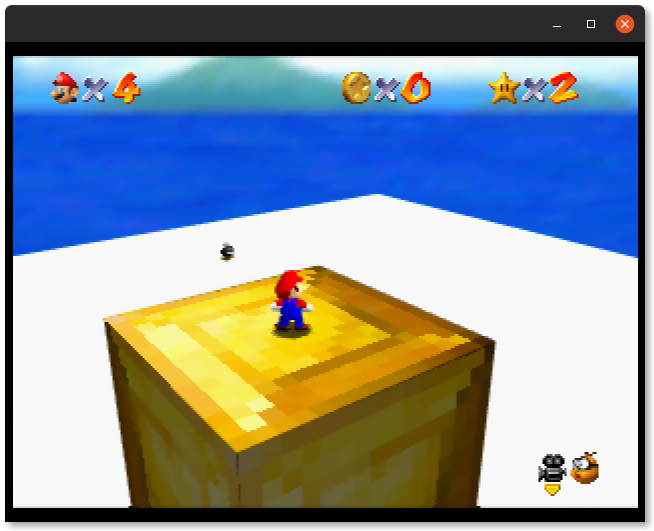
GLideN64 seems to be pushing my custom models' UVs by about half a texel. This contradicts what real hardware does, where it is properly aligned, and occurs in both HLE and LLE.
GLideN64:

Angrylion's Plus:
My N64:
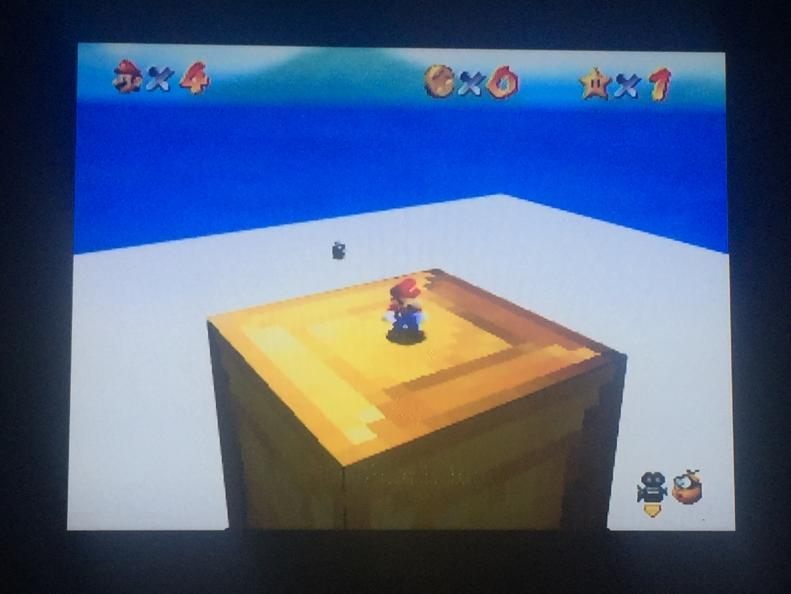
Other plugins (mostly tested by @theboy181). Passed means proper alignment, failed means misalignment:
real hw: passed
angrylions plus: passed
gliden64: failed
gliden64 2.0: failed
glide64mk2: failed
z64gl: passed
1964's video plugin: passed
jabod3d: failed
BPS patch (apply to big-endian SM64 ROM, select level ID 9 in the level select dialog):
https://files.catbox.moe/j8rqhr.bps
 mountainflaw
All 75 comments
Hi,
I guess, if you would test with glN64, it also would fail.
The idea is simple: to fetch texel properly with OpenGL, we need point to its center.
Thus, 0.5 added to texture coordinates.
Glide64 does it, glN64 does it too and GLideN64 inherited it.
I tried to remove that 0.5 shift. Some things became better, some much worse.
There were discussions there about that matter, people with better memory probably will find proper threads.
I think, if we will change these lines in src/Textures.cpp
    pCurrent->offsetS = 0.5f;
    pCurrent->offsetT = 0.5f;
as
    pCurrent->offsetS = 0.0f;
    pCurrent->offsetT = 0.0f;
the problem you described will be fixed.
But then we will need to carefully investigate all regression cases.
 gonetz
on 6 Oct 2019
gonetz
on 6 Oct 2019
@gonetz
This 0.5 does not depends on whether you are on point sample mode or BILERP mode?
 olivieryuyu
on 6 Oct 2019
olivieryuyu
on 6 Oct 2019
^ it shouldn't shift in point sample mode, but it should with bilerp
mountainflaw
on 6 Oct 2019
Ok, let's prove it.
I made corresponding fix in fix_2097 branch
https://github.com/gonetz/GLideN64/tree/fix_2097
commit 9b1fec6494
Test build:
https://drive.google.com/file/d/1stkn3Sf2vJiZqFVj-Q-YOly_Qt9jI1Lk/view?usp=sharing
gonetz
on 7 Oct 2019
looking for regressions? you find a case?
 theboy181
on 7 Oct 2019
theboy181
on 7 Oct 2019
Yes We need to find regression.
The difference btw bilerp and point sample is based on the programming manual 13.7.5.3 where this difference is clearly explained amongst other things.
olivieryuyu
on 7 Oct 2019
The 9b1fec6 commit fixes the described issue
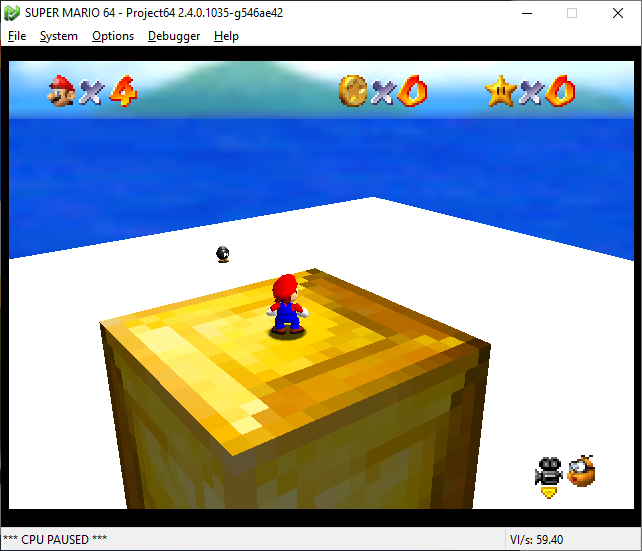
I haven't found any regressions so far.
EDIT: Tested more games, and didn't find any regressions.
 oddMLan
on 7 Oct 2019
oddMLan
on 7 Oct 2019
This is the same issue I investigated when I started looking into the issue at Ogre Battle.
The funny thing is texture coordinates are not necessarily shifted by 0.5 texels, but by 0.5*dsdx or 0.5*dtdy where these last variables represent the change in texture coordinates per change in primitive position. I.e., the shift is by 0.5 texels only when there's a one to one correspondence between pixels and texels. The case with triangles was similar but more difficult to understand.
I would say the correct approach would be to remove all shifts. The texture coordinates should be the original ones in any case. Since texture filtering is doing in shaders, it can be customized and add/subtract 0.5 there if needed.
Currently, the bilinear texture filters (3point or standard) subtract 0.5. It might be better to remove -vec2(0.5) in
" mediump vec2 offset = fract(texCoord*texSize - vec2(0.5)); \\\n"
than add an extra shift in
if (uTextureFilterMode != 0) texCoordOut += vec2(0.5); \n"
I think it does the same. You might want to test.
The text build fixes the game mod but doesn't fix many other things, like the blurriness in Zelda subscreens. It is a step in the right direction, anyway.
 standard-two-simplex
on 7 Oct 2019
standard-two-simplex
on 7 Oct 2019
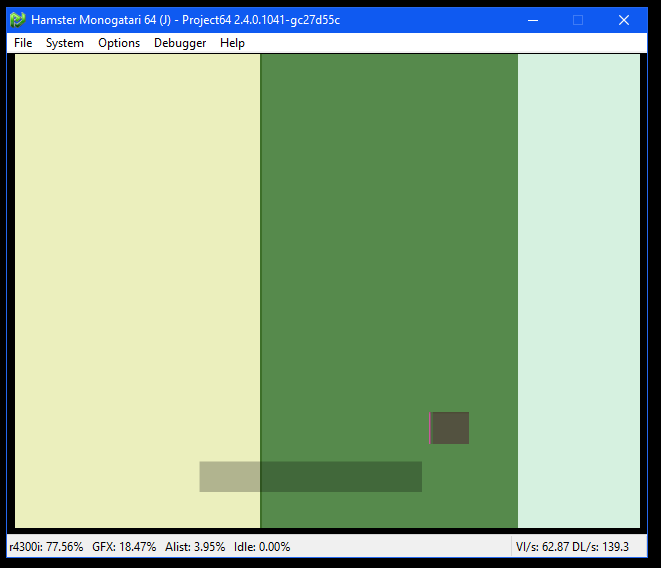
This is broken - Not sure if its related to the UV fix though.
theboy181
on 7 Oct 2019
I would say the correct approach would be to remove all shifts. The texture coordinates should be the original ones in any case. Since texture filtering is doing in shaders, it can be customized and add/subtract 0.5 there if needed.
It sounds as a good idea, worth to try. dsdx and dtdy also can be calculated in fragment shader.
gonetz
on 8 Oct 2019
reading http://n64devkit.square7.ch/pro-man/pro13/13-07.htm#05-03
It would be actually slightly more complex as clamping and wrapping as an effect on the shift (!)
olivieryuyu
on 8 Oct 2019
Currently, the bilinear texture filters (3point or standard) subtract 0.5.
On a second thought, I'm not so sure its doing just that.
One thing is for sure: Non-normalized (s,t) coordinates shouldn't be shifted. On the other hand it makes total sense to shift when normalizing, i.e., the way to do it would be ((s,t) + (0.5,0.5))/texSize. This shift is also necessary so that wrapping happens at normalized values 0.0f and 1.0f.
standard-two-simplex
on 8 Oct 2019
not sure if it is the same issue. May be not.
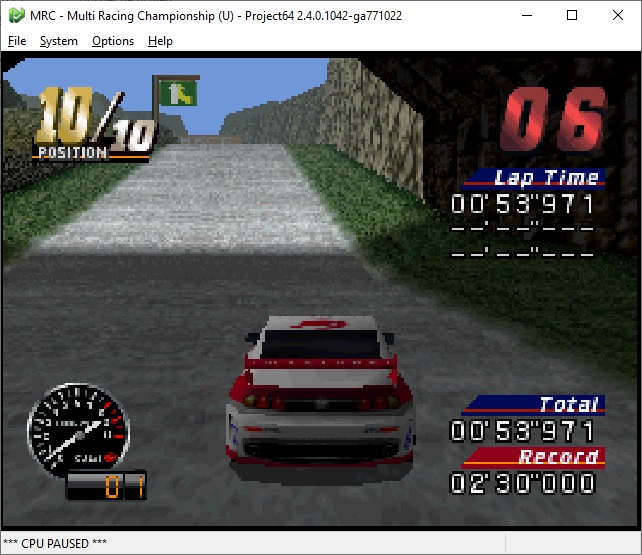
Gliden64
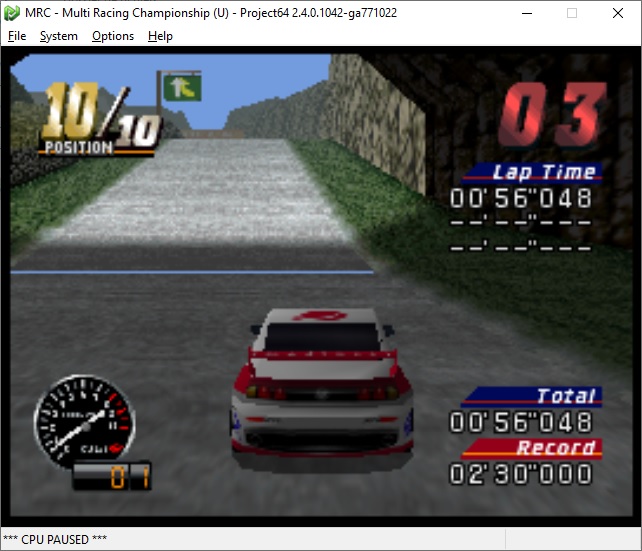
Angrylion
olivieryuyu
on 8 Oct 2019
That’s normal for that game. Need to add VI filters to take care of it.
theboy181
on 9 Oct 2019
The second screenshot @olivieryuyu supplied is without VI filters. There are some cases in which gaps between polygons are alleviated by VI filters, like the ones in Whomp's Fortress in SM64, but I think this one is related to fixed-point math... #1731
oddMLan
on 9 Oct 2019
It is very hard to know the root cause of such type of issues in those games.
texture mapping, VI, texel swapping...
I would guess we need to create test roms in order to apprehend correctly each case.
Btw I doubt that fixed point has anything to do with this. LLE uses RDP data to generate the triangles through using a scan line based computations. Gaps should not come from this so.
olivieryuyu
on 9 Oct 2019
This shift should be disabled.
if (uTextureFilterMode != 0) texCoordOut += vec2(0.5); \n"
I tested without this line and disabled texrects. Comment drawer.drawTexturedRect(params); in gDP.cpp to test it.
All the triangles seem correct including 2D done by them (subscreens in Zelda etc.), both bilinearly filtered and point sampled. Even the portraits in Mario Kart look correct, which haven't for quite a while.
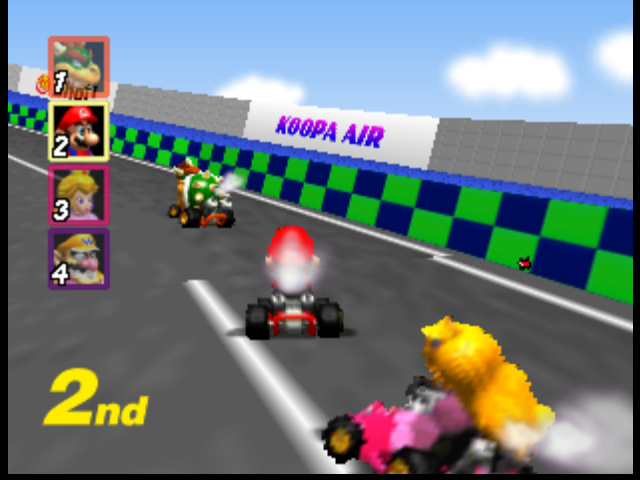
Tested in native res with 3 point bilinear filter.
So the bugs that are left are all related to textured rectangles.
standard-two-simplex
on 9 Oct 2019
This is as closest I got to a correct picture. As why it nearly works I only have a theory that doesn't convince me much. Anyway, I'll share it with you.
You can find significant improvements in games that use weird (mostly, dinamically created or negative) dsdx values like Ogre Battle, Beetle Adventure Racing or Excitebike. I didn't find major regressions, although some things, like hearts in Zelda, don't seem accurate.
https://github.com/standard-two-simplex/GLideN64/tree/fix_2097
standard-two-simplex
on 9 Oct 2019
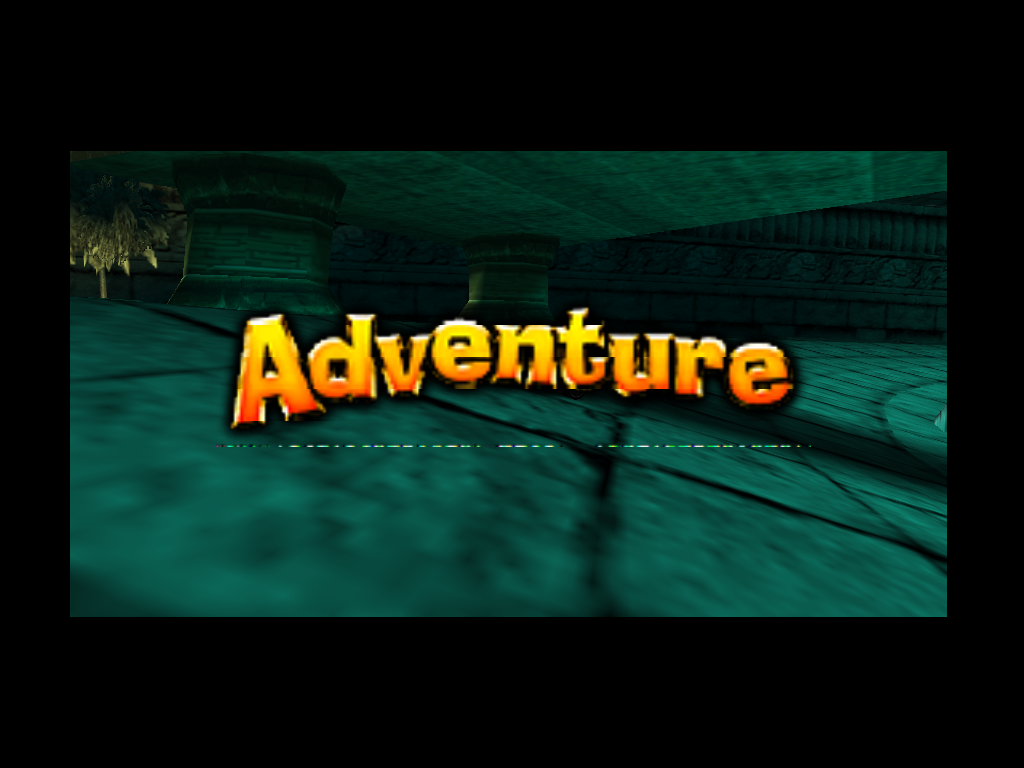
I see noticeable regression in Beetle Adventure Racing:
gonetz
on 10 Oct 2019
@standard-two-simplex
This shift should be disabled.
if (uTextureFilterMode != 0) texCoordOut += vec2(0.5); \n"
Removing this line causes that issue:
https://github.com/gonetz/GLideN64/issues/1971#issuecomment-450700164
It happens with your build too.
gonetz
on 13 Oct 2019
@standard-two-simplex
Even the portraits in Mario Kart look correct, which haven't for quite a while.
I disagree with that statement. Flashing portrait should have pink outline (checked with al rdp), which disappears without texture shift.
gonetz
on 13 Oct 2019
@theboy181
This is broken - Not sure if its related to the UV fix though.
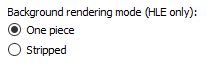
No, it is not related to UV fix. olivieryuyu and me specially implemented precise emulation of backgrounds commands to support games as Hamster. Just enable stripped mode.
gonetz
on 13 Oct 2019
It seems that this UV shift fixes the original issue and causes no regressions.
It doesn't fix many other things, but it is a step in the right direction.
I suggest to merge this step to master.
Any objections?
It is unclear yet, how to fix other issues. Attempts to move further do cause regressions.
It is possible that current code works more-less correct due to even number of mutually eliminating errors, and the regressions are caused by removing only one of them.
It would be nice to have some set of cases to test further fixes.
@olivieryuyu mentioned creation of test roms. It wold be great to have something simple to test, where current issues with texture mapping and filtering would be clearly visible.
gonetz
on 13 Oct 2019
I disagree with that statement. Flashing portrait should have pink outline (checked with al rdp), which disappears without texture shift.
True, I incorrectly assumed that the better looking image was the correct one.
I suggest to merge this step to master.
Any objections?
Not from me.
It is unclear yet, how to fix other issues. Attempts to move further do cause regressions.
It is possible that current code works more-less correct due to even number of mutually eliminating errors, and the regressions are caused by removing only one of them.
Indeed, errors eliminating each other are hard to debug. I made a second attempt here. I believe the wrong texture coordinates come from a wrong normalization from screen coordinates to the range (-1,-1). I tried to explain with comments the reason for the changes.
NOTE: It seems it only works in native resolution. Hopefully only missing something to scale the idea up.
I carelessly rebased the branch and removed the comment about Rocket: Robot on wheels. The logos are displayed upside down by using a negative dtdy (t=5, dtdy=-1). This way the t coordinates of each rectangle (height = 6 pixels) were intended to look like (5,4,3,2,1,0) depending on the row the pixel.
With the current implementation in master, ult=5 and lrt=5 + 6 * (-1) = -1 so the t coordinates were interpolated to approximatedly (4.5,3.5,2.5,1.5,0.5,-0.5). The last one was wrapped to 4.5 and thus the incorrect image. Therefore, master relied on this piece of code.
    if (uls > lrs) {
        texST[t].s0 -= _params.dsdx * shiftScaleS;
        texST[t].s1 -= _params.dsdx * shiftScaleS;
    }
    if (ult > lrt) {
        texST[t].t0 -= _params.dtdy * shiftScaleT;
        texST[t].t1 -= _params.dtdy * shiftScaleT;
    }
This way, ult=6, lrt=0 and the interpolated values are (5.5,4.5,3.5,2.5,1.5,0.5). Since nearest neighbour is used, this correctly returned colors at texels with t coordinates (5,4,3,2,1).
The new way, the rectangle are in a new position, so ult=5 and lrt=-1 are interpolated to more or less (5,4,3,2,1,0). A bias is needed to make sure it is more than and not less than (5,4,3,2,1,0).
I hope I made the idea clear. I have tested it with games and settings I usually use, so let me know if you find problems.
standard-two-simplex
on 13 Oct 2019
:) are you on Discord @standard-two-simplex
https://discord.gg/Gxa8Ns
theboy181
on 13 Oct 2019
No, I don't have the app.
standard-two-simplex
on 13 Oct 2019
It would be nice to have some set of cases to test further fixes.
@olivieryuyu mentioned creation of test roms. It wold be great to have something simple to test, where current issues with texture mapping and filtering would be clearly visible.
Crashoveride posted a SDK test ROM in the #gliden64 channel in that Discord server allows changing the cycle and texture filtering type.. ccbl is called, I think.
oddMLan
on 14 Oct 2019
@standard-two-simplex
The idea with shifting rect screen coordinates by 0.5 looks doubtful.
Plugin does not apply such correction to coordinates of regular triangles.
Would not we get rects wrongly shifted regarding rest of geometry?
gonetz
on 15 Oct 2019
Has anyone compare the other plugins from the list to see if they get rect right ?
theboy181
on 15 Oct 2019
The idea with shifting rect screen coordinates by 0.5 looks doubtful.
Yes, it does. I'm working on another way of achieving the same thing.
Would not we get rects wrongly shifted regarding rest of geometry?
I'm not sure about that. Rectangles use screen coordinates. What are the range and format of the vertices of triangles?
standard-two-simplex
on 15 Oct 2019
@gonetz
I need access to a variable containing the ratio native resolution / output resolution. That is, if the output resolution were 2 x native the variable should hold 0.5.
Is there any global variable holding this value? Or a way to compute the value inside drawTextureRectangle() in GraphicsDrawer.cpp?
standard-two-simplex
on 15 Oct 2019
I'm not sure about that. Rectangles use screen coordinates. What are the range and format of the vertices of triangles?
It depends. RDP triangle has the same format for coordinates as textured rect since texrect command is just a light version of textured triangle command. Btw, RDP triangle has no vertices. And it is not triangle in general case.
RSP triangle has vertices, but if we need to add a shift to screen coordinates, it is easier to do with viewport.
I need access to a variable containing the ratio native resolution / output resolution.
You may use pCurrentBuffer in drawTextureRectangle():
const FrameBuffer * pCurrentBuffer = _params.pBuffer;
pCurrentBuffer->m_scale holds output resolution / native resolution scale
gonetz
on 16 Oct 2019
pCurrentBuffer->m_scale holds output resolution / native resolution scale
Thanks, that will do.
By the way, I uploaded a better version of the attempt. There was a bug in the texture filter macros in shaders. Native res looks good, but I didn't test it too much.
There are some problems with higher resolutions. The problem is, I believe, that it is not possible to upscale all rectangles correctly because of the way they were designed. N64 game devs didn't program the rectangles the best way. As a result, they work in native but they give problems when upscaling.
I'll try to explain this idea in detail later.
standard-two-simplex
on 16 Oct 2019
There was a bug in the texture filter macros in shaders.
Actually, I was mistaken. There was no bug in the shaders, only it assumed that the texture coordinates were shifted by 0.5. OpenGL indeed needs a 0.5 shift when calling function texture(sampler, coordinate).
Anyway, I modified the filtering functions to work for unshifted 's' and 't'. It might be better to normalize by the map (u,v) = ((s+0.5)/width, (t+0.5)/height). At least, I believe mirroring needs this to make sure it happens at (u,v) values of 0and 1.
There are some problems with higher resolutions.
A rectangle with integral screen coordinates s=0 and dsdx=1 is intended to generate the following s coordinates.

In OpenGL, texture samples are in the middle of the pixel, so uls = -0.5 * dsdx and lrs = (width-0.5)*dsdx = uls + size*dsdx are needed.
In master branch, that rectangle would generate coordinates with an extra fractional part 0.5*dsdx, which are generally sampled correctly when using nearest neighbour (except if dsdx is negative, which is handled as below).
The standard way of magnifying is the following: many samples appear where there was one before. As a consequence, the first and last pixel have texture coordinates lower and higher than in native resolution, and a correct nearest neighbour filter is needed to sample the edges correctly. Sometimes even clamp would be needed.

However, since the rectangles were design to respect the first sample and generate subsequent coordinates, it seems wiser to magnify by adding the extra sample at the end.

But for negative dsdx values, it would be better to add the extra sample at the beginning.

There are some cases where the actual dsdx is greater than the ideal value (like the case of ogre battle). In those cases, the rectangle may be rendered correctly in native res, but it will jump out of bounds whenever magnifying, no matter the way it is done.
All in all, I uploaded the latest attempt in the branch. It seems to me that most of the rectangles are aligned correctly, specially the ones with nearest neighbour filtering. I would appreciate it if it were tested and any bugs reported. Please, compare against the master branch before reporting to make sure I introduced the bugs.
standard-two-simplex
on 27 Oct 2019
One strange thing I noticed. The following rectangle in Beetle Adventure Racing doesn't behave as most rectangles do.
The texture is the following 52x32 one that appears in the top left ingame.

Surprisingly, this texrect uses the following parameters,
Address 0: 3590240
Address 1: 3555368
ulx: 25.000000
lrx: 77.000000
uly: 21.000000
lry: 53.000000
dsdx: 0.999023
dtdy: -1.000000
s: 1.000000
t: 32.000000
With those t and dtdy values, it can't render as most rectangles do as the first t coordinate would be 32, wrapping to 0, then it would go down: 31,30,29... The first texcoord would need to be <32 in order to correctly fetch the last texel.
A piece of the Ubisoft logo in Rocket: Robots on Wheels which has the following parameters,
Address 0: 1822776
Address 1: 1822776
ulx: 20.000000
lrx: 300.000000
uly: 111.000000
lry: 117.000000
dsdx: 1.000000
dtdy: -1.000000
s: 0.000000
t: 5.000000
It seems that this one needs the first t value to be >5 in order to fetch texels correctly.
@gonetz I don't understand how both rectangles can be sampled correctly. Is it possible that some rectangles use some sort of offset?
standard-two-simplex
on 3 Nov 2019
Is it possible that some rectangles use some sort of offset?
I don't think so.
Texturing is the most complex part of RDP emulation. I personally can't keep in mind all the details about it. Luckily, we have angrylion's plugin sources, so we can see how RDP works with very good precision. It is hardcore way to extract information since the sources are not easy to understand even with debugger. I'll try to find, how these rects with negative dtdy work, but I don't know when I'll be able to find time on that.
gonetz
on 4 Nov 2019
@standard-two-simplex
I traced how coordinates for BAR texture calculated.
Tile size 52x32. Tile coords in ints
sl 2 unsigned short
tl 2 unsigned short
sh 206 unsigned short
th 126 unsigned short
In floats (0.50, 0.50, 51.50, 31.50 )
Clamp_s and Clamp_t enabled. Mask_s = 6, Mask_t = 5.
Texrect initial T is 32
T = T - tl = 32 - 0.5 = 31.5
31.5 is greater than maximal tile T, which is 31.
Since clamp_t enabled, T clamped to 31, see tcclamp_cycle_light in AL RDP.
After masking it is still 31. This value is used for the first row.
Next row.
32 + dtdy = 32 + -1 = 31
31 - 0.5 = 30.5
30.5 rounded to 30 and used for the second row.
And so on.
I'm not sure how to reproduce it in GLideN64. Put all this logic to shaders?
Besides, integer math can be important. For example, 126>>2 = 31, but 126.0/4.0 = 31.5
gonetz
on 23 Nov 2019
sl 2 unsigned short
tl 2 unsigned short
sh 206 unsigned short
th 126 unsigned short
Ah ok, this is what I missed. I read the rectangle values passed to gDPTextureRectangle() but forgot about the texture parameters.
So the s and t values I posted above needed subtracting 0.5, with wich the texture coordinates make sense. So as you said, the first t coordinate would be 31.5 and the last one 0.5.
Unfortunately, this means that there are going to be issues when magnifying. BAR's texture I mentioned uses sl = tl = 0.5 while the Rocket's Ubisoft logo or Ogre Battle's textboxes use sl=tl=0. In the first case, the first (standard) magnifying method is best. In the others, the second or third magnifying method are best.
One could try to find an heuristic to decide on how to magnify, but I think it might be best rendering rectangles in native res.
I'm not sure how to reproduce it in GLideN64. Put all this logic to shaders?
The main issue is not reproducing this. It can be done by shifting texture coordinates by 0.5*dsdx to the left and letting OpenGL calculate them (I put some code in a branch about a moth ago), rasterizing the values in the fragment shader (not sure how to do it for triangles though) or rasterizing in software and passing the values to the fragment shader.
The main issue is what to do in higher resolution. For example, as discused above, in native resolution it should be:
BAR (t-coordinate of hud) -> (31.5,30.5,...,0.5) - 32 coordinates
Rocket (t-coordinate of logo) -> (5,4,3,2,1,0) - 6 coordinates
Ogre Battle (s-coordinate of textbox) -> (0.0, 1.14, 2.28, 3.42, 4.56, 5.70, 6.84, 7.98) - 8 coordinates
Then the texel represented by the integral part is picked.
How to do this in x2 native? We need twice the number of coordinates, so the step from coordinate to coordinate to coordinate should be halved. Where to start though?
- Starting half a step to the left. Standard for the way OpenGL textures work.
BAR  -> (31.75,31.25,,...,0.75,0.25) - 64 coordinates - ideal for this case
Rocket  -> (5.25,4.75, ..., 0.25, -0.25) - 12 coordinates - last coordinate out of bounds - the bottom part of each tile is wrapped, hence the know graphic glitch
Ogre Battle  -> (-0.285, 0.285, ... , 7.695, 8.27)  - 16 coordinates - first and last coordinates out of bounds
- Adding an extra sample at the beggining or end.
BAR -> (31.5, 31, 30.5, ... , 0.5, 0) - 64 coordinates - added the extra coordinate at the end, last one barely in, a small bias could make it show the wrong texel.
Rocket -> (5.5, 5, 4.5, ... , 0.5, 0) - 12 coordinates - added the extra coordinate at the beggining, ideal for rocket
Ogre Battle -> (0.0, 0.57, 1.14, ..., 7.98, 8.55) - 16 coordinates - added the extra coordinate at the end - best for ogre battle, but the last one out of bounds.
So as I was saying, the difficult part is finding an heuristic to choose the ideal magnification for all rectangles.
standard-two-simplex
on 24 Nov 2019
I put some code in this branch.
The first commit changes the texture filter code to represent more clearly what's going on. The function texture() requires a 0.5 fractional part to return an unfiltered texel color with GL_LINEAR. I reflected this on the TEX_OFFSET macro. On top of that the texture filter assumes a 0.5 shift is there, which is not happening for triangles. Therefore, I removed the assumption. Lastly, I adjusted the rest of the code so that the math equals to that of the master branch. It makes visible that bilinearly filtered texrects were using a 0.5 shift left.
The second and third commit adapt glES code and mipmap code to work the same with the changes of the first commit. The glES code is untested, so any feedback is appreciated. I am missing the adaptation of glES code for mipmaps.
The last commit shifts the rectangle vertices coordinates so that the OpenGL rasterizer generates the above texture coordinates (approximatedly). A small bias (0.005) is added to prevent precision issues. An heuristic is applied to decide on the way to magnify.
Native res looks pretty good to me. I can only see issues with rectangles with non-integer screen coordinates (hearts in Zelda are not perfect for example). I still need to investigate this case further. Non-native resolutions look ok, I have only found issues when the texture is bilinearly filtered and contains garbage in it.
Any feedback is appreciated, specially if there are bugs/regressions in native resolution.
Builds:
build.zip
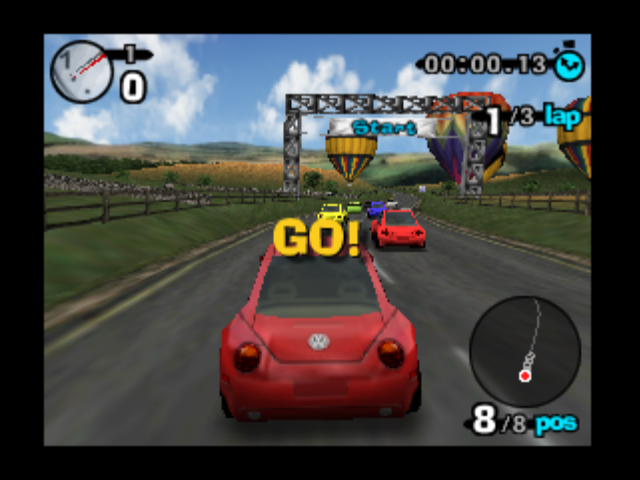
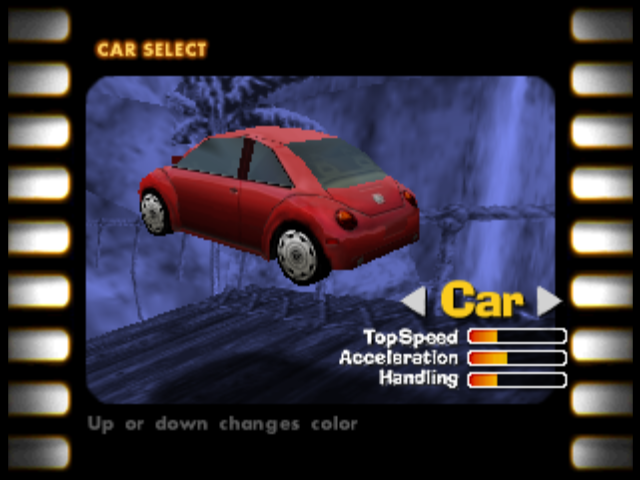
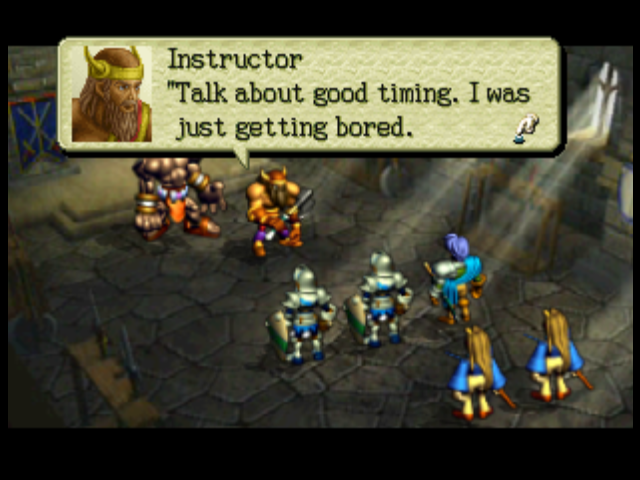
Some screenshots:
Correct ingame hud (all res)
Correct car select (native was incorrect)
Correct textboxes
standard-two-simplex
on 9 Dec 2019
Impressive screen shots!
I'll try to check the code changes asap.
And yes, a feedback is appreciated.
gonetz
on 10 Dec 2019
Quick test:
- OB64 looks great in native res and the same as before in non-native.
- BARs HUD looks better in all resolutions.
- Rocket Robot 2D looks worse in any non-native res.
I tested my own build with "texture_changes" branch rebased to master. The branch has "Workaround for textures with negative dtdy in copy mode" commit, but it does not fix all the problems with Rocket.
gonetz
on 11 Dec 2019
OB64 looks great in native res and the same as before in non-native.
Yes, Ogre battle only looks great in native. By the design of the rectangle command (dsdx and dtdy too big) it is not possible to render perfectly in higher resolutions. However, if you look closely, the new method displays only 1 wrong pixel, while before there were 2 (at least after fixup).
BARs HUD looks better in all resolutions.
It is one of the few cases where programmers listened to the programming manual, and padded the texture by 0.5 in order to use nearest neighbor. Funnily, it was the reson why it displayed wrong in master.
Rocket Robot 2D looks worse in any non-native res.
I found a bug in Earthworm Jim due to copy mode being ignored by my implementation and having removed some code from master. When writing the workaround I made a sintax mistake and fixed it wrong. I wrote if (texST[t].s0 - floor(texST[t].s0 > 0.1f)) instead of if (texST[t].s0 - floor(texST[t].s0) > 0.1f) which was building but mistakenly returning always true, when most of the times should've returned false. Now fixed.
standard-two-simplex
on 11 Dec 2019
Worth mentioning I found this unfortunate situation in F-Zero X (non-native res).

The game is using textures like this

to render the text wrongly displayed (click to enlarge).
t coords go like this in native: (0,1,2,3,4,5,6,7). When magnified I get coords (0, 0.5, 1, ... , 7, 7.5). Unfortunately, due to garbage existing and bilinear filter being used, the last pixel mixes 50/50 between last texel (transparent) and garbage. Master has coords (-0.25, 0.25, 0.75, ... , 6.75, 7.25). Here the last pixel mixes 75/25 between transparent and garbage, making the error much less noticeable. -0.25 is not a problem because t-mask is 0 and it is in the texture edge, so clamp helps fetch the first texel without issues.
standard-two-simplex
on 11 Dec 2019
Now fixed.
Yes, fixed. Thanks!
Worth mentioning I found this unfortunate situation in F-Zero X (non-native res).
It is rather common situation with filtered textures. Colored outline or garbage texels caught when output resolution is magnified.
I posted a WIP build with your changes in #2037.
gonetz
on 12 Dec 2019
I get this two pictures (click to magnify).
| WIP | Master |
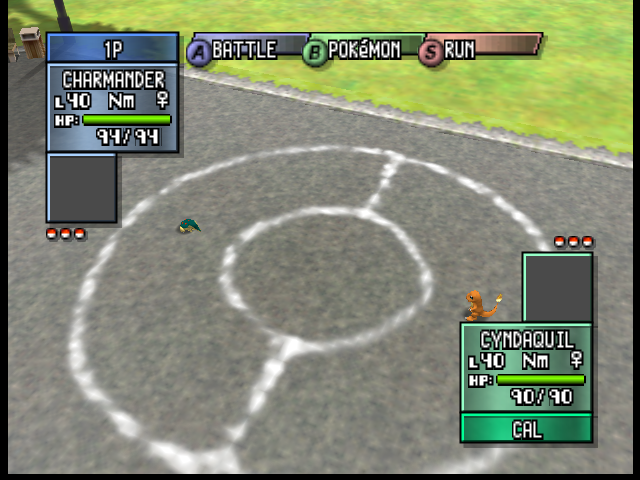 | 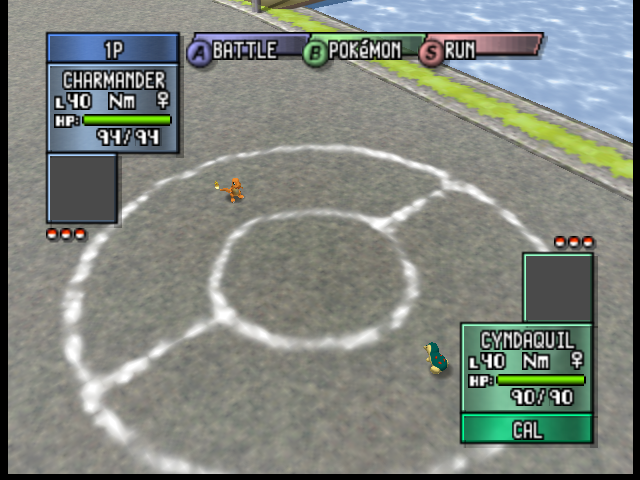 |
The game uses this texture to create hp indicators and uses and offset to write the desired number or symbol.

It is a poorly designed texture. Most numbers are 8 pixels wide and are padded by at least one transparent pixel. However, number 4 is 9 pixels wide and the / sign is 5 pixels wide with 3 transparent, so sometimes it fetches a ninth texel from the nearby symbol. The result is that some black lines appear where magnifying, even in master.
If anything, master is blurrier. You're probably getting the blur in WIP due to some setting. But I agree with one thing, master looks quite better even in my pictures. I adjusted the magnification filter to work in a similar fashion to master for filtered textures, which should fix the issue with pokemon stadium.
@DonelBueno Please, test with your settings.
standard-two-simplex
on 12 Dec 2019
I forgot to mention, native resolution texrects was activated during my tests, I think it looks better for those games.
@standard-two-simplex, your test build makes it look more like the master (both with native resolution texrects enabled). Although there is this strange colored artifact.
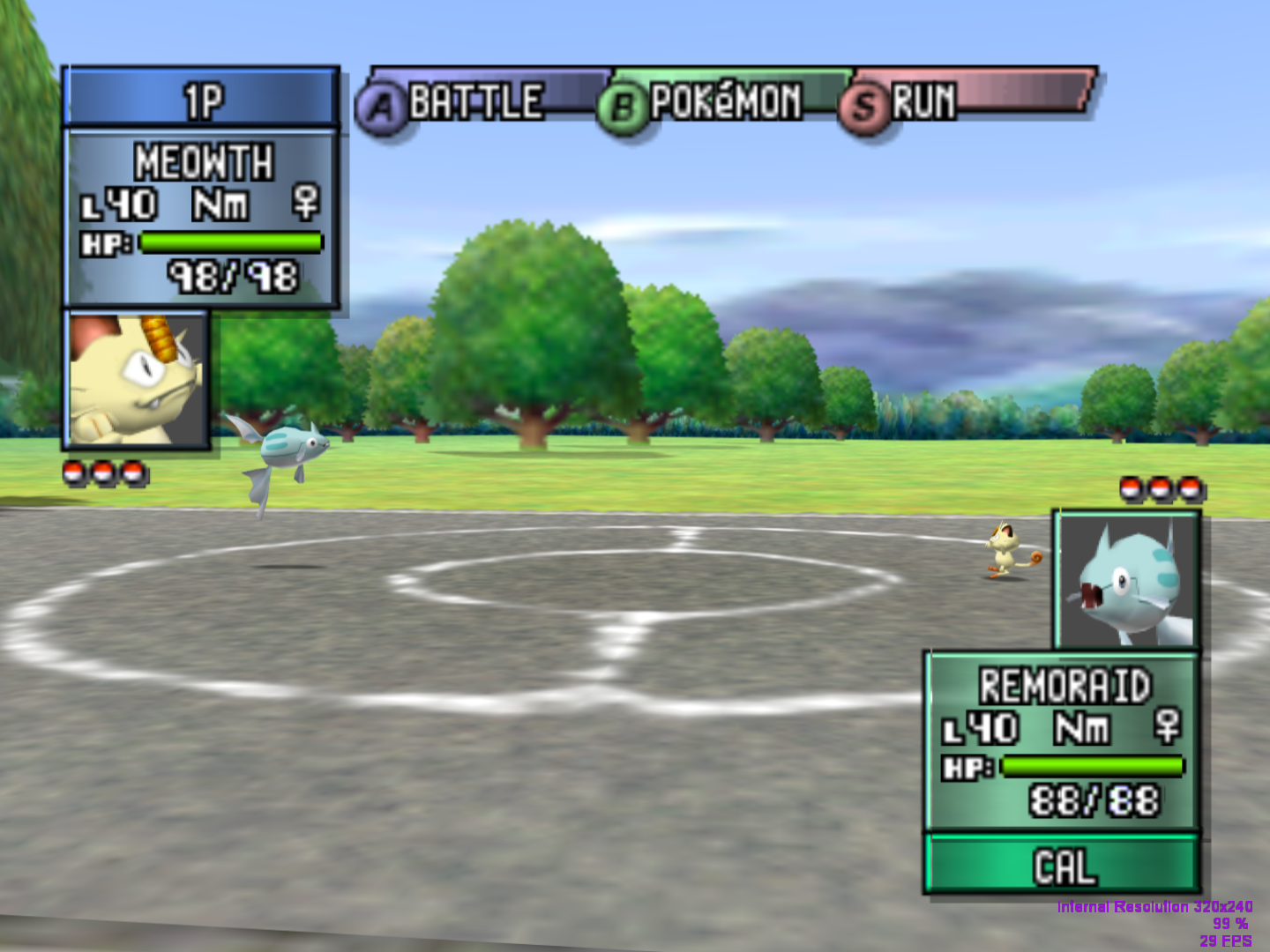
 DonelBueno
on 13 Dec 2019
DonelBueno
on 13 Dec 2019
there is this strange colored artifact
Which artifact do you mean?
standard-two-simplex
on 15 Dec 2019
The blue/green dots on number 9 and /.
DonelBueno
on 15 Dec 2019
The blue/green dots on number 9 and /.
I can't reproduce them, not even with native res, it's probably due to some other setting. I get the same picture in both master and WIP.
standard-two-simplex
on 15 Dec 2019
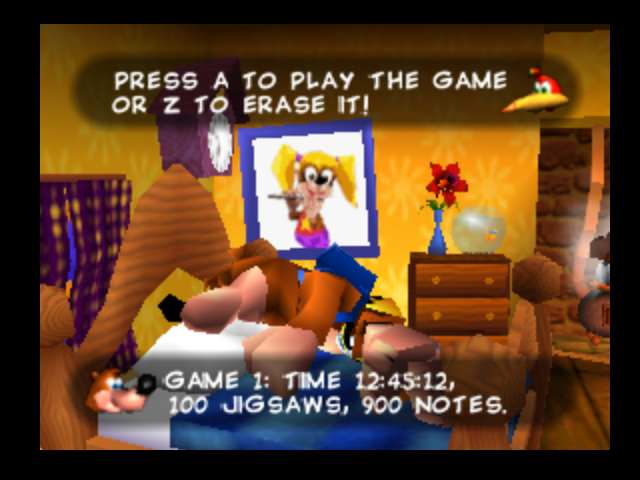
I was quite puzzled by the following bug. Many letters were displaying wrong in Banjo Kazooie, but not all of them. All the letters in GAME look wrong, while 1: looks right.
Upon checking the texrect command, I found out the cause of the issue. Different rectangles have different fractional parts in ther upper left screen coordinate. I was still puzzled: why do some look correct while others don't? I eventually found out the reason. It is related to the way the rasterizer operates in the N64 and Opengl. Lets see this example.
| Coordinate | N64 | OpenGL |
| 10.0 | Pixel 10 covered | Pixel 10 covered |
| 10.25 | Pixel 10 not covered | Pixel 10 covered |
| 10.5 | Pixel 10 not covered | Pixel 10 covered |
| 10.75 | Pixel 10 not covered | Pixel 10 not covered |
Because OpenGL rasters in the middle of the pixels, rectangles with fractional part in ulx equal to 0.25 or 0.5 where showing one more pixel than intended on the left and one fewer on the right. Therefore, the texture coordinates for this pixels were incorrect, often wrapping around or mirroring.
I tried to shift texture coordinates so that the texture shows as intended but one pixel to the left. The results were ok in native but couldn't figure it out for the rest of the cases. Furthermore, some rectangles were moved one pixel to the left so the spacing wasn't perfect.
Eventually I returned to the idea I had some time ago. By shifting rectangle coordinates instead of texture coordinates OpenGL's rasterizer chooses/discards pixels following the same criteria as the N64. I had to adjust the code a little bit for non native resolutions but finally got it working. Banjo Kazooie now looks correctly and I even found good results in some other games too.
Score +1 box now shows correctly.
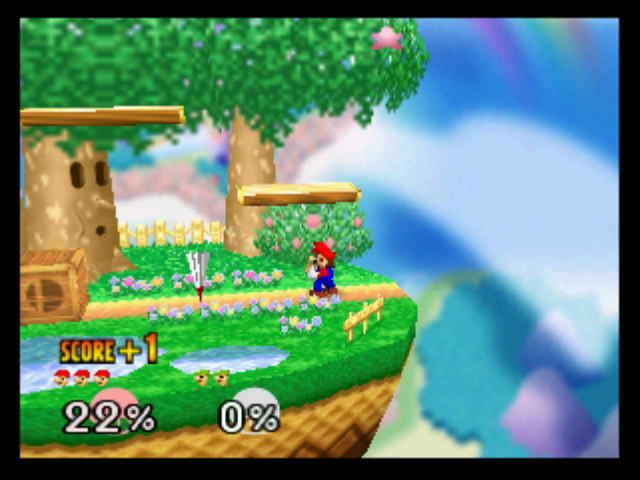
As always any bug reports are appreciated.
Builds:
build.zip
standard-two-simplex
on 15 Dec 2019
This fixes a number of alignment problems in Majora's Mask (in this case, the walkway texture didn't align with the edge. The bottom image is the fix build):


 Nerrel
on 16 Dec 2019
Nerrel
on 16 Dec 2019
This fixes a number of alignment problems
It is unclear for me from your screen shots where exactly the alignment problem was.
Could you mark somehow where to look at?
Also, it is unclear when it was fixed, since most of fixes in this branch related to texrects.
gonetz
on 16 Dec 2019
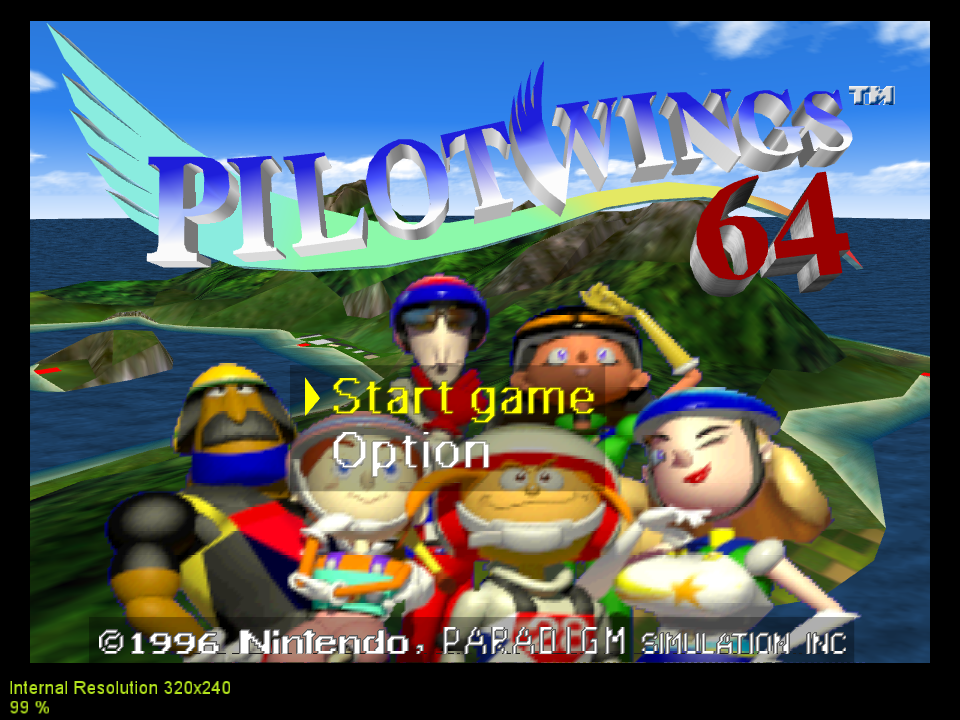
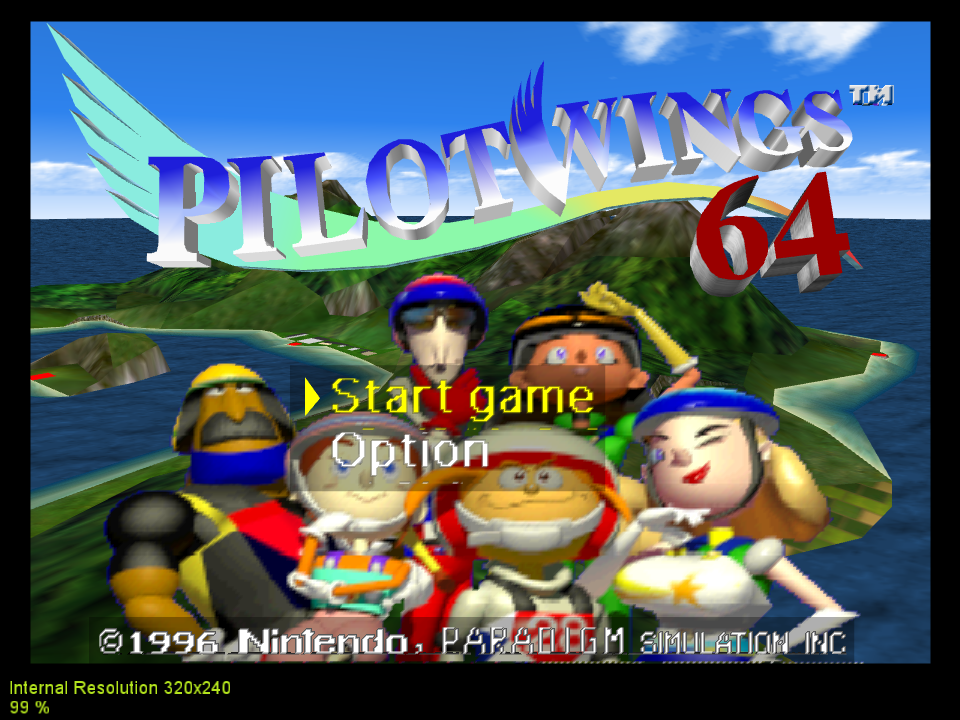
Pilot Wings regression:
gonetz
on 16 Dec 2019
Gonetz, it's subtle but check the right the edge of the platform Link is standing on (it's clearest just below the HUD clock). In the top photo you can notice the metal grate texture beginning to tile again just before the edge. It seems like the same problem as the Mario screenshot in the first post.
It's the same issue I mentioned in the S2DEX fixes thread (the other custom texture issues mentioned there, like the ground seam in north clock town and the misaligned grayscale+RGB texture combos are also fixed by this new test build): https://github.com/gonetz/GLideN64/issues/1971#issuecomment-452570892
Nerrel
on 16 Dec 2019
Most of the changes are to texture rectangles.
Perhaps the refactor commit (c2044b5) changed something, but it was not intended.
standard-two-simplex
on 16 Dec 2019
It mostly seems to impact custom textures. In this case, the default textures are unchanged when comparing this build to a WIP build from last week before these fixes were merged, but the custom textures are clearly shifted. The left is with this build (which correctly puts the bottom of the texture at the bottom of the wall), while the right is a WIP build from last week (the top of the texture is showing up at the bottom of the wall):

At the moment I'm not aware of any default textures being changed, but it's a fairly big improvement for custom textures.
Nerrel
on 16 Dec 2019
Pilot Wings regression:
It is the same issue as in F-Zero X. I changed the heuristic so that the artifacts are less visible in non-native res, as in master (1460b03e4a7e760622a22836bd6415c0b3ebce15).
Upon this change, I also encountered the following problem. Menus in Mario Kart showed wrong.
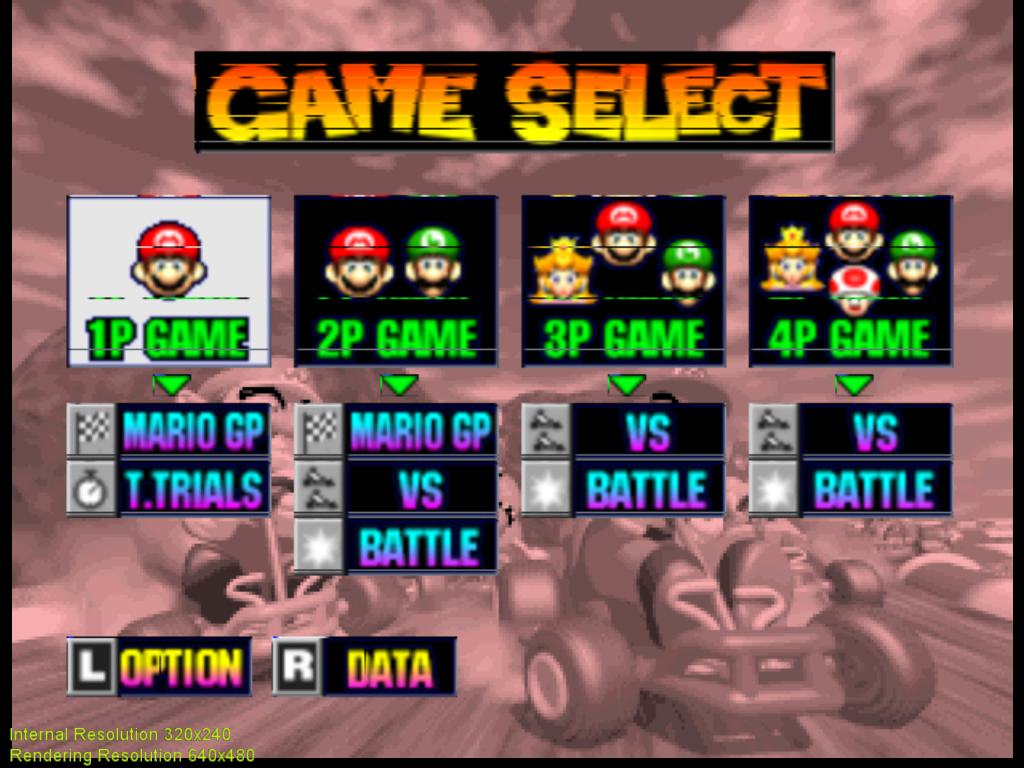
After debugging for a while, I realized that a small change in texture coordinates (as small as 0.0001f ) could drastically change the output color, which should not be happening in bilinear mode. The reason was texture wrap.
A t-coordinate of -0.25 was being wrapped to 7.75 and thus giving a mix of 75% of texel 8 and 25% of texel 7, instead of 75% of texel 0 and 25% of the last texel.
In master a subtraction by 0.5 is performed in the texture filter, so at that stage the t-coordinate was 0.25 and thus not wrapped.
So Marioa Kart looks wrong now, but this is due to the first commit conficting with the implementation of texture clamp, mirror and wrap, so I will wait for now.
standard-two-simplex
on 19 Dec 2019
@standard-two-simplex Since we have #2155 problem, may be it will be better to return to your implementation of clamp-wrap-mirror and try to adapt it to "texture_changes" branch?
You understand these sub-pixel matters better than me, so it can be easier for you to make necessary adjustments.
I believe it would be simpler to clamp mirror and wrap non-normalized coordinates and then normalize in the texture filter to lookup the textures.
You can be right.
I have an idea to move all texturing to shaders, using fixed-point arithmetic from al-rpd, including fetching from TMEM. It is hard however and I'm not sure that I'll ever have time for that.
Work with non-normalized coordinates until the texture filter can be a first step in that direction.
It still won't be easy since we can't work with ints and you mentioned the possible troubles in your comment https://github.com/gonetz/GLideN64/issues/2155#issuecomment-567700012
gonetz
on 21 Dec 2019
Ok, I will try to get it done.
standard-two-simplex
on 23 Dec 2019
I realized that the extension ARB_viewport_array allows calling glViewportIndexedf() with floating point inputs.
If I understood correctly, I believe this has the potential of solving the problem about subpixel precision by calling glViewportIndexedf(0,0.5,0.5,width,height) instead of glViewport(0,0,width,height). The multiple viewports are not used, but the fact that they allow floating point inputs is nice.
@gonetz Do you know how to make the function glViewportIndexedf() accesible in code? I tried a couple of things but didn't manage to get it working.
See this and this,
standard-two-simplex
on 2 Jan 2020
Do you know how to make the function glViewportIndexedf() accesible in code?
It probably will be better to ask @fzurita to do it. Now each GL function needs s special wrapper.
You also may use commit d7996329c10 as an example.
gonetz
on 2 Jan 2020
See this and this,
Cite: "The precision with which the GL interprets the floating point viewport bounds is implementation-dependent and may be determined by querying the impementation-defined constant GL_VIEWPORT_SUBPIXEL_BITS." There is a good chance that it really works with subpixel precision. It is worth to try.
gonetz
on 2 Jan 2020
@standard-two-simplex do you need me to add the function or do you think you can do it?
 fzurita
on 8 Jan 2020
fzurita
on 8 Jan 2020
@fzurita Add it please, I haven't managed it so far.Thanks.
standard-two-simplex
on 8 Jan 2020
Ok, I added them under this pull request: https://github.com/gonetz/GLideN64/pull/2166
One thing to note is that these functions don't seem to be available for GLES. I tried to look for equivalents but I'm not having much luck.
fzurita
on 8 Jan 2020
@fzurita Thanks.
Good news, it seems to do what I was hoping it would do. It solves issues like the one in Ogre Battle with a simple change. Texrects with negative delta and the bilinear filter have to be adjusted because they made some assumptions, but I think I will manage no problems.
Triangles look generally speaking better too. I noticed it fixes https://github.com/gonetz/GLideN64/issues/1869 too
Change glViewport(_x, _y, _width, _height); for glViewportIndexedf(0,_x + 0.495, _y + 0.495, _width, _height); in opengl_CachedFunctions.cpp for proof of concept.
The bad news is that it is not availabe in GLES and that it seems quite less performant.
standard-two-simplex
on 8 Jan 2020
@kev4cards posted a finding he had of the equivalent extension for GLES in #gliden64 at Discord64.
oddMLan
on 9 Jan 2020
I'll post the link here, too:
https://www.khronos.org/registry/OpenGL/extensions/OES/OES_viewport_array.txt .
I wasn't certain that I found the equivalent extension, so I chose to avoid posting here initially. I didn't want to send anyone down a rabbit hole with information that might not be useful. That said, fzurita is looking into the details of ViewportIndexedfOES. Hopefully, they check all the boxes.
 kev4cards
on 9 Jan 2020
kev4cards
on 9 Jan 2020
OpenGL ES 3.2, EXT_geometry_shader or OES_geometry_shader is required.

    This extension is written against the OpenGL ES 3.2 Specification (August
    10, 2015)

    This extension is written against the OpenGL ES Shading Language 3.20.2
    Specification (August 6, 2015)

    This extension has interactions with EXT_draw_buffers_indexed, OES_draw_buffers_indexed and ES3.2
So this extension only works with GLES 3.2
My primary phone doesn't support it either even though it's GLES 3.2
fzurita
on 9 Jan 2020
I put @fzurita 's pull request into glViewportIndexedf branch.
I also added graphics context function to access it.
I think it is too early to search for glViewportIndexedf alternative for GLES.
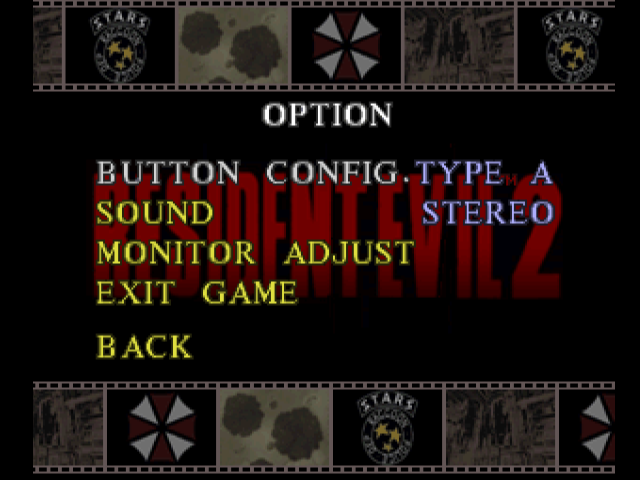
I made test commit ccc9959e, which replaced calls glViewport(_x, _y, _width, _height) by glViewportIndexedf(0,_x + 0.495, _y + 0.495, _width, _height). It really fixes issues mentioned by @standard-two-simplex but at the same time it brings new problems. Image looks more blurry, RE2 main menu has all text garbled. Hopefully it can be fixed somehow, but for now it looks definitely useful only for OB64.
Test build:
https://drive.google.com/file/d/1mbN3gGTm8o7ov1h5j8iOQI-hhp1OJITp/view?usp=sharing
gonetz
on 9 Jan 2020
I reused the texture filter refactor I had done and adjusted the code to the new viewport tranformation.
Still a WIP, but the result looks quite good. Please report any regressions found.
07431aee6e7fd9c12c29de7d5b036222373aba69 build.zip
standard-two-simplex
on 9 Jan 2020
@standard-two-simplex Your latest build works way better than my test build.
Regressions: the regression in Pilot Wings, which I already reported is still there: https://github.com/gonetz/GLideN64/issues/2097#issuecomment-566009182
Also, the problem with texrects with negative dtdy is not fixed yet, see Rocket Robot.
From the other side, I see improvements with texrects only in native resolutions. RE2, BAR, OB64 have noticeable texrect fixes, but only in native res.
Another notice: MSAA adds errors for texrects. Player position on mini-map in BAR looks perfect in native res, but MSAA distorts it.
gonetz
on 10 Jan 2020
The texture filter refactor fixes an issue (that has been present since the beginning of GlideN64) in Tony Hawk's Pro Skater 3 where there are vertical white lines to the left of several text characters on any menu or results screens or intro. That said, MSAA set to its maximum will produce one vertical white line next to a character (left of the C in cannonball).
commit ccc9959:
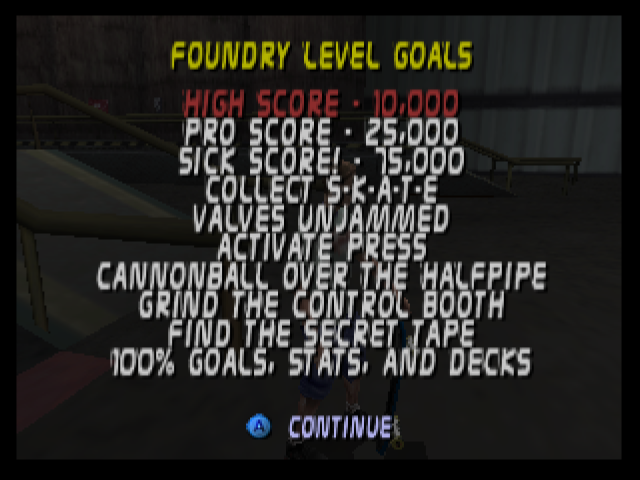
commit 07431ae:
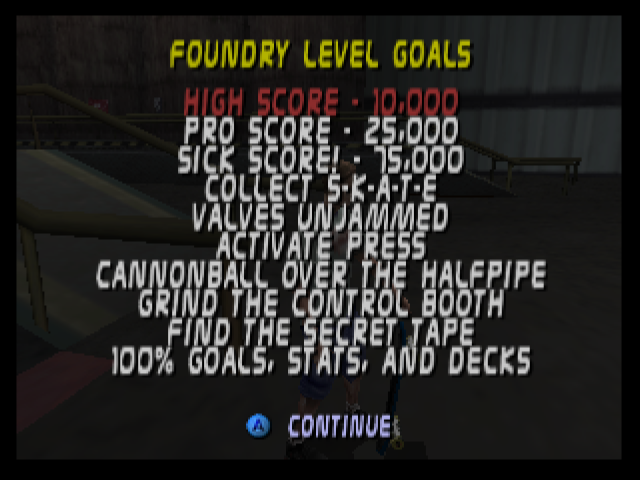
commit 07431ae (with max MSAA):
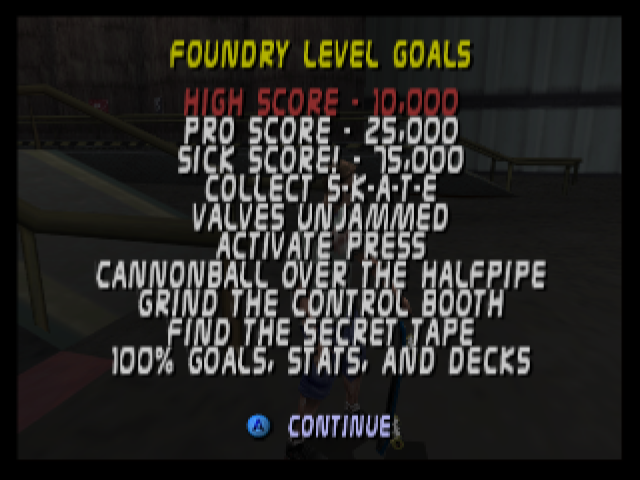
Angrylion RDP Plus r8 (nearest-neighbor filtered):
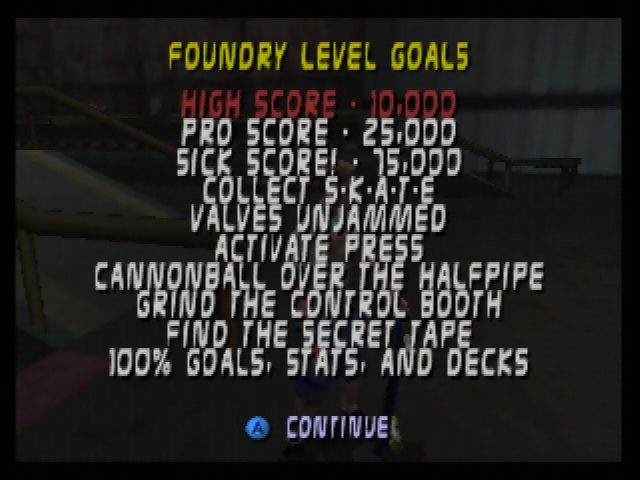
If you look at the S, G, and F in sick, grind, and find, respectively, you will notice that those letters, along with others, are clipped somewhat. This is true to hardware as evidenced by this video: https://www.youtube.com/watch?v=LA2lxz6EGWU .
UPDATE: The lack of letter clipping has been present since the beginning of GlideN64, also.
kev4cards
on 12 Jan 2020
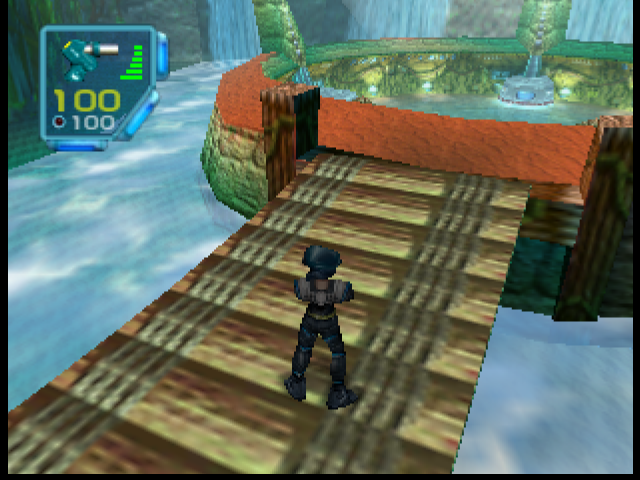
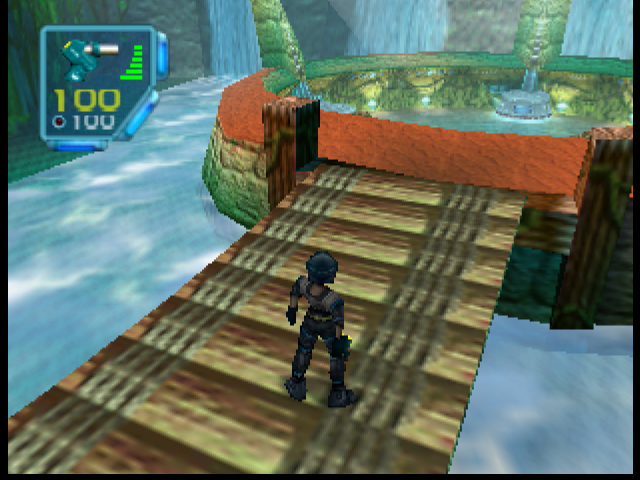
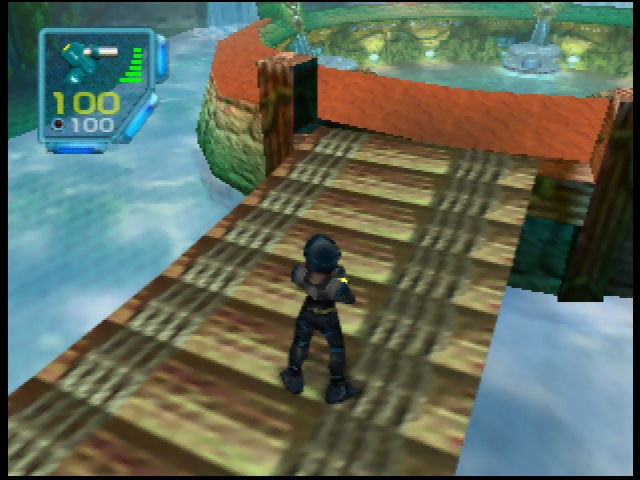
I found a regression with the ammo display in Jet Force Gemini:
commit ccc9959:
commit 07431ae:
Angrylion RDP Plus r8 (nearest-neighbor filtered):
kev4cards
on 12 Jan 2020
Sorry I haven't written for a while, I have been pretty busy lately and I expect to be so for quite some time.
I plan on trying one last thing to solve the problem with garbage in linearly filtered polygons, but not sure when I'll find the time.
Another notice: MSAA adds errors for texrects. Player position on mini-map in BAR looks perfect in native res, but MSAA distorts it.
True, I didn't think about it. Shifting vertices is incompatible with multisampling. It would be ideal to choose the sample location instead, but I don't know if it is possible.
There's an extension that allows choosing samples in multisample mode, but I don't know how to set it up, nor if it might work, so I am not going to try to go that way. I leave the link for reference.
https://www.khronos.org/registry/OpenGL/extensions/ARB/ARB_sample_locations.txt
standard-two-simplex
on 6 Mar 2020
Related issues
 purplemarshmallow
·
18Comments
gonetz
·
10Comments
Nerrel
·
8Comments
purplemarshmallow
·
18Comments
gonetz
·
10Comments
Nerrel
·
8Comments
 AriaHiro64
·
13Comments
olivieryuyu
·
12Comments
AriaHiro64
·
13Comments
olivieryuyu
·
12Comments
Most helpful comment
I get this two pictures (click to magnify).
The game uses this texture to create hp indicators and uses and offset to write the desired number or symbol.
It is a poorly designed texture. Most numbers are 8 pixels wide and are padded by at least one transparent pixel. However, number 4 is 9 pixels wide and the / sign is 5 pixels wide with 3 transparent, so sometimes it fetches a ninth texel from the nearby symbol. The result is that some black lines appear where magnifying, even in master.
If anything, master is blurrier. You're probably getting the blur in WIP due to some setting. But I agree with one thing, master looks quite better even in my pictures. I adjusted the magnification filter to work in a similar fashion to master for filtered textures, which should fix the issue with pokemon stadium.
@DonelBueno Please, test with your settings.
build.zip