Gliden64: glideN64 is corrupted for most games
Hi the graphics are almost corrupted most games even glideN64-Very-Accurate on mupen64plus fz and libretro, I'm using PowerVR ge8320 (mediatek Helio p22) android phone
Comparison:
Libretro mupen64plus-next (normal and gles3 versions):


Mupen64plus fz:
In glideN64 very accurate the polygon and textures are glitchy

In glideN64 medium same as libretro core
Super Mario 64 used for comparison and it happened for most games
 Panderner
All 114 comments
These Issues started appearing when pulling the following changes in from upstream: https://github.com/libretro/mupen64plus-libretro-nx/commit/16baae76c75e434d161b4974c1bcc1cca6db9657
 m4xw
on 24 Sep 2019
m4xw
on 24 Sep 2019
@m4xw the commit contains almost all changes since the PR 4.0
If we want to find the problem, we need to bisect to the wrong commit in GLideN64 repo.
@fzurita can you find, when the problem appeared?
 gonetz
on 27 Sep 2019
gonetz
on 27 Sep 2019
@fzurita I just tested Mupen64plus fz from Play Market. It works correct. Which version of GLideN64 it uses?
gonetz
on 27 Sep 2019
@gonetz he told me 2 days ago that he didn't update it yet, so I assume the reporter compiled it himself.
m4xw
on 27 Sep 2019
However we suspect it's related to the shader changes.
fwiw shader cache breaks too on nvidia shield android with gles, no issues with OpenGL (on switch via nouveau, and lakka switch with nvidia drivers)
m4xw
on 27 Sep 2019
@m4xw I modified shaders in commit 2d712f2ae048.
Could you make android build from previous commit 993960f9e and compare with 2d712f2ae048?
gonetz
on 28 Sep 2019
@gonetz Sorry but I dont have a dev env set up since we switched NDK version.
I was refering to these exact shader modifications you did, but it's not easy to bisect these issues with my fork since I always have to rebase all my commits on top the commit you showed, also would be broken anyway without a cherrypick of 34c6cae36485d06d050e7eaea7d4092d42f47e23
Can do it at my workstation at the office but not before next week :/
m4xw
on 28 Sep 2019
I'll go ahead and take a look, I have some time today. @Panderner which phone do you have?
 fzurita
on 28 Sep 2019
fzurita
on 28 Sep 2019
Thanks man, that would be great.
@fzurita
PowerVR ge8320 (mediatek Helio p22)
You will also find some more infos on my fork's issue tracker https://github.com/libretro/mupen64plus-libretro-nx/issues/99
This might also be related (I remember it working but would need to double check) https://github.com/libretro/mupen64plus-libretro-nx/issues/101
And it might've also caused a regression for bgStriped on Windows+GL https://github.com/libretro/mupen64plus-libretro-nx/issues/98
Weirdly enough that seems linked to monitor refresh rate.
I didn't confirm Yoshi's pacing issues, but I have a report that this also appeared when pulling in all the new changes from the commit i mentioned.
So thats about all detail's I know related to the recent upstream changes, sorry that I can't help bisecting it.
runs away
m4xw
on 28 Sep 2019
So in two devices so far, I can't reproduce the issue, they are Mali and Adreno devices. I do have a PowerVR device to try as well. Hopefully I see it there.
fzurita
on 28 Sep 2019
Some Mali devices seem affected tho https://github.com/libretro/mupen64plus-libretro-nx/issues/99#issuecomment-534497518
I have to rebuild a RPi2/3 image will then check & report again. But since I had these glitches on a Khadas VIM, VIM 3 & RockPro64 which use a Mali 450, T860 & G52 I suspect it's related to them.
Fwiw it was reported with no issues on RPi
Just tested on RPI3B+ with KMS/DRM/GLES2 using latest develop branch and all default core options, all looks normal here.
m4xw
on 28 Sep 2019
Also some amlogic devices. (cant remember what they use, I think mali too?)
Here was another Mali:
I used an Android TV Box, MX3-G S912, Open GL 2.0ES and Mali 450.
Broke like this:

m4xw
on 28 Sep 2019
@fzurita You are testing latest master right now?
Or the commit gonetz asked?
m4xw
on 28 Sep 2019
Latest master
fzurita
on 28 Sep 2019
Dunno if he changed smth but when I asked people to test my experimental branch (which was what gonetz just rebased), same issues appeared..
hm...
Try this commit https://github.com/gonetz/GLideN64/commit/2d712f2ae0482d7da3b49397902551addd676107
And cherry pick https://github.com/gonetz/GLideN64/commit/34c6cae36485d06d050e7eaea7d4092d42f47e23
m4xw
on 28 Sep 2019
btw are you testing GLES2 or GLES3?
I got mixed reports in that regard..
m4xw
on 28 Sep 2019
GLES3, I have some devices with GLES2.0 to test with, so I'll try those next.
fzurita
on 28 Sep 2019
Someone said GLES3 somewhat fixed it on his Mali, others reported no benefit.
Might also be related to a few option combos.
m4xw
on 28 Sep 2019
A quick reminder how it ended up for amlogic https://www.youtube.com/watch?v=6oYoRE0gkFw
m4xw
on 28 Sep 2019
In the Libretro core, the first time I booted a game it worked correctly. I had to close and reload the content to trigger the most serious glitches (like the missing graphics in Mario 64 seen in the first post). I haven't tested the issue in Mupen FZ to know how to trigger it there. Using a Galaxy S10 Adreno.
 GranvilleR
on 28 Sep 2019
GranvilleR
on 28 Sep 2019
Yea that was the shadercache issue.
m4xw
on 28 Sep 2019
Was the shader cache issue a libretro only issue?
fzurita
on 28 Sep 2019
I can't tell you that.
However we let GLN64 handle that completely, don't have any logic there that diverges from upstream.
m4xw
on 28 Sep 2019
Doesn't happen on mupen fz?
m4xw
on 28 Sep 2019
@fzurita btw my rebase was done on this directly:

I'd really test that commit to exclude a later fix if you have trouble reproducing it.
Also make sure to test the shader cache, I don't think that would be libretro exclusive and might be the actual cause of these severe bugs.
m4xw
on 28 Sep 2019
I'm not seeing the issue in mupen64plus FZ with at least 3 different phones.
fzurita
on 28 Sep 2019
On that commit?
m4xw
on 28 Sep 2019
Latest master.
fzurita
on 28 Sep 2019
Try that commit please, so we can exclude a later fix.
If we know it happened there and not later, would help a lot already.
m4xw
on 28 Sep 2019
Also, the shader cache issue should be only GLES 3.0 since GLES 2.0 doesn't support the shader cache. So, there seem to be several distinct issues.
fzurita
on 28 Sep 2019
I'll try that commit.
fzurita
on 28 Sep 2019
Thanks.
GLES 2.0 doesn't support the shader cache
Good to know.
m4xw
on 28 Sep 2019
(Also i should probably hide the shader cache option for GLES2 then, 🙈 )
m4xw
on 28 Sep 2019
Btw, which games are you testing?
m4xw
on 28 Sep 2019
Well, to be more specific, the binary shader cache doesn't work (the .shaders file). The .key files I think still do work, but all shaders have to be recompiled at startup. So I guess it could still be a problem with they .key files since those are used to generate shaders at startup if .shaders files don't have the right shaders or if not present.
fzurita
on 28 Sep 2019
@GranvilleR remember if it was GLES2 or 3 that you tested?
m4xw
on 28 Sep 2019
also @fzurita might be worth testing this issue without savestates (in case you do use them).
m4xw
on 28 Sep 2019
@m4xw It was GLES3.
GranvilleR
on 28 Sep 2019
@fzurita Can confirm I'm not seeing really any of these bugs in FZ.
 drinfernoo
on 28 Sep 2019
drinfernoo
on 28 Sep 2019
@drinfernoo Its not about the playstore version.
m4xw
on 28 Sep 2019
Try this build of mupen64plus fz with the latest GLideN64:
https://drive.google.com/open?id=1SJMuccm3Ooob4BicmMVAd87qlUZqC4f9
You can install it side by side with the playstore version. Make sure you change the emulation profile to a GLideN64 variant.
fzurita
on 28 Sep 2019
@fzurita I can't get this .apk to install on either my phone or Shield. I get "App not installed."
drinfernoo
on 28 Sep 2019
Whoops sorry about that. I'll make a new build, apparently I made an incremental build.
fzurita
on 28 Sep 2019
fzurita
on 28 Sep 2019
@fzurita did you supply him GLES2 or 3?
m4xw
on 28 Sep 2019
It's using EGL, so it will adapt to whatever device he has.
I do have some goods new though, I'm able to reproduce the Mario Kart issues in the ADT-2 device (GLES 2.0 device).
It seems to be affect all 2D elements as far as I can tell. I think I know what commit probably did it.
fzurita
on 28 Sep 2019
Lol we force it compiletime, I guess if they use GLES2 builds on GLES3 hw it would be undefined behaviour on top?
I do have some goods new though, I'm able to reproduce the Mario Kart issues in the ADT-2 device.
You got me sweating already :P
m4xw
on 28 Sep 2019
fwiw forcing gles2 when gles3 is provided fixed issues with other emu's I had before, namely ppsspp.
m4xw
on 28 Sep 2019
With Android, you can't really force GLES 2.0 in a GLES 3.0 device, it will always use the latest. What you can do is limit yourself to a certain subset of the GLES API.
fzurita
on 28 Sep 2019
Wanna try this hack and see if u can repro on GLES3?
https://github.com/libretro/mupen64plus-libretro-nx/blob/develop/GLideN64/src/Graphics/OpenGLContext/opengl_GLInfo.cpp#L28-L32
m4xw
on 28 Sep 2019
But i guess if u have a indication already, it's w/e
m4xw
on 28 Sep 2019
Maybe if I get stuck I'll try that.
fzurita
on 28 Sep 2019
He is testing on a shield, so it should be GLES3.
However he had the same issues tho for retroarch, but I dunno which core ver he actually used (GLES3 with forced GLES2 / GLES3).
m4xw
on 28 Sep 2019
And the problem is.... Shader compilation error, shouldn't be hard to figure out.
fzurita
on 28 Sep 2019
heh, yea.
Wanna quote the error?
m4xw
on 28 Sep 2019
Nvidia shield supports full OpenGL in Android, so Mupen64plus FZ will use that. Although, NVidia shield can support switching between GLES and Full open GL.
fzurita
on 28 Sep 2019
Oh yea, I didn't know you supported GL there too, we don't do that for Android builds (yet).
m4xw
on 28 Sep 2019
So the ADT-2 drivers kind of suck, so it's not giving me what line number in the shader failed.... But at least I know which shader is failing.
fzurita
on 28 Sep 2019
Weird, even the vertex shader is failing:
2019-09-28 17:35:25.549 6523-6562/paulscode.android.mupen64plusae.GameActivity E/GLideN64: glsl_Utils.cpp:65,ERROR, "Error in vertex shader"
2019-09-28 17:35:25.549 6523-6562/paulscode.android.mupen64plusae.GameActivity E/GLideN64: glsl_Utils.cpp:73,ERROR, "#version 100
    #if (__VERSION__ > 120)
    # define IN in
    # define OUT out
    #else
    # define IN attribute
    # define OUT varying
    #endif // __VERSION
    IN highp vec4 aRectPosition;

    OUT lowp vec4 vShadeColor;
    uniform lowp vec4 uRectColor;
    void main()
    {
      gl_Position = aRectPosition;
      vShadeColor = uRectColor;
    }
    "
version 100? lol
detection failing?
m4xw
on 28 Sep 2019
Yeah, that's a good point....
fzurita
on 28 Sep 2019
So, it's hard coded to use version #100 for all shaders in GLES2.
fzurita
on 28 Sep 2019
Hm what is expected for GLES2?
200?
m4xw
on 28 Sep 2019
Well, version 100 has been working fine for years. Probably something recent broke it, like using some feature of GLSL that is not supported in version 100.
fzurita
on 28 Sep 2019
Probably this broke it: 2d712f2ae0482d7da3b49397902551addd676107
fzurita
on 28 Sep 2019
The fz apk worked fine for him btw
m4xw
on 28 Sep 2019
Probably because it's not using GLES 2.0.
fzurita
on 29 Sep 2019
Yep, just wanted to confirm tho since he didnt post here.
m4xw
on 29 Sep 2019
@fzurita @m4xw Yeah, sorry... talking in Discord as well. I haven't had any issues with game accuracy in FZ before, or with the newer .apk you sent a bit ago.
drinfernoo
on 29 Sep 2019
Ok, reverted back to commit https://github.com/gonetz/GLideN64/commit/2d712f2ae0482d7da3b49397902551addd676107 and everything still works there... Must be something more recent.
fzurita
on 29 Sep 2019
My mistake https://github.com/gonetz/GLideN64/commit/2d712f2ae0482d7da3b49397902551addd676107 is indeed the broken one. I had a compilation error and I was still running the old version without realizing it.
fzurita
on 29 Sep 2019
Yea you need to cherry pick the compile fix
m4xw
on 29 Sep 2019
Did you try 1 earlier yet?
m4xw
on 29 Sep 2019
Yes, previous revision had no errors.
fzurita
on 29 Sep 2019
I do have a line number actually, somehow I missed it earlier:
2019-09-28 18:47:13.457 8629-8679/paulscode.android.mupen64plusae.GameActivity E/GLideN64: glsl_Utils.cpp:40,ERROR, "shader_compile error: 0:20: L0002: Undeclared variable 'gl_FragDepth'
    "
2019-09-28 18:47:13.457 8629-8679/paulscode.android.mupen64plusae.GameActivity E/GLideN64: glsl_Utils.cpp:65,ERROR, "Error in vertex shader"
2019-09-28 18:47:13.457 8629-8679/paulscode.android.mupen64plusae.GameActivity E/GLideN64: glsl_Utils.cpp:73,ERROR, "#version 100
    #extension GL_EXT_shader_texture_lod : enable
    #extension GL_OES_standard_derivatives : enable
    #if (__VERSION__ > 120)
    # define IN in
    # define OUT out
    # define texture2D texture
    #else
    # define IN varying
    # define OUT
    #endif // __VERSION __
    IN mediump vec2 vTexCoord0;
    uniform sampler2D uTex0;
    uniform sampler2D uTex1;
    OUT lowp vec4 fragColor;

    void main()
    {
        fragColor = texture2D(uTex0, vTexCoord0);
        gl_FragDepth = texture2D(uTex1, vTexCoord0).r;
      gl_FragColor = fragColor;
    }

    "
So fixing that error doesn't fix anything.
Not sure what is wrong a this point, the generated shaders are almost identical to before the change. Mario Kart 64 doesn't even use the texture modes that would make the changes take effect, so the shaders generated are pretty much identical.
The only real difference is that we got rid of the "realWidth" and "realHeight", so it's possible that GLES 2.0 is not happy with the new texture heights and widths.
Also, running the GLES 2.0 code in a GLES 3.0 device doesn't reproduce the issue.
fzurita
on 29 Sep 2019
Nothing happens on latest build
Panderner
on 29 Sep 2019
I'm using realme c2
Panderner
on 29 Sep 2019
gl_FragDepth = texture2D(uTex1, vTexCoord0).r;
I guess GLES2 does not support gl_FragDepth modification.
gonetz
on 29 Sep 2019
The only real difference is that we got rid of the "realWidth" and "realHeight", so it's possible that GLES 2.0 is not happy with the new texture heights and widths.
Hardly. "realWidth" and "realHeight" are atavism from old days, when hardware did not support non-pot texture sizes. "width" was for N64 texture width, "realWidth" was for power-of-two width.
I removed conversion to power-of-two texture sizes long ago, but "realWidth" and "realHeight" remained and most of time they duplicated "width" and "height". "realWidth" and "width" were different in rare cases, when N64 texture mirroring emulated via creating mirrored texture, that is when texture contained original and mirrored image.
gonetz
on 29 Sep 2019
Gotcha, I'm running out of ideas as to what is different that would be different. Generated shaders are the same as before. Texture widths and heights should be the same as well. I don't see much else different.
fzurita
on 29 Sep 2019
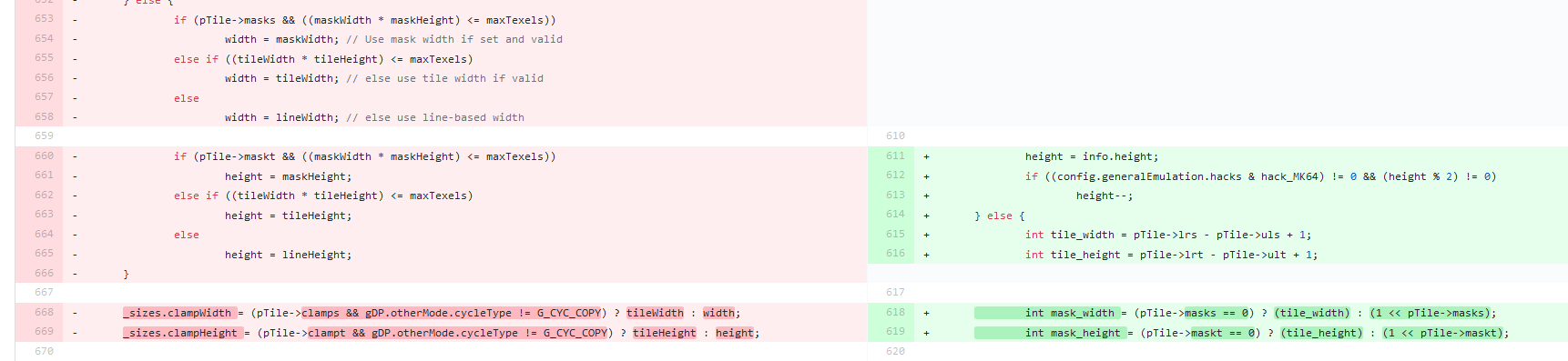
I saw this before, maybe related to this hack?
Running out of ideas too..
m4xw
on 29 Sep 2019
It's not, I already tried removing it just in case, it had no effect.
fzurita
on 29 Sep 2019
Ok, I think I got it narrowed down, at least in Mario Kart. Replacing this code:
        m_part =
            "highp vec2 clampWrapMirror(in highp vec2 vTexCoord, in highp vec4 vClamp,      \n"
            "   in highp vec2 vWrap, in lowp vec2 vMirror, in highp vec2 vScale)            \n"
            "{                                                                              \n"
            "  highp vec2 texCoord = clamp(vTexCoord, vClamp.xy, vClamp.zw);                \n"
            "  lowp vec2 one = vec2(1.0);                                                   \n"
            "  lowp vec2 clamped = step(vClamp.zw, texCoord);                               \n"
            "  lowp vec2 notClamped = one - clamped;                                        \n"
            "  texCoord = clamped * texCoord + notClamped * mod(texCoord, vWrap);           \n"
            "  highp vec2 intPart = floor(texCoord);                                                            \n"
            "  highp vec2 fractPart = fract(texCoord);                              \n"
            "  lowp vec2 needMirror = step(vec2(0.5), mod(intPart, vec2(2.0))) * vMirror;   \n"
            "  texCoord = clamped * texCoord + notClamped * fractPart;                      \n"
            "  texCoord = (one - vMirror) * texCoord + vMirror * fractPart;                 \n"
            "  texCoord = (one - texCoord) * needMirror + texCoord * (one - needMirror);    \n"
            "  texCoord *= vScale;                                                          \n"
            "  return texCoord;                                                             \n"
            "}                                                                              \n"
            ;
with:
        m_part =
                "highp vec2 clampWrapMirror(in highp vec2 vTexCoord, in highp vec4 vClamp,      \n"
                "   in highp vec2 vWrap, in lowp vec2 vMirror, in highp vec2 vScale)            \n"
                "{                                                                              \n"
                "  return vTexCoord;                                                                \n"
                "}                                                                              \n"
                ;
and everything works.
fzurita
on 29 Sep 2019
Weird, now that I started messing with it, I'm getting this error:
"shader_compile error: 0:29: P0004: High precision not supported, instead compiling high precision as medium precision
Well... getting closer. Floating point math is failing due to medium precision. Changing this:
        std::array<f32, 4> aTexClamp[2] = { { -10000.0f, -10000.0f, 10000.0f, 10000.0f },
                                            { -10000.0f, -10000.0f, 10000.0f, 10000.0f } };
        std::array<f32, 2> aTexWrap[2] = { { 10000.0f, 10000.0f }, { 10000.0f, 10000.0f } };
to this fixes it partially:
        std::array<f32, 4> aTexClamp[2] = { { -1000.0f, -1000.0f, 1000.0f, 1000.0f },
                                            { -1000.0f, -1000.0f, 1000.0f, 1000.0f } };
        std::array<f32, 2> aTexWrap[2] = { { 1000.0f, 1000.0f }, { 1000.0f, 1000.0f } };
chaging it to this completely fixes it:
        std::array<f32, 4> aTexClamp[2] = { { -10.0f, -10.0f, 10.0f, 10.0f },
                                            { -10.0f, -10.0f, 10.0f, 10.0f } };
        std::array<f32, 2> aTexWrap[2] = { { 10.0f, 10.0f }, { 10.0f, 10.0f } };
Edit: It's really just aTexWrap that has the issue because of the modulus operation here: texCoord = clamped * texCoord + notClamped * mod(texCoord, vWrap);
fzurita
on 29 Sep 2019
Pull request has been made: https://github.com/gonetz/GLideN64/pull/2092
fzurita
on 29 Sep 2019
@Panderner fix is done. Please test again.
gonetz
on 1 Oct 2019
I've tested builds of the core from @m4xw, and I'm not seeing any improvement on my end.
drinfernoo
on 1 Oct 2019
@drinfernoo Your issue might be unrelated.
Will need shanti to confirm it.
m4xw
on 1 Oct 2019
Shanti quickly confirmed the fix for MK64 from remote, he will do more throughout testing later.
So yea that GLES2 issue is very likely fixed.
Still no idea what ghosts hunt drinfernoo's shield.
m4xw
on 1 Oct 2019
@drinfernoo it sounds like you have a different issue. Do you have a Nvidia shield tv? Is your problem only with the libretro core?
fzurita
on 2 Oct 2019
@gonetz where is the build?
Panderner
on 2 Oct 2019
@fzurita Yes and yes. FZ works fine.
drinfernoo
on 2 Oct 2019
Ok, I have a Nvidia shield tv. I'll check what is happening and whether it's related to GLideN64.
fzurita
on 2 Oct 2019
@gonetz where is the build?
Where did you get it for the first time?
Sources updated, so binaries should be updated too.
gonetz
on 3 Oct 2019
Shader cache definitely breaks the shield tv with the libretro core. It works fine on mupen64plus fz. The problem is probably in the libretro core and not the video plug-in.
This issue should probably close.
fzurita
on 12 Oct 2019
As I understand, we did everything we could do on our side.
Lets close it then.
gonetz
on 15 Oct 2019
Ye the libretro issue is only semi related, basically your changes broke some of my GL state machine logic (which should never happen to begin with).
But my glsm version does some pretty funky stuff to begin with, just wasn't a issue before your recent updates.
So, yea. It's my homework not yours ;)
m4xw
on 15 Oct 2019
@gonetz glideN64 still not fixed and updated
Panderner
on 19 Oct 2019
@Panderner fzurita says that GLideN64 works fine on mupen64plus fz.
Can we do anything on our side to make it working better on Libretro mupen64plus?
gonetz
on 19 Oct 2019
@gonetz No need to do anything from your part, in regards to libretro.
I first need to understand what actually triggered the Issue in my codebase.
fwiw some issues only seem to appear at lowest resolution only.
m4xw
on 19 Oct 2019
Still not fixed I'm using realme C2, the mupen64plus fz and libretro mupen64plus didn't update glideN64 and still corrupted
Panderner
on 21 Oct 2019
@Panderner So does it work with Mupen64Plus FZ for you but not with libretro?
fzurita
on 21 Oct 2019
Even gliden64 fast, medium, accurate, and very accurate, glitched out
Panderner
on 22 Oct 2019
This is a completely different problem between libretro and mupen64plus fz. Please open a new issue that only describes the problem in mupen64plus fz.
fzurita
on 22 Oct 2019
@fzurita We don't have any of these configurations, he must be talking about fz.
m4xw
on 22 Oct 2019
@gonetz Just a headsup, this issue isn't fixed, I found the cause and it does indeed affect mupen fz and mupen next, only at lowest resolution (< 640x580).
I default to 320x240, hence I got so many reports and was still never able to reproduce it, heh.
tldr of it is: You mixed some logic realH/W and width/height do and your changes break your own design completely.
You used to set realWidth etc, do the buffer size calc and then you overwrote it later, now it's all the same and it tries to blit a 640x580 texture onto a 320x240 fb (instead of x298 anyway, due to just picking DisplayWindow sizes).
A simple mitigation @fzurita suggested is setting nativeResFactor to 1 and that does indeed work, but scaled now ofc.
Dunno if you want to deprecate it or it was a oversight.
This is likely also related to #2102, as well:
https://github.com/libretro/mupen64plus-libretro-nx/issues/109
https://github.com/libretro/mupen64plus-libretro-nx/issues/108
https://github.com/libretro/mupen64plus-libretro-nx/issues/98
and maaaybe:
https://github.com/libretro/mupen64plus-libretro-nx/issues/119
https://github.com/libretro/mupen64plus-libretro-nx/issues/112
I will write a Issue about that & the details sometime tomorrow.
m4xw
on 22 Oct 2019
However I believe the specific issue Panderner had, is something completely different tho.
m4xw
on 22 Oct 2019
Yeah, I created this issue for Panderner's issues: https://github.com/gonetz/GLideN64/issues/2108
fzurita
on 22 Oct 2019
It is very strange decision to set default to 320x240 for N64 games, because half of them use higher internal resolution. The plugin designed to work in high or at least native resolutions, not in resolutions below native.
The fzurita's suggestion to set nativeResFactor to 1 should work indeed. I tested hi-res N64 games such as Indi in 320x240 resolution with native-res enabled and found no issues. What "scaled now ofc" means?
gonetz
on 23 Oct 2019
@gonetz This is a bit of a unexpected response, since it used to work before your changes.
The plugin designed to work in high or at least native resolutions, not in resolutions below native.
So I must assume it was unknowingly working?
320x (no nativeResFactor, no longer working)

320x (with nativeResFactor)

With scaling I mean the scale factor calculations that are applied in your blitting logic, but I guess, the pics tell it already.
Also thats one of the cases where you broke the logic that worked prior:

Notice the ->width etc override, I confirmed that with my setup it would override them to 320x298
So, what does GLideN want going forward?
m4xw
on 23 Oct 2019
So I must assume it was unknowingly working?
I did not know that it might work that way. It is really wrong idea to have rendering buffer smaller than frame buffer in RDRAM.
Also thats one of the cases where you broke the logic that worked prior:
It was major refactoring, and I really could made mistakes. This change looks as a mistake.
However, I can't see how it is related to the original issue. Could you open a new issue with whole details about what is wrong and when (and why) things got broken?
So, what does GLideN want going forward?
I'm not sure that I understand that question.
gonetz
on 24 Oct 2019
(just a quick reminder i didnt forget to create the issue, but I didn't have time to investigate some more, for creating a detailed bug report).
Hope I get to it on the holidays.
m4xw
on 30 Oct 2019
Related issues
 olivieryuyu
·
12Comments
olivieryuyu
·
12Comments
 NurioHin
·
10Comments
NurioHin
·
10Comments
 IronYoshi64
·
18Comments
IronYoshi64
·
18Comments
 IceLancerSR
·
15Comments
IceLancerSR
·
15Comments
 purplemarshmallow
·
18Comments
purplemarshmallow
·
18Comments
Most helpful comment
Whoops sorry about that. I'll make a new build, apparently I made an incremental build.