Gliden64: Super Mario 64 - green textures on Intel Iris Pro GPU (regression)
macOS 10.13
Intel Iris Pro 1536 MB

This first appeared in commit https://github.com/gonetz/GLideN64/commit/81cc0854dce4e3914dbc71b0067cf9d7549c936e
Incidentally, that commit fixed other Intel issues that first appeared in commit https://github.com/gonetz/GLideN64/commit/231463e3681606615efe56a2a52a3bab0458e593 cc: @loganmc10 so these are somehow related, however Mario's face was not affected but everything else was:

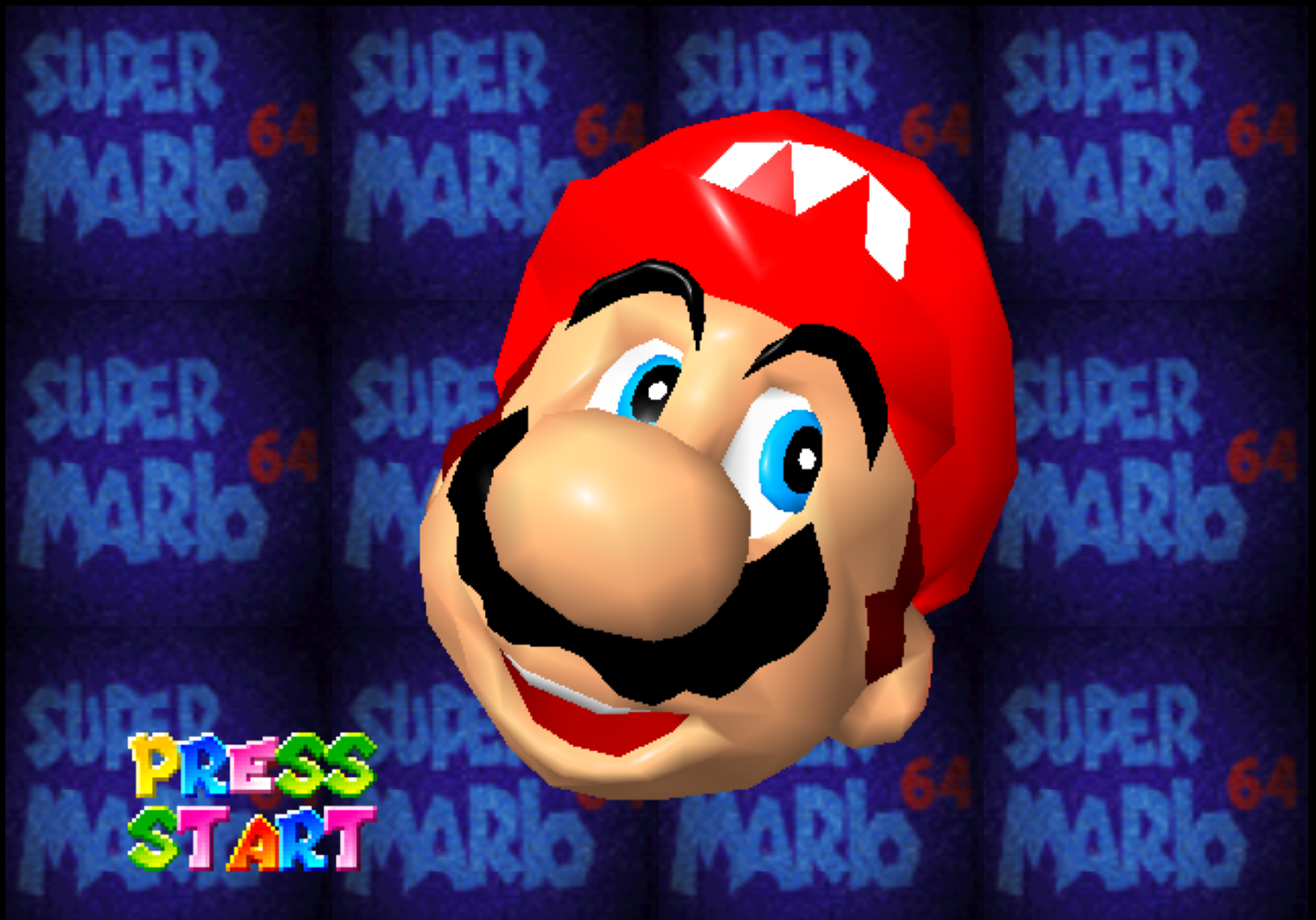
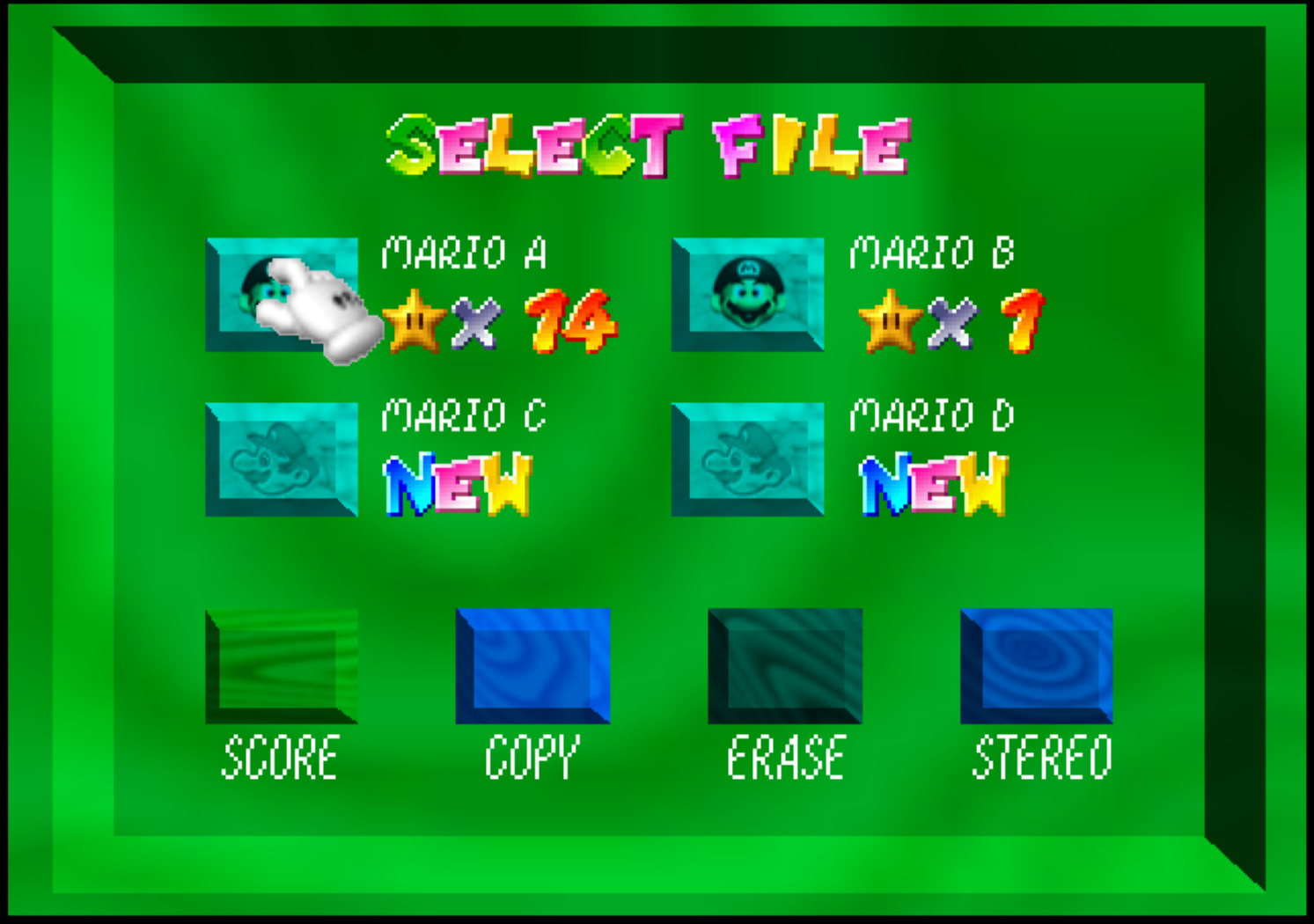

 clobber
All 42 comments
Something is up with your drivers, wasn't Conker's green at one point too? What commit fixed the green in Conker's?
 loganmc10
on 27 Sep 2017
loganmc10
on 27 Sep 2017
Well in terms of drivers and GL implementation, I'm at the mercy of the OS vendor (Apple) and at the moment I am on the latest release of macOS, 10.13.
Anyway, yeah Conker's walls were green in the pub but it wasn't fixed by your changes. I'll roll back a bit more and find the commit.
clobber
on 27 Sep 2017
Oh, also I should be clear in case my issue report was confusing. Only Mario's face is green now as of https://github.com/gonetz/GLideN64/commit/81cc0854dce4e3914dbc71b0067cf9d7549c936e. Everything else seems fine.
clobber
on 27 Sep 2017
@loganmc10 Okay regarding Conker's, I cannot track down which commit fixed the green walls because I'm on macOS 10.13 now and it appears it was fixed somewhere between the OS update or a change in the new SDK.
clobber
on 27 Sep 2017
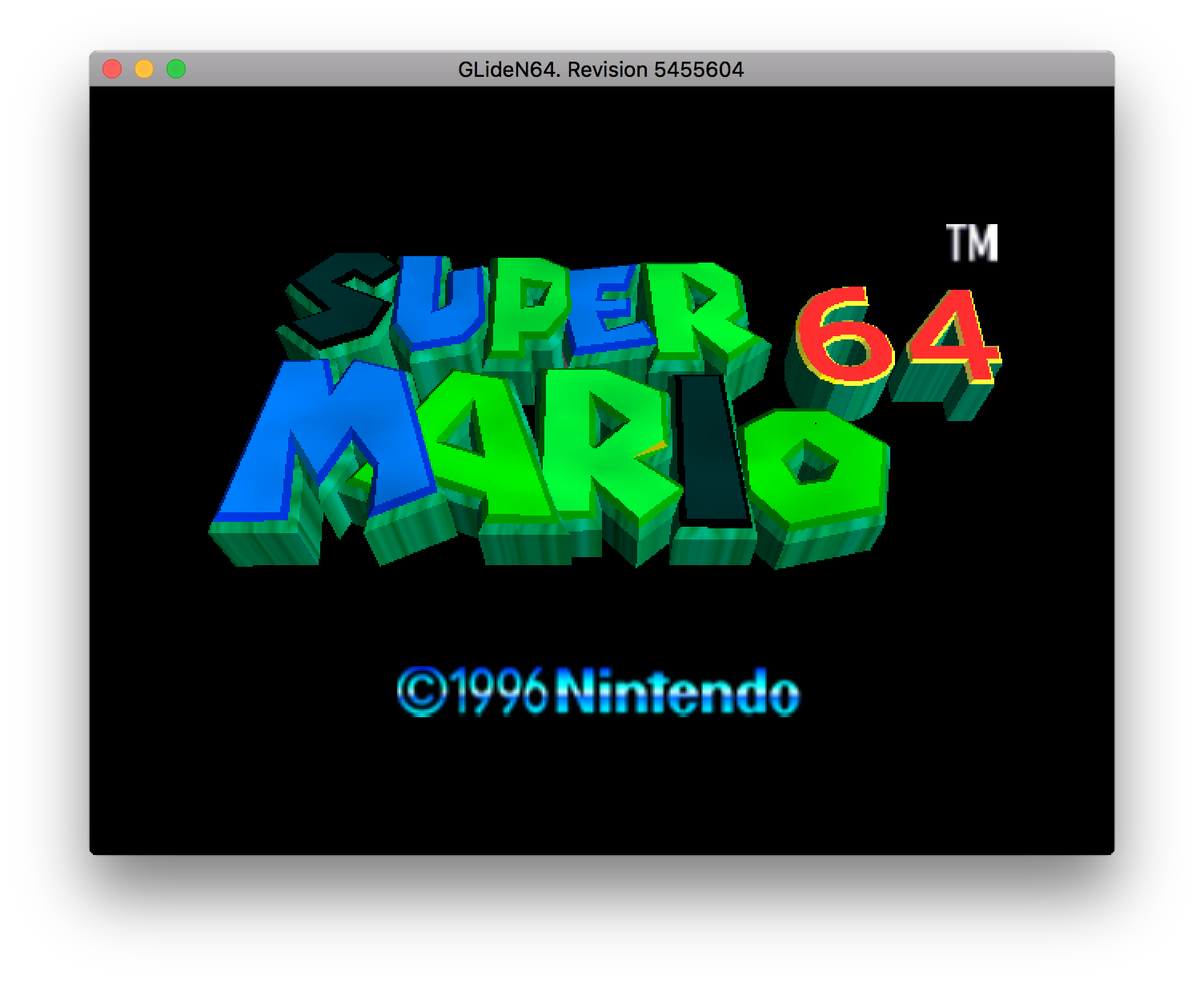
Alright, now as of commit https://github.com/gonetz/GLideN64/commit/ee3f4a6962a21c4ca702246d716c716e481ef78a we are back to looking like this:
...which first broke in commit https://github.com/gonetz/GLideN64/commit/231463e3681606615efe56a2a52a3bab0458e593
Intel GPU's do not like the changes to the Combiner it seems. Specifically the shader code.
clobber
on 27 Sep 2017
@Frank-74 I read in another issue that you have Intel HD Graphics. Can you replicate this with the latest commit?
In testing, I switched back to the #ifdef'd old blender/shader code that was kept for reference, and everything appears fine aside from these blue sprites that broke in commit https://github.com/gonetz/GLideN64/commit/d4dbe7c094509df0f843b94d898f69a57f13d6d7
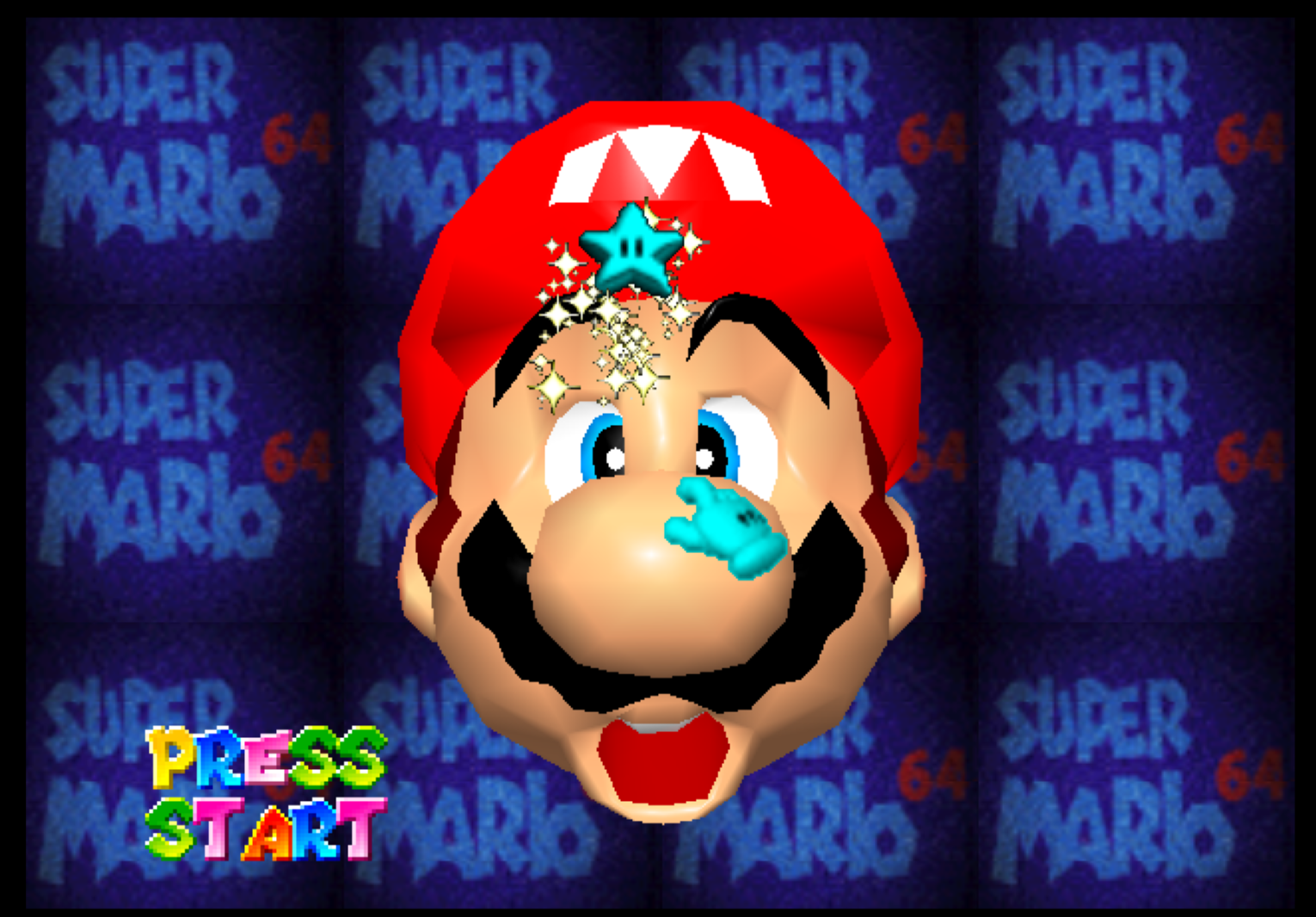
clobber
on 28 Sep 2017
I tested last build from WIP3 thread. https://github.com/gonetz/GLideN64/commit/597f7a25cfe2f9ed4c1474daef1d22027e32fcb8.
Everything looks good in SM64 with Intel HD Graphics (OGL 4.0) on Windows 8.1.
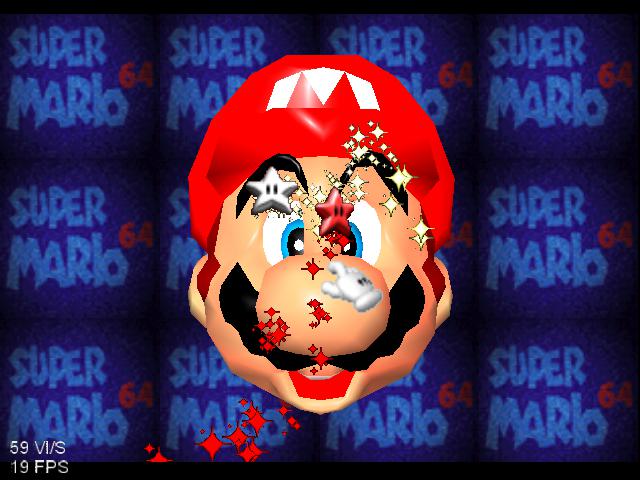
Looks like you have some antialiasing and/or anisotropic filtering, so just tested again with 8x and 16x. Still looks good.
 Frank-74
on 28 Sep 2017
Frank-74
on 28 Sep 2017
Okay thanks for checking.
@gonetz I need to come to some sort of resolution here for the Mac. The majority of Macs are going to be using Intel integrated graphics (and my frontend + this plugin) yet I appear to be the only Mac tester. In my M64P implementation, I might have no choice but to revert https://github.com/gonetz/GLideN64/commit/231463e3681606615efe56a2a52a3bab0458e593 & https://github.com/gonetz/GLideN64/commit/d4dbe7c094509df0f843b94d898f69a57f13d6d7 as I don't know enough about GLSL shader code to suggest a workaround. It seems any changes to the combiner blender/shader code is very touchy with Intel's.
clobber
on 28 Sep 2017
If it's just the shader blending that is causing the issue then enabling Legacy Blending should work around the problem. You might have to enable that in your frontend, this seems like a Mac-Intel specific driver bug
loganmc10
on 28 Sep 2017
Thanks @loganmc10 - that looks like a good workaround to enable frontend-side for Intel's. I see from the setting description that it "can cause glitches" though. Any idea what issues arise from it?
I'll also try to figure out if there is a way to optimize the shader blending for any Intel-specific GPU bugs for Mac. If I can put together a minimal reproducible test case of exactly what is wrong I can submit a bug report to Apple.
clobber
on 28 Sep 2017
Any idea what issues arise from it?
Someone else will know better but it's just a generally less accurate blending emulation. So just various incorrect effects and wrong colors. Things like the recent fixes to F Zero require the shader blending (http://gliden64.blogspot.ca/2017/09/f-zero-fixes-patreon.html)
Whatever little glitches might arise, they probably aren't as bad as Mario looking like he's been holding his breath for 10 minutes :)
loganmc10
on 28 Sep 2017
I see from the setting description that it "can cause glitches" though. Any idea what issues arise from it?
Various problems across a wide range of games. Examples include F-Zero X colours, World Driver Championship cars, Banjo Kazooie fade to white, Hexen skies, and many other subtle improvements across a range of games.
It basically reverts blending accuracy to Glide64's level. Which isn't exactly terrible, mind you. But it is significantly less accurate. It's unfortunate that Intel drivers are so fickle across different platforms.
 AmbientMalice
on 28 Sep 2017
AmbientMalice
on 28 Sep 2017
It basically reverts blending accuracy to Glide64's level.
Actually, below Glide64's level. Glide64 has hacks to fix some blender issues. Legacy blending is hacks free, so it has more problems than Glide64 blender.
 gonetz
on 28 Sep 2017
gonetz
on 28 Sep 2017
Well in that case I guess I won't be using legacy blending :\
I'll just have to keep a version of the blender in my implementation that has the two troublesome commits reverted. If there are more changes to the shader code it might be a pain to keep up to date though. The shader code before the recent optimization was okay, besides the the blue sprites which were in a commit prior to that.
clobber
on 28 Sep 2017
Okay well here's a weird one for you guys:
In the shader code I was playing around, comparing the optimized version to the old referenced code and replacing occurrences of:
" lowp vec4 blend1 = (muxpm0 * muxa) + (muxpm2 * muxb); \n"
with
" lowp vec4 blend1 = (muxPM[uBlendMux1[0]] * muxA[uBlendMux1[1]]) + (muxPM[uBlendMux1[2]] * muxB[uBlendMux1[3]]); \n"
and
"  } else {                                                                 \n"
    "      lowp vec4 muxpm0 = muxPM * vec4(equal(vec4(uBlendMux1[0]), vprobe)); \n"
    "      clampedColor.rgb = muxpm0.rgb;                                   \n"
with
" } else clampedColor.rgb = muxPM[uBlendMux1[0]].rgb; \n"
for both ShaderBlender1() and ShaderBlender2() was enough to fix the problem(s). I don't know if this is correct but maybe someone has an idea. But it would appear that Intel doesn't like the math happening in variables muxpm0 and muxpm2 for blend1/blend2 and clampedColor.rgb
clobber
on 28 Sep 2017
Actually, to reduce that even further I merely changed:
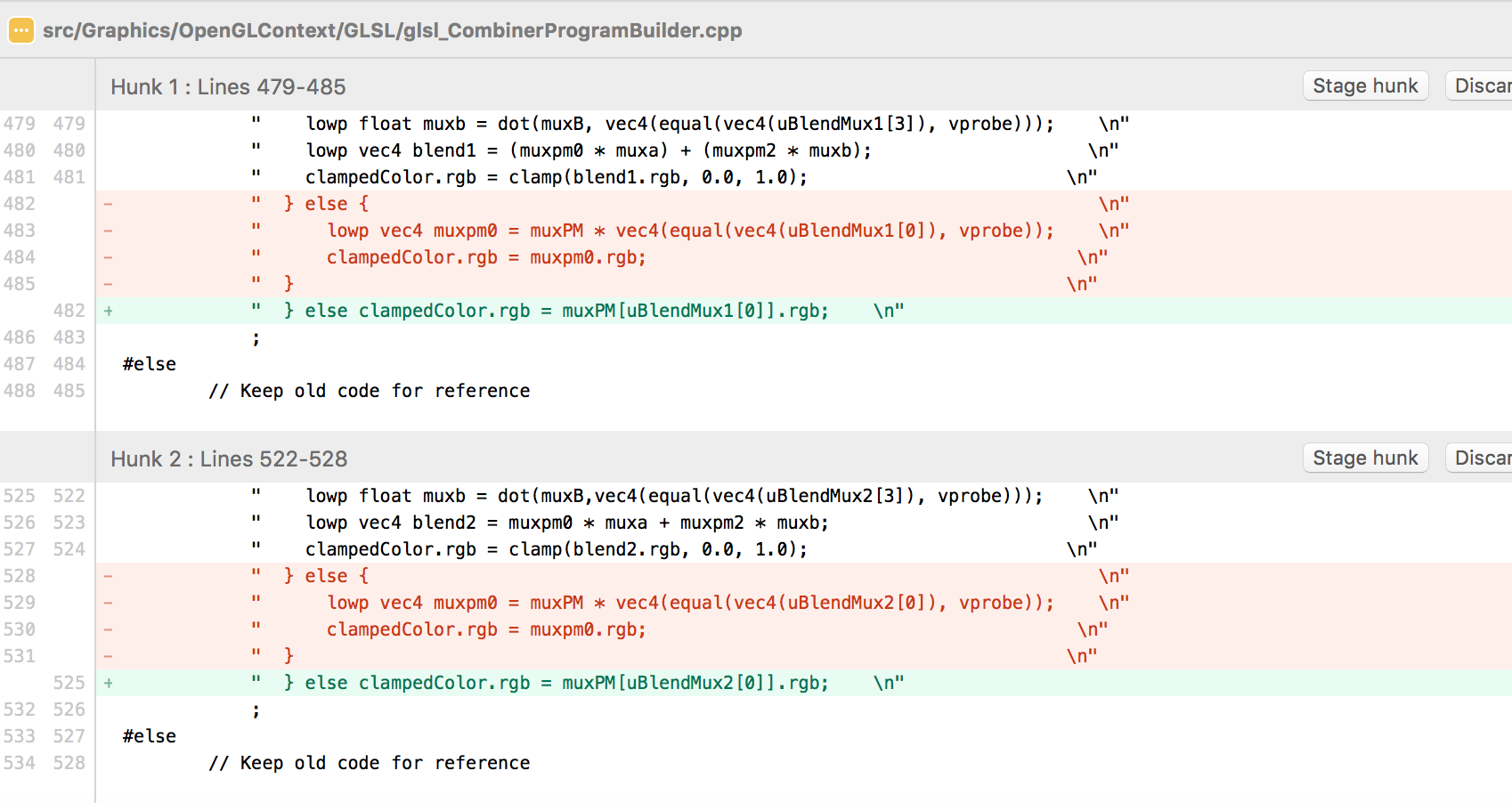
Any ideas?
clobber
on 28 Sep 2017
Nevermind, seems I need both like so:
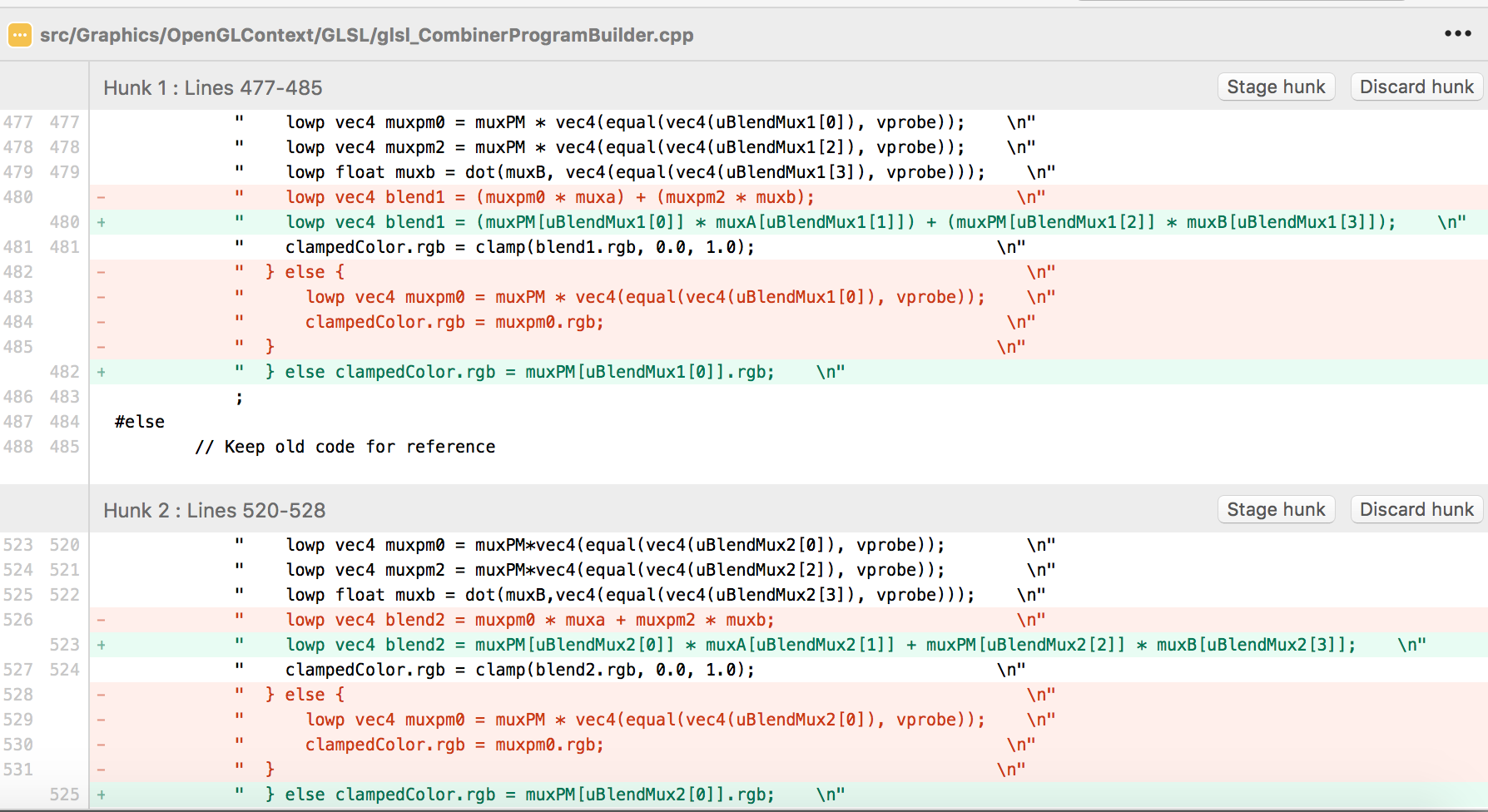
clobber
on 28 Sep 2017
That's just the unoptimized version that we had before. Are you sure you have the shader cache disabled? I'd be interested to hear if someone else on a Mac has this same issue.
Perhaps Mac keeps it's own shader cache somewhere?
loganmc10
on 28 Sep 2017
I'm not sure it's exactly as the ifdef'd reference version, because that one still has the blue sprites (Mario's glove and that star in the above screenshot) if I restore it.
Shader cache disabled? Am I supposed to? Which setting is that, txSaveCache? If so, it appears to default to True. Despite that setting, I don't think I have it saving anyway because I have all of TextDrawer.cpp stubbed out.
As for other Mac users, those on my team can confirm this same problem on their Intel GPU's - @duckey77 for example.
clobber
on 28 Sep 2017
The setting is EnableShadersStorage, can you try disabling that?
loganmc10
on 28 Sep 2017
Ah. Okay, in mupen64plus.cfg I set EnableShadersStorage = False but the problem still persists with the green textures.
clobber
on 28 Sep 2017
I can confirm this is happening (green tint to background in Mario 64) on my MBP with Intel GPU. Using commit 5455604.
 duckey77
on 28 Sep 2017
duckey77
on 28 Sep 2017
The only thing I can think of is that the function equal isn't supported. Try replacing vec4(equal(vec4(uBlendMux1[0]), vprobe)) by vec4(uBlendMux1[0] == 0, uBlendMux1[0] == 1 , uBlendMux1[0] == 2 , uBlendMux1[0] == 3) or use the if/else code or a switch like before. You need to do this with each muxpm calculation.
 standard-two-simplex
on 28 Sep 2017
standard-two-simplex
on 28 Sep 2017
Could it be that equal isn't good at comparing floating point numbers on the Mac? Perhaps changing vprobe to an ivec4 and casting the other value to an ivec4 would do it
loganmc10
on 28 Sep 2017
I doubt. All or none will be supported probably. In any case, GPUs are meant to work with floats so if anything is supported it should be floats.
standard-two-simplex
on 28 Sep 2017
Thanks for the suggestions! Yes it seems there is an issue with equal() and Intel GPU's on the Mac, because the code otherwise works fine with my AMD Radeon in the same machine. So here's the extent of my changes:
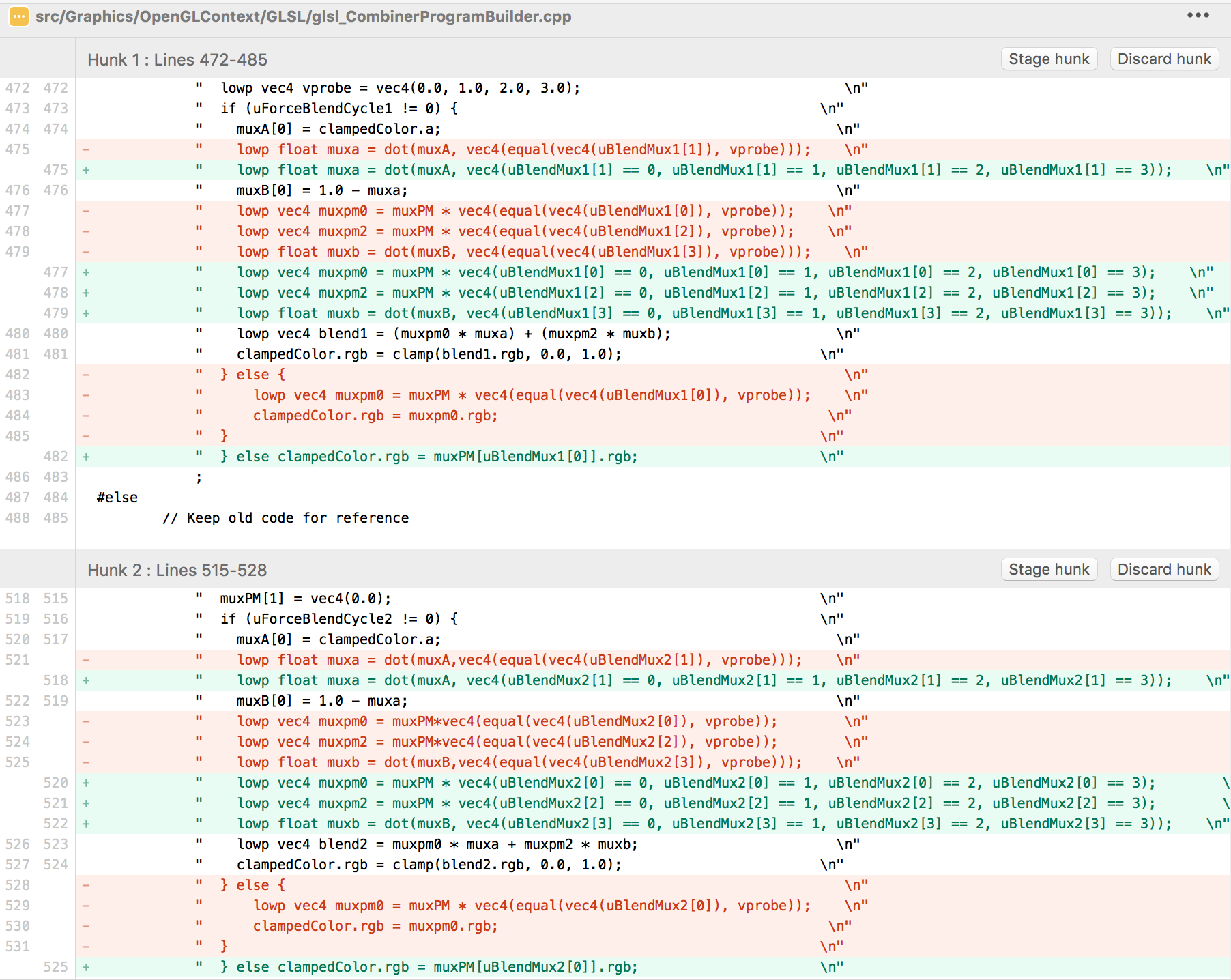
That does fix the wrong colors for the textures, but I also had to change clampedColor.rgb from:
lowp vec4 muxpm0 = muxPM * vec4(uBlendMux1[0] == 0, uBlendMux1[0] == 1 , uBlendMux1[0] == 2 , uBlendMux1[0] == 3);
clampedColor.rgb = muxpm0.rgb;
back to } else clampedColor.rgb = muxPM[uBlendMux1[0]].rgb; otherwise I'd get the blue textures for Mario's glove and star sprites introduced in commit https://github.com/gonetz/GLideN64/commit/d4dbe7c094509df0f843b94d898f69a57f13d6d7 (as pictured above). I don't yet know why that is happening, but I guess it's some other compatibility issue with Intel. Any ideas?
So are you all comfortable with replacing occurrences of equal() in the shader with the alternative == comparisons to workaround this Mac-Intel GPU bug, or is that an issue with the optimizations that were made?
clobber
on 28 Sep 2017
I don't know why equal isn't supported, it's available since OpenGL 1.10. I don't know about performance, but I personally like current (using equal()) code more for readability.
It's not my repo though, so ask the chief xP
P.S. Maybe forwarding the issue to Intel might be useful. I'm assuming you have up to date drivers.
standard-two-simplex
on 28 Sep 2017
I think equal() is supported, there just appears to be a bug with how it's being used or perhaps what is being compared in this case. I just don't know enough about GLSL to debug it. If readability is the only issue, then this change should be made so that the shader isn't totally broken in Intel GPU's on the Mac going forward.
clobber
on 28 Sep 2017
If readability is the only issue, then this change should be made so that the shader isn't totally broken in Intel GPU's on the Mac going forward.
I'd rather keep it as equal(). uBlendMux1[0] == 0 is an if statement. I'm not exactly sure how the GPU might deal with the equal() function, but I'd rather leave it up to the GPU to optimize. Replacing 1 equal() function with 4 if statements might degrade performance on some GPU's
loganmc10
on 28 Sep 2017
You can try using an ivec4 and see if it likes that better:
vec4(equal(vec4(uBlendMux1[0]), vprobe))
to:
vec4(equal(ivec4(uBlendMux1[0]), vprobe))
and change the type of vprobe (also changing 1.0 to 1, etc..) when it is declared from vec4 to ivec4. It's kind of a long shot but who knows
loganmc10
on 28 Sep 2017
Yeah, who knows, maybe it does work.
standard-two-simplex
on 28 Sep 2017
Well you yourself maintain a cross-platform M64P frontend. Do you really want to leave the shader code broken on Mac-Intel GPU's? I guess before we assume there is performance degradation we could do a bit of profiling. Or a better alternative, there could at least be an #ifdef __APPLE__ in place so no other platform has to worry about that change. As a Win/Linux user, don't you care about portability too? Anyway, no change when using ivec4
clobber
on 28 Sep 2017
As a Win/Linux user, don't you care about portability too?
I care about it, but not enough to bend the code to fit obviously broken GPU drivers.
By the way, are you testing this in your frontend, or using mupen64plus-ui-console? Like is it rendering into framebuffer 0, or is it rendering into a intermediary framebuffer?
I only ask because as I mentioned before (I can't remember where I wrote this), when I was working on glupen64 (mupen64plus+gliden64 for libretro), I had a user with this exact same issue. The GitHub repo is gone, but the conversation is in my email:
Super Mario 64 colors are wrong
Just changed Graphics Processor from integrated to High-Performce (NVIDIA with driver 353.62) and the colors are fine again!
Updated the driver for Intel from version 20.19.15.4360 (21 dec 2015) to version 20.19.15.4463, A04 (7 sep 2016). No difference unfortunately.
Btw, tried my own GLideN64 with Project64 and MupenPlus-Console and there were no problems. :-/
He only had the issue with glupen64, not upstream mupen64plus + GLideN64. The only real difference is that with libretro, it was rendering into the libretro framebuffer, not the default framebuffer
loganmc10
on 28 Sep 2017
Dolphin has an include with workarounds specifically designed for buggy drivers. I think the #ifdef would work well in this scenario
Also wouldn't count on Intel to get the bug fixed, they are slow as molasses to care enough to fix it. Also you can't exactly tell them to download a super Mario 64 ROM off the internet so they can see the bug in action themselves and can debug it. At least Dolphin has FIFO logs, 1 frame snapshots, which are legal to distribute since they don't contain the whole copyrighted code.
 oddMLan
on 28 Sep 2017
oddMLan
on 28 Sep 2017
Also you can't exactly tell them to download a super Mario 64 ROM off the internet so they can see the bug in action themselves and can debug it. At least Dolphin has FIFO logs, 1 frame snapshots, which are legal to distribute since they don't contain the whole copyrighted code.
You can just send them an apitrace. I've done that before with the Mesa devs. An apitrace (http://apitrace.github.io/) captures all the GL state (textures, every GL command with its arguments, etc..) and allows you to play it back just like it happened. I've been thinking about using that for regression testing since they are like 1000x smaller than actual screenshots.
loganmc10
on 29 Sep 2017
By the way, are you testing this in your frontend, or using mupen64plus-ui-console?
Using mupen64plus command line and made sure to switch my GPU to Intel, that way I know I'm not introducing any bugs of my own.
I care about it, but not enough to bend the code to fit obviously broken GPU drivers.
Okay so what can we do here? I'd like to ensure the plugin works on Macs using Intel GPU's. There appears to be a driver bug with the use of equal() being more strict in a way the driver/GPU doesn't like. There's no way to "update" the drivers on my end and no fix for older versions of macOS moving forward if this issue is ever resolved in a macOS point release.
So, can we settle on a platform specific #ifdef __APPLE__ macro? I see no other way to solve this in upstream.
clobber
on 29 Sep 2017
Ok, put the shader code, which works on your Mac , guard it with #ifdef OS_MAC_OS_X and make pull request. As I understand, this version is close to the non optimized 'reference' blender, which is already in the code.
gonetz
on 29 Sep 2017
@gonetz Thanks. Yes it's essentially the same as the referenced version with a small addition to muxB to work around the blue sprites I get if I leave that code unchanged:
muxPM[0] = clampedColor;
lowp vec4 vprobe = vec4(0.0, 1.0, 2.0, 3.0);
if (uForceBlendCycle1 != 0) {
  muxA[0] = clampedColor.a;
  lowp float muxa = dot(muxA, vec4(equal(vec4(uBlendMux1[1]), vprobe)));
  muxB[0] = 1.0 - muxa;
  lowp vec4 blend1 = (muxPM[uBlendMux1[0]] * muxA[uBlendMux1[1]]) + (muxPM[uBlendMux1[2]] * muxB[uBlendMux1[3]]);
  clampedColor.rgb = clamp(blend1.rgb, 0.0, 1.0);
} else clampedColor.rgb = muxPM[uBlendMux1[0]].rgb;
Notice that equal() works fine in this scenario. I think the problem in the optimized version is happening in blend1/blend2 or with the else statement in clampedColor. Very strange...maybe there are some more suggestions?
clobber
on 29 Sep 2017
Wait wait wait...I think there's a better solution, and this is back to what you said @loganmc10
You had said to ivec4 cast:
vec4(equal(vec4(uBlendMux1[0]), vprobe))
to
vec4(equal(ivec4(uBlendMux1[0]), vprobe))
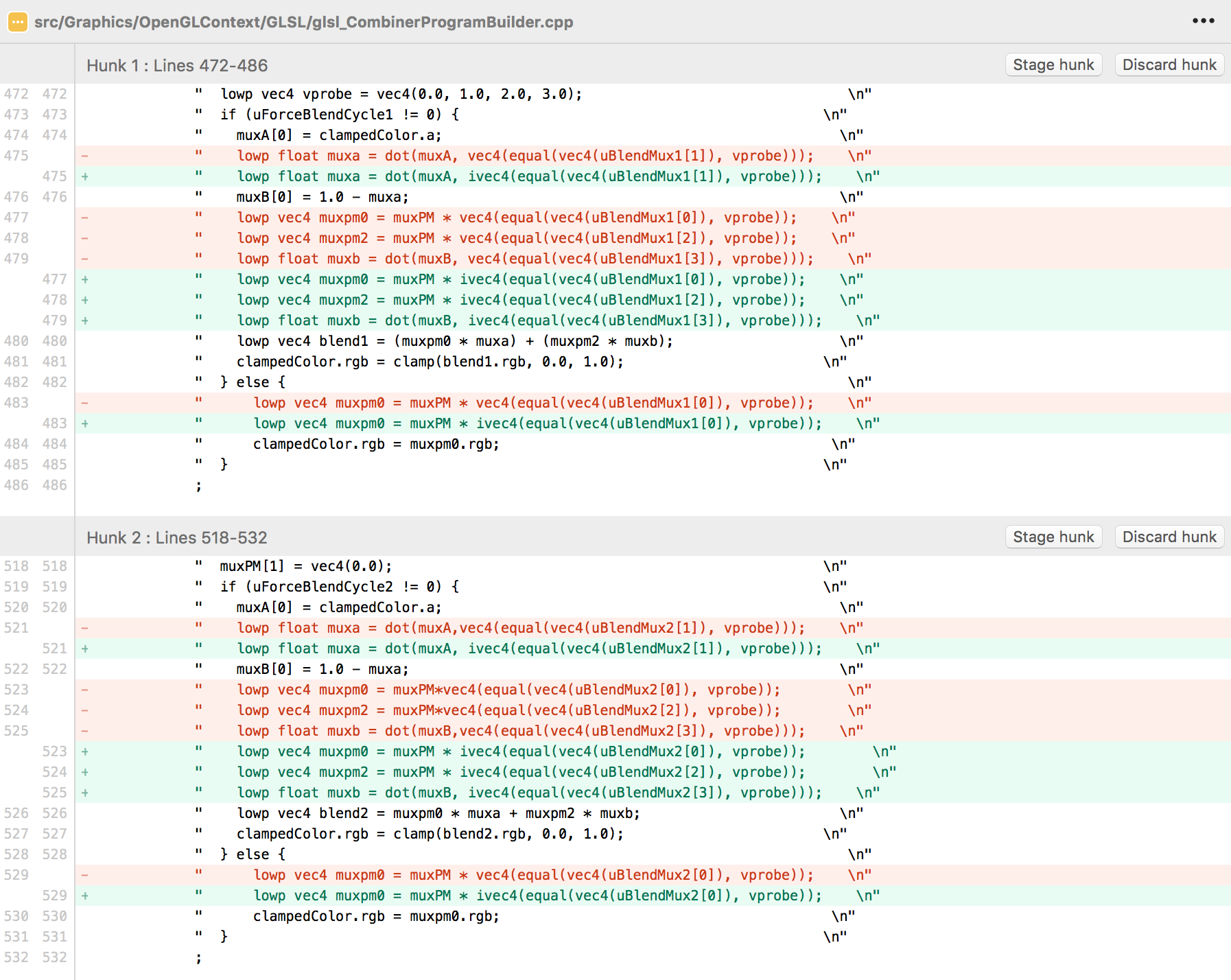
And that is what I tried. But what I'm finding is that if I cast
vec4(equal(vec4(uBlendMux1[0]), vprobe))
to
ivec4(equal(vec4(uBlendMux1[0]), vprobe))
Which is probably what you meant (or maybe even ivec4(equal(ivec4(..., then everything looks fine! So can we roll with this as a solution instead (or whatever needs to be cast properly to ivec4)?
clobber
on 29 Sep 2017
Yeah I'm personally okay with that. I tested it on Linux and it seems to work fine with no performance degradation. I'm glad you found a fix, I applaud your persistence!
loganmc10
on 29 Sep 2017
Good! Please make a PR.
gonetz
on 29 Sep 2017
Okay, incoming. Thanks for helping me troubleshoot.
clobber
on 29 Sep 2017
Related issues
 kcghost
·
10Comments
kcghost
·
10Comments
 olivieryuyu
·
20Comments
olivieryuyu
·
20Comments
 maximemoring
·
17Comments
maximemoring
·
17Comments
 Dorzalty
·
20Comments
Dorzalty
·
20Comments
 ImSpecial
·
10Comments
ImSpecial
·
10Comments
Most helpful comment
Ok, put the shader code, which works on your Mac , guard it with #ifdef OS_MAC_OS_X and make pull request. As I understand, this version is close to the non optimized 'reference' blender, which is already in the code.