Givewp: When no list items in the tables display an informative graphic
Issue Overview
On a fresh install the list tables are all empty. We should improve the UX with a helpful icon, text and button if necessary to improve the first user impressions of the plugin
- Donation Forms
- Donations
- Donors
Similar to WPBR:
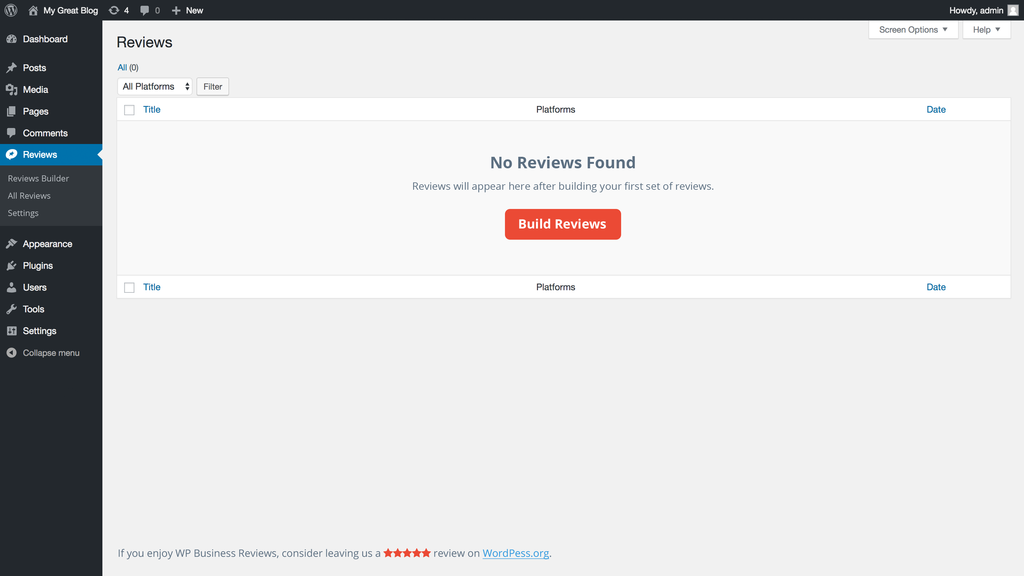
Todos
- [x] Design empty list layouts content
- [x] Implement and test
 DevinWalker
All 3 comments
Here's my recommendation:
In order for any of these tables to function, a form must be created. For that reason, I think we should prioritize form creation in the empty list table message. If a form already exists but there are no donations or donors, then we can display messaging specific to donations or donors respectively. The logic would look something like this:
// Donation Forms List Table.
IF 0 === donation_forms THEN

    DISPLAY message w/ call to action to create first form

ELSE

    DISPLAY donation_forms

ENDIF

// Donations List Table.
IF 0 === donation_forms THEN

    DISPLAY message w/ call to action to create first form

ELSEIF 0 === donations THEN

    DISPLAY message that donations will appear here when the first donation occurs

ELSE

    DISPLAY donations

ENDIF

// Donors List Table.
IF 0 === donation_forms THEN

    DISPLAY message w/ call to action to create first form

ELSEIF 0 === donors THEN

    DISPLAY message that donors will appear here when the first donation occurs

ELSE

    DISPLAY donors

ENDIF
 kevinwhoffman
on 25 Jul 2017
kevinwhoffman
on 25 Jul 2017
@DevinWalker and I also discussed a concept similar to Help Scout's empty inbox graphics.

Suggested components of the message would be:
- Icon representing donation form/donation/donor.
- Brief one-line message.
- Call to action button (e.g. Add a Donation Form)
- Help text (linked to Give 101)
kevinwhoffman
on 25 Jul 2017
@kevinwhoffman I like what you have here. I suggest that if no donation forms are created that we combine the messages for donors and donation payments:
Empty Donation Payments List
Your donation payments will appear here once you begin accepting donations. Get started by creating your first donation form.
(cta button: Create a Donation Form)
subtext: Not sure where to start? Begin with Give 101.
Empty Donors List
Donors will appear here once you have accepted your first donation. It looks like you haven't created a donation form yet.
(cta button: Create a Donation Form)
subtext: Not sure where to start? Begin with Give 101.
DevinWalker
on 25 Jul 2017
Related issues
 gingerling
·
4Comments
gingerling
·
4Comments
 emgk
·
3Comments
DevinWalker
·
4Comments
emgk
·
3Comments
DevinWalker
·
4Comments
 mathetos
·
4Comments
mathetos
·
4Comments
 vukvukovich
·
4Comments
vukvukovich
·
4Comments
Most helpful comment
@kevinwhoffman I like what you have here. I suggest that if no donation forms are created that we combine the messages for donors and donation payments:
Empty Donation Payments List
(cta button: Create a Donation Form)
subtext: Not sure where to start? Begin with Give 101.
Empty Donors List
(cta button: Create a Donation Form)
subtext: Not sure where to start? Begin with Give 101.