Prerequisites
- Have you tried to reproduce the problem in Safe Mode?
- Have you followed all applicable steps in the debugging guide?
- Have you checked the FAQs on the message board for common solutions?
- Have you checked that your issue isn't already filed?
Description
Unable to push to a repository.
Steps to Reproduce
- Created repo.
- Added remote origin link manually. (Some reason atom doesn't connect to the repo.)
- Click Publish.
Expected behavior:
Successful push.
Actual behavior:
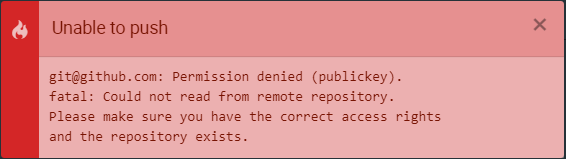
Received unable to push error.
Reproduces how often:
100%
Versions
You can get this information from copy and pasting the output of atom --version and apm --version from the command line. Also, please include the OS and what version of the OS you're running.
`atom --version
Atom : 1.34.0
Electron: 2.0.16
Chrome : 61.0.3163.100
Node : 8.9.3
apm --version
apm 2.1.3
npm 6.2.0
node 8.9.3 x64
atom 1.34.0
python
git 2.17.1.windows.2
visual studio`
Additional Information
Please include any additional information, configuration or data that might be necessary to reproduce the issue. Screenshots, if appropriate, are helpful as well.
If your issue involves a repository, and that repository is public, please include a link to it.
 Polecalex
All 5 comments
Does it work from the command line?
 Aerijo
on 10 Feb 2019
Aerijo
on 10 Feb 2019
Does it work from the command line?
Yes
Polecalex
on 10 Feb 2019
@Polecalex thanks for reporting! 👋
Can you please clarify what you mean by 2. Some reason atom doesn't connect to the repo?
 annthurium
on 20 Feb 2019
annthurium
on 20 Feb 2019
@Polecalex thanks for reporting! 👋
Can you please clarify what you mean by
2. Some reason atom doesn't connect to the repo?
I had to manual create repo origin link to the .git config file. i.e.
[remote "origin"]
    url = [email protected]:Polecalex/Personal.git
    fetch = +refs/heads/*:refs/remotes/origin/*
When I clicked create new repo, i'd assume that it would have automatically added the link itself.
Polecalex
on 21 Feb 2019
@Polecalex I think, in the future, you can just run git remote add origin [email protected]:Polecalex/Personal.git. 💯
By the way, this step is necessary at all times when you initialise an empty git repository on your machine and then manually create a new repository at github.com. It's important to remember that even though git and github are designed to work together, they are really two independent tools. Therefore, initialising an empty git repo on your computer will not automatically create a github counterpart, or vice-versa. You have to manually make the connection by adding a remote to your local git repository. Atom uses this git remote information to look up your github repository. At this time, Atom does not support managing your remotes; you have to do that using other tools (ie. the git CLI).
Alternatively, you can start by creating a new Github repository on the web and then cloning the empty, new repository to your computer: git clone [email protected]:Polecalex/Personal.git - the git CLI will set the remote up for you since it now knows where that repository is hosted (you just cloned it from there). 💪
 robertrossmann
on 21 Feb 2019
robertrossmann
on 21 Feb 2019
Related issues
 joshaber
·
4Comments
joshaber
·
4Comments
![move[bot] picture](https://avatars.githubusercontent.com/in/6673?v=4&s=40) move[bot]
·
3Comments
move[bot]
·
3Comments
 Ben3eeE
·
4Comments
Ben3eeE
·
4Comments
 JamesChevalier
·
4Comments
JamesChevalier
·
4Comments
 yubaoquan
·
3Comments
yubaoquan
·
3Comments
Most helpful comment
@Polecalex I think, in the future, you can just run
git remote add origin [email protected]:Polecalex/Personal.git. 💯By the way, this step is necessary at all times when you initialise an empty
gitrepository on your machine and then manually create a new repository atgithub.com. It's important to remember that even thoughgitandgithubare designed to work together, they are really two independent tools. Therefore, initialising an empty git repo on your computer will not automatically create a github counterpart, or vice-versa. You have to manually make the connection by adding aremoteto your local git repository. Atom uses thisgit remoteinformation to look up your github repository. At this time, Atom does not support managing your remotes; you have to do that using other tools (ie. thegitCLI).Alternatively, you can start by creating a new Github repository on the web and then cloning the empty, new repository to your computer:
git clone [email protected]:Polecalex/Personal.git- thegitCLI will set theremoteup for you since it now knows where that repository is hosted (you just cloned it from there). 💪