Prerequisites
- [x] Have you tried to reproduce the problem in Safe Mode?
- [x] Have you followed all applicable steps in the debugging guide?
- [x] Have you checked the FAQs on the message board for common solutions?
- [x] Have you checked that your issue isn't already filed?
Description
It seems that github is unable to GPG sign commits on Atom v1.21.0-beta0.
Steps to Reproduce
git config --global commit.gpgsign true(or some other method of requiring a signature)- Open a project under a Git repo.
- Make a change
- Attempt to commit the change
Expected behavior:
Password prompt to unlock the GPG key.
Actual behavior:
Error message with the following contents:
15:15:15.823226 git.c:328               trace: built-in: git 'commit' '-m' '<the commit message>'
15:15:15.836227 run-command.c:626       trace: run_command: 'C:\Users\LANDON~1\AppData\Local\Temp\github-117812-61424-g6031n.528gs0pb9\gpg-wrapper.sh' '-bsau' 'EEE3FB2B'
error: cannot spawn C:\Users\LANDON~1\AppData\Local\Temp\github-117812-61424-g6031n.528gs0pb9\gpg-wrapper.sh: No such file or directory
error: gpg failed to sign the data
fatal: failed to write commit object


Reproduces how often:
100% of the time.
Versions
Atom    : 1.21.0-beta0
Electron: 1.6.9
Chrome  : 56.0.2924.87
Node    : 7.4.0
apm  1.18.5
npm  3.10.10
node 6.9.5 x64
python 2.7.13
git 2.14.1.windows.1
visual studio 2015
Windows 10 x64 Enterprise
Additional Information
This was working perfectly fine in Atom v1.20.0-beta7.
 Arcanemagus
All 16 comments
Thanks for the trace output, and sorry for the issue. @smashwilson I assume we're somehow failing to copy the script out of the ASAR into the temp location in order to run it — anything stand out to you as a likely suspect?
 BinaryMuse
on 13 Sep 2017
BinaryMuse
on 13 Sep 2017
No worries, that's what beta's are for: Catching things like this before it gets out to everyone 😉.
As always let me know if there is any additional testing or information I can do to help!
Arcanemagus
on 13 Sep 2017
Oh, weird, this regressed again? Let me see if I can reproduce... 🔎
Thanks for the report, @Arcanemagus 🙇
 smashwilson
on 13 Sep 2017
smashwilson
on 13 Sep 2017
Okay, I've done a little digging around in Git for Windows source, and I've managed to reproduce this on my machine. The error message is deceptive: the underlying execve() call isn't unable to find the gpg-wrapper.sh script; it's unable to find the _shell_ binary. I traced the system calls with Procmon and you can see it searching for sh.exe (then, interestingly, busybox.exe):
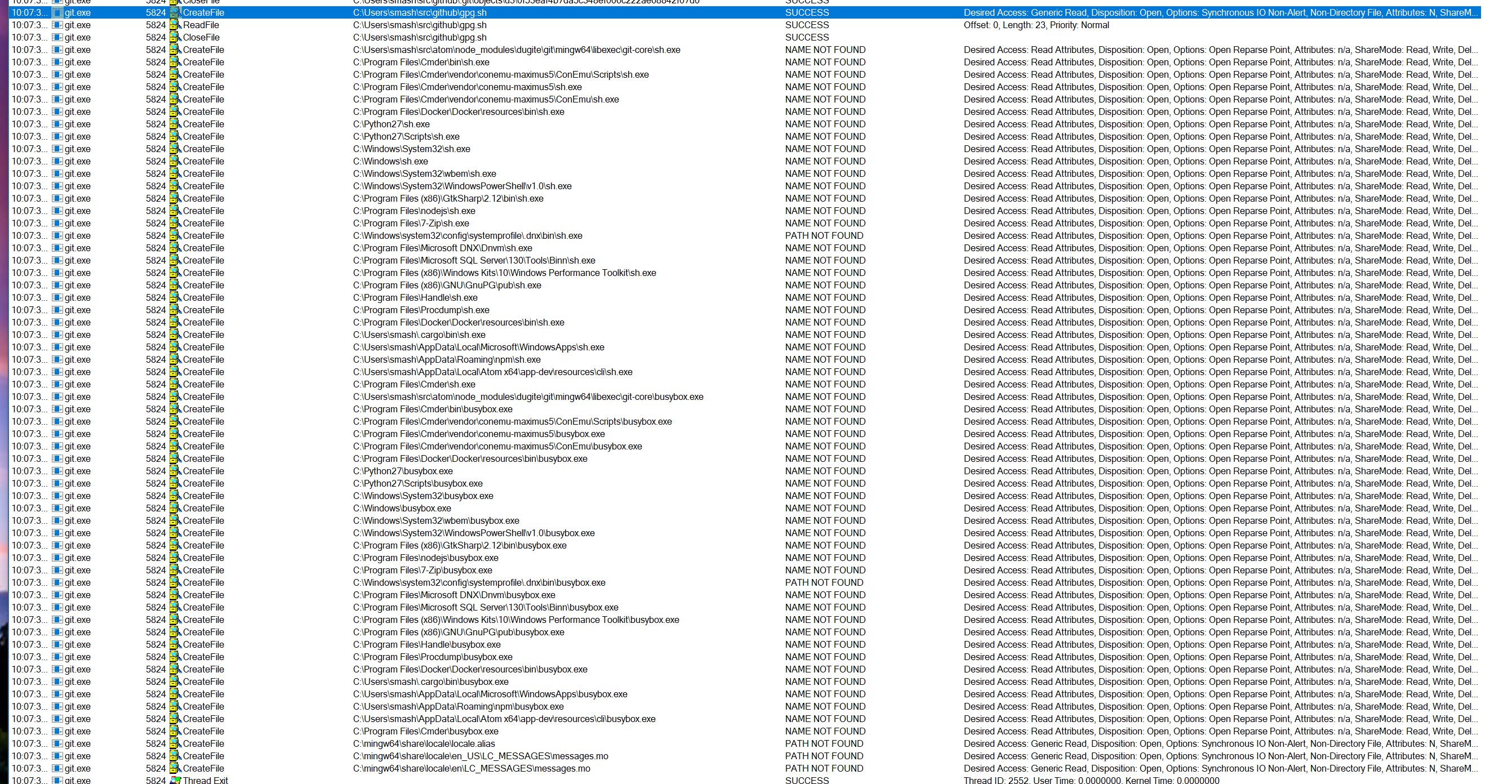
The sh.exe that it _should_ be finding is in the node_modules\dugite\git\usr\bin directory:

It's not clear to me yet why that directory isn't on the $env:PATH for this call. A quick fix may be to just append that directory to the path in GitShellOutStrategy, but I'd rather dig a little further and see if this is something that regressed upstream in dugite first.
smashwilson
on 15 Sep 2017
A few additional points of data:
- This works just fine on my laptop at home, so it's something unique to the workstation
- If I modify
%PATH%to include ash.exeI can commit, but every commit prompts for my GPG key's password so I don't think the missingshis the entire issue.
Arcanemagus
on 18 Sep 2017
I get the unable to commit error also when attempting to specify a commit message that starts with an issue reference like: #1200 implemented widget A
Omit the # and the commit will work.
 vanboom
on 1 Oct 2017
vanboom
on 1 Oct 2017
I did a little investigation with a recent build of Atom and git seems to be finding sh correctly now:

C:\Users\smash
λ  atom --version

Atom    : 1.23.0-dev-c9c495792
Electron: 1.6.14
Chrome  : 56.0.2924.87
Node    : 7.4.0
C:\Users\smash
λ  apm ls | select-string -pattern github

Γö£ΓöÇΓöÇ [email protected]
It isn't clear to me what's changed, since 0.6.3 doesn't include the dugite bump from #1197.
smashwilson
on 8 Oct 2017
I get the unable to commit error also when attempting to specify a commit message that starts with an issue reference like: #1200 implemented widget A
Omit the # and the commit will work.
That looks more like #962.
smashwilson
on 8 Oct 2017
@smashwilson Btw, on my laptop at home this works perfectly, so it seems to be something about the environment of the computer running it. I'm just not sure where to start tracking down what could be the difference between the two.
Arcanemagus
on 8 Oct 2017
@Arcanemagus Do you have git's cmd directory on your path on your laptop? That's how it was working for me before - it was picking up the binaries from my other git install :smile:
The other sh.exe could also be coming from a separate MinGW install, maybe?
smashwilson
on 8 Oct 2017
Workstation (broken):

Laptop (working):
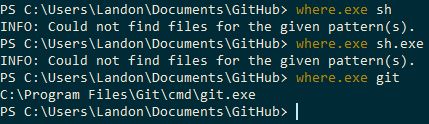
In other words neither environment has a sh available (outside of Atom).
Arcanemagus
on 9 Oct 2017
Gotcha. Weird. My current hypothesis is that this has something to do with the way that MinGW converts paths to their POSIX-land form.
One thing that jumps out at me: on your workstation, your home directory path has a space in it. Maybe that's breaking dugite's MinGW environment somehow?
smashwilson
on 9 Oct 2017
One thing that jumps out at me: on your workstation, your home directory path has a space in it. Maybe that's breaking dugite's MinGW environment somehow?
Ooo, good catch. I know it's been the source of many issues being reported before 😉.
Arcanemagus
on 9 Oct 2017
Workstation OS was re-installed, username there is now abneyl and the github package is once again working properly so I'd say your "space in path" theory has more evidence behind it... but I can't test the original environment directly any more. If needed I can try creating a user with a space in the name to test though 😉.
Arcanemagus
on 18 Oct 2017
I also have a space in my user name and I am facing the exact same problem. I will create a new user since my Windows installation is relatively new and I will install Atom there to see if a username without spaces helps resolve the issue.
 rdnt
on 24 Nov 2017
rdnt
on 24 Nov 2017
A new user account (one without spaces) with Atom BETA installed reports the same issue. So my guess is that this problem doesn't have any relation with usernames. It has to be something else.
rdnt
on 24 Nov 2017
Related issues
 Hreacon
·
3Comments
Hreacon
·
3Comments
 HidekiHokuto
·
4Comments
HidekiHokuto
·
4Comments
 UziTech
·
4Comments
UziTech
·
4Comments
![move[bot] picture](https://avatars.githubusercontent.com/in/6673?v=4&s=40) move[bot]
·
3Comments
move[bot]
·
3Comments
 benogle
·
4Comments
benogle
·
4Comments