Hi there,
I really like your project. Its suits my productive system.
I just jumped in and used your template and got a local application running.
Now I want to deploy that template to a Staging System with IIS and an installed AspNetCoreModul.
What are the next steps to get the Giraffe system running on IIS?
Do I need to add a webconfig?
 tforkmann
All 13 comments
Running Giraffe on IIS should not be any different that any other AspNetCore app.
I believe you will need a web.config like this.
 nojaf
on 13 Oct 2017
nojaf
on 13 Oct 2017
I added the web.config file.
Now I receive the following error page:
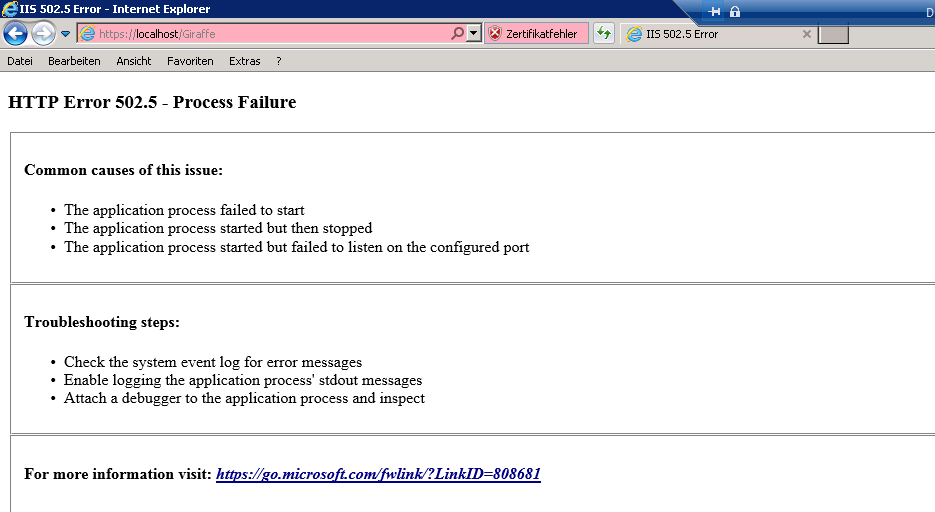
IIS is running on port 433 with SSL.
Do I have to adjust the port?
tforkmann
on 13 Oct 2017
Hmm, do you have a log file? Did you see https://github.com/aspnet/IISIntegration/issues/406?
nojaf
on 13 Oct 2017
Here's an example:
 JonCanning
on 13 Oct 2017
JonCanning
on 13 Oct 2017
@JonCanning Thanks a lot.
I got a little bit forward. I removed the first error message. Now I get

I found a error description in: https://docs.microsoft.com/en-us/aspnet/core/publishing/iis?tabs=aspnetcore2x#troubleshooting-tips
Do I have to set the dll in the system path?
Or maybe I'm missing some patches because I'm on Windows Server 2008 R2
tforkmann
on 13 Oct 2017
I was getting an error like this....
Make sure dotnetcore 2.0 is installed in the target server.
Open command prompt and type dotnet --version
 AlbertoDePena
on 13 Oct 2017
AlbertoDePena
on 13 Oct 2017
Same ...

tforkmann
on 13 Oct 2017
Is your ssl properly set up? Does it work if you use http://localhost/giraffe or http://servername/giraffe?
AlbertoDePena
on 13 Oct 2017
If you havent deployed a dotnetcore app before, make sure to follow these steps:
AlbertoDePena
on 13 Oct 2017
Are your file permissions correct? dotnet crashes and IIS returns the 502.3 error when it does not have the correct permissions.
Give IIS_IUSRS user Read&Execute permissions to the app folder and Read&Write permission to .\logs
 nurges
on 13 Oct 2017
nurges
on 13 Oct 2017
Hi, glad so many people already jumped in to help you with the issue. My general advice with these type of errors is to remove as many potential error sources from the equation as possible. Seems like you don't really have a Giraffe specific problem, but a more general "how to get an ASP.NET Core app running in IIS" problem and therefore I'd recommend to just try this first. Create the smallest simplest hello world app in ASP.NET Core which doesn't use Giraffe/MVC or any other middleware and make sure to follow all the steps to get this one running in IIS. Once you've got that working then it is usually a lot easier to add more middleware like Giraffe and re-deploy with your working recipe.
Also if you don't get a simple ASP.NET Core Hello World app in IIS working then you've got a much smaller app which you can reference to when reaching out to an even wider audience of potential people who might know how to help you (e.g. IIS team, ASP.NET Core team, etc.) :)
 dustinmoris
on 13 Oct 2017
dustinmoris
on 13 Oct 2017
Hi,
sorry for the late reply.
I did some more research...
I think it actually has to do with the fact that I tried to create the app as a subapp.
There is an open issue about it at:
https://github.com/aspnet/AspNetCoreModule/issues/150
I will try to install it as a new website an let you know if it works after.
tforkmann
on 18 Oct 2017
Running it as a new app just works...

Closing the issue for now.
Thanks guys!
tforkmann
on 23 Oct 2017
Related issues
 panesofglass
·
4Comments
panesofglass
·
4Comments
 Disco-Dave
·
4Comments
Disco-Dave
·
4Comments
 forki
·
8Comments
forki
·
8Comments
 nicolocodev
·
4Comments
nicolocodev
·
4Comments
 alfonsogarciacaro
·
4Comments
alfonsogarciacaro
·
4Comments