Ghidra: Missing space characters in GUI labels
Describe the bug
Several GUI elements are missing space characters.
To Reproduce
Steps to reproduce the behavior:
- Get the latest version via git.
- Open Ghidra
- GUI labels are missing space characters
Expected behavior
The GUI labels have correct space characters between words.
Screenshots
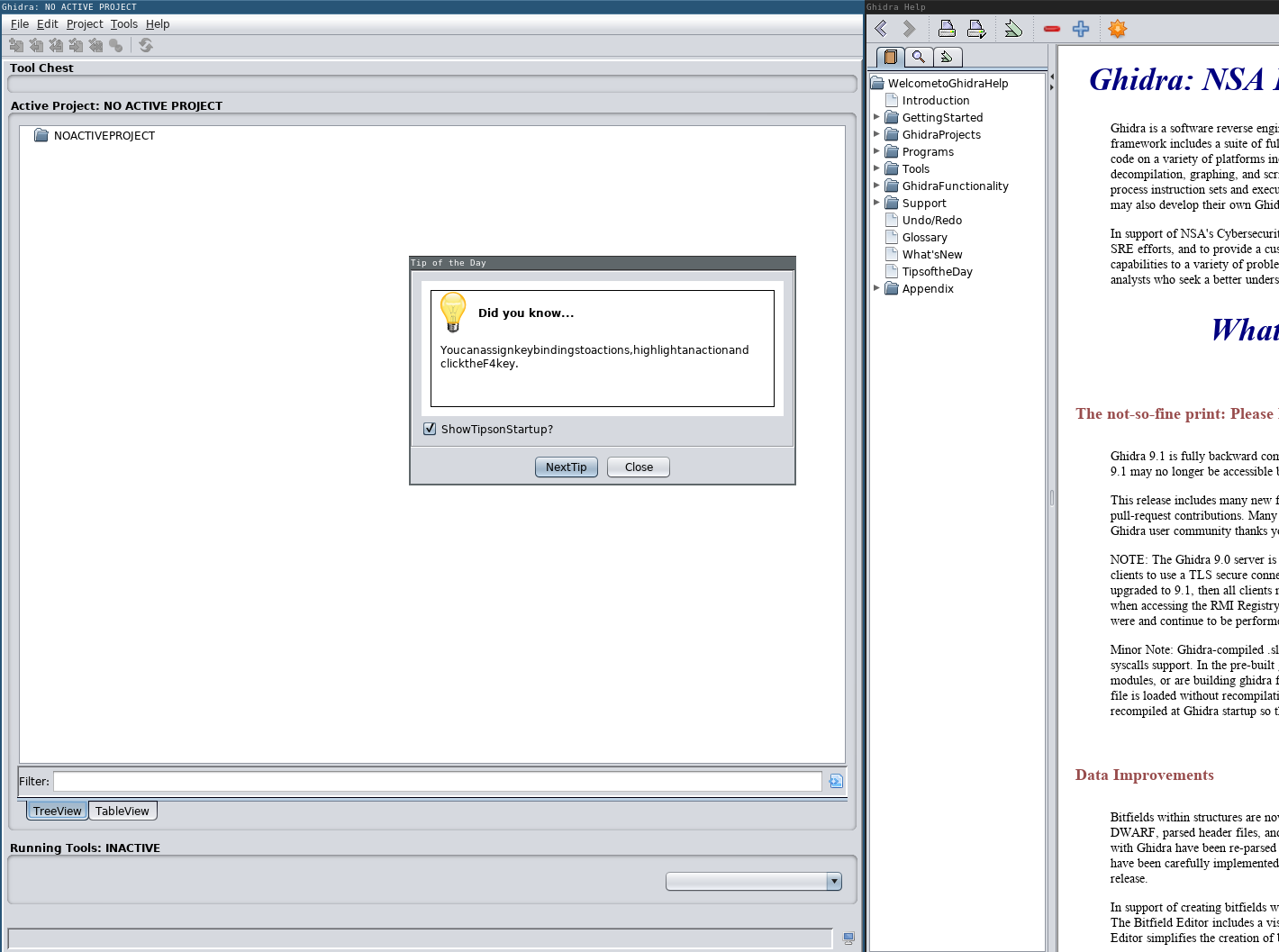
Environment (please complete the following information):
- OS: CentOS 7
- Java Version: 11.0.5
- Ghidra Version: 9.1-DEV ea554996235412571588eca36c4801b71dda087d
- Ghidra Version: 9.2-DEV 068cac365711c658505ce8f44b1d729e061b7252
It works find in 9.1-BETA downloaded from ghidra-sre.org.
 0x6d696368
All 19 comments
Did you do a build or are you running out of Eclipse?
 ryanmkurtz
on 29 Oct 2019
ryanmkurtz
on 29 Oct 2019
Did you do a build or are you running out of Eclipse?
Build via gradle buildGhidra.
I will try running from Eclipse and report back tomorrow.
0x6d696368
on 29 Oct 2019
Running from Eclipse the space characters are present (only tested with ea55499).
Cleaning everything and making a fresh rebuild solved the issue.
I. however. couldn't determine the root cause.
0x6d696368
on 30 Oct 2019
For posterity, let me add to instances where I've seen the same behavior with both Ghidra 9.0.4 and 9.1.
I first encountered this behavior when running Ghidra in Sway, a tiling Wayland window manager. Ghidra refused to start initially, which was related to Sway being a nonreparenting window manager. Running 'wmname LG3D' is a common hack to allow AWT applications to start in nonreparenting window managers. Indeed, this allowed Ghidra to start, but space characters were missing as you noted. Finally I settled on instead setting the _JAVA_AWT_WM_NONREPARENTING environment variable, which allowed Ghidra to start and resulted in text being displayed properly.
I also encountered the same problem when running Ghidra in Gnome under Wayland. Again setting the _JAVA_AWT_WM_NONREPARENTING environment variable resulted in correct text display, though this environment variable was not required for Ghidra to start under Gnome as it was under Sway.
All of this was to say that there seemed to be some mysterious Wayland/AWT interaction at play when I encountered this problem. In both cases I found a workaround, but I was far from understanding the root cause.
 ahroach
on 2 Nov 2019
ahroach
on 2 Nov 2019
I'm now getting this on the 9.1_PUBLIC downloaded from ghidra-sre.org. HELP!
@ahroach thanks for the hint. I am running i1wm. I will investigate further.
0x6d696368
on 2 Nov 2019
Running the 9.1_PUBLIC downloaded from ghidra-sre.org once via Eclipse (from GhidraDev plugin while testing an extension) has fixed the problem, also for running Ghidra 9.1 from outside of Eclipse.
I still have no idea what caused it. I will keep this issue open and either add more information as I find it or close the issue in case the problem doesn't reappear again.
0x6d696368
on 2 Nov 2019
One more note on the Gnome/Wayland scenario: I'm not sure how important the Wayland aspect actually is. It turns out that the first time I run Ghidra 9.1 under a variety of window manager setups (Gnome/Wayland, Gnome/Xorg, i3/Xorg), the text is missing spaces. If I restart Ghidra, the text is correct. And if I delete the "USER_AGREEMENT=ACCEPT" line from .ghidra/.ghidra_9.1_PUBLIC/preferences, the next time I start Ghidra text is again missing spaces, both in the user agreement window and other windows as part of that session.
All of this was in a VM running Debian Stable with openjdk version 11.0.5+10.
ahroach
on 3 Nov 2019
It turns out that the first time I run Ghidra 9.1 under a variety of window manager setups (Gnome/Wayland, Gnome/Xorg, i3/Xorg), the text is missing spaces. If I restart Ghidra, the text is correct. And if I delete the "USER_AGREEMENT=ACCEPT" line from .ghidra/.ghidra_9.1_PUBLIC/preferences, the next time I start Ghidra text is again missing spaces, both in the user agreement window and other windows as part of that session.
Can confirm for my setup i3/X11. When running Ghidra 9.1 and USER_AGREEMENT=ACCEPT is not in preferences spaces are missing. Accepting the user agreement and restarting Ghidra fixes the problem as preferences then contains USER_AGREEMENT=ACCEPT.
Not sure if this is something the Ghidra devs care to investigate further. If alternative window managers are not supported by Ghidra, this issue can be closed.
At least others with the same problem can find the conversation.
0x6d696368
on 4 Nov 2019
I investigated briefly the code relating to the User Agreement preference. I did not see anything special on our side of things. My guess is that when we show the user agreement dialog, the UI has not been fully initialized, which causes the aforementioned window managers to do something funky.
 dragonmacher
on 4 Nov 2019
dragonmacher
on 4 Nov 2019
I'm seeing this in the v 9.1.2 downloadable from https://ghidra-sre.org/ and running the ./ghidraRun script on Ubuntu 18.04 desktop. I deleted my ~/.ghidra directory and tried again. Same issue.
 huornlmj
on 25 Feb 2020
huornlmj
on 25 Feb 2020
Ditto what @huornlmj wrote above. This issue should be reopened.

 kalbfled
on 1 Mar 2020
kalbfled
on 1 Mar 2020
Same here. It's usable for sure, just a bit goofy.
 svidovich
on 5 Mar 2020
svidovich
on 5 Mar 2020
If it helps - I had the same issue with Ubuntu and the downloaded 9.1.2 public. I did not have openjdk11 installed, so did that and went to start ghidra and experienced the the aforementioned error with missing spaces. I figured it might have to do with user java environment vars and opened a new terminal, which fixed the problem.
 khae0
on 31 Mar 2020
khae0
on 31 Mar 2020
Same issue on NixOS using Sway and Xwayland. Closing ghidra and restarting it fixed the problem.
Without Xwayland, ghidra doesn't start with the error Exited with error. Run in foreground (fg) mode for more details..
Running without Xwayland fails completly with the following errors. (AFAIK this is not something that ghidra can fix, AWT just doesn't support Wayland).
Log
openjdk version "11.0.6-internal" 2020-01-14
OpenJDK Runtime Environment (build 11.0.6-internal+0-adhoc..jdk11u-jdk-11.0.6-ga)
OpenJDK 64-Bit Server VM (build 11.0.6-internal+0-adhoc..jdk11u-jdk-11.0.6-ga, mixed mode)
INFO  Using log config file: jar:file:/nix/store/n8w50a6dynifg0makhxmk9rvd2lvixlg-ghidra-9.1.2/lib/ghidra/Ghidra/Framework/Generic/lib/Generic.jar!/generic.log4j.xml (LoggingInitialization)
INFO  Using log file: /home/nils/.ghidra/.ghidra_9.1.2_PUBLIC/application.log (LoggingInitialization)
INFO  Loading user preferences: /home/nils/.ghidra/.ghidra_9.1.2_PUBLIC/preferences (Preferences)
ERROR Error: Uncaught Exception!
AWTError - Can't connect to X11 window server using ':0.0' as the value of the DISPLAY variable. (SwingExceptionHandler) java.awt.AWTError: Can't connect to X11 window server using ':0.0' as the value of the DISPLAY variable.
    at java.desktop/sun.awt.X11GraphicsEnvironment.initDisplay(Native Method)
    at java.desktop/sun.awt.X11GraphicsEnvironment$1.run(X11GraphicsEnvironment.java:102)
    at java.base/java.security.AccessController.doPrivileged(Native Method)
    at java.desktop/sun.awt.X11GraphicsEnvironment.<clinit>(X11GraphicsEnvironment.java:61)
    at java.base/java.lang.Class.forName0(Native Method)
    at java.base/java.lang.Class.forName(Class.java:315)
    at java.desktop/java.awt.GraphicsEnvironment$LocalGE.createGE(GraphicsEnvironment.java:101)
    at java.desktop/java.awt.GraphicsEnvironment$LocalGE.<clinit>(GraphicsEnvironment.java:83)
    at java.desktop/java.awt.GraphicsEnvironment.getLocalGraphicsEnvironment(GraphicsEnvironment.java:129)
    at java.desktop/sun.awt.X11.XToolkit.<clinit>(XToolkit.java:232)
    at java.base/java.lang.Class.forName0(Native Method)
    at java.base/java.lang.Class.forName(Class.java:315)
    at java.desktop/java.awt.Toolkit$2.run(Toolkit.java:588)
    at java.desktop/java.awt.Toolkit$2.run(Toolkit.java:583)
    at java.base/java.security.AccessController.doPrivileged(Native Method)
    at java.desktop/java.awt.Toolkit.getDefaultToolkit(Toolkit.java:582)
    at java.desktop/java.awt.Toolkit.getEventQueue(Toolkit.java:1494)
    at java.desktop/java.awt.EventQueue.isDispatchThread(EventQueue.java:1086)
    at java.desktop/javax.swing.SwingUtilities.isEventDispatchThread(SwingUtilities.java:1493)
    at ghidra.util.Swing.isSwingThread(Swing.java:70)
    at ghidra.util.SystemUtilities.isEventDispatchThread(SystemUtilities.java:425)
    at ghidra.util.Swing.runNow(Swing.java:210)
    at ghidra.util.Swing.runNow(Swing.java:166)
    at ghidra.util.SystemUtilities.runSwingNow(SystemUtilities.java:253)
    at ghidra.docking.util.DockingWindowsLookAndFeelUtils.setLookAndFeel(DockingWindowsLookAndFeelUtils.java:124)
    at ghidra.docking.util.DockingWindowsLookAndFeelUtils.loadFromPreferences(DockingWindowsLookAndFeelUtils.java:77)
    at ghidra.framework.GhidraApplicationConfiguration.initializeApplication(GhidraApplicationConfiguration.java:48)
    at ghidra.framework.Application.initializeApplication(Application.java:115)
    at ghidra.GhidraRun.lambda$launch$1(GhidraRun.java:78)
    at java.base/java.lang.Thread.run(Thread.java:834)


Exception: java.lang.NoClassDefFoundError thrown from the UncaughtExceptionHandler in thread "Ghidra"
 NilsIrl
on 10 Apr 2020
NilsIrl
on 10 Apr 2020
I'm seeing this on Ubuntu 18.04, using X.Org, with the latest public download from https://ghidra-sre.org (ghidra_9.1.2_PUBLIC_20200212.zip)
 VorpalBlade
on 13 Apr 2020
VorpalBlade
on 13 Apr 2020
Experiencing this issue on a fresh Ubuntu 18.04 with the openjdk-11-jdk JDK package. Ghidra being run with the "ghidraRun" script.
 ttepatti
on 18 Apr 2020
ttepatti
on 18 Apr 2020
I also experienced this on arch linux with X.org and i3. So this has nothing to do with Wayland.
NilsIrl
on 20 Apr 2020
I did some debugging. Here are the conditions needed to see the bug:
- Linux (Update 04/24/2020 - Issue not present in Ubuntu 20.04)
- User Agreement pops up
- Look & Feel is "Nimbus"
Nimbus is the hardcoded default Look & Feel on Linux. If I change the code to not use Nimbus, I don't see the issue when the User Agreement pops up. I also made Nimbus the default Look & Feel on Windows hoping that Linux doesn't have anything to do with this issue, but Windows was able to handle Nimbus and the User Agreement fine.
ryanmkurtz
on 20 Apr 2020
Running into a similar problem with Tuner Studio on Arch Linux. I found that using OpenJDK 10 instead of OpenJDK 8 fixed the missing spaces while still allowing me to use the Nimbus L&F (which I prefer over the GTK integration).
EDIT: But, of course, OpenJDK 10 might not work for compatibility reasons.
EDIT 2: Only OpenJDK 10 works, the problem returns if I use OpenJDK 11.
 MTres19
on 2 May 2020
MTres19
on 2 May 2020
Related issues
0x6d696368
·
3Comments
 Merculous
·
3Comments
Merculous
·
3Comments
 forkoz
·
3Comments
forkoz
·
3Comments
 pd0wm
·
3Comments
pd0wm
·
3Comments
 toor-de-force
·
3Comments
toor-de-force
·
3Comments
Most helpful comment
I'm seeing this in the v 9.1.2 downloadable from https://ghidra-sre.org/ and running the ./ghidraRun script on Ubuntu 18.04 desktop. I deleted my ~/.ghidra directory and tried again. Same issue.