Ghidra: Ghidra does not render correctly with GDK_SCALE set (HiDPI display)
100% perfect workaround: https://github.com/NationalSecurityAgency/ghidra/issues/1#issuecomment-480923545
Describe the bug
On HiDPI displays on Linux, it is necessary to set GDK_SCALE= for a reasonable experience with OpenJDK apps, but setting this variable causes clipping of UI elements in every window.
To Reproduce
- Acquire HiDPI machine
- Set GDK_SCALE=2 or higher
- Launch Ghidra
Expected behavior
Neatly scaled UI
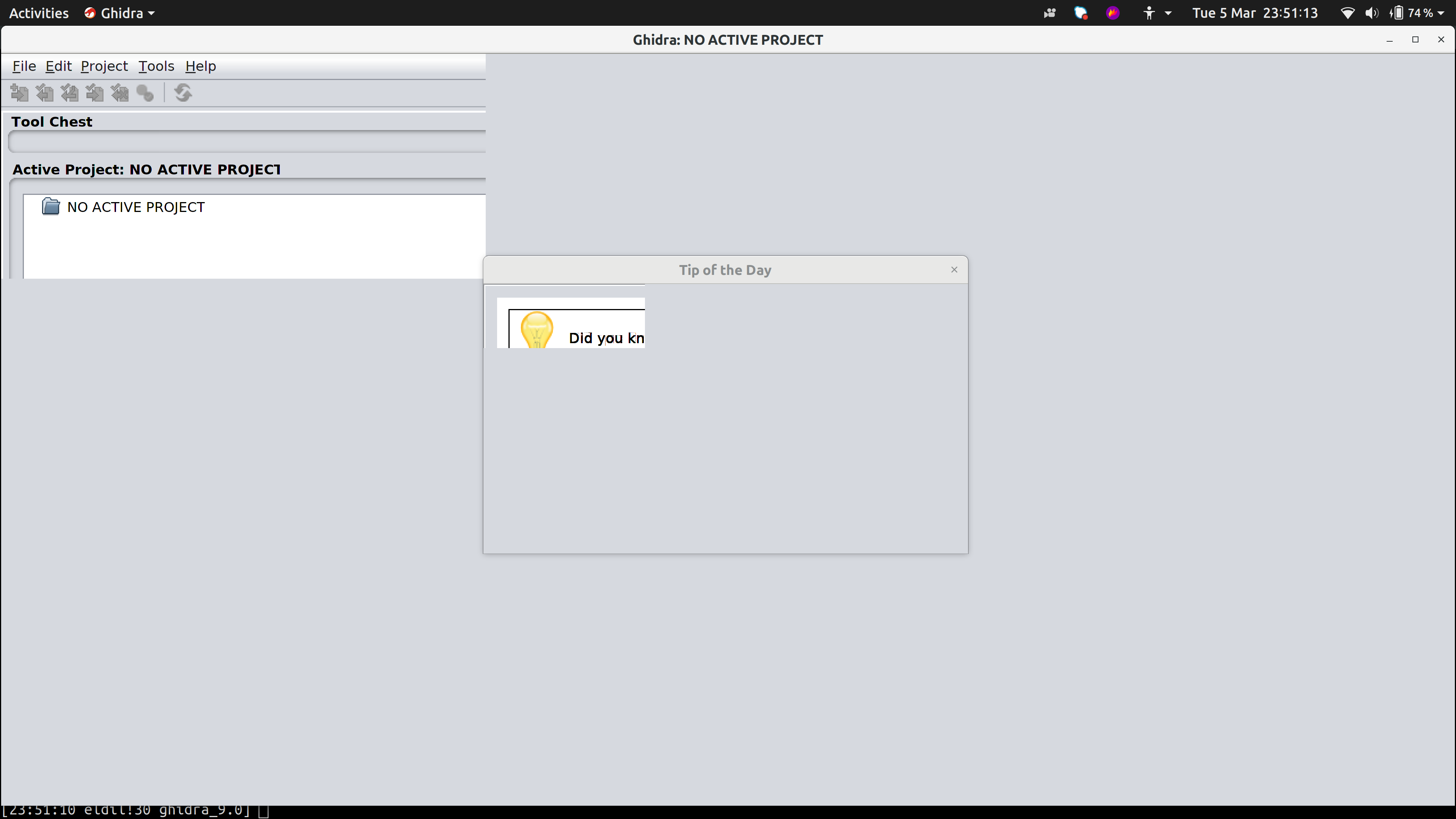
Environment (please complete the following information):
- OS: Ubuntu 18.10
- Version ghidra_9.0_PUBLIC_20190228.zip
- Dell XPS 9550 (~285 dpi)
 dw
dw
All 20 comments
setting the java2d.uiscale also results in the same -Dsun.java2d.uiScale=2
 AlexKraak
on 6 Mar 2019
AlexKraak
on 6 Mar 2019
I tried to find somewhere to jerry-rig a fix, but no luck yet. The clipping is clearly relative to the size of the container window, so I bet this is a single line of code somewhere that somehow is fetching unscaled dialog widths and copying the result to a scaled width
(but finding that line escapes me! looks like it's under docking/ somewhere. ./ghidra/app/plugin/core/totd/TipOfTheDayDialog.java shows the classes involved for the tip of the day dialog
dw
on 6 Mar 2019
Forcing the Swing look and feel to GTK+ (under Edit > Tool Options > Tool in the main window) and unsetting GDK_SCALE does slightly better, though it's still not usable. Many of the text controls are scaled properly, but the custom controls and images are not.

 ahertz
on 6 Mar 2019
ahertz
on 6 Mar 2019
Another option is to use run_scaled. It works iff you change bg to fg in the last line of ghidraRun.
 backerman
on 6 Mar 2019
backerman
on 6 Mar 2019
See https://github.com/bkerler/ghidra_installer
Tested and verified to work with Ubuntu / Kubuntu 18.04 and 18.10.
 bkerler
on 6 Mar 2019
bkerler
on 6 Mar 2019
Having spent some time debugging this I'm starting to suspect it is an Xlib scaling issue in openjdk itself. All the window->jframe->jpanel hierarchies seem sized properly (at a quotient of the scaling factor) and _should_ be scaled up consistently, but clearly some root view port's scaled size is being used as a literal resolution (thus the clipping).
I'm no java swing expert, but all the layout manager logic seems kosher to me as well. I dumped the actual window components, and they all seem correct and as expected throughout the hierarchy.
e.g. on a 3200x1800 screen, and a scale factor of 2.0:
...
javax.swing.JPanel[null.contentPane,0,33,1600x833,invalid,layout=java.awt.BorderLayout,alignmentX=0.0,alignmentY=0.0,border=,flags=9,maximumSize=,minimumSize=,preferredSize=]
javax.swing.JPanel[,0,24,1600x809,invalid,layout=java.awt.BorderLayout,alignmentX=0.0,alignmentY=0.0,border=javax.swing.border.EmptyBorder@402e0506,flags=9,maximumSize=,minimumSize=,preferredSize=]
Project Window
javax.swing.JPanel[,2,2,1596x802,invalid,layout=java.awt.BorderLayout,alignmentX=0.0,alignmentY=0.0,border=,flags=9,maximumSize=,minimumSize=,preferredSize=]
javax.swing.JPanel[,0,0,1596x802,invalid,layout=java.awt.BorderLayout,alignmentX=0.0,alignmentY=0.0,border=,flags=9,maximumSize=,minimumSize=,preferredSize=]
javax.swing.JPanel[,0,0,1596x675,invalid,layout=java.awt.BorderLayout,alignmentX=0.0,alignmentY=0.0,border=,flags=9,maximumSize=,minimumSize=,preferredSize=]
....
Which is what what you would expect to see, as openjdk itself is responsible for scaling up the scaled down resolutions for final display, but it seems at some root component this is not happening, and thus the displayed scaled output is clipped.
I suspect it's a corner case in openjdk's Linux specific XLib scaling since Ghidra scales fine on Windows HIDPI and OSX HIDPI. Unless I missed something I did not immediately see a simple fix in Ghidra itself.
 anticomputer
on 10 Mar 2019
anticomputer
on 10 Mar 2019
On my laptop, adding GDK_SCALE=2 to "launch.properties" will enlarge about half of the UI text, and does nothing for resizing icons. I don't experience any clipping, everything seems to come up, but the inconsistency in text size makes the program unusable. I'm running Centos 7, Gnome 3.28.2.
 rd0shak
on 28 Mar 2019
rd0shak
on 28 Mar 2019
Would someone with this problem mind testing Ghidra against Amazon Corretto 11 to see if they've done anything to address it? I don't have a setup to reproduce the problem. Thanks!
 ryanmkurtz
on 28 Mar 2019
ryanmkurtz
on 28 Mar 2019
I'll test against Coretto in a bit and report back.
anticomputer
on 28 Mar 2019
Tested with java-11-amazon-corretto-devel-11.0.2.9-3.x86_64.rpm and the issue persists. I believe this will probably require openjdk team support once the UI test case is isolated since it's almost certainly an issue with the Linux specific xlib scaling (there's a history of this kind of thing happening with the Linux specific scaling code). This is further supported with the native OSX version scaling fine on Retina screens (not driven by the xlib scaling code).
anticomputer
on 28 Mar 2019
Ok thanks for following up. Issue #161 reported some success switching from OpenJDK to Oracle JDK with another linux/graphics problem, so I figured it was worth a shot.
ryanmkurtz
on 28 Mar 2019
I did try with both oracle java 8 and oracle java 11 as well just in case, but no dice.
anticomputer
on 28 Mar 2019
I found this in support/launch.properties. Changing it to true fixed the problem for me.
# Resolves issue with Ubuntu when running within VM
VMARGS=-Dsun.java2d.xrender=false
 talex5
on 8 Apr 2019
talex5
on 8 Apr 2019
D'oh! I can confirm that fixes the issue for me as well.
anticomputer
on 8 Apr 2019
same here, it's fixed!
 pedrib
on 8 Apr 2019
pedrib
on 8 Apr 2019
can confirm aswell, in combination with
VMARGS=-Dsun.java2d.uiScale=2
on a 3000x2000 screen running cinnamon
 FMorsbach
on 8 Apr 2019
FMorsbach
on 8 Apr 2019
I updated launch.properties to indicate that sun.java2d.xrender set to true may address HiDPI monitor issues on Linux. We've had to set that property to false in the past to get Ghidra to render correctly in VM's so I wasn't comfortable with using true as a default just yet. We might change that in the future though.
ryanmkurtz
on 29 Apr 2019
The proposed solution does not work for me. With both ...xrender=true and ...uiscale=2, I'm getting the same broken interface as the OP. I've tried all 4 combinations (xrender true/false, uiscale 1/2) and none give a usable GUI (uiscale = 1 is correct but too small to be usable).
 X-Ryl669
on 3 Nov 2020
X-Ryl669
on 3 Nov 2020
What distro are you using?
ryanmkurtz
on 4 Nov 2020
Manjaro (based on Archlinux)
X-Ryl669
on 4 Nov 2020
Related issues
 CalcProgrammer1
·
3Comments
CalcProgrammer1
·
3Comments
 toor-de-force
·
3Comments
toor-de-force
·
3Comments
 lab313ru
·
3Comments
lab313ru
·
3Comments
 awsaba
·
3Comments
awsaba
·
3Comments
 marcushall42
·
3Comments
marcushall42
·
3Comments
Most helpful comment
I found this in
support/launch.properties. Changing it totruefixed the problem for me.