Gdevelop: Lights are not rendered in browser if radius is over 255
Describe the bug
If you set the radius of the lights higher than 255, it is no longer rendered in Safari and Chrome on iOS 13.7 and maybe also Android 9 (to be confirmed)
Here is the forum discussion about it:
https://forum.gdevelop-app.com/t/lights-does-not-render-on-ios/27492
To Reproduce
Steps to reproduce the behavior:
- Create a light object
- Set radius to 256 or higher
- Add light object to scene
- run preview over wifi, open the project in your web browser on your mobile.
- Please include a link to a game if possible!
LightTest.zip
Other details
- Include any OS/browser version/smartphone that you're using
iOS 13.7, latest version of Safari and Chrome web browser - Which version of GDevelop are you using? The desktop app or the web-app?
desktop v5 beta 100
Thanks.
 ddabrahim
All 6 comments
Chrome and Safari are the same browser on iOS, because Apple does not allow 3rd party browsers (Chrome is just a shell around Safari, which is the only allowed way to make a browser) ;)
This being said, there seems to be some glitches when rendering lights on iOS/Android indeed. Might be due to the shader being used - @HarsimranVirk would you have a device to test this?
 4ian
on 18 Sep 2020
4ian
on 18 Sep 2020
@4ian I could test on Android, but I'm not sure about the problem though. What do you suggest, how should I figure out the exact issue (whether its shader related or not)?
 HarsimranVirk
on 18 Sep 2020
HarsimranVirk
on 18 Sep 2020
Let's confirm if you can observe a glitch, and if it's related to the radius of the object: is the light showing properly for radius 50? 250? 600? 1000?
Then we can start finding some hypothesis, maybe there are some PIXI.Mesh limitations on mobile phones that may have more limited GPUs?
4ian
on 18 Sep 2020
Maybe try also with/with a few/with a lot of obstacles. Could be some uniforms not being passed properly? Or the fading effect not shown because we use some GLSL syntax not supported on some GPUs.
4ian
on 18 Sep 2020
About the hypothesis of 255 radius, I believe it's really device/chrome ver/webgl ver specific. I could easily render 1000+ radius on my device (again it was pretty pointless, because my screen was completely red, red being the color of light).
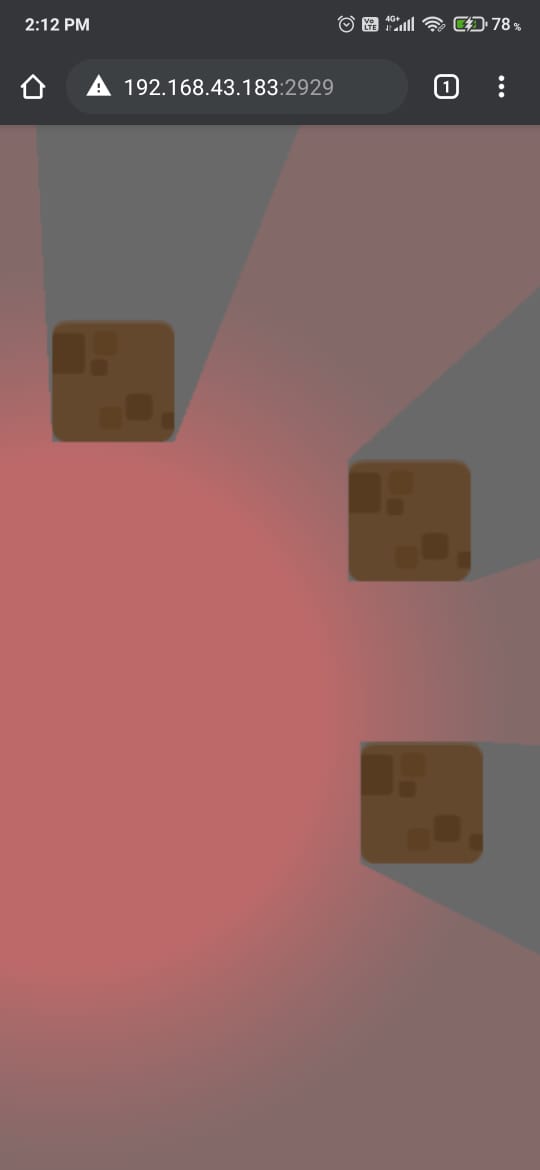
This is a 500 radius light, working fine.
Let's confirm if you can observe a glitch
About the glitch, I could see one
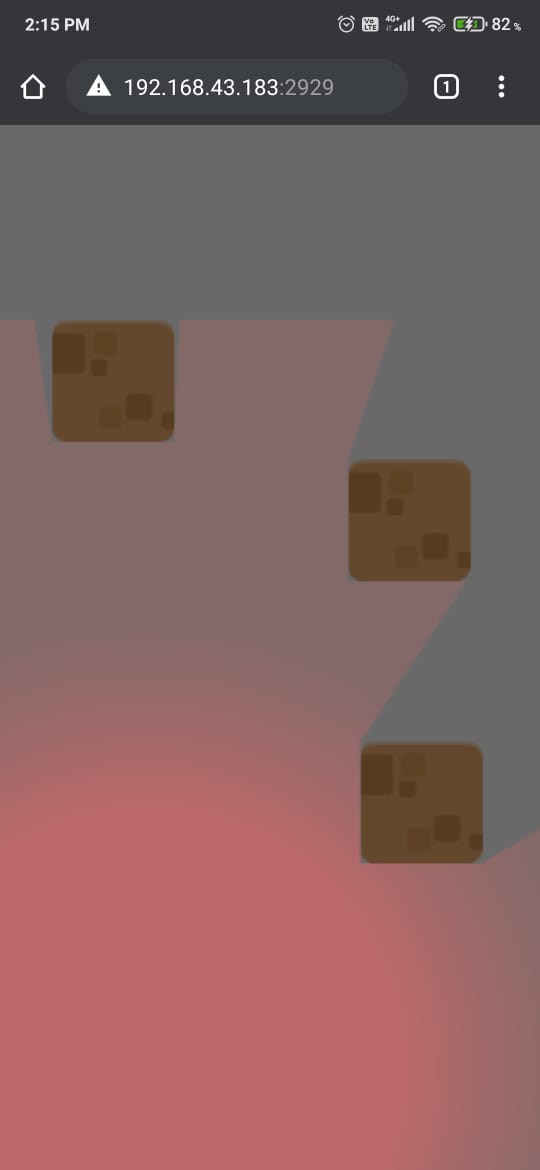
The light is cut off abruptly, this should be a shader issue I guess. I'll have to try some solutions to see if it can be fixed or not. 😬
My guess is that the fading function isn't able to get rgb(0, 0, 0) before it hits the boundary of the light object, let's try out different functions to see if they work or not.
EDIT: The guess was based on the fact that I can see light not fading out after a certain distance, the color becomes fairly constant.
HarsimranVirk
on 18 Sep 2020
The guess was based on the fact that I can see light not fading out after a certain distance, the color becomes fairly constant.
Yeah that's strange. Surely goes in the direction of the shader function not working properly.
4ian
on 20 Sep 2020
Related issues
 Jose-Moreno
·
5Comments
Jose-Moreno
·
5Comments
 Wend1go
·
3Comments
ddabrahim
·
4Comments
4ian
·
4Comments
Wend1go
·
3Comments
ddabrahim
·
4Comments
4ian
·
4Comments
 KinkGD
·
5Comments
KinkGD
·
5Comments