Gdevelop: Limited size for custom hitboxes polygon on larger image in sprite
Description :
I use a large image in a frame of a sprite, and want to use custom polygon mask, well... It's just not possible, or somehting is going wrong :
There is a zone displayed with a black line (rectangle in fact) that you can't exceed. Or maybe the values of the custom polygon points are right, but not the preview of the mask.
Illustration :
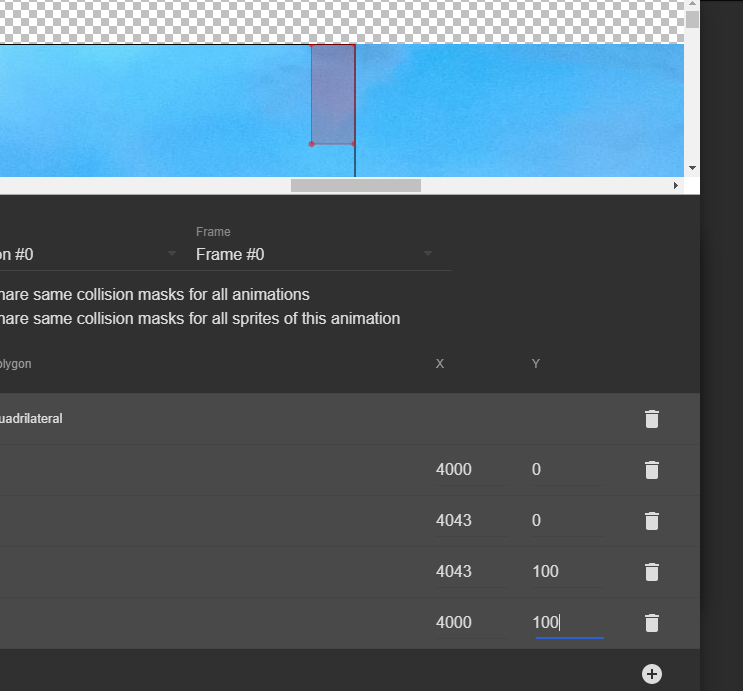
To Reproduce (or better to download the zipped file i'm giving, and take a look on custom hitboxes)
Steps to reproduce the behavior:
- new project > new object => sprite
- Add frame/image, a large image like this one : https://pixnio.com/fr/nature-paysages/ciel-fr/nature-ciel-crepuscule-fond-decran
- Edit Hitbox (and enjoy the pain of editing polygons on large image with such a small display zone (and without zoom- wich i know is coming)
- try to cover with the custom polygon for example the top right corner : impossible, or something is wrong on the view..
Project with wich i've made the screenshot :
I work on point and click game adventure game, so i use a lot of large sprite, some for static object (and easy positionning) and for the need of some animations... with custom hitboxes.
I hope this could be easily fixed... i was often using very large images in GD4 (native) without problem in sprites.
 KinkGD
All 5 comments
That is one huge sprite :)
You could optimize the game by slicing the sprite into parts that are visible on the screen and only render those when in view
Would be nice if we could do zoom in/out on this window
 blurymind
on 7 Sep 2018
blurymind
on 7 Sep 2018
Zoom would be good here. I'll try to see if I can add this or at least fix the rendering issue.
Note that this should only be a rendering issue, meaning that you can still edit the coordinates of the points (which are limited by the size of the image).
Also side note, I would not recommend at all to use such huge images for, notably because graphics card may not support it. 1024x1024 would be the maximum (if you're targeting low end mobile devices, it can be as low as 512x512, but I think it's not your case :)) for a texture to be sure that it is displayed properly.
Even iPad that are not so old might not support things larger than 2048*2048: https://stackoverflow.com/questions/2505186/what-is-the-maximum-texture-size-available-on-the-ipad
WIth a smaller image, you'll also reduce its size, so your game will be less heavy (both to download and in memory). :)
Finally if you have to display a ultra large image at some point, better in this case to split it into multiple objects.
I know that this is not changing the fact that the preview seems bugged, but be aware of these potential issues :) I might even add a warning in GDevelop.
 4ian
on 7 Sep 2018
4ian
on 7 Sep 2018
@4ian yes i agree about performance issue, i'm always concerned by this :) And i also know about the issue of 2048x2048+ textures with ipad.
I just wanted to report this rendering trouble in preview : fact is i can set the point of a polygon correctly by values, but i have to check the value x,y in an external image editor. With one image it's not a problem, but when you have multiples frames with custom hitboxes..
Also, i was used to develop only in native platform on GD4, and.. very large image where supported without trouble, and in fact i need a mimum size of 1920x1080 right now in GD5... So every X/Y coords of my points have to be checked with external editor.
About performances, i have "not so bad" (even great!) results on low spec mobiles with large images of this size : i use png8 with 32 colors or less (indexed color pal).
A fix for the rendering issue would be just perfect.
KinkGD
on 7 Sep 2018
Hi, any update on this ? It's difficult to edit hitboxes in an area limited to 200 pixels high. Maybe a larger modal window could help if a zoom functionality is too complicated.
 ced64k
on 24 May 2019
ced64k
on 24 May 2019
Still on the roadmap: https://trello.com/c/kPRc19zV/147-add-support-for-zooming-in-out-when-editing-points-hit-boxes-or-in-a-preview-of-a-sprite-in-the-sprite-editor
Did not have time lastly to work on this - even if I know it's a big pain point
4ian
on 24 May 2019
Related issues
 RyanNerd
·
4Comments
RyanNerd
·
4Comments
 Bouh
·
3Comments
4ian
·
3Comments
ced64k
·
4Comments
Bouh
·
3Comments
4ian
·
3Comments
ced64k
·
4Comments
 BWPanda
·
4Comments
BWPanda
·
4Comments
Most helpful comment
Still on the roadmap: https://trello.com/c/kPRc19zV/147-add-support-for-zooming-in-out-when-editing-points-hit-boxes-or-in-a-preview-of-a-sprite-in-the-sprite-editor
Did not have time lastly to work on this - even if I know it's a big pain point