I tried to add an AdvancedBloom and a tiltshift filter, only to discover that the classes to build those dont exist in a minified pixi.js file.
@4ian can you give me some pointers what to do if I want to add new filters from the demo here
https://pixijs.io/pixi-filters/tools/demo/
I tried following https://github.com/4ian/GDevelop/commit/a077da2f54948a1378ab40aece8fcfa55d6ab079 , but unfortunately that is missing something. Where does one add these pixi filters?
why is there a minified pixi.js file in the pixi-renderers folder? Do I need to somehow update it to get more effect constructors? Why not add them all,so its easy to do a pr to expose more to the frontend.
It seems relatively simple and returns a huge gain for the users. There are many many awesomepixi filters that we are not taking advantage of. Other favorites of mine are the crt one, the rgb shift, the color swap... These are absolutely awesome and would love to add them to GD. I kind of got stuck though, since all the filter constructors are missing - apart of BlurFilter and a few other ones.
Strangely enough the constructors are all listed in the flow file
https://github.com/4ian/GDevelop/blob/b410a1e1b3c3e6f1f1120165430d06ed5f1ba29b/newIDE/app/flow-typed/npm/pixi.js_vx.x.x.js
but if you try any here
https://github.com/4ian/GDevelop/blob/28a232d175aa8d624a526472518b0438376103cb/GDJS/Runtime/pixi-renderers/pixi-filters-tools.js
you will find they are not there at all..
I was also interested in having the ability to add these effects to individual objects, but that seems to be missing in the engine atm :)
 blurymind
All 23 comments
why is there a minified pixi.js file in the pixi-renderers folder
That's Pixi.js core source code.
Do I need to somehow update it to get more effect constructors
The effects you're referencing are part of pixi-filters, not pixi itself. They are not included in Pixi by default: https://github.com/pixijs/pixi-filters
Strangely enough the constructors are all listed in the flow file
Typings must be there for convenience, but they don't properly reflect the fact that pixi and pixi-filters are separate libraries.
Where does one add these pixi filters?
So one solution would be to add all of these pixi-filters into the GDJS Runtime, then add them in the IDE and you're "done".
The problem is that it's not very modular. Ideally we want the core of the game engine (GDJS Runtime) to stay lean and small and the rest to be provided by... extensions :) Modular extension allow to reduce the size of the game (only include files that are needed by extensions), help for the startup time (less things to parse) and memory usage, because you only "pay for what you use".
This is what pixi-filters is actually doing: filters are distributed as separate packages (or you can install everything if you want to).
To support new filters, we would need, much like you can create objects, actions, conditions, expressions, events and behaviors in extensions, to have methods to declare a new effect (addEffect, much like addAction, etc...). Read this comment: https://github.com/4ian/GDevelop/pull/1206#issuecomment-524038108 where I explain a bit what is to be done.
The addEffect method would allow to declare a descriptor of the effect (name, description, parameters) and add JS file to include. That's pretty much it, it would work like declaring an object. This surely mean also create a "gdjs.RuntimeEffect" (or something that contain makeFilter and updateParameter, like the existing filters), and finally rework gdjs.PixiFiltersTools so that these "gdjs.RuntimeEffect" that have been included in the game can be used.
With this, you would be able to create a lot of very small extensions, that contain a JsExtension.js file where you use addEffect, and a JS file containing the "gdjs.RuntimeEffect" (basically, 2 functions makeFilter and updateParameter that would use the pixi filter). You would use addIncludeFile to include this JS file and the pixi filter source.
By itself it's not an ultra complicated thing to do but requires a bit of knowledge about how extensions are working internally so I think I have to do it myself.
 4ian
on 12 Dec 2019
4ian
on 12 Dec 2019
thank you for explaining this @4ian :) I would really love to add more filters to GD.. not just the ones from that repository, but also my own.
Can you add an example filter extension when we do have support for this? It will help me in adding my filters. I believe @Wend1go would also like to work on this, so perhaps we can coordinate the work so it gets done faster?
In any case I look forward to getting support for addEffect in the extension API. Is this something that needs to be added to the trello board?
Would addEffect also automatically add the effect to both layers and objects? I hope that in this case we would not have to write a lot of boilerplate for each effect
I really like the way we can currently declare filter parameters and GD just populates them in the frontend. It would be nice if the extension api could mimic that a bit and a filter be just an jsExtension.js file with no other files, apart of the included pixi filter file.
Having more filters in GD can really help us elevate the visual presentation of games made in it. A lot of indie games on steam heavily rely on filters - especially the chromatic aberration and the crt effect filters
blurymind
on 13 Dec 2019
The night effect currently implemented in GD makes the games run very slowly on mobile.
I tested on chrome mobile the Night effect of ColorMatrix which seems to be more faster.
It needs to be checked if it really changes performance in apk with GD engine.
https://pixijs.download/dev/docs/PIXI.filters.ColorMatrixFilter.html
In addition, currently the Night filter is written with shaders while pixi already has a method to do it.
Let the PixiJS team write the shader for us. If they already do it, we don't need to rewrite behind them :)
 Bouh
on 13 Dec 2019
Bouh
on 13 Dec 2019
Is this something that needs to be added to the trello board?
Yes I think, also maybe in this new card add a link to the more general one:
https://trello.com/c/5U5dWRSd/34-support-for-visual-effects-shaders
Would addEffect also automatically add the effect to both layers and objects?
Effects are for now only for layers, but ideally in the future they could be applied to objects (by setting .filters on the PIXI object returned by getRendererObject, could be as "simple" as that.
(if that works, we would then add a list of effects to RuntimeObject, much like layers, and we would add a dialog in the IDE equivalent to the one for layers, and finally similar actions/conditions to manipulate object effects, like the one for layers).
When object are supporting effects, then we can consider "Support for Visual Effects (shaders)" to be done :)
But to answer your question yes addEffect should register an effect that can work on layer or object
I really like the way we can currently declare filter parameters and GD just populates them in the frontend.
I think that you missed that effects in the frontend are actually hardcoded here in EffectDescription.js. For example, the sepia:
Adding addEffect would in fact be a function that would look similar to what is in EffectDescription.js currently:
addEffect("blur")
  .addParameter("quality")
  .setParameterLabel(_("Number of render passes. High values cause lag"))
  .setParameterValueType("number")
  .setParameterDefaultValue(8)
  .setRange() // Optional
  .setAcceptedValues // Optional
  .setIncludeFile("my-blur-pixi-filter.js")
  .setFunctionName("makeMyBlurFilter")
In my example, makeMyBlurFilter would be the function to create your filter, probably returning itself these two functions (example for Sepia again):
and that would be it. Does that make sense?
Note that this distinction between frontend/runtime is for everything in GDevelop (you "declare" things for the IDE. This is called "Metadata" in GDevelop (when you call addObject, you creating an "ObjectMetadata", same for addAction which are creating an "InstructionMetadata") because it's information not needed at runtime).
An alternative would be to load filter "extensions" by automatically scanning folders and files for a specific convention. (but the advantage of having a separate API is that you can add extra information, like the maximum ranges for values, the accepted values, and potentially lots of other things that are making the IDE understand how to present things on screen and help the user)
Having more filters in GD can really help us elevate the visual presentation of games made in it. A lot of indie games on steam heavily rely on filters - especially the chromatic aberration and the crt effect filters
Yes I do agree it's a missing part for doing high quality rendering games and that it would be great to have!
4ian
on 13 Dec 2019
The night effect currently implemented in GD makes the games run very slowly on mobile
Shaders can be very expensive indeed for mobile to run. Depends on what the shader is doing.
We can always flag expensive ones (.setExpensiveOnMobile()) when declaring them so that we display a warning in the IDE (and possibly another warning when exporting to mobile).
I tested on chrome mobile the Night effect of ColorMatrix which seems to be more faster.
If this is much faster, I'm happy to deprecate the Night effect (.setHidden, like old actions/conditions :)).
4ian
on 13 Dec 2019
Made a card here: https://trello.com/c/cLzur8l0/386-add-support-for-declaring-new-effects-in-extensions
4ian
on 14 Dec 2019
sounds awesome :) looking forward to the api and doing a PR to add some of the popular pixi filters
blurymind
on 14 Dec 2019
I already have a branch with the object based filters running but I stopped developing since I have no knowledge about the React stuff and currently not enough time to learn it. @blurymind If you'd like to give it a go, the branch that I was working on is linked here: https://trello.com/c/5U5dWRSd/34-support-for-visual-effects-shaders-for-objects
 Wend1go
on 16 Dec 2019
Wend1go
on 16 Dec 2019
thanks @Wend1go , but I will wait until @4ian , who is already working on this merges it into master and fork from there if possible. I don't want to jump the gun before the API is fully baked :)
blurymind
on 16 Dec 2019
@Wend1go thanks for mentioning this! Your experiment is still useful to confirm that putting filters on objects for PIXI is working! 👍
For now I'll first finish the work to make extension able to bring new effects.
Then I can add the support for objects to also have effects :) (the reason is that I want to implement effects on objects without relying on a behavior - so that in the editor we can show effects independently from behaviors) (also this allows to keep behaviors only working on logic, independently from how the object is rendered).
4ian
on 16 Dec 2019
Done in https://github.com/4ian/GDevelop/pull/1321#issuecomment-566549883 🙂
Closing this but discussion can continue if you have questions.
4ian
on 17 Dec 2019
@4ian once I compile a filter from
https://github.com/pixijs/pixi-filters
like so
npm run build:prod -- --scope "@pixi/filter-emboss"
I get a minified js file and am now scratching my head. What am I to do with it. Where would you place it, what should I copy from it? None of the current filters import a third party file and I'm not sure how to import it
blurymind
on 18 Dec 2019
ah I see, I was able to just inlcude it like this
```
const crtEffect = extension
.addEffect('Crt')
.setFullName(_('Crt'))
.setDescription(_('Add Crt effect'))
.addIncludeFile('Extensions/Effects/pixi-filters/filter-crt.js')
.addIncludeFile('Extensions/Effects/crt-pixi-filter.js');
const crtProperties = crtEffect.getProperties();
crtProperties.set('curvature', new gd.PropertyDescriptor(/* defaultValue= */ '1').setLabel(_('Curvature (between 0 and 10)')).setType('number'));
;
```
blurymind
on 18 Dec 2019
another stumbling block, filterFrame comes up as undefined in the minified file
Not sure if this is due to something missing in the minified pixi.js we have atm or the way filters are declared to gd, but it is used by some of the filters I want to add
https://github.com/pixijs/pixi-filters/search?q=filterFrame&unscoped_q=filterFrame
blurymind
on 18 Dec 2019
I get a minified js file and am now scratching my head. What am I to do with it. Where would you place it, what should I copy from it?
Filter minified file are fortunately "standalone" in the way that they can execute and register themselves on the global PIXI object. So you just have to copy the whole file into a new JS file and add the registerFilterCreator for GDJS.
another stumbling block, filterFrame comes up as undefined in the minified file
Unfortunately the PixiJS filters from pixi-filters are all for Pixi.js V5 😬
We need to upgrade at some point to Pixi.js V5, seems like it would not be too hard: https://github.com/pixijs/pixi.js/wiki/v5-Migration-Guide - but there will surely some adaptations to do and as we start to have quite a lot of objects, this multiply the potential adaptations to do.
Two solutions:
- Hopefully your filter was there already when pixi-filters was released for PixiJS v4. See the list in v2.7.1 (that was supporting v4 of PixiJS): https://www.npmjs.com/package/pixi-filters/v/2.7.1
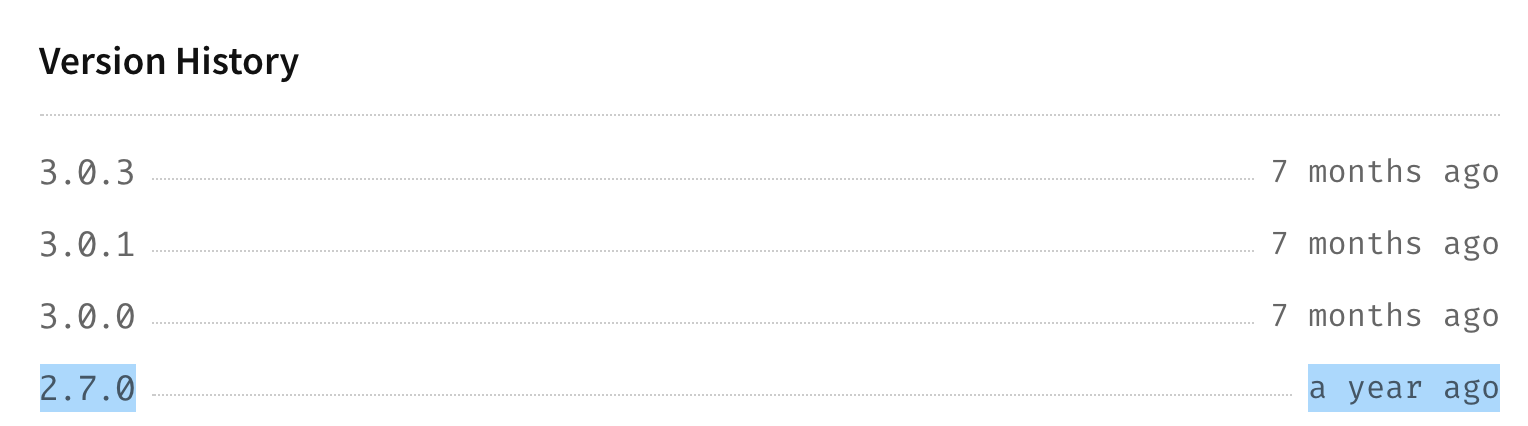
- If yes, good news, you should be able to find the filter as a package with a similar version. For example, for @pixi/filter-crt: go to https://www.npmjs.com/package/@pixi/filter-crt, click on Versions, find version 2.7.0:
- Install it locally in a random folder:
npm install @pixi/[email protected] - Find the built JS file:
node_modules/@pixi/filter-crt/lib/filter-crt.js - Copy the whole file, add
registerFilterCreator, done :)
- If yes, good news, you should be able to find the filter as a package with a similar version. For example, for @pixi/filter-crt: go to https://www.npmjs.com/package/@pixi/filter-crt, click on Versions, find version 2.7.0:
- Other solution, manually adapting the filter! Fortunately, changes to adapt filters to v4 seems fairly small :)
- Install the latest version of the filter
npm install @pixi/filter-crtand find the built JS file, somewhere in adistfolder. - See this commit that converted everything from v4 to v5: https://github.com/pixijs/pixi-filters/commit/caeac3f2ff85077befaeb18990e7fede6defc61e#diff-600fa35d9796407a3241ccc8ba6c77f9 - look for your filter, and see the changes that you need to "undo". In the case of CRT filter for example, changing back filterFrame to sourceFrame should be enough:

- Do the replacement in the minified file, then copy the whole file, add
registerFilterCreator(or adapt it from another filter), done :)
- Install the latest version of the filter
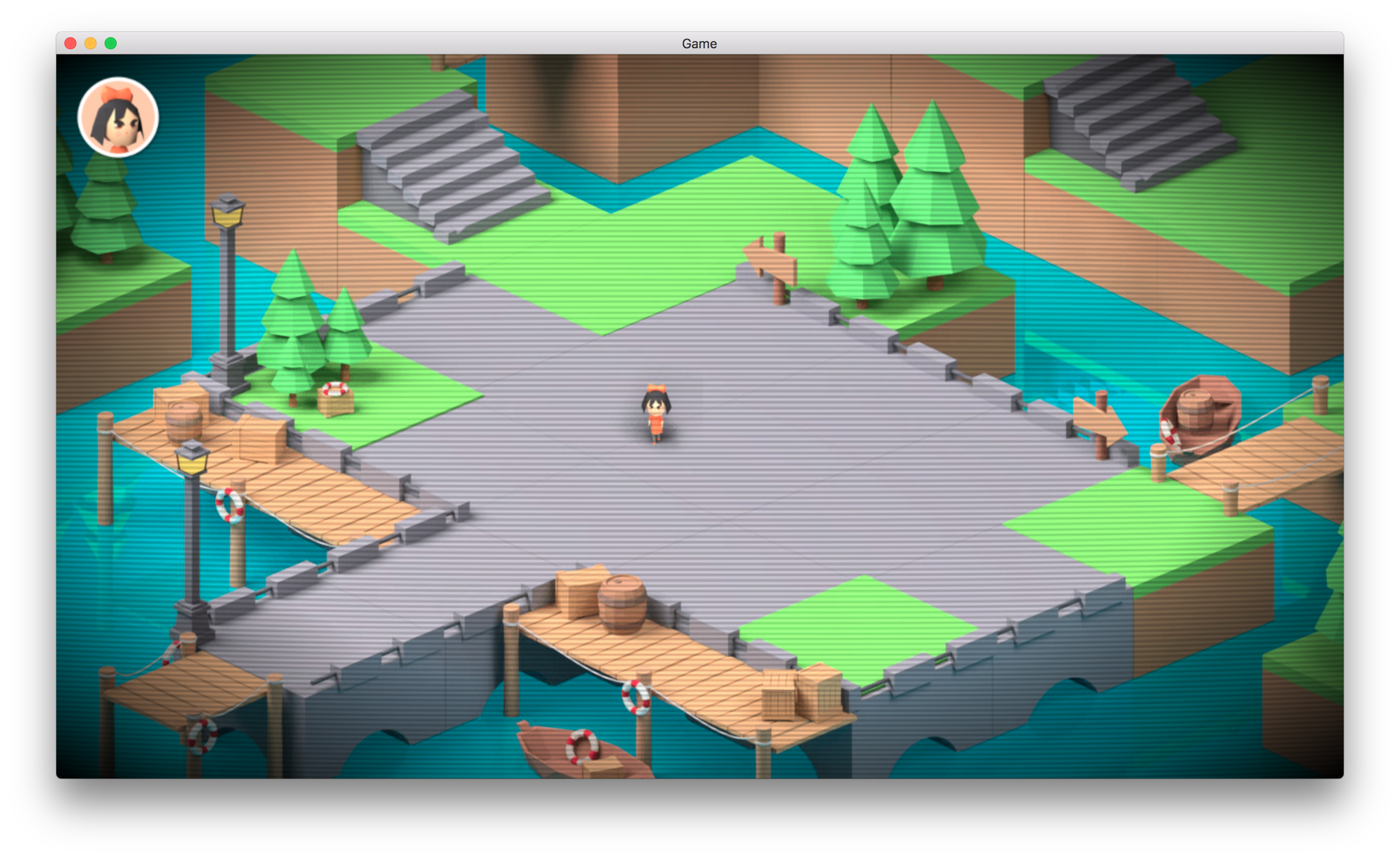
I tried both approaches for CRT Filter. It works: 😄
I would prefer to go with the first solution so that we're sure to have the unmodified filters that were working with V4. Be sure to copy also the comment
/*!
 * @pixi/filter-crt - v2.7.0`
...
which is a the top of the file, so that we can easily upgrade these filters once we upgrade to Pixi V5.
4ian
on 19 Dec 2019
Thank you for explaining this @4ian I will try to add it tonight :)
Would it be ok to try and get the newest filters to work, so when we switch to pixi5, we wont have to update them again? If the required change is so small I am leaning to altering some of the minified files where needed. It appears that only three other filters will need the same change to work with the older pixi.
It's annoying that pixi devs change name of things without keeping backwards compaibility. When we upgrade to version 5, I will need to do some small alterations to the multistyle-pixy-text library to get it to work on 5. There is already an issue raised for that and a PR by another user
blurymind
on 19 Dec 2019
Would it be ok to try and get the newest filters to work, so when we switch to pixi5, we wont have to update them again
What do you mean by newest? Some that were not in the pixi-filters repository at the time it was for v4?
Sure, make sure to add a comment explaining the changes (renamed this to this, done this). As long as they are available for V5, upgrading them will be a matter of replacing the V4 version by the V5 so it's fine :)
It's annoying that pixi devs change name of things without keeping backwards c
It's both annoying and at the same time that's probably the reason they bumped the major version number :) Changes seems not that important, but if pixi-multistyle-text is not compatible with V5, that's definitely a roadblock toward upgrading. Would be awesome to have this updated/fixed so that I could upgrade to V5 soon.
4ian
on 19 Dec 2019
Upgrading multistyle text library to 5 is straightforward. I can do a PR on
it's repo if you like :) so it would no longer be a stopping block
On Thu, Dec 19, 2019, 10:06 AM Florian Rival notifications@github.com
wrote:
Would it be ok to try and get the newest filters to work, so when we
switch to pixi5, we wont have to update them againWhat do you mean by newest? Some that were not in the pixi-filters
repository at the time it was for v4?
Sure, make sure to add a comment explaining the changes (renamed this to
this, done this). As long as they are available for V5, upgrading them will
be a matter of replacing the V4 version by the V5 so it's fine :)It's annoying that pixi devs change name of things without keeping
backwards cIt's both annoying and at the same time that's probably the reason they
bumped the major version number :) Changes seems not that important, but if
pixi-multistyle-text is not compatible with V5, that's definitely a
roadblock toward upgrading. Would be awesome to have this updated/fixed so
that I could upgrade to V5 soon.—
You are receiving this because you were mentioned.
Reply to this email directly, view it on GitHub
https://github.com/4ian/GDevelop/issues/1316?email_source=notifications&email_token=ABRRWVKXH6ZRF63DSWVUA3TQZNBSRA5CNFSM4J2DCCR2YY3PNVWWK3TUL52HS4DFVREXG43VMVBW63LNMVXHJKTDN5WW2ZLOORPWSZGOEHJDEJQ#issuecomment-567423526,
or unsubscribe
https://github.com/notifications/unsubscribe-auth/ABRRWVLBJHOZMDTRBLY2XP3QZNBSRANCNFSM4J2DCCRQ
.
blurymind
on 19 Dec 2019
Ah would be great yeah! This would make one less thing to remember when updating to V5 :)
4ian
on 19 Dec 2019
@4ian is there some way we can automatically update one of the filter values on animation update? The crt filter has a value called time, which is used to animate the effect. I can of course let the user disable animation updates
blurymind
on 19 Dec 2019
one interesting thing testing this on the platformer example's base layer - the filter doesnt seem to affect the background color fill
blurymind
on 19 Dec 2019
one interesting thing testing this on the platformer example's base layer - the filter doesnt seem to affect the background color fill
This is unfortunately "normal", in PIXI the background color is not affected by filters as it's not contained in any PIXI.Container. If you want to see the effect you need to put a background image on the layer itself. Note that for CRT like effects, we may want to add a list of "screen" effects, that would be rendered on the whole image (but need a bit of working, probably render to a render texture unless we can apply filters to a PIXI stage).
The crt filter has a value called time, which is used to animate the effect. I can of course let the user disable animation updates
That's very interesting. For now, no automatic way of doing this. I recommend that you include this in the effect description (which is not yet shown on the screen, but I plan to display it as a text) (and also add optional descriptions for the parameters, in the effects, actions, conditions). Would be better than nothing.
4ian
on 20 Dec 2019
We kind of really need to be able to increment time on a lot of these filters, otherwise they are static - kind of boring compared to their demos :)
I was kind of hoping to get that working as it adds a lot to the effect.
I made an initial PR for the CRT filter:
https://github.com/4ian/GDevelop/pull/1325
We can continue there. @Bouh is also starting to get into this and might submit a PR soon too
blurymind
on 20 Dec 2019
Related issues
Wend1go
·
5Comments
 BWPanda
·
4Comments
BWPanda
·
4Comments
 Jose-Moreno
·
5Comments
Jose-Moreno
·
5Comments
 RyanNerd
·
4Comments
RyanNerd
·
4Comments
 KinkGD
·
5Comments
KinkGD
·
5Comments
Most helpful comment
@Wend1go thanks for mentioning this! Your experiment is still useful to confirm that putting
filterson objects for PIXI is working! 👍For now I'll first finish the work to make extension able to bring new effects.
Then I can add the support for objects to also have effects :) (the reason is that I want to implement effects on objects without relying on a behavior - so that in the editor we can show effects independently from behaviors) (also this allows to keep behaviors only working on logic, independently from how the object is rendered).