Gdevelop: Random deletion of events while not being on the events editor tab?
Describe the bug
Events can be altered because the focus remains active. No matter where we are in GDevelop.
It is not even possible to delete the focus by clicking on the background of the event sheet.
The only way is to close the tab.
There are a lot of bug reports on the forum right now.
This one I put here to get a trace, but also because it is very blurry.
This is not the first time that this has happened to events that are disappearing, this is probably a lead.
To Reproduce
Steps to reproduce the behavior:
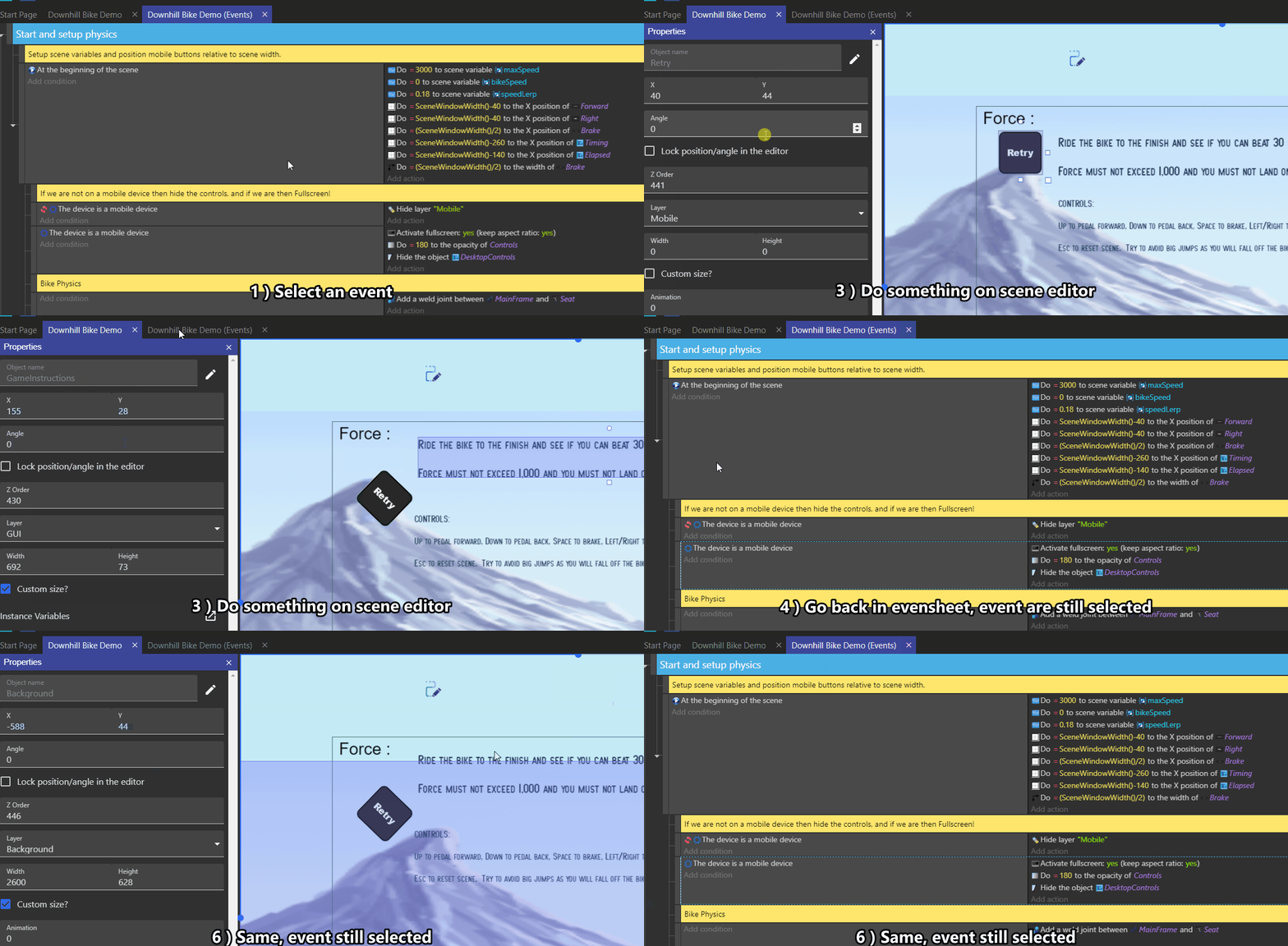
- Select a event
- Go back in scene editor, click somewhere of edit an instance.
- Go back in eventsheet, the event are still selected (border dash in blue)
Other details
Everywhere
Topic on forum
 Bouh
Bouh
All 16 comments
I guess we don't know how to reproduce this everytime with 100% certainty?
I tried to select various actions/conditions or events, then going to the scene editor and pressing "Delete" keyboard key to remove a few instances, then went back to the events editor but can't see any event being removed.
It's possible that somehow events get picked by the events editor, but I don't know how this would be the case?
- Select a event
- Go back in scene editor, click somewhere of edit an instance.
- Go back in eventsheet, the event are still selected (border dash in blue)
If we take apart the potential bug, this is the proper behavior right? It's a good thing that you can go back to a tab and still have your selection as before (much like in a browser/text editor).
 4ian
on 17 Nov 2019
4ian
on 17 Nov 2019
I guess we don't know how to reproduce this everytime with 100% certainty?
Unfortunately not
Selection in events is not useful.
If it just gives a blue dotted frame, then it is possible to do without it largely.
Unless it's necessary for something else?
To capture the bug you would need to have an listener on the events when the focus is not in an event tab.
Then the listener blocks the user with a window to say "bruh something is going on on background".
We are in beta we can afford to create tools to chase bugs.
Bouh
on 17 Nov 2019
Hey, i'm not really present nowaday here or on the forums, but i spend a lot of time on Gdevelop everyday, and i can just tell that this issue is really boring, and can happen really often...
i can't give a lot of details since it's really weird, but the case that Bouh exposed in the GIF is not the only one : on a large project (lot of scene, lot of external events and functions), without using any object on the scene (because i create them by events), it can just happen when switching from tab to tab. Not only events are impacted, this can happen on both actions or conditions selected (select an action in an event, switch tab, delete an event or some actions/conditions on the other tab, and bing! something is deleted on the other tab).
The only "workaround" is to always unselect everything before switching to another tab (i just a create an empty event before switching).
I encounter this bug since i work on GD5, but i never was able to clearly reproduce it... so i never was able to report it :(. The bigger are the event sheets, more frequent is the issue.
 KinkGD
on 18 Nov 2019
KinkGD
on 18 Nov 2019
I did add a console.log("DELETE SELECTION") in deleteSelection in EventsSheet.js, clicked on an event and then went to other tabs and press randomly the delete key.
- As long as you've focused something else (by clicking on a text field, the scene editor, etc...), it seems that you're safe.
- I did see the "DELETE SELECTION" popping up when switching to the Start Page and pressing immediately Delete after. Though I can't reproduce it.
4ian
on 18 Nov 2019
The keyboard shortcuts (like Delete) in the events sheet are deactivated when you "blur" the div containing the events sheet (the div with className="gd-events-sheet"). Might be possible that this blur event is not sent sometimes?
This goes in the direction that if you click on something else, you should be "safe" (though Kink says the contrary :/).
4ian
on 18 Nov 2019
I noticed something like that too but was hessistant to create an issue because I was unable to locate the problem.
The topmost event in one external event sheet was deleted when I was deleting something completely different in another external event sheet. It happened multiple times. But unfortunately I cannot reproduce it.
 Wend1go
on 18 Nov 2019
Wend1go
on 18 Nov 2019
Does this looks like something that started to happen recently or not?
I wonder if this can be a chrome/chromium bug that has been there for a
while, or if it's related to a recent change.
On Sun, 17 Nov 2019, 23:55 Wend1go, notifications@github.com wrote:
I noticed something like that too but was hessistant to create an issue
because I was unable to locate the problem.
I'm pretty sure that events in one external event sheet got deleted when I
was deleting something completely different in another external event
sheet. It happened multiple times. But unfortunately I cannot reproduce it.—
You are receiving this because you commented.
Reply to this email directly, view it on GitHub
https://github.com/4ian/GDevelop/issues/1292?email_source=notifications&email_token=AAJYRARW2S2ZRGUJIIQOYL3QUHKWHA5CNFSM4JOMCMV2YY3PNVWWK3TUL52HS4DFVREXG43VMVBW63LNMVXHJKTDN5WW2ZLOORPWSZGOEEIZ2XQ#issuecomment-554802526,
or unsubscribe
https://github.com/notifications/unsubscribe-auth/AAJYRAWD7FZKZ4MYYZ7KROLQUHKWHANCNFSM4JOMCMVQ
.
4ian
on 18 Nov 2019
I would do that if it doesn't affect anything else.
Hoping that the problem is not with blur() or from Electron.
onBlur={() => {
 this.setState({
  selection: clearSelection(),
 });
 this._keyboardShortcuts.blur();
}}
This existing since GD5, which release i don't know, it's not recent, i remember this last year.
Kink was telling me about it on 02/20/2019
With quick research on Discord i see an user said :
09/16/2019
Just fixed the sonic jumping bug and now all of my enemy events are missing from all level scenes
Literally as soon as I fix one thing something else in gdevelop either1) disappears
2) has events mysteriously added that weren't there before
3) an entire event group crumbles
And I have everything sorted separately just to avoid those things but I guess my organization was in vain :person_shrugging:
Bouh
on 18 Nov 2019
I reproduced something similar:
- Open a scene
- Go to the events editor, drag'n'drop an action from one event to another.
- Go to the start page
- Press Delete (backspace) key on your keyboard
The events sheet will be capturing this keyboard shortcut and calling deleteSelection. "Luckily" in this scenario, the drag'n'drop already cleared the selection so nothing is deleted. But you can clearly see the bug because the toolbar is updated at the end of the selection deletion (even if the selection is empty), so the events sheet toolbar is shown in the start page:

In this case, seems that when you drag a condition/action/event, the focus is called on your div, but then blur is for some reason never called (because I guess it really does not have the focus anymore: the drag "stole" the blur event).
Investigating the issue but the solution might be related to make KeyboardShortcuts more robust by checking the element having the focus at every key down - and ignore things if the element is not a descendant of the "root" element to which KeyboardShortcuts is attached. Will need some changes though.
4ian
on 18 Nov 2019
Another way:
- Open a scene
- Go to the events editor, drag'n'drop an action into the conditions list (so the line will be red). Nothing will be moved because it's not a valid move.
- Press delete (the action you previously tried to drag'n'drop is removed) (if you don't press it now, it won't trigger the issue).
- Go to the start page
- Press Delete on your keyboard and see that the events sheet toolbar is appearing (same issue as before).
Again here it's "fine" because the selection was already cleared when we pressed delete... but I wonder if there is a situation where we can do this and there is still an event/action/condition selected when we reach the start page (at which point pressing Delete will indeed remove it).
4ian
on 18 Nov 2019
Found how to reproduce it!! 😄
- Select a condition or action, so that the "focus" is on it
- Scroll very far from it (so that the condition/action is removed from memory, but removing it from memory does not count as losing focus ("blur") for the browser).
- Go to another tab
- Press delete
- Go back to the events sheet: the condition/action was removed.
This means that we need a more robust way of checking the focus of events sheet than relying on the "blur" event given by browsers.
This is not happening in events and this regression was "introduced" recently when I added the possibility to browse conditions/actions and parameters using the tab key (by making them focusable - while events are not).
If you want to be safe for now:
- Always keep your selection action/condition visible before switching to another tab (yeah I know...)
- Or select an event before switching to another tab.
Would appreciate if you can confirm you can reproduce the issue though :)
4ian
on 18 Nov 2019
Linking this for future reference: https://zellwk.com/blog/inconsistent-button-behavior/
I was thinking of working around the fact that onBlur is not called when you scroll too far (or when you delete something that has the focus) by checking document.activeElement. Turns out the browsers don't handle this in a consistent way. In particular buttons are not shown in document.activeElement after being clicked on Safari/Firefox Mac - so checking document.activeElement itself is risky..
4ian
on 19 Nov 2019
If the events tab is not active, do we know that?
Then we can clear the selection in the tab if we're not in it.
Bouh
on 19 Nov 2019
Ideally I want to avoid clearing the selection, as this is a remedy for the symptom, not the root cause. Other keyboard shortcuts added later could still be triggered and make modifications to events without you seeing it.
The real solution is to be sure that the KeyboardShorcuts are notified (by calling blur or having another detection mechanism) when their associated editor is not focused.
My idea is to avoid the issue of onBlur not being called: this is because when we scroll far from the focused element (focused element = the element with the blue border shown by Chrome), it's removed from the DOM (same happen if you select something and press delete) so the "body" of the page is now considered as focused - but onBlur is not called now or later on the div containing the events sheet.
I'll try a fix where I explicitly call .focus() on the events sheet div when the cursor or touch is detected on the events sheet div (and the focus is not already on a child). So that when you switch to another tab, the div is properly going from focused to blurred and the onBlur event is called.
4ian
on 19 Nov 2019
I've worked on a fix that should where I reworked the keyboard shortcuts handling so that key presses are only captured when you're focusing the events sheet - so no risk of things being deleted or changed behind your back :)
Testing this before pushing to master, and will then publish a fix version with this and other UI fixes.
4ian
on 20 Nov 2019
Should be fixed in 55aae059ffe2b5ea54ac1bc22a607e4164b4fc15, will be part of the next release
4ian
on 20 Nov 2019
Related issues
 Jeje2201
·
5Comments
Wend1go
·
5Comments
Bouh
·
4Comments
Jeje2201
·
5Comments
Wend1go
·
5Comments
Bouh
·
4Comments
 Phenomena3
·
5Comments
Phenomena3
·
5Comments
 BWPanda
·
4Comments
BWPanda
·
4Comments
Most helpful comment
Hey, i'm not really present nowaday here or on the forums, but i spend a lot of time on Gdevelop everyday, and i can just tell that this issue is really boring, and can happen really often...
i can't give a lot of details since it's really weird, but the case that Bouh exposed in the GIF is not the only one : on a large project (lot of scene, lot of external events and functions), without using any object on the scene (because i create them by events), it can just happen when switching from tab to tab. Not only events are impacted, this can happen on both actions or conditions selected (select an action in an event, switch tab, delete an event or some actions/conditions on the other tab, and bing! something is deleted on the other tab).
The only "workaround" is to always unselect everything before switching to another tab (i just a create an empty event before switching).
I encounter this bug since i work on GD5, but i never was able to clearly reproduce it... so i never was able to report it :(. The bigger are the event sheets, more frequent is the issue.