Gdevelop: grpc issues - fails to build newIde on windows - if using Node Lts or current, instead of 8.x.x
since pulling the latest master, I've been having trouble building gdevelop's newide.
npm ERR! [email protected] install: `node-pre-gyp install --fallback-to-build --library=static_library`
npm ERR! Exit status 1
this error seems caused by firebase
I am on windows 10, tried reinstalling both versions of nodejs
(current and latest)
https://nodejs.org/en/
 blurymind
All 27 comments
this is the same as
https://github.com/4ian/GDevelop/issues/698
seems to be a reoccurring issue with different versions of nodejs
blurymind
on 26 Mar 2019
@4ian seeing as to how 10.15 is the lts release of nodejs now- this can potentially be a problem for other users to build GD, unless they specifically download nodejs 8
https://nodejs.org/dist/latest-v8.x/
perhaps we should try to address this or make it clear in the readme that version 8 must be used
Has anyone been able to build GD in nodejs 10.xx LTS ? Or latest?
blurymind
on 26 Mar 2019
Can you try updating firebase to latest version in package.json, and npm install again with Node 10?
 4ian
on 26 Mar 2019
4ian
on 26 Mar 2019
doing that gets me further, but still fails to build
first i get this warning:
node-pre-gyp WARN Using request for node-pre-gyp https download
[grpc] Success: "E:\DEV\GD\GDevelop\newIde\app\node_modules\grpc\src\node\extension_binary\node-v64-win32-x64-unknown\grpc_node.node" is installed via remote
then:
.....
ECopied GDJS and extensions runtime files (*.js) to "E:\DEV\GD\GDevelop\newIDE\app\node_modules\GDJS-for-web-app-only\Runtime".
✅ Sources of Monaco Editor properly copied in public folder
internal/util/inspect.js:31
const types = internalBinding('types');
              ^

ReferenceError: internalBinding is not defined
    at internal/util/inspect.js:31:15
    at req_ (E:\DEV\GD\GDevelop\newIDE\app\node_modules\natives\index.js:137:5)
    at require (E:\DEV\GD\GDevelop\newIDE\app\node_modules\natives\index.js:110:12)
    at util.js:25:21
    at req_ (E:\DEV\GD\GDevelop\newIDE\app\node_modules\natives\index.js:137:5)
    at require (E:\DEV\GD\GDevelop\newIDE\app\node_modules\natives\index.js:110:12)
    at fs.js:42:21
    at req_ (E:\DEV\GD\GDevelop\newIDE\app\node_modules\natives\index.js:137:5)
    at Object.req [as require] (E:\DEV\GD\GDevelop\newIDE\app\node_modules\natives\index.js:54:10)
    at Object.<anonymous> (E:\DEV\GD\GDevelop\newIDE\app\node_modules\fstream\node_modules\graceful-fs\fs.js:1:99)
npm ERR! code ELIFECYCLE
npm ERR! errno 1
npm ERR! [email protected] import-resources: `cd scripts && node import-libGD.js && node import-res-folder.js && node import-GDJS-Runtime.js && node import-monaco-editor.js && node import-zipped-editor.js piskel 5.0.0-beta56 && node import-zipped-editor.js jfxr 5.0.0-beta55`
npm ERR! Exit status 1
npm ERR!
npm ERR! Failed at the [email protected] import-resources script.
npm ERR! This is probably not a problem with npm. There is likely additional logging output above.

npm ERR! A complete log of this run can be found in:
npm ERR!     C:\Users\blury\AppData\Roaming\npm-cache\_logs\2019-03-26T19_50_56_001Z-debug.log
npm ERR! code ELIFECYCLE
npm ERR! errno 1
npm ERR! [email protected] postinstall: `npm run import-resources`
npm ERR! Exit status 1
npm ERR!
npm ERR! Failed at the [email protected] postinstall script.
npm ERR! This is probably not a problem with npm. There is likely additional logging output above.

npm ERR! A complete log of this run can be found in:
npm ERR!     C:\Users\blury\AppData\Roaming\npm-cache\_logs\2019-03-26T19_50_56_092Z-debug.log
I confirm that downgrading to nodejs 8 fixes the issue, but version 8 is no longer LTS
blurymind
on 26 Mar 2019
could try this
https://support.glitch.com/t/internal-util-inspect-js-31-error/7019/4
this requires adding a new dependency
[email protected]
blurymind
on 26 Mar 2019
Mmm I'd like to identify what's the package creating the issue. 🧐 We should not have to artificially add a new dependency without knowing why.
4ian
on 26 Mar 2019
This being said, it's true that everyone is telling about this. Let me know if it's better when you npm install [email protected]
4ian
on 26 Mar 2019
Issue seems to be with fstream that is using graceful-fs that is using some Node internals. We should see what is using fstream and if we can update this.
EDIT: might be unzip2:
├─ [email protected]
│  ├─ binary@~0.3.0
│  ├─ fstream@~0.1.21
│  ├─ [email protected]
│  │  ├─ graceful-fs@~3.0.2
EDIT: unzip2 seems abandoned :/ Should switch to something else to unzip files.
EDIT2: https://www.npmjs.com/package/unzipper seems better
4ian
on 26 Mar 2019
Can you pull master and retry? I've replaced unzip2 by unzipper, which comes with a newer version of fstream (v1) and graceful-fs (v4). Hopefully all of this is compatible with Node 10.
4ian
on 26 Mar 2019
I'm having an issue with grpc as well. I have windows 7, a few weeks ago I tried using the latest LTS and it failed. Yesterday I tried using version 8.9.4 and version 8.15.0 and both failed, it's always the grpc 1.10.0 stalling. I tried installing only that package and it froze as well.
There's also a warning about the monaco tarball being corrupted.
This is from February 19th when installing with 10.15.1 LTS:

This is from yesterday installing with 8.15.0

Actually i tried to install yesterday with 10.15 again but i got a ton of errors and I had recalled that other users had similar experience on discord, so they recommended using 8.x.x
 Jose-Moreno
on 27 Mar 2019
Jose-Moreno
on 27 Mar 2019
@4ian I will try to build on 10 again tonight
@Jose-Moreno are you sure you have enough disk space on C drive? The tarball warning indicates that it possibly fails to download the whole thing
blurymind
on 27 Mar 2019
@Jose-Moreno:
I tried installing only that package and it froze as well.
This indicates to me that the problem is more related to Node or your system than GDevelop. Not sure what's going on but this looks like permission/space disk issue.
@Jose-Moreno are you sure you have enough disk space on C drive? The tarball warning indicates that it possibly fails to download the whole thing
Good thing to check indeed.
4ian
on 27 Mar 2019
it's worth deleting the node_modules folder between tries too :)
blurymind
on 27 Mar 2019
Yeah, always always delete node_modules and re-run npm install :)
4ian
on 27 Mar 2019
@4ian I had a try - still fails to build. Same reason :(
Heres log:
PS E:\DEV\GD\GDevelop\newIde\app> npm install

> [email protected] install E:\DEV\GD\GDevelop\newIde\app\node_modules\grpc
> node-pre-gyp install --fallback-to-build --library=static_library

node-pre-gyp ERR! Tried to download(403): https://storage.googleapis.com/grpc-precompiled-binaries/node/grpc/v1.10.1/node-v64-win32-x64-unknown.tar.gz
node-pre-gyp ERR! Pre-built binaries not found for [email protected] and [email protected] (node-v64 ABI, unknown) (falling back to source compile with node-gyp)
node-pre-gyp ERR! Pre-built binaries not installable for [email protected] and [email protected] (node-v64 ABI, unknown) (falling back to source compile with node-gyp)
node-pre-gyp ERR! Hit error Connection closed while downloading tarball file
Traceback (most recent call last):
  File "C:\Program Files\nodejs\node_modules\npm\node_modules\node-gyp\gyp\gyp_main.py", line 16, in <module>
    sys.exit(gyp.script_main())
  File "C:\Program Files\nodejs\node_modules\npm\node_modules\node-gyp\gyp\pylib\gyp\__init__.py", line 545, in script_main
    return main(sys.argv[1:])
  File "C:\Program Files\nodejs\node_modules\npm\node_modules\node-gyp\gyp\pylib\gyp\__init__.py", line 538, in main
    return gyp_main(args)
  File "C:\Program Files\nodejs\node_modules\npm\node_modules\node-gyp\gyp\pylib\gyp\__init__.py", line 523, in gyp_main
    generator.GenerateOutput(flat_list, targets, data, params)
  File "C:\Program Files\nodejs\node_modules\npm\node_modules\node-gyp\gyp\pylib\gyp\generator\msvs.py", line 2025, in GenerateOutput
    version=msvs_version)
  File "C:\Program Files\nodejs\node_modules\npm\node_modules\node-gyp\gyp\pylib\gyp\MSVSNew.py", line 213, in __init__
    self.Write()
  File "C:\Program Files\nodejs\node_modules\npm\node_modules\node-gyp\gyp\pylib\gyp\MSVSNew.py", line 340, in Write
    f.close()
  File "C:\Program Files\nodejs\node_modules\npm\node_modules\node-gyp\gyp\pylib\gyp\common.py", line 393, in close
    os.rename(self.tmp_path, filename)
WindowsError: [Error 183] Cannot create a file when that file already exists
gyp ERR! configure error
gyp ERR! stack Error: `gyp` failed with exit code: 1
gyp ERR! stack     at ChildProcess.onCpExit (C:\Program Files\nodejs\node_modules\npm\node_modules\node-gyp\lib\configure.js:345:16)
gyp ERR! stack     at ChildProcess.emit (events.js:189:13)
gyp ERR! stack     at Process.ChildProcess._handle.onexit (internal/child_process.js:248:12)
gyp ERR! System Windows_NT 10.0.17134
gyp ERR! command "C:\\Program Files\\nodejs\\node.exe" "C:\\Program Files\\nodejs\\node_modules\\npm\\node_modules\\node-gyp\\bin\\node-gyp.js" "configure" "--fallback-to-build" "--library=static_library" "--module=E:\\DEV\\GD\\GDevelop\\newIde\\app\\node_modules\\grpc\\src\\node\\extension_binary\\node-v64-win32-x64-unknown\\grpc_node.node" "--module_name=grpc_node" "--module_path=E:\\DEV\\GD\\GDevelop\\newIde\\app\\node_modules\\grpc\\src\\node\\extension_binary\\node-v64-win32-x64-unknown"
gyp ERR! cwd E:\DEV\GD\GDevelop\newIde\app\node_modules\grpc
gyp ERR! node -v v10.15.3
gyp ERR! node-gyp -v v3.8.0
gyp ERR! not ok
node-pre-gyp ERR! build error
node-pre-gyp ERR! stack Error: Failed to execute 'C:\Program Files\nodejs\node.exe C:\Program Files\nodejs\node_modules\npm\node_modules\node-gyp\bin\node-gyp.js configure --fallback-to-build --library=static_library --module=E:\DEV\GD\GDevelop\newIde\app\node_modules\grpc\src\node\extension_binary\node-v64-win32-x64-unknown\grpc_node.node --module_name=grpc_node --module_path=E:\DEV\GD\GDevelop\newIde\app\node_modules\grpc\src\node\extension_binary\node-v64-win32-x64-unknown' (1)
node-pre-gyp ERR! stack     at ChildProcess.<anonymous> (E:\DEV\GD\GDevelop\newIDE\app\node_modules\grpc\node_modules\node-pre-gyp\lib\util\compile.js:83:29)
node-pre-gyp ERR! stack     at ChildProcess.emit (events.js:189:13)
node-pre-gyp ERR! stack     at maybeClose (internal/child_process.js:970:16)
node-pre-gyp ERR! stack     at Process.ChildProcess._handle.onexit (internal/child_process.js:259:5)
node-pre-gyp ERR! System Windows_NT 10.0.17134
node-pre-gyp ERR! command "C:\\Program Files\\nodejs\\node.exe" "E:\\DEV\\GD\\GDevelop\\newIDE\\app\\node_modules\\grpc\\node_modules\\node-pre-gyp\\bin\\node-pre-gyp" "install" "--fallback-to-build" "--library=static_library"
node-pre-gyp ERR! cwd E:\DEV\GD\GDevelop\newIde\app\node_modules\grpc
node-pre-gyp ERR! node -v v10.15.3
node-pre-gyp ERR! node-pre-gyp -v v0.7.0
node-pre-gyp ERR! not ok
Failed to execute 'C:\Program Files\nodejs\node.exe C:\Program Files\nodejs\node_modules\npm\node_modules\node-gyp\bin\node-gyp.js configure --fallback-to-build --library=static_library --module=E:\DEV\GD\GDevelop\newIde\app\node_modules\grpc\src\node\extension_binary\node-v64-win32-x64-unknown\grpc_node.node --module_name=grpc_node --module_path=E:\DEV\GD\GDevelop\newIde\app\node_modules\grpc\src\node\extension_binary\node-v64-win32-x64-unknown' (1)
npm WARN optional SKIPPING OPTIONAL DEPENDENCY: [email protected] (node_modules\fsevents):
npm WARN notsup SKIPPING OPTIONAL DEPENDENCY: Unsupported platform for [email protected]: wanted {"os":"darwin","arch":"any"} (current: {"os":"win32","arch":"x64"})
npm WARN optional SKIPPING OPTIONAL DEPENDENCY: [email protected] (node_modules\fork-ts-checker-webpack-plugin\node_modules\fsevents):
npm WARN notsup SKIPPING OPTIONAL DEPENDENCY: Unsupported platform for [email protected]: wanted {"os":"darwin","arch":"any"} (current: {"os":"win32","arch":"x64"})

npm ERR! code ELIFECYCLE
npm ERR! errno 1
npm ERR! [email protected] install: `node-pre-gyp install --fallback-to-build --library=static_library`
npm ERR! Exit status 1
npm ERR!
npm ERR! Failed at the [email protected] install script.
npm ERR! This is probably not a problem with npm. There is likely additional logging output above.

npm ERR! A complete log of this run can be found in:
npm ERR!     C:\Users\blury\AppData\Roaming\npm-cache\_logs\2019-03-27T20_06_56_614Z-debug.log
PS E:\DEV\GD\GDevelop\newIde\app>
Have you had an opportunity to try it with nodejs 10? If so, is it fixed on macOs?
blurymind
on 27 Mar 2019
I tried installing [email protected], doesn't fix it either :)
blurymind
on 27 Mar 2019
when trying to run it after the failed install, you get this
Failed to compile.

./src/Utils/GDevelopServices/Authentification.js
Module not found: Can't resolve 'firebase' in 'E:\DEV\GD\GDevelop\newIDE\app\src\Utils\GDevelopServices'
doesnt even start
blurymind
on 27 Mar 2019
@blurymind @4ian Hi, thanks. Just to be clear I never said it's the fault of GDevelop, I explicitly said it's a problem with the GRPC 1.10.1 package, as well as the monaco tarball showing signs of corruption (says so in the images). I even mentioned that i tried to download each package individually, without GDevelop.
For sure, It may even be a problem with npm for windows itself which is pulling corrupted tarballs for that specific distribution of monaco editor, but the fundamental problem is: no grpc, no GDevelop. Also, FYI , I deleted / cleaned the npm-cache / .staging folders between tries.
In reply to your other comment, I am the administrator of my system, ran git-bash as admin and have over 120 GB left in the HD to download these packages, so i kind of doubt it's a problem with disk space :confused: Though I agree that this may be a very Windows specific problem with permissions (no surprise there to be honest :weary: ) however other packages download just fine, it's just the grpc that fails.
That said, I'm not the only one that's been affected by this though, people on discord and on the grpc github repo have expressed similar problems, so this is an old problem it seems (I already tried their solutions but no luck).
I personally just wanted to share the related issues in lieu of helping you find a solution, so apologies if my comment seemed unhelpful. I wish I could help more but this Node ecosystem is quite complex for the uninitiated. When I have some free time i'm willing to install each package individually if that's what it takes, I'll also have to try and use yarn instead of npm to see if that solves the problem. Thank you both for your replies and for testing this problem. Cheers.
Jose-Moreno
on 30 Mar 2019
@blurymind @4ian Hey, I'm back. So, I tried working with Yarn and unfortunately I couldn't make it work as Yarn seems to have it's own set of unresolved bugs however thanks to that, I ended up deleting the existing locked files (package-lock.json + yarn.lock) that come in the newIDE folder when cloning the repo, and well suffice to say that everything worked now! :tada:
I installed the grpc package individually first and downloaded super fast, no issues. Then I proceeded to download the rest by using npm install and aside from a few deprecation warnings it worked well with version 8.15.0 (which didn't work before as shown) so at least that part has been fixed for me (but IMO could be added as a troubleshooting step for new devs in the wiki).
Afterwards I cleaned everything again and tried to install via npm but this time using the latest Node LTS (10.15.3) and well at least now I'm getting consistent errors with Todor:
57585 verbose stack Error: [email protected] install:
node-pre-gyp install --fallback-to-build --library=static_library
57585 verbose stack Exit status 1
57585 verbose stack at EventEmitter.(C:\Users\MORE\AppData\Roaming\nvm\v10.15.3\node_modules\npm\node_modules\npm-lifecycle\index.js:301:16)
57585 verbose stack at EventEmitter.emit (events.js:189:13)
57585 verbose stack at ChildProcess.(C:\Users\MORE\AppData\Roaming\nvm\v10.15.3\node_modules\npm\node_modules\npm-lifecycle\lib\spawn.js:55:14)
57585 verbose stack at ChildProcess.emit (events.js:189:13)
57585 verbose stack at maybeClose (internal/child_process.js:970:16)
57585 verbose stack at Process.ChildProcess._handle.onexit (internal/child_process.js:259:5)
57586 verbose pkgid [email protected]
57587 verbose cwd C:\Users\MORE\source\repos\GDevelop\newIDE\app
57588 verbose Windows_NT 6.1.7601
57589 verbose argv "C:\Program Files\nodejs\node.exe" "C:\Program Files\nodejs\node_modules\npm\bin\npm-cli.js" "install"
57590 verbose node v10.15.3
57591 verbose npm v6.4.1
57592 error code ELIFECYCLE
57593 error errno 1
57594 error [email protected] install:node-pre-gyp install --fallback-to-build --library=static_library
57594 error Exit status 1
57595 error Failed at the [email protected] install script.
57595 error This is probably not a problem with npm. There is likely additional logging output above.
57596 verbose exit [ 1, true ]
I found a few related issues with this same error on github, but their solutions wouldn't work either even though it seems to be related to permissions.
I tried installing node-gyp globally, but that didn't work. Tried using the --unsafe-perm=true flag but it didn't work either A lot of people seem to be getting this same error even on other OS' (e.g Ubuntu) but most commonly on Windows.
Lastly, I found that in older iterations of this problem some people seem to have fixed it by installing firebase which pulls grpc as a dependency. I've tried this with Node LTS 10.15.3 and it works! Although grpc is installed as a module inside the @ firebase folder, so i'm not sure if this is an actual workaround for this problem? What do you think? Will this let GDevelop build and work as expected if we do it like this?

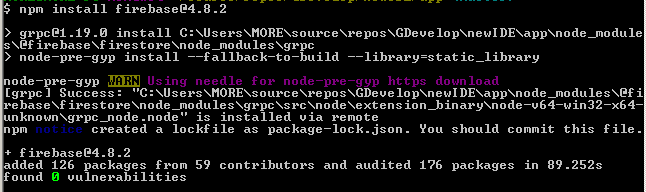
Edit: I noticed that even though I pulled the same version of firebase that GDevelop has on it's package.json the actual grpc version that appears as a dependency is 1.7.1 and not 1.10.1, so I guess this might not be a proper workaround either :confused:

Jose-Moreno
on 31 Mar 2019
grpc is not a direct dependency of GDevelop, it's being pulled because it's being required by firebase (it seems).
So it's fine to have a slightly different version, as long as it works. npm/yarn are responsible for pulling a version that should be compatible according to firebase package.json - so yeah seems like a proper workaround.
Still wondering why it's not working with the "official" package-lock.json and yarn.lock that I commited. I guess it's pinning some version with issues. I could try upgrading to Node.js 10
4ian
on 31 Mar 2019
@4ian That's great to hear actually, now it's all clear. After doing a bit more research into firebase's json it seems that it's firestore that needs grpc:
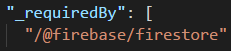
"@firebase/firestore": {
      "version": "0.2.3",
      "resolved": "https://registry.npmjs.org/@firebase/firestore/-/firestore-0.2.3.tgz",
      "integrity": "sha512-RNOvUPfswoZlldd/Kopwp8nOvSpXDP1Sqmsh/yU/0o/zbBL5Cbf8qXdmaGaGoEHyQKnXTEJhhVq4uduHnoSoZg==",
      "requires": {
        "@firebase/firestore-types": "0.1.1",
        "@firebase/webchannel-wrapper": "0.2.6",
        "grpc": "^1.7.1"
      }
What's bothering me now is that I tried just to remove the explicit grpc line from the package.json file to let firebase pull the required version by itself, and it's really odd that it keeps failing with the same [email protected] error, even though the property is gone form the package.json file, but when pulling [email protected] by itself it works and on it's own pulls [email protected] and today it places the folder outside of @ firebase, and not inside like in the previous screenshot :confused: So now I have to install firebase first before running npm install to finish the process, or I get more errors that do not allow me to continue haha.
There's also a problem when i use npm start (says webpack is outdated) but it seems unrelated to this specific issue so i'll ask in the discord later.
Jose-Moreno
on 1 Apr 2019
Ok, so I was having some issues with webpack versions being higher for @storybook than for react-scripts but I downgraded (npm install [email protected]) the same version on storybook\react and storybook\core and the install automatically deduped (de-duplicated) the version to point to the one in react-scripts, which requires it as a direct dependency it seems.
Once I did that, after all the problems I managed to run npm start and the webserver with gdevelop ran using Node LTS 10.15.3
It seems the electron build also opened succesfully so I'll gladly plan to make a quick video guide with my experience for other people to workaround this issue without much difficulty, at least meanwhile there's a more definite solution. Thanks again for both of your input!
Jose-Moreno
on 4 Apr 2019
I've (if I'm not mistaken) fixed compatibility with Node.js 10 by upgrading firebase (which was previously requiring the old version of grpc). At least, it's building on Node 10 LTS :)
Let me know if it's better.
4ian
on 30 May 2019
I'll test it out and let you know soon. Thanks for all the hard work! :blush:
Jose-Moreno
on 1 Jun 2019
@4ian Excellent! the fix did for my environment. Now following the guide is enough to get both web and electron versions running, no more grpc issues! :tada: @blurymind can you test it to see if it works for you as well? despite some audit warnings I managed to build with 10.15.3 LTS easily thanks to Florian's firebase upgrade.
Jose-Moreno
on 9 Jun 2019
Good to know! Thanks for checking :) Should hopefully help more people run development versions of GD.
4ian
on 9 Jun 2019
Related issues
 KinkGD
·
5Comments
KinkGD
·
5Comments
 Wend1go
·
3Comments
Wend1go
·
3Comments
 shadow00dev
·
4Comments
shadow00dev
·
4Comments
 PascalLadalle
·
3Comments
PascalLadalle
·
3Comments
 Bouh
·
4Comments
Bouh
·
4Comments
Most helpful comment
grpcis not a direct dependency of GDevelop, it's being pulled because it's being required by firebase (it seems).So it's fine to have a slightly different version, as long as it works. npm/yarn are responsible for pulling a version that should be compatible according to firebase package.json - so yeah seems like a proper workaround.
Still wondering why it's not working with the "official" package-lock.json and yarn.lock that I commited. I guess it's pinning some version with issues. I could try upgrading to Node.js 10