Gdevelop: Android apks are built debuggable
When upload to Google Play says
Upload failed
You uploaded a debuggable APK or Android App Bundle. For security reasons you need to disable debugging before it can be published in Google Play. Find out more about debuggable APKs or Android App Bundles.
You uploaded an APK that is not signed with the upload certificate. You must use the same certificate. The upload certificate has fingerprint:
....
There are other users reporting same behaviour on gdevelop forums.
I dissasembled apk with apktool and indeed, androidmanifest.xml contains a debuggable=true section.
Happened once some days ago, but know happened more than 10 times
 xiscoj
All 68 comments
Might need to recompile it manually on Android Studio and generate a signed one. Else would be nice to add it into game properties too like the same as admob id.
 ghost
on 13 Feb 2019
ghost
on 13 Feb 2019
I'm struggling with Android Studio no luck until now. I've found a web where they say to add --release option to cordova on compilation.
xiscoj
on 13 Feb 2019
hi still compiling debuggable apks
xiscoj
on 16 Feb 2019
Just happened to me too today. Was adding my final version of my app to Play Store and it isn't letting me submit. Trying to work out what to do now.
 Baylissimo
on 18 Feb 2019
Baylissimo
on 18 Feb 2019
Is this what we need to do? In conjunction with making our own keystore, etc.?
Build for android platform in release mode with specified signing parameters:
cordova build android --release -- --keystore="..android.keystore" --storePassword=android --alias=mykey
from
[https://cordova.apache.org/docs/en/latest/reference/cordova-cli/]
Baylissimo
on 18 Feb 2019
hi,
yes I think it is the problem is that we need to contact google to reset upload key and send them te new generated key. I think 4ian could solve this by 2 methods (maybe i'm wrong):
1.- add --release to the build options
2.- Allow us to download the key used to compile
Here is how to do option 2
http://cauldron.pt/pt/lost-keystore-how-to-generate-and-register-a-new-upload-key-mac/
I'm working on it :-(
xiscoj
on 18 Feb 2019
This won't help with a simple solution for Gdevelop or for people who already have apps published on the store. But just letting you know for restarting, I unpublished and renamed my app on the play console and started from scratch. Used Cordova command line to build Android project. Opened it in Android Studio. A few hours of updating and learning later, I have bundled builds for the play store with all the necessary keys and certificates. And uploaded a second apk to make sure it is accepting it.
Baylissimo
on 18 Feb 2019
From Android Studio you have to generate signed bundle or apk to avoid debuggable error code.
Baylissimo
on 18 Feb 2019
Sorry for the bad user experience here! I'll try to add releases build for next version.
Otherwise, going manually with Cordova/Android studio is the way to go. We could document this on the wiki.
 4ian
on 18 Feb 2019
4ian
on 18 Feb 2019
Thanks Florian. All good. Going to bed now but I'll try and write it up a bit more clearly and concisely tomorrow at work, if that helps.
I'm so happy I got it working. Sending the link to my internal testers now.
Baylissimo
on 18 Feb 2019
hi,
google contacted me with instructions to generate new key, now I'n fighting with android studio and cordova to generate a signed apk waiting for your document @Baylissimo
xiscoj
on 18 Feb 2019
Not sure if this will help... 🤔
https://stackoverflow.com/questions/10930331/how-to-sign-an-already-compiled-apk
You will have to remove from playstore and start from scratch as the signature will be different.
 zatsme
on 18 Feb 2019
zatsme
on 18 Feb 2019
@4ian Going forward, could the online service could accept keystore parameters from the gui and sign the APK with release flags 😁
zatsme
on 18 Feb 2019
@zatsme the problem here is that we don't have the key to sign apks.
It gdevelop could accept our key it would be great
xiscoj
on 18 Feb 2019
@zatsme the problem here is that we don't have the key to sign apks.
It gdevelop could accept our key it would be great
Did you look at the link? You can unpack the apk, sign it yourself and then upload to Google. If that's not your problem then I don't understand the problem 😞
zatsme
on 18 Feb 2019
Hi @zatsme. Have you tried it? I think the issue is signing the apk after it has already been submitted. That's why I shelved my first release and just recreated it with a proper keystore etc. via cordova and Android Studio.
Baylissimo
on 19 Feb 2019
Here's the walkthrough of my process. Very rambly and nooby (I'm still getting my head around everything.) But it seems to work. @xiscoj Here it is. Ask me anything.
ExportAsCordovaProject (2).pdf
Baylissimo
on 19 Feb 2019
I'm starting to think that I may just be able to go from Gdevelop to Android Studio without using Cordova in the middle. Shows how much of a noob I am.
Baylissimo
on 19 Feb 2019
@zatsme the problem here is that we don't have the key to sign apks.
It gdevelop could accept our key it would be greatDid you look at the link? You can unpack the apk, sign it yourself and then upload to Google. If that's not your problem then I don't understand the problem disappointed
hi,
the problem is that we don't have the key to sign because google generates it from the first apk you upload and it was generated by gdevelop. Thats the problem. Now I've generated my own key and will give google my public key so will be able to sign myself.
My problem is that when I compile with cordova admob doesn't work if gdevelop compiles it works
xiscoj
on 19 Feb 2019
Here's the walkthrough of my process. Very rambly and nooby (I'm still getting my head around everything.) But it seems to work. @xiscoj Here it is. Ask me anything.
ExportAsCordovaProject (2).pdf
thanks @Baylissimo , it pretty much what I've done, the problem as said for me is admob doesn't show with manual compilation :(
I think before android studio can read the project you have to build once with cordova and before signing andorid studio also need to build once. It is also possbile to build a signed apk with cordova
Create a file in your platforms/android/ directory with the name release-signing.properties .
Put the following content into the file
storeFile=YourApp.keystore
storeType=jks
keyAlias=yourapp
keyPassword=YOUR-KEY-PASSWORD
storePassword=YOUR-STORE-PASSWORD
Extracted from here
https://haensel.pro/apache-cordova/cordova-create-a-signed-release-apk-easy-howto
xiscoj
on 19 Feb 2019
Ah, yes. Thanks @xiscoj
So many complex parts. It's good for me to learn though.
Sorry, I missed the part about admob with manual compilation. Hope you get it sorted.
Baylissimo
on 19 Feb 2019
@4ian Thanks for your reaction. 👍
I'm having this problem since februari 8. I'm surprised it has anything to do with Gdevelop itself, it looks like a build server configuration cause.
I currently don't have the time to dive into doing it manually with Cordova/Android studio
(and I'm not sure if I want to learn this manual compiling, I was very pleased with my Indie subscription).
So I just have to wait for the update. Is there a planned date?
Fedor
my game: Santa, Penguin Hunter
https://play.google.com/store/apps/details?id=tid.games.santapenguinhunter
 LudicrousExplosion
on 19 Feb 2019
LudicrousExplosion
on 19 Feb 2019
I bought an indie subscription for the ease of publishing apps. But the issue has become too complicated. We need a solution. I've been building the app for 2 months every day and I can not publish it for this inconvenience. I'm not a programmer, that's why I chose your program.
 Marichalazo
on 25 Feb 2019
Marichalazo
on 25 Feb 2019
hi there,
here is my solution to this problem, mantaining the app on google play store. Here are some of the needed programs
here
GoogleSignApp.pdf
xiscoj
on 25 Feb 2019
You say literally: "mantaining the app on google play store", but I could not upload the application because GooglePlay tells me that the application is debuggable. Will they give me the signature even if the app is not in Google Play?
Pd: Sorry for my english.
Marichalazo
on 25 Feb 2019
sorry I used the wrong word I mean without deleting your app from google Play as I thin @Baylissimo did.
Sorry about my englidh too
xiscoj
on 25 Feb 2019
I've just tested and was able to upload an APK built from GDevelop without any issue:

This is because I explictly opted out from Android App Bundle:
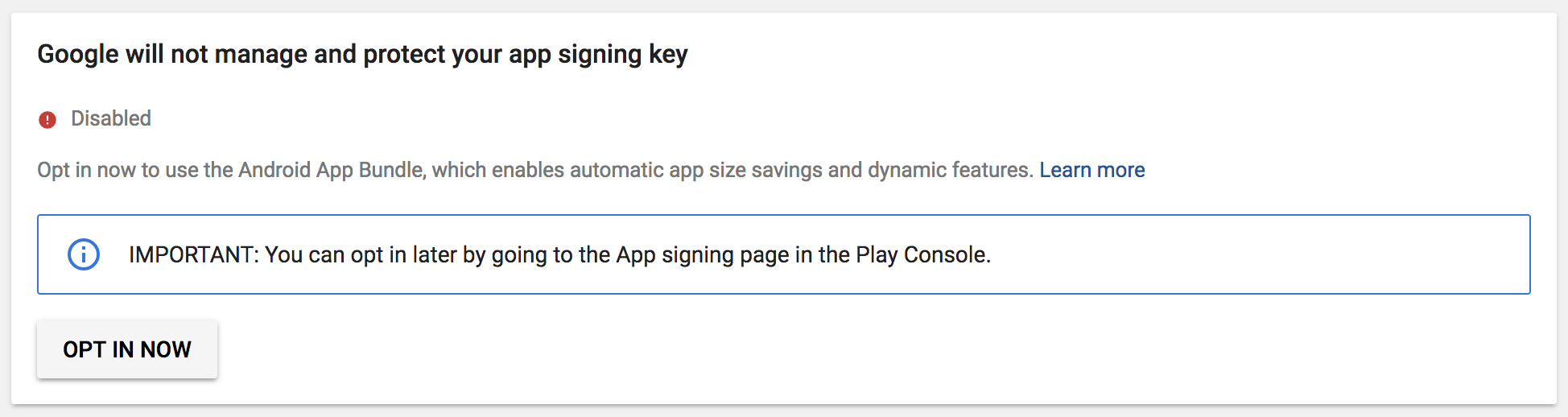
Can you all confirm if you done this or not? If you not done this, you won't see Disabled. Instead you will see Enabled.
I have enabled Google managing the "app signing key", what to do?
If this is the case, two solutions:
- Easiest: Erase your application (if you've not published it) and create a new one. This time, click on Opt Out. Submit your APK and it should work:
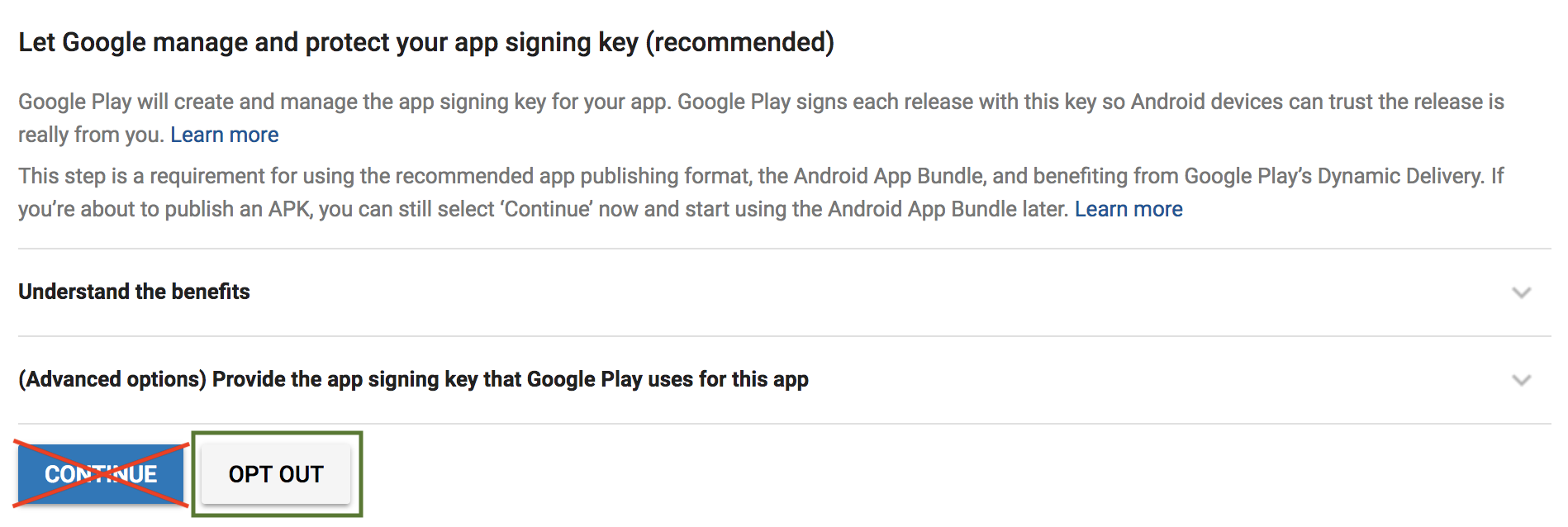
- Harder: Otherwise, you must edit your APK to disable debuggable and to re-sign it with a new upload key. as explain here by @xiscoj
- Later, you must always do these steps to submit an update.
Will GDevelop be compatible with the new "Android App Bundle" (i.e: automatic signing by Google)
Surely later, but it's a bit more complicated because this means that GDevelop would have to generate a unique key pair for each game (at least the first time it's uploaded), and sign the APK with this key.
Nothing impossible, but there are tons of things to do and it's still a bit tricky - and decompiling APK and recompiling is always an alternative.
How to avoid other users having this issue?
I've updated the wiki page to make this more obvious that opt out must be chosen.
I'm sure it's not my problem
In this case, please comment here and send screenshots so that we're extra sure what the issue is.
4ian
on 25 Feb 2019
Hi Florian
Was that a second attempt at uploading? Or a first attempt?
On Tue, 26 Feb 2019 at 08:55, Florian Rival notifications@github.com
wrote:
I've just tested and was able to upload an APK built from GDevelop without
any issue:[image: image]
https://user-images.githubusercontent.com/1280130/53369025-1e456580-3942-11e9-9fb2-f8af620f402f.pngThis is because I explictly opted out from Android App Bundle:
[image: image]
https://user-images.githubusercontent.com/1280130/53369568-687b1680-3943-11e9-8a1e-2830f02ee70e.pngCan you all confirm if you done this or not? If you not done this, you
won't see Disabled. Instead you will see Enabled.
I have enabled Google managing the "app signing key", what to do?If this is the case, two solutions:
- Erase your application (if you've not published it) and create a new
one. This time, click on Opt Out. Submit your APK and it should work- Otherwise, you must edit your APK to disable debuggable and to
re-sign it with a new upload key. as explain here
https://github.com/4ian/GDevelop/issues/929#issuecomment-466980710
by @xiscoj https://github.com/xiscoj
- Later, you must always do these steps to submit an update.
Will GDevelop be compatible with the new "Android App Bundle" (i.e:
automatic signing by Google)Surely later, but it's a bit more complicated because this means that
GDevelop would have to generate a unique key pair for each game (at least
the first time it's uploaded), and sign the APK with this key.
Nothing impossible, but there are tons of things to do and it's still a
bit tricky - and decompiling APK and recompiling is always an alternative.
How to avoid other users having this issue?I've updated the wiki page to make this more obvious that opt out must be
chosen.
I'm sure it's not my problemIn this case, please comment here and send screenshots so that we're extra
sure what the issue is.—
You are receiving this because you were mentioned.
Reply to this email directly, view it on GitHub
https://github.com/4ian/GDevelop/issues/929#issuecomment-467199261, or mute
the thread
https://github.com/notifications/unsubscribe-auth/AOoZIAcn8_W85JSLs8Zs3oBI7DoPH7oVks5vRFu6gaJpZM4a3eNx
.
Baylissimo
on 25 Feb 2019
And good work on the wiki @4ian
http://wiki.compilgames.net/doku.php/gdevelop5/publishing/android_and_ios/play-store
comprehensive
On Tue, 26 Feb 2019 at 09:36, Michael Bayliss mikeyb@aphid.net wrote:
Hi Florian
Was that a second attempt at uploading? Or a first attempt?On Tue, 26 Feb 2019 at 08:55, Florian Rival notifications@github.com
wrote:I've just tested and was able to upload an APK built from GDevelop
without any issue:[image: image]
https://user-images.githubusercontent.com/1280130/53369025-1e456580-3942-11e9-9fb2-f8af620f402f.pngThis is because I explictly opted out from Android App Bundle:
[image: image]
https://user-images.githubusercontent.com/1280130/53369568-687b1680-3943-11e9-8a1e-2830f02ee70e.pngCan you all confirm if you done this or not? If you not done this, you
won't see Disabled. Instead you will see Enabled.
I have enabled Google managing the "app signing key", what to do?If this is the case, two solutions:
- Erase your application (if you've not published it) and create a
new one. This time, click on Opt Out. Submit your APK and it should
work- Otherwise, you must edit your APK to disable debuggable and to
re-sign it with a new upload key. as explain here
https://github.com/4ian/GDevelop/issues/929#issuecomment-466980710
by @xiscoj https://github.com/xiscoj
- Later, you must always do these steps to submit an update.
Will GDevelop be compatible with the new "Android App Bundle" (i.e:
automatic signing by Google)Surely later, but it's a bit more complicated because this means that
GDevelop would have to generate a unique key pair for each game (at least
the first time it's uploaded), and sign the APK with this key.
Nothing impossible, but there are tons of things to do and it's still a
bit tricky - and decompiling APK and recompiling is always an alternative.
How to avoid other users having this issue?I've updated the wiki page to make this more obvious that opt out must be
chosen.
I'm sure it's not my problemIn this case, please comment here and send screenshots so that we're
extra sure what the issue is.—
You are receiving this because you were mentioned.
Reply to this email directly, view it on GitHub
https://github.com/4ian/GDevelop/issues/929#issuecomment-467199261, or mute
the thread
https://github.com/notifications/unsubscribe-auth/AOoZIAcn8_W85JSLs8Zs3oBI7DoPH7oVks5vRFu6gaJpZM4a3eNx
.
Baylissimo
on 25 Feb 2019
This is a first attempt at uploading. Once you have an APK successfully uploaded, you must now upload other APK like the first one. Be sure to increase the version number (1.0.0 -> 1.0.1 -> 1.0.2 or 1.1, 1.1.1, 1.1.2... etc) otherwise the play store will reject an APK that has the same version as an existing one.
4ian
on 26 Feb 2019
Thanks. I'll try it. Was just wondering if you have successfully uploaded a
second APK.
On Tue, 26 Feb 2019 at 10:54, Florian Rival notifications@github.com
wrote:
This is a first attempt at uploading. Once you have an APK successfully
uploaded, you must now upload other APK like the first one. Be sure to
increase the version number (1.0.0 -> 1.0.1 -> 1.0.2 or 1.1, 1.1.1,
1.1.2... etc) otherwise the play store will reject an APK that has the same
version as an existing one.—
You are receiving this because you were mentioned.
Reply to this email directly, view it on GitHub
https://github.com/4ian/GDevelop/issues/929#issuecomment-467233157, or mute
the thread
https://github.com/notifications/unsubscribe-auth/AOoZIDCs9EwIPZsXHZ-Y7wg3WiL3wTEpks5vRHehgaJpZM4a3eNx
.
Baylissimo
on 26 Feb 2019
Yeah, as long as version number is increased that should be fine :)
4ian
on 26 Feb 2019
Nope. Just did everything from above.
Just got the debuggable error on Play Store. Did I miss something?
On Tue, 26 Feb 2019 at 11:17, Florian Rival notifications@github.com
wrote:
Yeah, as long as version number is increased that should be fine :)
—
You are receiving this because you were mentioned.
Reply to this email directly, view it on GitHub
https://github.com/4ian/GDevelop/issues/929#issuecomment-467238764, or mute
the thread
https://github.com/notifications/unsubscribe-auth/AOoZINo0xOL3KXyY0Ia4wClOJSUzCXA-ks5vRH0tgaJpZM4a3eNx
.
Baylissimo
on 26 Feb 2019
This is after testing it with one click export again. The other app I've
released I have to go through cordova and android studio and xcode.
On Tue, 26 Feb 2019 at 11:48, Michael Bayliss mikeyb@aphid.net wrote:
Nope. Just did everything from above.
Just got the debuggable error on Play Store. Did I miss something?On Tue, 26 Feb 2019 at 11:17, Florian Rival notifications@github.com
wrote:Yeah, as long as version number is increased that should be fine :)
—
You are receiving this because you were mentioned.
Reply to this email directly, view it on GitHub
https://github.com/4ian/GDevelop/issues/929#issuecomment-467238764, or mute
the thread
https://github.com/notifications/unsubscribe-auth/AOoZINo0xOL3KXyY0Ia4wClOJSUzCXA-ks5vRH0tgaJpZM4a3eNx
.
Baylissimo
on 26 Feb 2019
@4ian was your example above with admob id included?
On Tue, 26 Feb 2019 at 11:53, Michael Bayliss mikeyb@aphid.net wrote:
This is after testing it with one click export again. The other app I've
released I have to go through cordova and android studio and xcode.On Tue, 26 Feb 2019 at 11:48, Michael Bayliss mikeyb@aphid.net wrote:
Nope. Just did everything from above.
Just got the debuggable error on Play Store. Did I miss something?On Tue, 26 Feb 2019 at 11:17, Florian Rival notifications@github.com
wrote:Yeah, as long as version number is increased that should be fine :)
—
You are receiving this because you were mentioned.
Reply to this email directly, view it on GitHub
https://github.com/4ian/GDevelop/issues/929#issuecomment-467238764,
or mute the thread
https://github.com/notifications/unsubscribe-auth/AOoZINo0xOL3KXyY0Ia4wClOJSUzCXA-ks5vRH0tgaJpZM4a3eNx
.
Baylissimo
on 26 Feb 2019
Could it be that different subscription models have this error for some
reason?
On Tue, 26 Feb 2019 at 11:57, Michael Bayliss mikeyb@aphid.net wrote:
@4ian was your example above with admob id included?
On Tue, 26 Feb 2019 at 11:53, Michael Bayliss mikeyb@aphid.net wrote:
This is after testing it with one click export again. The other app I've
released I have to go through cordova and android studio and xcode.On Tue, 26 Feb 2019 at 11:48, Michael Bayliss mikeyb@aphid.net wrote:
Nope. Just did everything from above.
Just got the debuggable error on Play Store. Did I miss something?On Tue, 26 Feb 2019 at 11:17, Florian Rival notifications@github.com
wrote:Yeah, as long as version number is increased that should be fine :)
—
You are receiving this because you were mentioned.
Reply to this email directly, view it on GitHub
https://github.com/4ian/GDevelop/issues/929#issuecomment-467238764,
or mute the thread
https://github.com/notifications/unsubscribe-auth/AOoZINo0xOL3KXyY0Ia4wClOJSUzCXA-ks5vRH0tgaJpZM4a3eNx
.
Baylissimo
on 26 Feb 2019
Um. Just cancelled my subscription so that I can try with an apk from the free version and now it's telling me I don't have any builds left. Will try and subscribe for pro.
Baylissimo
on 26 Feb 2019
Sorry, for the play by play.
Baylissimo
on 26 Feb 2019
Pro doesn't work either for me. Still giving me debuggable error. Back to the longer workflow for me.
Baylissimo
on 26 Feb 2019
Before reading this solution, I was able to publish a test app. What I did was decompile the apk with Apk Easy Tool, modify the manifest and set the debuggable to false. It is also convenient to modify the com.example.game in case you have not done it in Gdevelop, because Google has it blocked. Then, in Android Studio I built a new keystore but I did not assign it to the apk. I opened Apk Easy Tool again and in the signature option, I assigned the keystore path created with Android Studio because the signatures that the Apk Easy Tool assigned were not valid. All done very noob and surely half of the steps are not necessary, but maybe this can help someone. Although the best way is the one that says # 4ian
Marichalazo
on 26 Feb 2019
Hi. Yes. I can do a workaround.
It just seemed that @4ian said it was possible to do a one button export
but every time I do it Play Console says my app is debuggable. Even when I
start fresh. Tried it about 10 times.
On Tuesday, February 26, 2019, Marichalazo notifications@github.com wrote:
Before reading this solution, I was able to publish a test app. What I did
was decompile the apk with Apk Easy Tool, modify the manifest and set the
debuggable to false. It is also convenient to modify the com.example.game
in case you have not done it in Gdevelop, because Google has it blocked.
Then, in Android Studio I built a new keystore but I did not assign it to
the apk. I opened Apk Easy Tool again and in the signature option, I
assigned the keystore path created with Android Studio because the
signatures that the Apk Easy Tool assigned were not valid. All done very
noob and surely half of the steps are not necessary, but maybe this can
help someone. Although the best way is the one that says # 4ian—
You are receiving this because you were mentioned.
Reply to this email directly, view it on GitHub
https://github.com/4ian/GDevelop/issues/929#issuecomment-467328860, or mute
the thread
https://github.com/notifications/unsubscribe-auth/AOoZIEj-xx2AxVNCSfe_Yg0Myyt0wMTTks5vROOOgaJpZM4a3eNx
.
Baylissimo
on 26 Feb 2019
But have you decompiled and set the debugging attribute to false?
Marichalazo
on 26 Feb 2019
I did it with one-button export
Marichalazo
on 26 Feb 2019
No. Why do you ask?
@4ian said he got it working without decompiling?
(Otherwise, I am using manual exportand android studio which works fine for
me. Would just like a smoother workflow if possible).
On Tuesday, February 26, 2019, Marichalazo notifications@github.com wrote:
But have you decompiled and set the debugging attribute to false?
—
You are receiving this because you were mentioned.
Reply to this email directly, view it on GitHub
https://github.com/4ian/GDevelop/issues/929#issuecomment-467329895, or mute
the thread
https://github.com/notifications/unsubscribe-auth/AOoZIBbw16DbPobktb0hWLFhalLe4Mquks5vRORxgaJpZM4a3eNx
.
Baylissimo
on 26 Feb 2019
Here @4ian said he did it without decompiling.
I'm happy to decompile or use Cordova/android workflow as I've been doing.
But would love a one button export
Did you do one button export without decompiling?
On Tuesday, February 26, 2019, Michael Bayliss mikeyb@aphid.net wrote:
No. Why do you ask?
@4ian said he got it working without decompiling?(Otherwise, I am using manual exportand android studio which works fine
for me. Would just like a smoother workflow if possible).On Tuesday, February 26, 2019, Marichalazo notifications@github.com
wrote:But have you decompiled and set the debugging attribute to false?
—
You are receiving this because you were mentioned.
Reply to this email directly, view it on GitHub
https://github.com/4ian/GDevelop/issues/929#issuecomment-467329895, or mute
the thread
https://github.com/notifications/unsubscribe-auth/AOoZIBbw16DbPobktb0hWLFhalLe4Mquks5vRORxgaJpZM4a3eNx
.
Baylissimo
on 26 Feb 2019
I tried it without putting the debug in false and I did not get it. He told me that the app was debuggable. That's why I easily decompile it with Apk Easy Tool and compile it again.
Marichalazo
on 26 Feb 2019
Thanks 😁
On Tuesday, February 26, 2019, Marichalazo notifications@github.com wrote:
I tried it without putting the debug in false and I did not get it. He
told me that the app was debuggable. That's why I easily decompile it with
Apk Easy Tool and compile it again.—
You are receiving this because you were mentioned.
Reply to this email directly, view it on GitHub
https://github.com/4ian/GDevelop/issues/929#issuecomment-467331630, or mute
the thread
https://github.com/notifications/unsubscribe-auth/AOoZIJ-ViwAY12PirX1HCifVZv25tWByks5vROX4gaJpZM4a3eNx
.
Baylissimo
on 26 Feb 2019
I had to decompile it to put the debuggable in "false" in the manifest.xml. Then I compiled it again and that's it. I had my apk file with my own keys and in publish mode
Marichalazo
on 26 Feb 2019
I'm sorry if I do not explain myself well. I am Spanish and my English level is not very good.
Marichalazo
on 26 Feb 2019
It's all good.
I just thought @4ian said the one button export wa s working so I got
excited.
And the apk tool is only windows so I just have to use the longer workflow.
😁
On Tuesday, February 26, 2019, Marichalazo notifications@github.com wrote:
I'm sorry if I do not explain myself well. I am Spanish and my English
level is not very good.—
You are receiving this because you were mentioned.
Reply to this email directly, view it on GitHub
https://github.com/4ian/GDevelop/issues/929#issuecomment-467333456, or mute
the thread
https://github.com/notifications/unsubscribe-auth/AOoZIGy5xDtuFdd4l9lSVuTf2BPcBvB7ks5vROebgaJpZM4a3eNx
.
Baylissimo
on 26 Feb 2019
So for clarity, beacause there are a few things going on in this thread.
@4ian, you are saying that even with opting out of Google signing keys you
must still decompile and change debug option?
On Tuesday, February 26, 2019, Michael Bayliss mikeyb@aphid.net wrote:
It's all good.
I just thought @4ian said the one button export wa s working so I got
excited.And the apk tool is only windows so I just have to use the longer workflow.
😁
On Tuesday, February 26, 2019, Marichalazo notifications@github.com
wrote:I'm sorry if I do not explain myself well. I am Spanish and my English
level is not very good.—
You are receiving this because you were mentioned.
Reply to this email directly, view it on GitHub
https://github.com/4ian/GDevelop/issues/929#issuecomment-467333456, or mute
the thread
https://github.com/notifications/unsubscribe-auth/AOoZIGy5xDtuFdd4l9lSVuTf2BPcBvB7ks5vROebgaJpZM4a3eNx
.
Baylissimo
on 26 Feb 2019
Can you please post a screenshot of the error?
@4ian, you are saying that even with opting out of Google signing keys you
must still decompile and change debug option?
No. When opt-ing out I was able to upload my APK without any error and without decompiling.
4ian
on 26 Feb 2019
Hi. The screenshot is above. Ill try and find it.
On Tuesday, February 26, 2019, Florian Rival notifications@github.com
wrote:
Can you please post a screenshot of the error?
@4ian https://github.com/4ian, you are saying that even with opting out
of Google signing keys you
must still decompile and change debug option?No. When opt-ing out I was able to upload my APK without any error and
without decompiling.—
You are receiving this because you were mentioned.
Reply to this email directly, view it on GitHub
https://github.com/4ian/GDevelop/issues/929#issuecomment-467380536, or mute
the thread
https://github.com/notifications/unsubscribe-auth/AOoZIFH7l3W79_A1EBEsinmR9CYa4gnrks5vRQlUgaJpZM4a3eNx
.
Baylissimo
on 26 Feb 2019
Here it is again.
And that was with a fresh new gdevelop app and export.
On Tuesday, February 26, 2019, Michael Bayliss mikeyb@aphid.net wrote:
Hi. The screenshot is above. Ill try and find it.
On Tuesday, February 26, 2019, Florian Rival notifications@github.com
wrote:Can you please post a screenshot of the error?
@4ian https://github.com/4ian, you are saying that even with opting
out of Google signing keys you
must still decompile and change debug option?No. When opt-ing out I was able to upload my APK without any error and
without decompiling.—
You are receiving this because you were mentioned.
Reply to this email directly, view it on GitHub
https://github.com/4ian/GDevelop/issues/929#issuecomment-467380536, or mute
the thread
https://github.com/notifications/unsubscribe-auth/AOoZIFH7l3W79_A1EBEsinmR9CYa4gnrks5vRQlUgaJpZM4a3eNx
.
Baylissimo
on 26 Feb 2019
We can't see it, please post instead on GitHub directly: https://github.com/4ian/GDevelop/issues/929
Also prefer to edit your message rather than posting a new one to keep the discussion shorter ;)
4ian
on 26 Feb 2019
I'm sending from my phone. Not sure how to edit the message.
Will wait till I'm on the computer.
Which version of GDevelop did you export from for the upload?
Baylissimo
on 26 Feb 2019
Latest version. Yeah please upload them from your computer. :) You can also edit from your computer.
4ian
on 26 Feb 2019
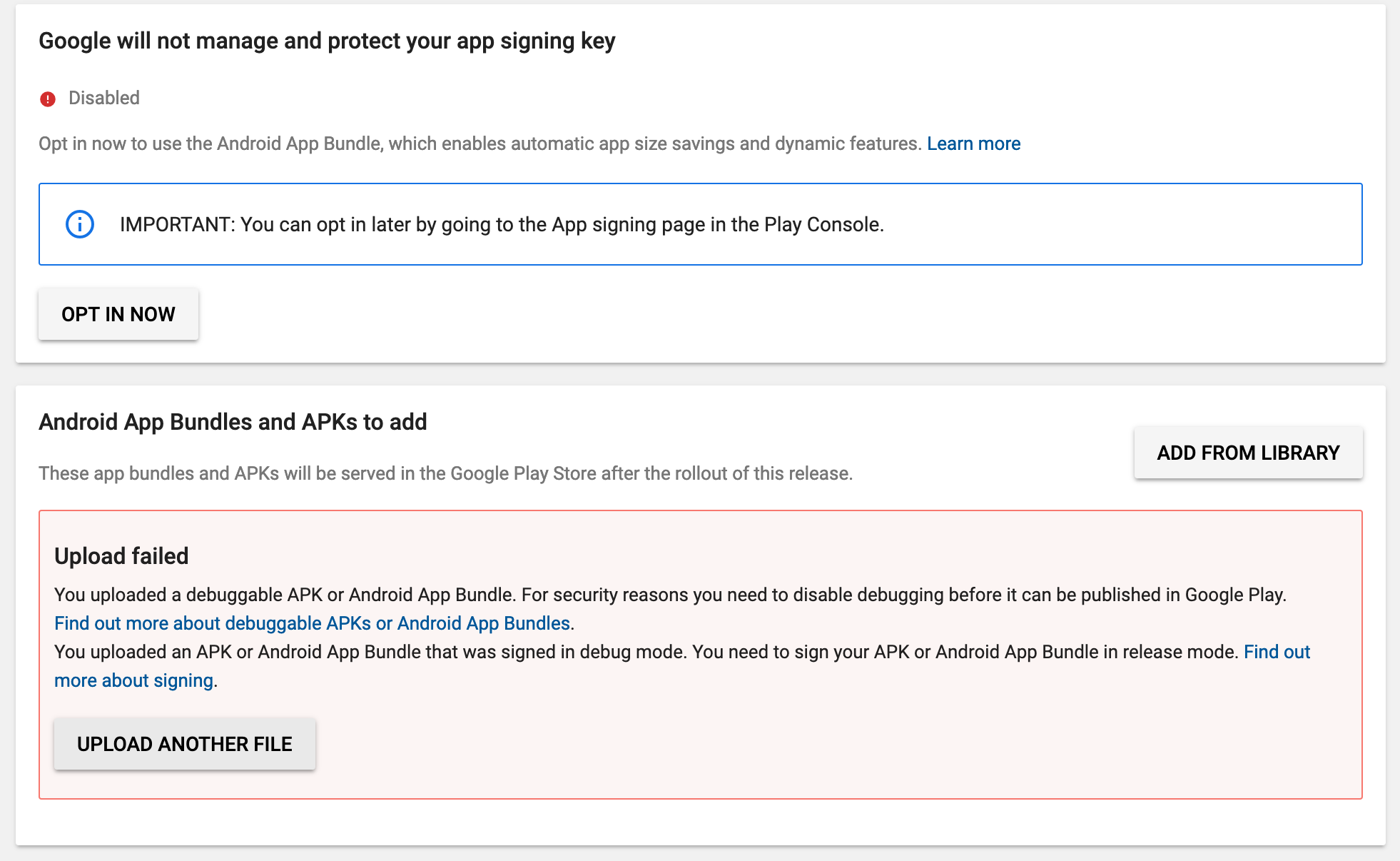
Ok. About to sleep, but went in and tried again. Here's what Google says:
Baylissimo
on 26 Feb 2019
Is this a second app in your account and might that be the difference with 4ian? Not clear from the conversation? Can you have two apps with same debug key? 🤔
zatsme
on 26 Feb 2019
It's more than the second app on my account. Can we only have one?
Baylissimo
on 26 Feb 2019
@zatsme Just checked at https://support.google.com/googleplay/android-developer/answer/7384423?hl=en
And shouldn't be a problem.
From above link: "Accepting the Terms of Service does not mean that all apps associated with your developer account will automatically be enrolled in app signing."
Baylissimo
on 26 Feb 2019
Think I've found the issue. Some workers doing the compilation to APK did not have signing activated. So you would have a debug APK. Sorry about this!
During my tests, I must have had signed APK by luck.
So give it another try (sorry about this!):
- Package your game as usual with GDevelop
- Upload (make sure to not choose Google app signing as I explained.
That should work :)
4ian
on 26 Feb 2019
Ha! Oh boy. Just tried it and it worked.
Thanks @4ian
Off to sleep. Will make more apps and take over the world tomorrow.
Night!
Baylissimo
on 26 Feb 2019
Off to sleep. Will make more apps and take over the world tomorrow.
Sounds like a good plan :)
Glad it works, thanks for testing!
For your interest this happened because:
- There have been a bug where workers that are doing the packaging got stuck for some reason. I added extra safety for this.
- When fixing this, I forgot to activate signing on new workers. I added reminders to ensure this is not forgotten (should a bug happen again).
4ian
on 26 Feb 2019
Closing as @Baylissimo confirmed it's working for him.
@xiscoj, @vavedev @Marichalazo @LudicrousExplosion and others: please retry now, it should work :) Be sure not to choose the Google app signing (I've updated the wiki page to explictly say that you have to opt out).
4ian
on 26 Feb 2019
Workers are partially based on AWS yeah!
4ian
on 26 Feb 2019
Yes you do. All versions compiled from gdevelop until 22th February had debuggable "true" I don't know if something changed from that day.
Then you have to compile and sign again, check at my pdf some posts above.
Bye
So for clarity, beacause there are a few things going on in this thread. @4ian, you are saying that even with opting out of Google signing keys you must still decompile and change debug option?
…
On Tuesday, February 26, 2019, Michael Bayliss @.> wrote: It's all good. I just thought @4ian said the one button export wa s working so I got excited. And the apk tool is only windows so I just have to use the longer workflow. grin On Tuesday, February 26, 2019, Marichalazo *@.*> wrote: > I'm sorry if I do not explain myself well. I am Spanish and my English > level is not very good. > > — > You are receiving this because you were mentioned. > Reply to this email directly, view it on GitHub > <#929 (comment)>, or mute > the thread > https://github.com/notifications/unsubscribe-auth/AOoZIGy5xDtuFdd4l9lSVuTf2BPcBvB7ks5vROebgaJpZM4a3eNx > . >
xiscoj
on 26 Feb 2019
Thank you all for solving this!
LudicrousExplosion
on 27 Feb 2019
Related issues
 ced64k
·
4Comments
ced64k
·
4Comments
 BWPanda
·
4Comments
BWPanda
·
4Comments
 ddabrahim
·
4Comments
ddabrahim
·
4Comments
 KinkGD
·
5Comments
4ian
·
4Comments
KinkGD
·
5Comments
4ian
·
4Comments
Most helpful comment
Sounds like a good plan :)
Glad it works, thanks for testing!
For your interest this happened because: