Gdevelop: Add new Event row commands are hard to discover
Describe the bug
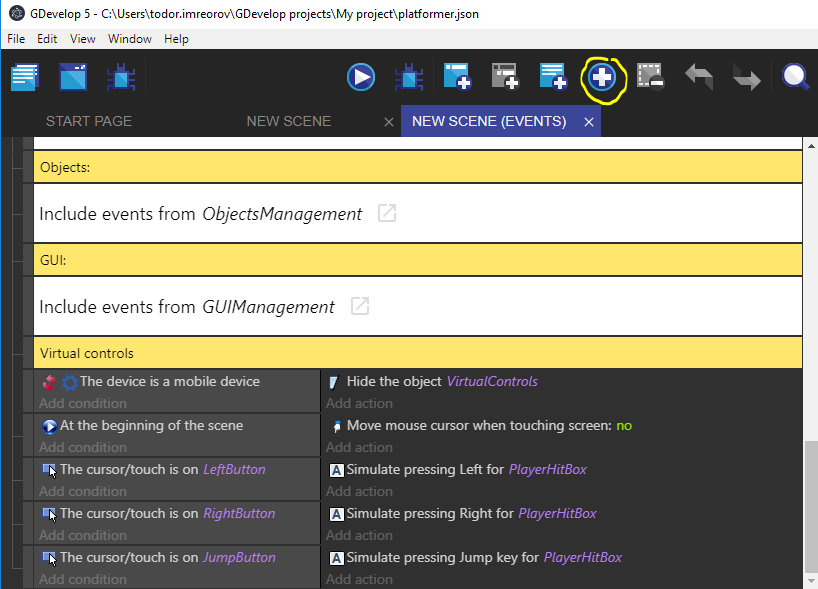
It seems like I am not the only one who has trouble finding that menu, because it is hidden between buttons that trigger actions. It also feels a bit detached from the event sheet itself:
To Reproduce
Watch somebody new use gdevelop for the first or second time - you will see that they struggle to find how to make a javascript event row or a group event row. They just dont look for it there. First thing they do is scroll to the bottom of the event sheet, where they find nothing - no button to add a new row. The button is instead outside of the event sheet and is mixed with buttons for other things.
Suggestion
The most intuitive place to find this menu IMO is at the bottom of the event sheet. Here is a crude mockup:
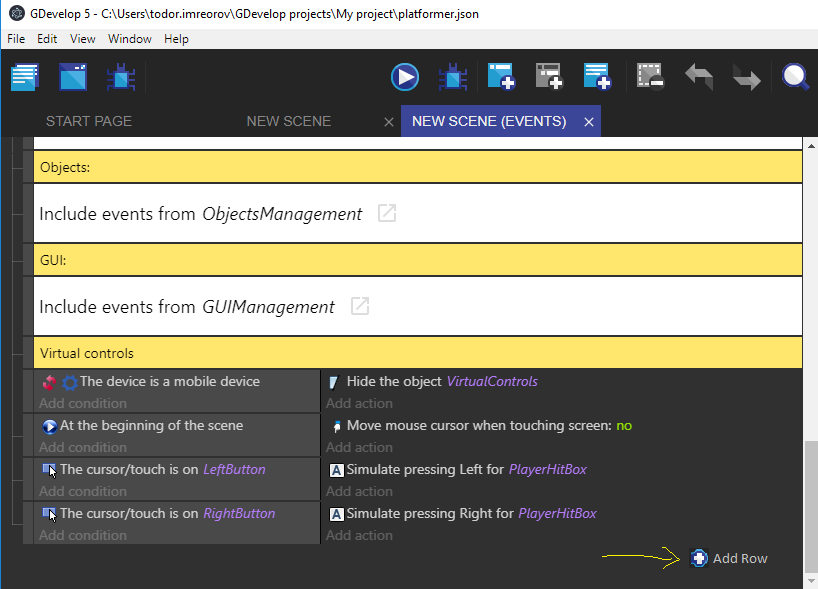
:)
I can try to implement this change if you like the idea. Check out the number of this issue :p its the number of the 😈
 blurymind
All 10 comments
Another intuitive place would be in the right click menu, unless it's already there and I've not noticed 😁
 zatsme
on 25 Sep 2018
zatsme
on 25 Sep 2018
Here is a second mockup that makes more sense:
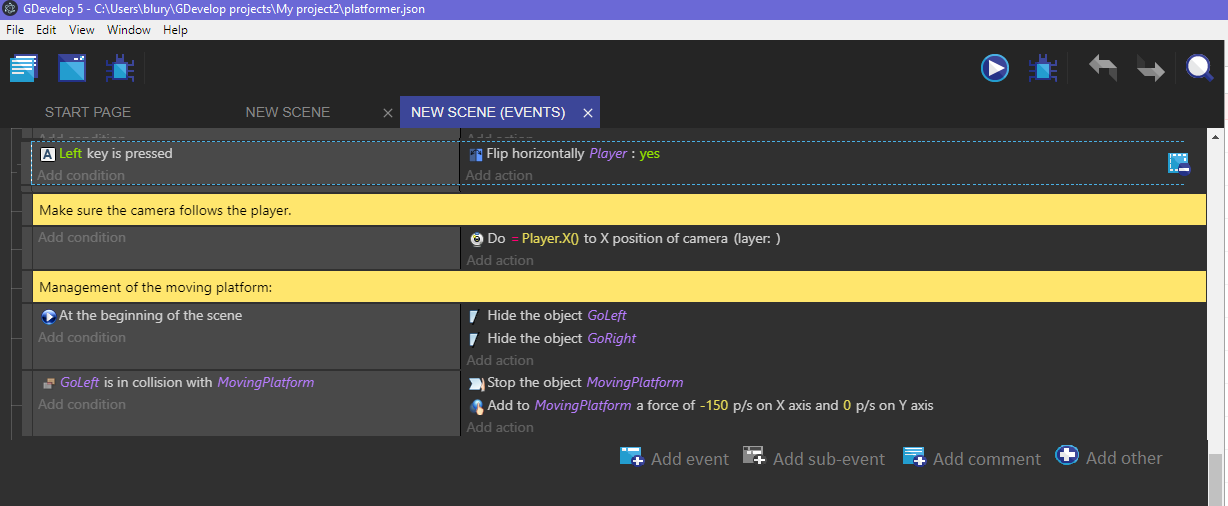
The delete selected button could appear on the last selected. I personally feel that we do not need a button like that, as most people will delete via the the right click menu.. but with a touch interface it would be good to have a button somewhere.
We could of course keep it up there, but perhaps if that is the case, it should be moved after the undo/redo buttons. I feel that undo/redo are more global commands- so they do make sense there. Event sheet commands however make more sense inside the event sheet
blurymind
on 25 Sep 2018
What about in right click menu as I suggest? On windows tablet it's a long press so just as intuitive to me?
zatsme
on 26 Sep 2018
the right click menu is context sensitive, so it would be a great opportunity to add new commands to insert a new event or sub-event below or above first/last selected. That could be done in another pull of course.
If no event is selected, the commands could operate on the lowest event of the event sheet.
The new menu commands are another usability feature
blurymind
on 26 Sep 2018
I think a context menu showing when you're clicking outside any event would be the way to go :)
 4ian
on 26 Sep 2018
4ian
on 26 Sep 2018
@4ian The problem with that proposition is that when you scroll down to the end of an event sheet - there is no pixel space left to right click on at the very bottom.

If we add pixels space, then why not just as well have these buttons or some of them there:
- It will allow the user to add an event with two steps less (point and click instead of point, right click, point, click )
- It will be easier to discover than just empty space to right click on.
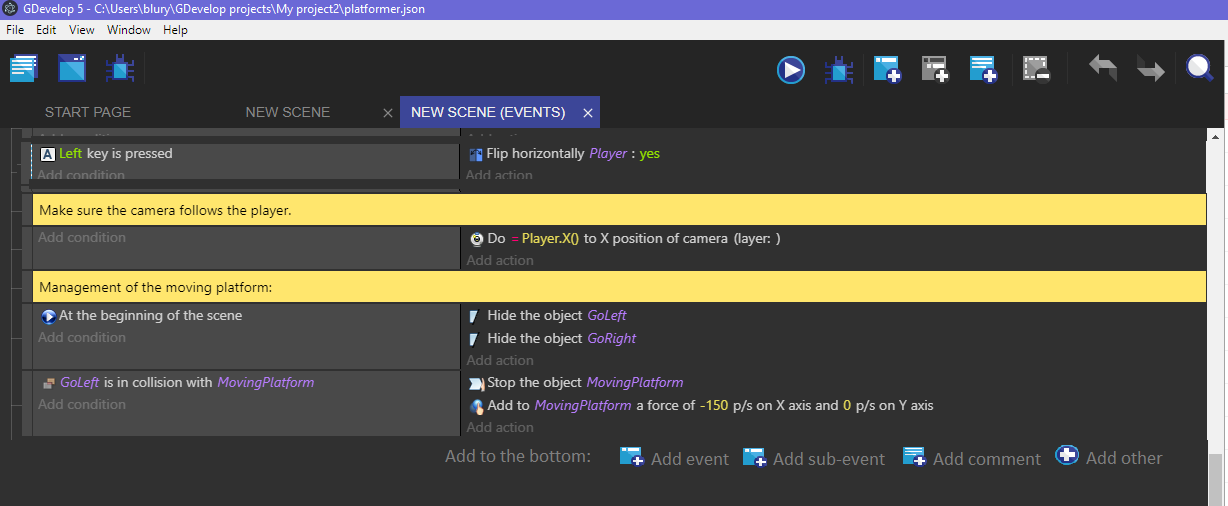
We could only add the buttons for commands that make most sense at the bottom - such as add new event or sub event to the bottom row. That doesnt necessarily mean we have to remove the current buttons. There are cases where there is an advantage of having them detached from the scollable event sheet space.
The buttons on the bottom could only target creating new events for the bottom of the sheet - such as create new event at the very bottom, or add subevent to the most bottom event
Here is another mockup
blurymind
on 28 Sep 2018
Why not try adding two buttons: One "Add event" and one "Add other" that when clicked open a context menu with the same content as the one in the toolbar.
(Let's forget about the add subevent/add comment to avoid cluttering the interface - especially because these buttons are targetted at people that begin).
About the design, I don't know if we should go with the design in your mockup or keep using <FlatButton />, without icon, for consistency?
4ian
on 28 Sep 2018
It could be a flat button if you like :) I am having more trouble figuring out how to put it at the bottom of the SortableTree component in eventstree/index
In any case, I added these commands to the context menu:
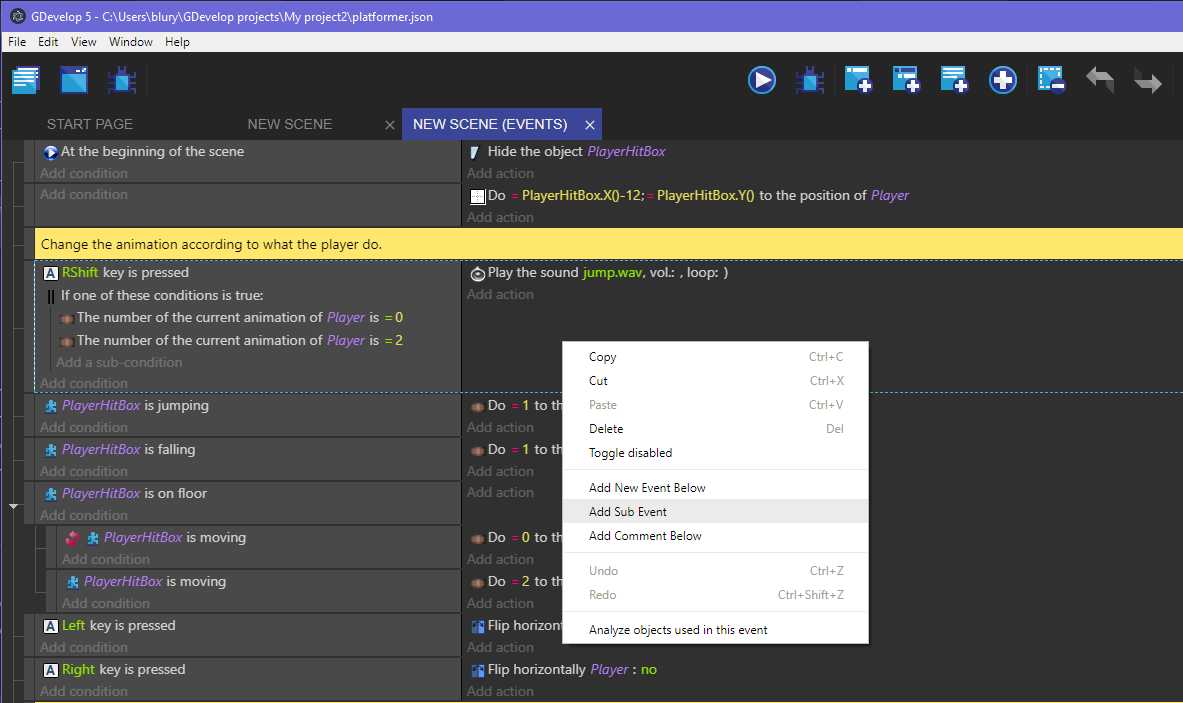
That was easy
https://github.com/4ian/GDevelop/pull/681
Will need some more time to add the special (+) ones- as they are inside the toolbar component
blurymind
on 30 Sep 2018
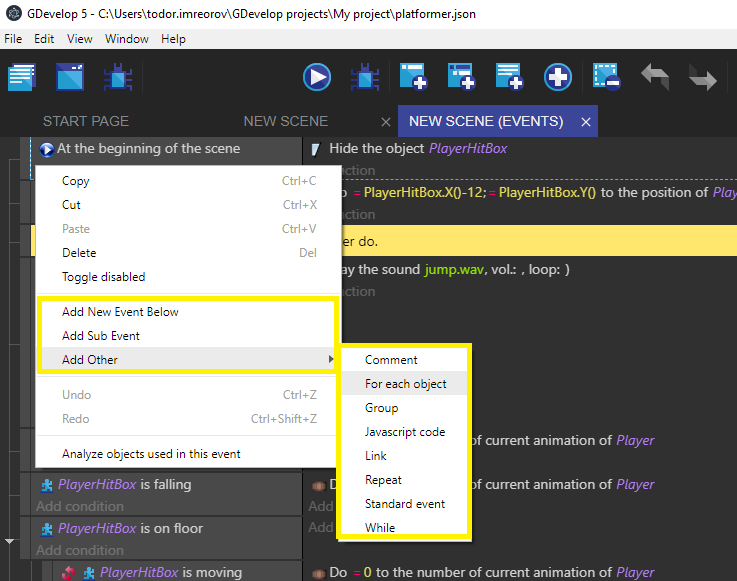
Ok I added the 'Other' commands to the menu. Pull request coming later today :)
Here is how it looks like now:
blurymind
on 1 Oct 2018
Good job! This "Add Other" will be perfect there :)
4ian
on 1 Oct 2018
Related issues
 giusreds
·
4Comments
giusreds
·
4Comments
 Bouh
·
4Comments
Bouh
·
3Comments
blurymind
·
5Comments
Bouh
·
4Comments
Bouh
·
3Comments
blurymind
·
5Comments
 KinkGD
·
5Comments
KinkGD
·
5Comments