Gdevelop: newIde: ability to drag and drop images into a scene or automatically scan the project folder for new resources
Description
Adding new resources to a scene is a painfully slow multi step process that requires to be repeated on each individual image. This makes it quite laborious to get a game prototype started
Solution suggested
I have two suggestions to make this smoother:
- Ability to drag and drop files files into the resource manager
- A button to scan for new resources within the project folder or even better - make the newIde automatically scan for new resources every time a scene is opened/loaded
 blurymind
All 22 comments
Might give this a try this week :)
At least the scan for new resources part. Wanted to make a simple demo from scratch - with a free resource pack and really bugged me that I have to add them one by one
blurymind
on 11 Sep 2018
Is the multiselection when choosing an image for a Sprite not enough? Example:
If you choose multiple files:

You'll get this:
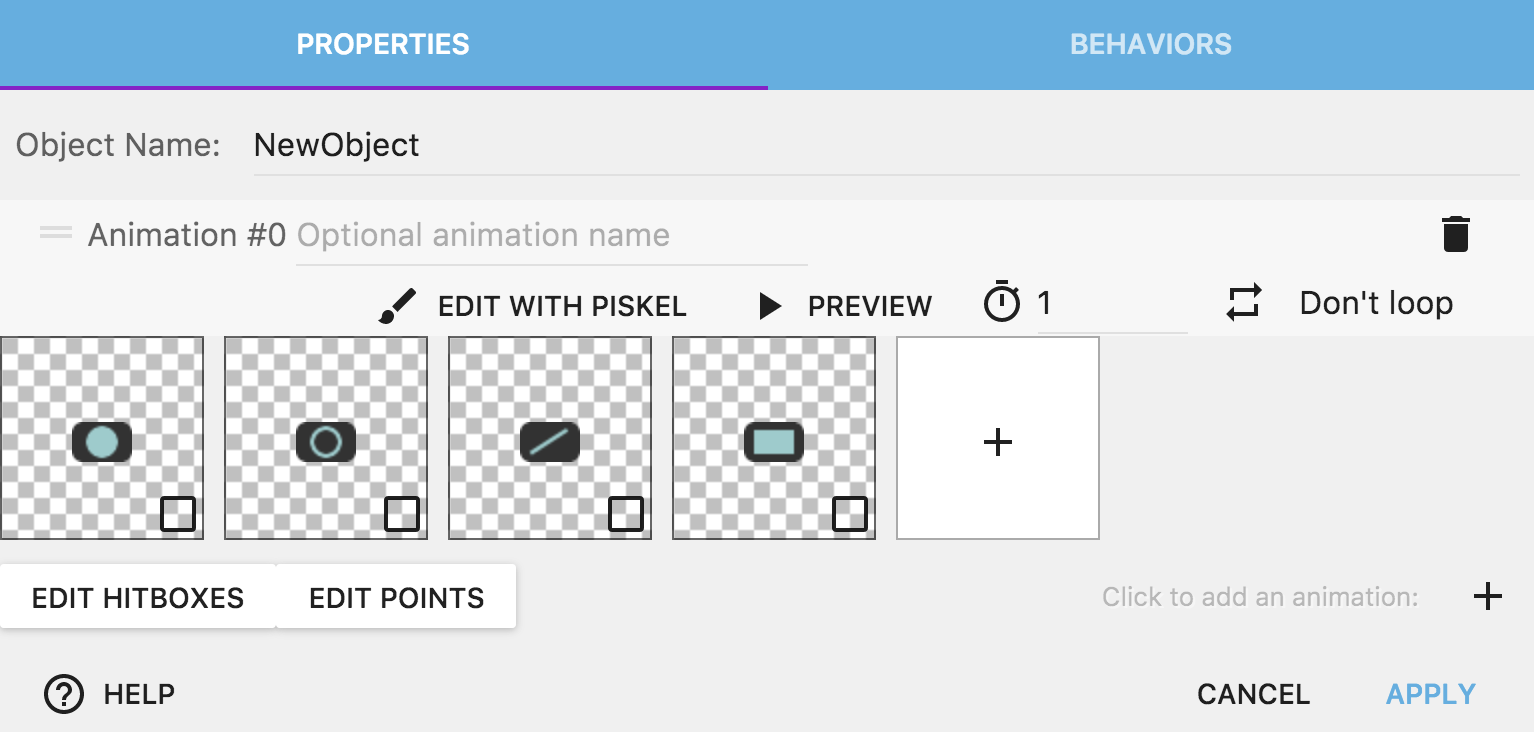
And for other objects, adding an image is a matter of 2 clicks (click on Choose a new image, then choose your file):

Do you think it's not fast enough? I'm not convinced it's a problem of the resource manager in any case?
I'm saying this because resource manager is still something that should normally not be seen too much by the user. It's useful to delete unused resources or change the property of an image, but ideally GDevelop would manage all of this automatically :)
This being said, might still be useful if you want to take a look at either the drag'n'drop or the automatic scan (but again, think about if it's really useful?). For drag'n'drop, I'm thinking also of something that could be, when an image file is drag'n'dropped on the scene editor, to have a Sprite object created with this image and the image filename. (not sure if it's worth it though... but might help a few users that are used to this gesture in program like Sketch/Photoshop).
 4ian
on 11 Sep 2018
4ian
on 11 Sep 2018
@4ian
In many cases (as it is with background elements and props), you would put one image per game object.
I use the image sequence mostly for animated objects or things like switches.
Most game engine IDEs (Unity3d, godot, cocos creator, Unreal, etc) automatically scan the project folder for new resources and do not require the user to manually select and add them.I have to admit that I kind of got used to that :D
You are right that it is also a matter of preference. I guess in my case I don't recognise it is a big problem, but it is definitely a turn off on the initial experience of starting a project from scratch, when compared to other engines. That initial experience is very important- as it is the time when the user is least invested in what they are doing in the engine and have the least patience.
On the drag and drop into scene editor that would definitely be awesome - thats a great idea! :D
Should the dropped be sprite object or a tiled image object.. or perhaps we could have a drop down menu appear to select what object?
I started implementing a 'scan for new resources' command in the resources manager btw. It's in the menu for now - with undo and redo.
I might be able to show something soon.
blurymind
on 11 Sep 2018
Sorry if it's kinda tangential, but since you're speaking of managing resources: something that I'd like to suggest is a preference setting for NOT smoothing out images added into the project by default. It's kinda annoying to uncheck every time from the manager a new file made for a pixel-perfect game, it would be a nice time saviour :)
 MercurioC
on 12 Sep 2018
MercurioC
on 12 Sep 2018
It's kinda annoying to uncheck every time from the manager a new file made for a pixel-perfect game, it would be a nice time saviour :)
Yes that's true that some kind of preferences somewhere would be useful for this!
On the drag and drop into scene editor that would definitely be awesome - thats a great idea! :D
Should the dropped be sprite object or a tiled image object.. or perhaps we could have a drop down menu appear to select what object?
Can be a dropdown, or in a first version we can go for sprite.
Most game engine IDEs (Unity3d, godot, cocos creator, Unreal, etc) automatically scan the project folder for new resources and do not require the user to manually select and add them.I have to admit that I kind of got used to that :D
Yes but I don't see how it help? You want to use an image that is in your directory:
1- You create an object
2- You click on "Add a new image"
3- You select it in your folder
4- Done ;)
That initial experience is very important- as it is the time when the user is least invested in what they are doing in the engine and have the least patience.
I agree, but again I'm quite confuse in seeing if it's really more pratical? A new user want to create its first object:
1- Click on Add a new object, choose Sprite
2- Click to add an an animation
3- Click on +
4- Choose its image that he copied in the game folder
5- Done.
And I'm not sure how having the resource automatically added in the resources would help? Could it be on the contrary confusing? ("Bug report: my game is 300mega" "Did you added your holidays photos in your game folder?" "Oops yeah sorry" 😊)
If you're used to type the name of a resource in objects like Tiled Sprite, that might be useful, but this looks like a quite specific case (in which case, we could display in gray files that are in the folder but not added, and add them when selected). But I think most people are just choosing their image and don't rely care about the Resource Manager until they need it at some point to unsmooth image or delete an image (which is good for the learning curve, if we can avoid user using something that they don't need first).
But that being said again I think that drag'n'drop could be really nice. I think starting with a Sprite object is fair as it's the most used object by far. We'll add a dialog to choose later :)
Ping me if you need help with this or the scan on the codebase.
4ian
on 12 Sep 2018
Pull request here:
https://github.com/4ian/GDevelop/pull/634
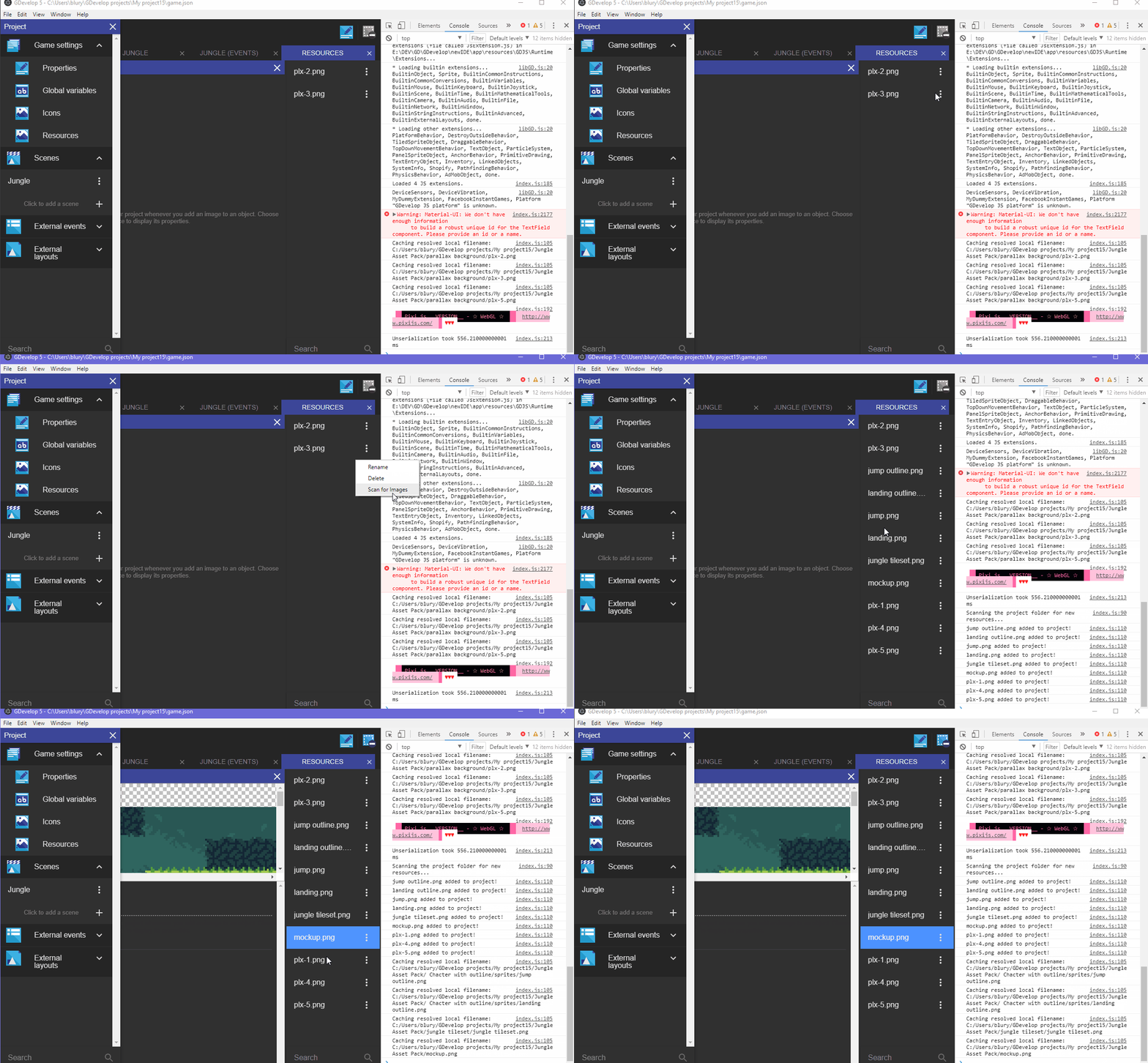
It scans the project folder and all subfolders for png files. If a resource has not been added,it adds it and updates the list
I found it saves time with importing paralaxing backgrounds and background props. It's not very useful for importing animation image sequences
In general I would advice against importing huge files in the game project.
If a game is prepped for release, it should not have unused resources included :)
Will add the drag and drop feature in a separate pull
blurymind
on 12 Sep 2018
Now all that is missing is a way to choose images either from the resource manager or the file system when clicking on the white [+] square in the sprite properties dialog.
Or as another approach show the resource manager list in a new column inside the properties tab of the sprite object. But to be useful the list of resources would need a small preview icon of the image in front of its name like in the object list.
I'm also missing this feature from GD4.
 Wend1go
on 12 Sep 2018
Wend1go
on 12 Sep 2018
@Wend1go a searchable list would be nice, but I think that for an image sequence it makes more sense to simply select it from the folder as it is now.
My next steps to improve this for now are to add drag and drop to scene editor to create sprite or tiled sprite objects as @4ian suggested. I think that is an awesome idea - it will make it more fun to do quick prototyping with free resources from the web :D
Adding thumbnails to the resource list would be quite nice, but might make it much more taxing to render the UI
One thing that might be problematic is the way imported resources are named. The current design seems to not allow two resources with the same name to exist. This is ok, until you have something like subfolders in your project. Consider the scenario of these two resources:
project/redParrot/idle.png
project/blueParrot/idle.png
will both idle.png files be imported? Can somebody test this please? I might be wrong, but will check after work.
One suggestion is to import them and name them as follows:
redParrot.Idle.png and blueParrot.idle.png
I wonder if I should open an issue for that and try to fix it.
blurymind
on 12 Sep 2018
It is indeed a bug. Reported it here: #635
Wend1go
on 12 Sep 2018
@Wend1go thank you. I will have a look tonight if I can :)
It probably needs to be addressed for piskel too
blurymind
on 12 Sep 2018
fixed #635 and also added a command to clear all unused image resources
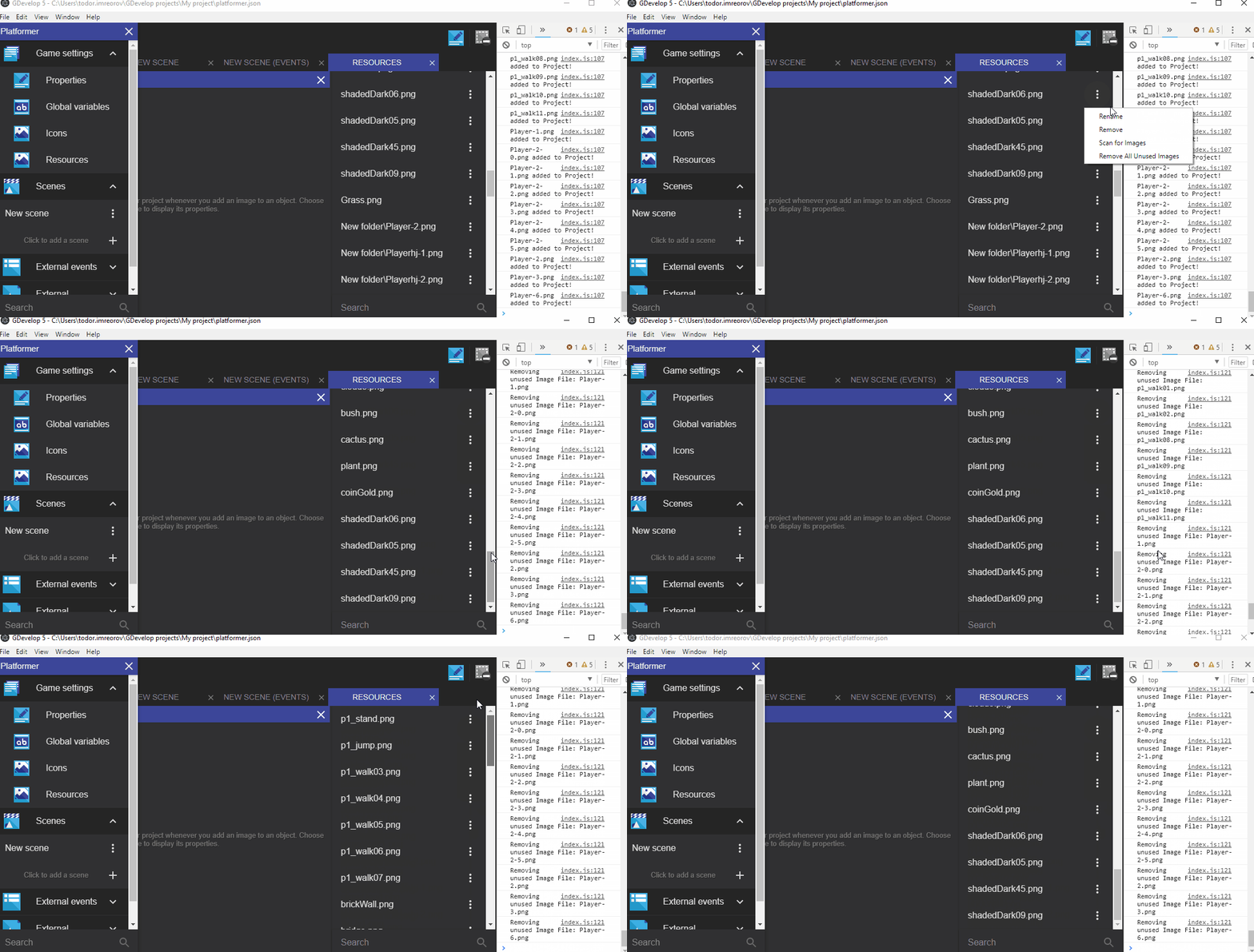
Commit coming tonight, after I get back from work :)
blurymind
on 13 Sep 2018
Sweet! 👍Would you mind adding a separator in the menu between your two new options in the two existing ones (Rename, Remove), to create a logical grouping?
4ian
on 13 Sep 2018
@4ian like this? :)

Btw I wanted to add drag and drop images to the resource manager, but that might be a bigger task as there doesn't seem to be an event listener and I'm not sure where to add the event listener for drop files
blurymind
on 13 Sep 2018
Perfect! Yeah keep drag'n'drop for another pull request.
For drag'n'drop of files you might want to take a look at react-dnd (used for all the drag'n'drop inside the app): http://react-dnd.github.io/react-dnd/docs-drop-target.html
In particular the section "Handling Files and URLs"
You might use this to create a DropTarget with react-dnd on the SceneEditor component for example.
4ian
on 13 Sep 2018
@4ian got it. Thank you :)
This will come in handy for the other feature I have in mind- but will keep it for another pull
blurymind
on 13 Sep 2018
Cool, let me review it again :)
4ian
on 13 Sep 2018
Ok this is partly solved now. I will work on the drag and drop into scene next :D
blurymind
on 14 Sep 2018
@4ian Do we already have something like a dropper UI component? I was wondering whether to use something like
https://github.com/mfix22/dropperx
Or it is better to use drop target and have all the drop code in scene editor?
blurymind
on 14 Sep 2018
Dropperx code seems rely simple: https://github.com/mfix22/dropperx/blob/master/src/dropperx.js
We could almost recode it/include it in the newIDE/app/src/UI folder to avoid having a dependency.
In both case (using it or not), we should have a React component that wrap the scene editor. When it detects a drop, it calls one or more functions on the scene to add an object and add the resource (if needed) :)
(A react-dnd context is already wrapping the app)
4ian
on 14 Sep 2018
When there are zero images imported, the menu to scan for new ones can't be called. That is kind of a problem imo :)
Maybe we should have something there when there are zero? Like a scan button? @4ian what do you think?
blurymind
on 25 Sep 2018
We can have a context menu on the list I think, that should be triggered when right clicking outside of an element of the list. The context menu can have the two options to scan/remove resources.
4ian
on 25 Sep 2018
Closing this as it's an enhancement/feature request, I've created a card for this on the roadmap: https://trello.com/c/8Tpqlh2T/167-enable-to-dragndrop-image-from-the-explorer-finder-into-gdevelop-to-create-automatically-an-object-with-this-image
4ian
on 3 Oct 2018
Related issues
 Jose-Moreno
·
5Comments
Jose-Moreno
·
5Comments
 ced64k
·
4Comments
ced64k
·
4Comments
 BWPanda
·
4Comments
Wend1go
·
3Comments
Wend1go
·
5Comments
BWPanda
·
4Comments
Wend1go
·
3Comments
Wend1go
·
5Comments