Gatsby-theme-novela: New project built using gatsby command shows 404 page
Prerequisites
- [x] Have you searched the issue tracker for similar issues (either past or present)?
- [x] Can you reproduce the issue consistently?
- [x] Are you reporting to the correct repository?
- [ ] Is this something you can debug and fix? Send a pull request! Bug fixes and documentation fixes are welcome.
Description
Building a new site using docs/readme at https://github.com/narative/gatsby-theme-novela , builds the site but shows 404 page in browser.
Version of Novela you are using
"^0.*"
Number of posts you have and which data source
- [x] Local
- [ ] Contentful
Describe the bug
Built a sample site pre READMe docs and was able to also build properly but shows 404 page.
To Reproduce
Steps to reproduce the behavior:
Following docs
gatsby new novela-site https://github.com/narative/gatsby-starter-novelacd novela-siteyarn dev' andyarn build`
Expected behavior
Default site load showing the home page.
Screenshots
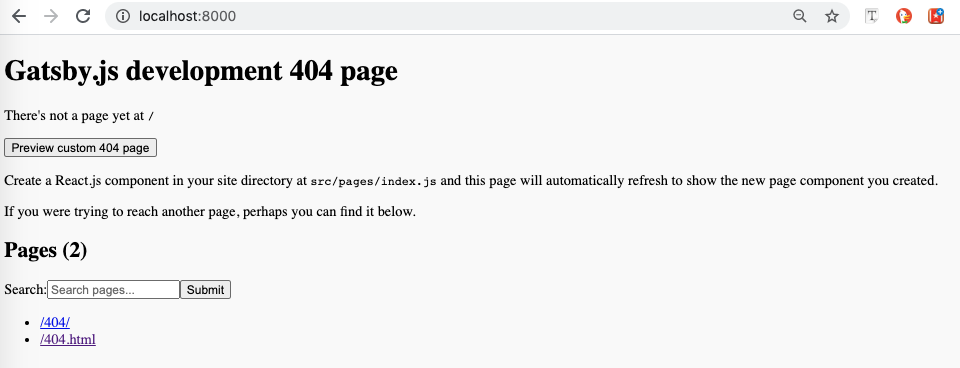
Shows the page as
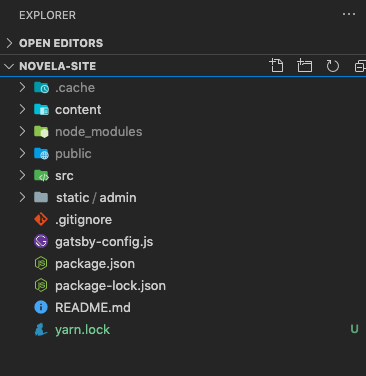
The folder does not contain "index.js"
Browser
Chrome 83.0 on MacOS
Additional context
_Add any other context about the problem here._
 ksurendra
All 6 comments
I also encountered similar problem when Initialized by the wrong way. I found some errors when creating pages, maybe you can get some error messages in command line.
 curlywater
on 25 Jul 2020
curlywater
on 25 Jul 2020
I'm currently facing the same issue, create page fails even after adding posts and authors.
logs
````
$ gatsby develop
Something is already running at port 8000
√ Would you like to run the app at another port instead? ... yes
Debugger listening on ws://127.0.0.1:9229/cab80614-4cea-4ca0-9c78-b0f6740710cd
For help, see: https://nodejs.org/en/docs/inspector
success open and validate gatsby-configs - 0.270s
success load plugins - 7.819s
success onPreInit - 0.015s
success initialize cache - 0.058s
success copy gatsby files - 1.090s
success onPreBootstrap - 0.153s
success createSchemaCustomization - 0.034s
success Checking for changed pages - 0.009s
success source and transform nodes - 1.120s
success building schema - 1.402s
{}
Config rootPath not set, using basePath instead => /
Config basePath /
Config authorsPath /authors
Querying Authors & Articles source: Local
ERROR #85923 GRAPHQL
There was an error in your GraphQL query:
Cannot query field "secret" on type "Article".
If you don't expect "secret" to exist on the type "Article" it is most likely a typo.
However, if you expect "secret" to exist there are a couple of solutions to common problems:
- If you added a new data source and/or changed something inside gatsby-node.js/gatsby-config.js, please try a restart of your development server
- The field might be accessible in another subfield, please try your query in GraphiQL and use the GraphiQL explorer to see which fields you can query and what shape they have
- You want to optionally use your field "secret" and right now it is not used anywhere. Therefore Gatsby can't infer the type and add it to the GraphQL schema. A quick fix is to add a least one entry with that field ("dummy content")
It is recommended to explicitly type your GraphQL schema if you want to use optional fields. This way you don't have to add the mentioned "dummy content". Visit our docs to learn how you can define the schema for "Article":
https://www.gatsbyjs.org/docs/schema-customization/#creating-type-definitions
File: node_modules\@narative\gatsby-theme-novela\src\gatsby\node\createPages.js:96:35
ERROR #85923 GRAPHQL
There was an error in your GraphQL query:
Cannot query field "subscription" on type "Article".
If you don't expect "subscription" to exist on the type "Article" it is most likely a typo.
However, if you expect "subscription" to exist there are a couple of solutions to common problems:
- If you added a new data source and/or changed something inside gatsby-node.js/gatsby-config.js, please try a restart of your development server
- The field might be accessible in another subfield, please try your query in GraphiQL and use the GraphiQL explorer to see which fields you can query and what shape they have
- You want to optionally use your field "subscription" and right now it is not used anywhere. Therefore Gatsby can't infer the type and
add it to the GraphQL schema. A quick fix is to add a least one entry with that field ("dummy content")
It is recommended to explicitly type your GraphQL schema if you want to use optional fields. This way you don't have to add the mentioned "dummy content". Visit our docs to learn how you can define the schema for "Article":
https://www.gatsbyjs.org/docs/schema-customization/#creating-type-definitions
File: node_modules\@narative\gatsby-theme-novela\src\gatsby\node\createPages.js:96:35
ERROR
TypeError: Cannot read property 'articles' of undefined
at Object.module.exports [as createPages] (C:\Users\Administrator\Documents\Projects\2020\porfolio\node_modules\@narative\gatsby-theme-novela\src\gatsby\node\createPages.js:102:55)
at async runAPI (C:\Users\Administrator\Documents\Projects\2020\porfolio\node_modules\gatsby\dist\utils\api-runner-node.js:347:16)
ERROR #11321 PLUGIN
"@narative/gatsby-theme-novela" threw an error while running the createPages lifecycle:
You must have at least one Author and Post. As reference you can view the
example repository. Look at the content folder in the example repo.
https://github.com/narative/gatsby-theme-novela-example
Error: You must have at least one Author and Post. As reference yo u can view the
example repository. Look at the content folder in the example
repo.
https://github.com/narative/gatsby-theme-novela-example
createPages.js:148 Object.module.exports [as createPages]
[porfolio]/[@narative]/gatsby-theme-novela/src/gatsby/node/creat ePages.js:148:11api-runner-node.js:347 async runAPI
[porfolio]/[gatsby]/dist/utils/api-runner-node.js:347:16From previous event:
api-runner-node.js:466 Promise.catch.decorateEvent.pluginName
[porfolio]/[gatsby]/dist/utils/api-runner-node.js:466:7From previous event:
api-runner-node.js:465
[porfolio]/[gatsby]/dist/utils/api-runner-node.js:465:12timers.js:456 processImmediate
internal/timers.js:456:21From previous event:
api-runner-node.js:459
[porfolio]/[gatsby]/dist/utils/api-runner-node.js:459:11From previous event:
api-runner-node.js:366 module.exports
[porfolio]/[gatsby]/dist/utils/api-runner-node.js:366:12create-pages.js:32 createPages
[porfolio]/[gatsby]/dist/services/create-pages.js:32:36interpreter.js:721 Interpreter.exec
[porfolio]/[xstate]/lib/interpreter.js:721:27interpreter.js:223 Interpreter.execute
[porfolio]/[xstate]/lib/interpreter.js:223:22interpreter.js:243 Interpreter.update
[porfolio]/[xstate]/lib/interpreter.js:243:18interpreter.js:144
[porfolio]/[xstate]/lib/interpreter.js:144:23scheduler.js:59 Scheduler.process
[porfolio]/[xstate]/lib/scheduler.js:59:13scheduler.js:43 Scheduler.schedule
[porfolio]/[xstate]/lib/scheduler.js:43:14interpreter.js:140 Interpreter.send
[porfolio]/[xstate]/lib/interpreter.js:140:29interpreter.js:836 actor.id
[porfolio]/[xstate]/lib/interpreter.js:836:23
failed createPages - 1.288s
success Checking for changed pages - 0.005s
success createPagesStatefully - 0.475s
success updating schema - 0.147s
success write out redirect data - 0.049s
success onPreExtractQueries - 0.010s
success extract queries from components - 3.311s
success write out requires - 0.502s
success run page queries - 0.468s - 1/1 2.14/s
````
 TheDhejavu
on 25 Jul 2020
TheDhejavu
on 25 Jul 2020
Solution, dont be on macOS Big Sur Beta
 yixe
on 30 Jul 2020
yixe
on 30 Jul 2020
+1 the same issue on Windows 10
"node": "v12.18.3",
"yarn": "1.22.4",
"gatsby": "2.24.13",
"gatsby-cli": "2.12.87",
"@narative/gatsby-theme-novela": "^0.17.0",
"gatsby-source-contentful": "^2.3.45",

// gatsby-config.js
{
    resolve: 'gatsby-source-contentful',
    options: {
      spaceId: process.env.CONTENTFUL_SPACE_ID,
      accessToken: process.env.CONTENTFUL_ACCESS_TOKEN
    }
},
{
    resolve: `@narative/gatsby-theme-novela`,
    options: {
      contentPosts: 'content/posts',
      contentAuthors: 'content/authors',
      rootPath: '/',
      basePath: '/blog',
      sources: {
        local: false,// neither true/false does not work
        contentful: true// the same for local
      }
    }
  }
 shinaBR2
on 12 Sep 2020
shinaBR2
on 12 Sep 2020
This Contentful issue is related to https://github.com/narative/gatsby-theme-novela/issues/376
 slavakurilyak
on 24 Sep 2020
slavakurilyak
on 24 Sep 2020
Same issue here, on Linux, and not using Contentful.
Are we meant to create the index.js file that is missing? If so, what should be the content?
Does anyone have a workaround?
 batjko
on 13 Dec 2020
batjko
on 13 Dec 2020
Related issues
 mabasic
·
4Comments
mabasic
·
4Comments
 sw-yx
·
3Comments
sw-yx
·
3Comments
 alfieqashwa
·
4Comments
alfieqashwa
·
4Comments
 zactony
·
3Comments
zactony
·
3Comments
 mwood23
·
4Comments
mwood23
·
4Comments
Most helpful comment
I'm currently facing the same issue, create page fails even after adding posts and authors.
logs
````
$ gatsby develop
Something is already running at port 8000
√ Would you like to run the app at another port instead? ... yes
Debugger listening on ws://127.0.0.1:9229/cab80614-4cea-4ca0-9c78-b0f6740710cd
For help, see: https://nodejs.org/en/docs/inspector
success open and validate gatsby-configs - 0.270s
success load plugins - 7.819s
success onPreInit - 0.015s
success initialize cache - 0.058s
success copy gatsby files - 1.090s
success onPreBootstrap - 0.153s
success createSchemaCustomization - 0.034s
success Checking for changed pages - 0.009s
success source and transform nodes - 1.120s
success building schema - 1.402s
{}
Config rootPath not set, using basePath instead => /
Config basePath /
Config authorsPath /authors
Querying Authors & Articles source: Local
ERROR #85923 GRAPHQL
There was an error in your GraphQL query:
Cannot query field "secret" on type "Article".
If you don't expect "secret" to exist on the type "Article" it is most likely a typo.
However, if you expect "secret" to exist there are a couple of solutions to common problems:
It is recommended to explicitly type your GraphQL schema if you want to use optional fields. This way you don't have to add the mentioned "dummy content". Visit our docs to learn how you can define the schema for "Article":
https://www.gatsbyjs.org/docs/schema-customization/#creating-type-definitions
File: node_modules\@narative\gatsby-theme-novela\src\gatsby\node\createPages.js:96:35
ERROR #85923 GRAPHQL
There was an error in your GraphQL query:
Cannot query field "subscription" on type "Article".
If you don't expect "subscription" to exist on the type "Article" it is most likely a typo.
However, if you expect "subscription" to exist there are a couple of solutions to common problems:
add it to the GraphQL schema. A quick fix is to add a least one entry with that field ("dummy content")
It is recommended to explicitly type your GraphQL schema if you want to use optional fields. This way you don't have to add the mentioned "dummy content". Visit our docs to learn how you can define the schema for "Article":
https://www.gatsbyjs.org/docs/schema-customization/#creating-type-definitions
File: node_modules\@narative\gatsby-theme-novela\src\gatsby\node\createPages.js:96:35
ERROR
TypeError: Cannot read property 'articles' of undefined
at Object.module.exports [as createPages] (C:\Users\Administrator\Documents\Projects\2020\porfolio\node_modules\@narative\gatsby-theme-novela\src\gatsby\node\createPages.js:102:55)
at async runAPI (C:\Users\Administrator\Documents\Projects\2020\porfolio\node_modules\gatsby\dist\utils\api-runner-node.js:347:16)
ERROR #11321 PLUGIN
"@narative/gatsby-theme-novela" threw an error while running the createPages lifecycle:
Error: You must have at least one Author and Post. As reference yo u can view the
example repository. Look at the content folder in the example
repo.
https://github.com/narative/gatsby-theme-novela-example
createPages.js:148 Object.module.exports [as createPages]
[porfolio]/[@narative]/gatsby-theme-novela/src/gatsby/node/creat ePages.js:148:11
api-runner-node.js:347 async runAPI
[porfolio]/[gatsby]/dist/utils/api-runner-node.js:347:16
From previous event:
api-runner-node.js:466 Promise.catch.decorateEvent.pluginName
[porfolio]/[gatsby]/dist/utils/api-runner-node.js:466:7
From previous event:
api-runner-node.js:465
[porfolio]/[gatsby]/dist/utils/api-runner-node.js:465:12
timers.js:456 processImmediate
internal/timers.js:456:21
From previous event:
api-runner-node.js:459
[porfolio]/[gatsby]/dist/utils/api-runner-node.js:459:11
From previous event:
api-runner-node.js:366 module.exports
[porfolio]/[gatsby]/dist/utils/api-runner-node.js:366:12
create-pages.js:32 createPages
[porfolio]/[gatsby]/dist/services/create-pages.js:32:36
interpreter.js:721 Interpreter.exec
[porfolio]/[xstate]/lib/interpreter.js:721:27
interpreter.js:223 Interpreter.execute
[porfolio]/[xstate]/lib/interpreter.js:223:22
interpreter.js:243 Interpreter.update
[porfolio]/[xstate]/lib/interpreter.js:243:18
interpreter.js:144
[porfolio]/[xstate]/lib/interpreter.js:144:23
scheduler.js:59 Scheduler.process
[porfolio]/[xstate]/lib/scheduler.js:59:13
scheduler.js:43 Scheduler.schedule
[porfolio]/[xstate]/lib/scheduler.js:43:14
interpreter.js:140 Interpreter.send
[porfolio]/[xstate]/lib/interpreter.js:140:29
interpreter.js:836 actor.id
[porfolio]/[xstate]/lib/interpreter.js:836:23
failed createPages - 1.288s
success Checking for changed pages - 0.005s
success createPagesStatefully - 0.475s
success updating schema - 0.147s
success write out redirect data - 0.049s
success onPreExtractQueries - 0.010s
success extract queries from components - 3.311s
success write out requires - 0.502s
success run page queries - 0.468s - 1/1 2.14/s
````