Game-compatibility: 4D5307DF - Blue Dragon
Tested on (https://github.com/xenia-project/xenia/commit/ab2edf9c8243f8b74444895a750df53830f9f01f)
Issues:
(starts gameplay with corrupted graphics)
Log:
Screenshot(s):

Labels:
(state-gameplay gpu-missing-drawing gpu-corrupt-drawing)
 bdeimos
All 33 comments
half duplicate https://github.com/xenia-project/game-compatibility/issues/110 will leave open as have different IDs
 Razzile
on 25 Jun 2018
Razzile
on 25 Jun 2018
I am still having this issue are there any fixes for this yet?
 Cariandis
on 20 Jul 2018
Cariandis
on 20 Jul 2018
it’s not fixed yet. Maybe in several months.
bdeimos
on 20 Jul 2018
Tried playing this game in November but it's still corrupted. R.I.P hope it's fixed soon cause I really want to play this.
 Celvox
on 15 Nov 2018
Celvox
on 15 Nov 2018
The game now runs and renders though if you don't skip cutscenes the game will lag and shortly crash after
Must be run with the Directx 12 version of the emulator
 ZolaKluke
on 3 Dec 2018
ZolaKluke
on 3 Dec 2018
I tested this on commit: https://github.com/xenia-project/xenia/commit/21def8a5223624bb05c78a4a9a633976170df0ef
The game has mostly been fine though after the first boss fight visuals start to glitch out, however reloading a save will fix this, but when moving to a new area the textures break completely.
My log: xenia.zip
Screenshots:
Before going down stairs (loading lower level of building)
https://i.imgur.com/XpT1rIg.png
After going down stairs (lower level)
https://i.imgur.com/XpT1rIg.png
ZolaKluke
on 4 Dec 2018
Once i get to the drill machine and go up to the second level, the textures and graphics are so scrambled. I've tried reloading but it doesn't work. Not sure what else i could try..
 bkawarsky12
on 10 Dec 2018
bkawarsky12
on 10 Dec 2018
So this needs it's labels updated as gpu-missing-drawing is no longer an issue as long as you use the D3D12 build.
Labels: remove gpu-missing-drawing
ZolaKluke
on 2 Jan 2019
Also since it doesn't have XamSwapDisc it also has unimplemented kernel features
Labels: kernel-unimplemented-feature
ZolaKluke
on 2 Jan 2019
Exactly how? Because it crashes most of the time on d3d12?
On Wed, Jan 2, 2019 at 2:46 AM ZolaKluke notifications@github.com wrote:
So this needs it's labels updated as gpu-missing-drawing is no longer an
issue as long as you use the D3D12 build and also I would recommend this
being considered state-playable as I was able to beat the whole game
although there is tonnes of rendering issues sometimes it's 100% beatableLabels: state-playable, remove gpu-missing-drawing
—
You are receiving this because you commented.
Reply to this email directly, view it on GitHub
https://github.com/xenia-project/game-compatibility/issues/988#issuecomment-450810484,
or mute the thread
https://github.com/notifications/unsubscribe-auth/AovqZ9mrolxmexdX5wgdAbN-V44yvf3kks5u_HHegaJpZM4U1hK1
.
bkawarsky12
on 2 Jan 2019
I haven't had this game crash once a part from screwing with game files and loading saves with the wrong disc this game does not crash at all, sure it has some visual issues, but hasn't crashed during proper gameplay yet
Exactly how? Because it crashes most of the time on d3d12?
ZolaKluke
on 12 Jan 2019
Can this game be played now?
I really want to play
 XiangZone
on 8 May 2019
XiangZone
on 8 May 2019
You can play the game, but it's not playable yet. It's current issues is the audio is out of sync by about 2 seconds and the true killer is the performance killing vertex explosions after about 2-3 hours of gameplay which can be bypassed temporarily with an actual save from a Xbox 360
ZolaKluke
on 8 May 2019
few examples


 illusion0001
on 8 May 2019
illusion0001
on 8 May 2019

I will be trapped here.
Then can't continue
XiangZone
on 8 May 2019

https://mega.nz/#!RpZFnAqC!A6W6HZAUYXhkfTkEJzUqwrtkMfZpG2Nv9x1hiNsk6V4
This problem happens to me after the footage of the shark, when I take control of Shu's grandfather.
I attach the log file in Mega because it is 77 mb big.
OS:Windows 10 Pro 64 Bit
Processor:Intel core I7 3770 3.40 Ghz
Ram:16 Gb
Video Card:Gigabyte GeForce Gtx 1060 6gb
Send a video:
https://youtu.be/hOeyqbZs29Y
 kanelakis
on 1 Sep 2019
kanelakis
on 1 Sep 2019
So if your unaware I recently made a discovery that is a workaround for the graphics glitches that occur, pretty much when they do occur you can click GPU > Trace Frame on the Xenia window (see screenshot below) or simply press F4 which creates a trace frame and also resets graphics memory resulting in making the game semi-playable again. I've also linked 2 videos below which you can see the trick being used.
Screenshot:

Videos:
https://youtu.be/YY7qG3pLEzk
https://www.youtube.com/watch?v=RAyNTPf7b1A
ZolaKluke
on 28 Oct 2019
So if your unaware I recently made a discovery that is a workaround for the graphics glitches that occur, pretty much when they do occur you can click GPU > Trace Frame on the Xenia window (see screenshot below) or simply press F4 which creates a trace frame and also resets graphics memory resulting in making the game semi-playable again. I've also linked 2 videos below which you can see the trick being used.
Screenshot:
Videos:
https://youtu.be/YY7qG3pLEzk
https://www.youtube.com/watch?v=RAyNTPf7b1A
I did as you said and improved, now I'll see later.
kanelakis
on 28 Oct 2019
Then you can play by pressing F4, anyway if the game is still without moving the character, after a while the screen darkens, and I didn't put it in fullsceen.
I had to restart my computer because it didn't accept any commands.
I left it on the small screen and it gave me a graphic device lost error, but I updated the card to the latest driver version.
Send Log file big:
https://mega.nz/#!csJESKqB!hYwAuWw6uXTc9ang6eD81UQMKpZD9S0F5Am2DRNTgj8
I did a third test, but the video card crashed very badly.
It would be better to wait later, I wouldn't want the video card to damage me.
kanelakis
on 28 Oct 2019
I updated my hardware and tried the December 4th version but nothing has changed, there is always the graphic problem, and if I press F4 the game graphics not resolve and crashes after a while.
Also in battle i've fps problem.
https://mega.nz/#!4pwnjaTY!GRtFrRcabl5YjnO6xo9_tHUPs4JMglULo3cf5M9rPDI
Intel core i9 9900k 3.60
Ram: 32 Gb
Videocard: Gigabyte GTX 1060 6gb.
kanelakis
on 6 Dec 2019
I'm testing the game with the canary version December 29th, pressing F4 when there are those graphic problems works.
I use Direct3D 12, also because I don't know how to change in Vulkan if there is one.
Every now and then I get the video error derived from the gpu and it closes.
kanelakis
on 29 Dec 2019
I'm testing the game with the canary version December 29th, pressing F4 when there are those graphic problems works.
I use Direct3D 12, also because I don't know how to change in Vulkan if there is one.
Every now and then I get the video error derived from the gpu and it closes.
There is no 29th December build, the last update to Xenia was 25 days ago
ZolaKluke
on 29 Dec 2019
I'm testing the game with the canary version December 29th, pressing F4 when there are those graphic problems works.
I use Direct3D 12, also because I don't know how to change in Vulkan if there is one.
Every now and then I get the video error derived from the gpu and it closes.There is no 29th December build, the last update to Xenia was 25 days ago
I have tested the game with the canary version that bears the date 29 December on the emulator.
Then if the files are 25 days ago ok.

kanelakis
on 29 Dec 2019
I'm testing the game with the canary version December 29th, pressing F4 when there are those graphic problems works.
I use Direct3D 12, also because I don't know how to change in Vulkan if there is one.
Every now and then I get the video error derived from the gpu and it closes.There is no 29th December build, the last update to Xenia was 25 days ago
I have tested the game with the canary version that bears the date 29 December on the emulator.
Then if the files are 25 days ago ok.
This is the Xenia Master branch, there is a separate github page for Canary
ZolaKluke
on 29 Dec 2019
I'm testing the game with the canary version December 29th, pressing F4 when there are those graphic problems works.
I use Direct3D 12, also because I don't know how to change in Vulkan if there is one.
Every now and then I get the video error derived from the gpu and it closes.There is no 29th December build, the last update to Xenia was 25 days ago
I have tested the game with the canary version that bears the date 29 December on the emulator.
Then if the files are 25 days ago ok.
This is the Xenia Master branch, there is a separate github page for Canary
So is there another page where xenia Canary games are reported?
If you send me the link.
kanelakis
on 29 Dec 2019
@kanelakis https://github.com/xenia-canary
ZolaKluke
on 29 Dec 2019
@kanelakis https://github.com/xenia-canary
I checked the site, but all the reports of the games come here, on the site of the canary emulator they are not there.
So I think there is only this section to report games.
kanelakis
on 29 Dec 2019
Hey guys, kind of out of topic question but I just tried on the latest version of xenia and now that it's at least playable i'm wondering if there's a way to get japanese audio because I only have english,spanish and german.
Does it comes from my iso of the game or could it come from the emulator and could be fixed ?
 darkdarkai
on 4 Jan 2020
darkdarkai
on 4 Jan 2020
Hey guys, kind of out of topic question but I just tried on the latest version of xenia and now that it's at least playable i'm wondering if there's a way to get japanese audio because I only have english,spanish and german.
Does it comes from my iso of the game or could it come from the emulator and could be fixed ?
The voice options are region specific, my Australian copy is limited to English, French and Japanese

ZolaKluke
on 4 Jan 2020
My Game is Crashing when I Try to enter the "Deep Zone" and here is the crash log for it
xenia.zip
 NemesisSama
on 2 Jun 2020
NemesisSama
on 2 Jun 2020
I just want to register my interest, and say that the vertex explosion bug still happens, but F4 indeed fixes it. If F4 fixes it though, surely it can't be too hard for someone to develop a quick fix that does this automatically. Anything that improves the experience in the short term is better than nothing, right? It only seems to happen during scene changes (especially after a cutscene), which should narrow it down.
I've played through the game on console a couple of times, but having a powerful PC capable of 4K, it would be nice to see what the game would look like at a higher resolution.
 Jdbye
on 1 Aug 2020
Jdbye
on 1 Aug 2020
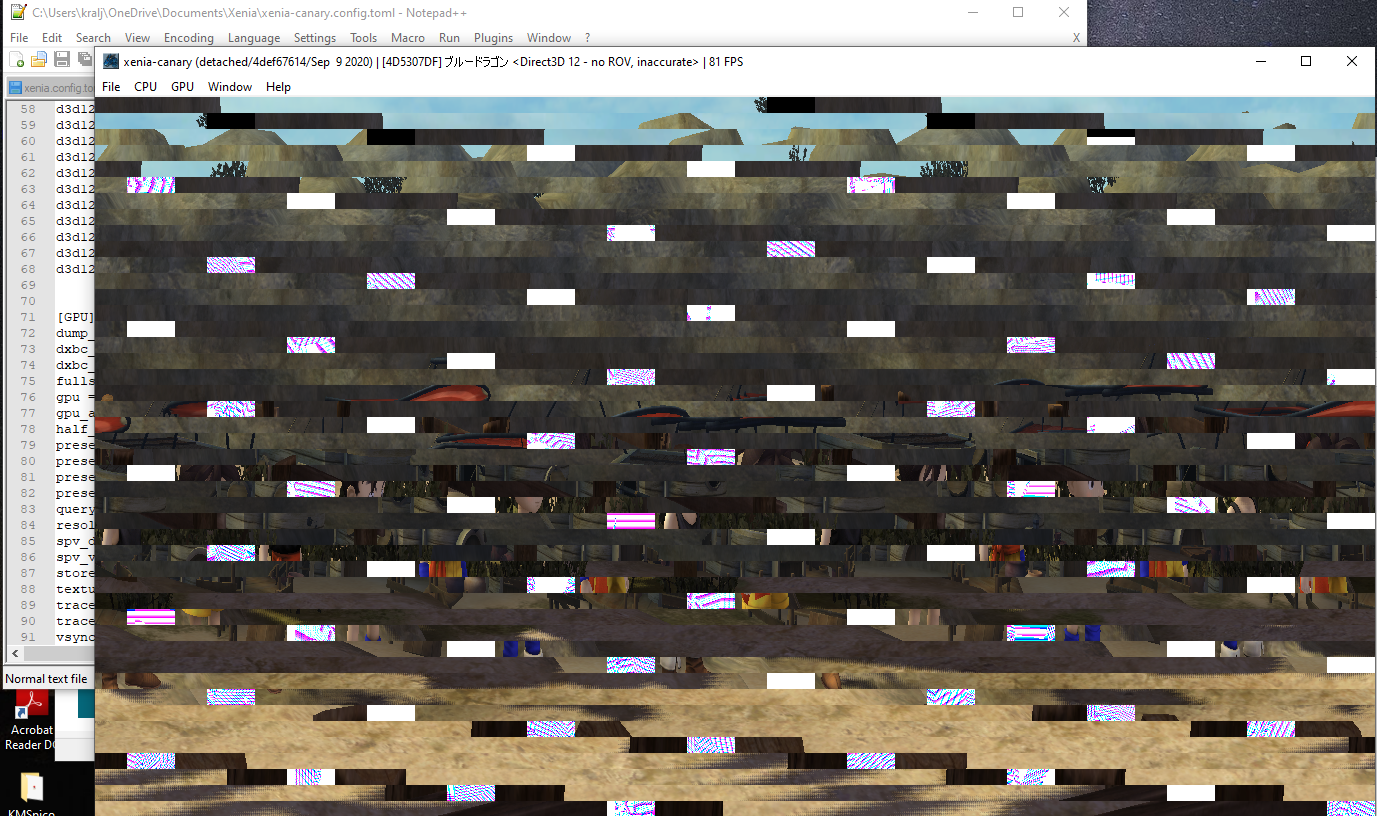
Does anyone know how to fix this?
My specs:
RAM 32GB
CPU: Ryzen 9 3900XT
GPU AMD RX 5700 XT Red Devil
I disabled rov (since it wouldnt even load before) and now it at least loads, but I get this. I can move freely, but its way too unplayable, I dont see anything.
 dexy58
on 13 Sep 2020
dexy58
on 13 Sep 2020
just tried on Canary build 15d561f1d (Jan31st 2021) seems like the Video corruption and vertex Explosion bugs are (only played till just after the landshark dropping you into the caves)are mostly down to just the CS's, Shu's "Scrap" greatsword still has a garbled texturedurring the first cutscene, (more pronounced in the latest Nightly build and that still requires manual trace frame/Clear frame cache to fix the problem temporarily vs just skipping the CS in canary.)
Seems far more playable but yea Performance tanks when the vertex explosion bug occurs.
(Specs)
32GB DDR4-3200 Ram
AMD Ryzen 5-3600
Nvidia GTX 1650 Super
 CaelThunderwing
on 7 Feb 2021
CaelThunderwing
on 7 Feb 2021
Related issues
 Myoko
·
7Comments
Myoko
·
7Comments
 IgelRM
·
5Comments
IgelRM
·
5Comments
 TotalCaesar659
·
4Comments
TotalCaesar659
·
4Comments
 theoldsport
·
8Comments
theoldsport
·
8Comments
 PhanHongAn0105
·
7Comments
PhanHongAn0105
·
7Comments
Most helpful comment
You can play the game, but it's not playable yet. It's current issues is the audio is out of sync by about 2 seconds and the true killer is the performance killing vertex explosions after about 2-3 hours of gameplay which can be bypassed temporarily with an actual save from a Xbox 360