Game-compatibility: Jet Set Radio Future [PAL] [IG-024] [1.01]
Description
Game plays relatively well with minor issues. Effects such as graffiti and shadows are hit-and-miss, with some users reporting no shadows or graffiti and others reporting wrong colored shadows. This has also been reported to vary from stage to stage.
Dumps
Status
Previous behavior:
Broken graphics in some locations, crashes at different points in the game. Inconsistent behavior when booting. Sound effects are broken.
Boost dash blanks screen, some sound effects too quiet.
Current behavior:
Game plays relatively well with minor issues: Graffiti and shadows are missing.
Screenshots


Additional Information
Tested on b4badcd2 (Mar 19 2018)
This replaces the older issue
See also: NTSC combo disk, Taikenban Demo
 CakeLancelot
All 60 comments
Found these two graphical issues when looking through the graffiti menus. Also got a console screenshot for comparison.
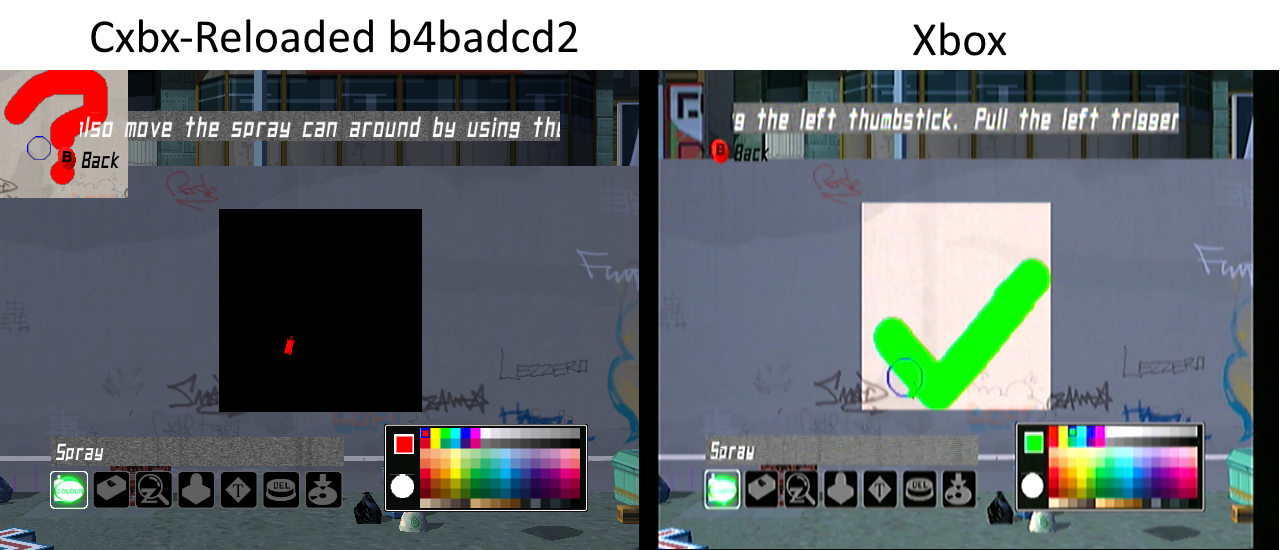
Box you're supposed to be drawing in is in the upper left and is smaller than it should be

Texture that is supposed to be mapped to the wall is instead blocking the screen
CakeLancelot
on 20 Mar 2018
@CakeLancelot Boost Dash appears black if we apply in the story mode, in the VS mode works great. Button to press is "B". You need to get 10 spray cans to perform this.
 HyperScorpio
on 20 Mar 2018
HyperScorpio
on 20 Mar 2018
@CakeLancelot Boost Dash appears black if we apply in the story mode, in the VS mode works great. Button to press is "B".
It works in VS mode because the blur effect is skipped entirely.
CakeLancelot
on 20 Mar 2018
I'm getting a lot of missing polygons which make the game essentially unplayable. Here are some shots from the title screen and the Garage. My specs are:
Radeon HD 6800 series GFX card
Windows 10
Plenty of RAM and CPU, but maybe the graphics card is too old? Amazed at the progress on this game, even since I've been trying to get it working, and hope someone can find a fix to this. Also attached an XBE dump.
Xbe.txt


 lunchrush
on 24 Mar 2018
lunchrush
on 24 Mar 2018
Reminder: I will be removing discussion - try to keep it to the discussion to the Discord or Gitter chat.
The above issue seems to be a driver issue - I have the same problem on a laptop with an AMD APU. If you have an integrated GPU you can try that and see if it renders any better.
CakeLancelot
on 25 Mar 2018
I still have the problem with missing textures in the garage, Same problem that the user above has. Everything feels fine, But at the same time, The problem keeps going

^ March Second Build, This is an outdated build yes. But Its still happening on the newer builds.
 Rdup222
on 26 Mar 2018
Rdup222
on 26 Mar 2018
Regarding the shadows, it appears that it draws shadows to the stencil buffer correctly, but when doing a full screen colored quad with a stencil test to darken them, the colors of that draw are somehow uninitialized. Sometimes when I start the game it's white, sometimes nothing, sometimes a gradient.
Some stages barely use shadows at all like 99th Street so would be unaffected.
So my guess is a that the draw is done with vertices that don't specify a vertex color but has a pixel shader/fixed-function-setup using one anyway - and that there's some mechanism to globally set a color for all vertices in a draw, similar to glColor4f, which isn't emulated correctly. (D3DDevice_SetVertexData4f ?)
Some grafitti is partially visible with what looks like garbage vertex colors - could be the same thing there.
Other than this and the boost dash bug, the game plays impressively well.
 hrydgard
on 9 Apr 2018
hrydgard
on 9 Apr 2018
i get an error running it on build bd29526e received exception code 0xc0000005 @ EIP 0x0005f500 unknown 0x0
 LinusOS400
on 16 Apr 2018
LinusOS400
on 16 Apr 2018

LinusOS400
on 16 Apr 2018
it started working with the title intro at first but no buttons responded to start the game. so i restarted it hasnt work again. i hope this game gets completed well.. however the progress now is excellent great work for making this happen
LinusOS400
on 16 Apr 2018
@LinusOS400 Look at the date from your emulator, you need to download a new version.
HyperScorpio
on 16 Apr 2018
its still the same though, thanks for letting me know though
LinusOS400
on 16 Apr 2018
@LinusOS400 Check your %appdata% CXBX Reloaded Folder and Your CXBX Reloaded folder in Regedit and remove it. May cause a few errors, don´t remove your save data game or you will lost it.
HyperScorpio
on 17 Apr 2018
wow, thanks this game is playable i got thru 2 stages only thing is the graffiti is glitched out meaning its "darken or invisible" framerate ok on my graphics card
LinusOS400
on 17 Apr 2018
@LinusOS400 I finish the game twice.
HyperScorpio
on 18 Apr 2018
And yes I'm everywhere, but I probably have a suggestion. which could correct some problem coming from the polygons, why not create a fusion, by highlighting a script forced on this one and thus incited the game to answer in the manner that one wants it. After that it may not be the same, but by testing it on Dolphin a Gamecube / Wii emulator on the game Brothers In Arms: Earned In Blood, it gave a propore result that corresponds to my request, but on the other hand because of the micro- problem like crash at some key location, or a big slowdown.
But the codes on the cxbx is not at all adapted to our emulator, but I think modifying it and succeeding has created a SCRIPTFORCED adaptable to emulmation we could make many market game like Azurik, Blood Wake, or Jet Set Future Radio
 AzurikRiseOfPerathia
on 26 Apr 2018
AzurikRiseOfPerathia
on 26 Apr 2018
A new video with some sound effects/audio fixed. Oh, along with the other graphical glitches mentioned before, the PC is missing its own shadow (on the ground). Weird. Also it appears that the buildings lack their own shadow (Even though the vehicles and all pedestrians have shadowing intact).
- CXBX-R | Jet Set Radio: Future (SFX Fixed / 60 FPS) (Bahax Emulation. Published on Apr 24, 2018. Build used: (a58d9a6b) [PR#1073. Probably midway thru Radwolfie's DSound fixes pt. 2.].
"i7 2600 3.8 Ghz (Turbo) + CM Blizzard T2
16GB DDR3 1600 Mhz Kingston HyperX
Zotac GTX 1070 8GB
Windows 10 Pro x64
Now with sound effects fixed.
AA 8x + AF 16x enabled in Nvidia control panel.")
 ObiKKa
on 26 Apr 2018
HyperScorpio
on 4 May 2018
ObiKKa
on 26 Apr 2018
HyperScorpio
on 4 May 2018
I can no longer maintain 60 fps even in the starting area with the latest releases, the intro gameplay behind the title also runs at 40-50 fps instead of 60 like I was getting a couple months ago.
I was able to trace the change in performance to a build on April 1 titled Introduce functional NV2A LLE build# ccb8af2d58bde60969acead13330435447ca6281 according to appveyor.
I found this out by testing over a dozen builds narrowing it down until I discovered the version that first showed the dramatic FPS drop. I was not using any of the LLE functions in the settings when testing the newer releases as well, and was sure to delete registry entries and appdata between tests.
My computer is not amazing by any stretch but I hope it can be resolved so lower end/older computers can also have full speed gameplay like previously.
specs:
Intel i5 3330 3.00 GHz
Asus GTX 660ti 2GB
12GB DDR3 1600 MHz
Windows 10 x64
 murphmaster01
on 8 May 2018
murphmaster01
on 8 May 2018
@murphmaster01 the computer don´t need to be amazing to run such a emulator it runs ok on pentium III versions. So your problems are my problems. It's emulator problem. We can´t do anything at all. We need to wait.
HyperScorpio
on 8 May 2018
@HyperScorpio that's not true at all. Cxbx-Reloaded is rather CPU hungry, there's no way you'd get anywhere near a usable speed on a Pentium III, seeing that the original Xbox had a Pentium III class processor, and Cxbx-Reloaded needs to do significantly more work than just running the game code.
 LukeUsher
on 8 May 2018
LukeUsher
on 8 May 2018
@LukeUsher How many CPU is asking for? You need to check all the intel familly versions since the 1st generation. People up there was blurring about this emu running at Pentium III not me.
HyperScorpio
on 8 May 2018
People up there was blurring about this emu running at Pentium III not me.
@HyperScorpio I don't see Pentium III from other people's post here. The only thing talked about was i5 and i7 CPUs, which are under Intel Core family. Are you misreading the posts here or are you talking about different site of communication?
Also, minimal requirement to run Cxbx-R smoothly during experimental stage do keep changing. We are not able to provide accurate information until it get stable enough. Plus meets the requirement @LukeUsher had listed for next alpha, or proof of concept, release.
 RadWolfie
on 8 May 2018
RadWolfie
on 8 May 2018
@RadWolfie maybe i did confuse for something else. :(
PM me in private if some new stable things gets done.
Thank you guys and sorry for the confusing, i just listen to someone in youtube talking about this.
HyperScorpio
on 10 May 2018
The issue with all the missing polygons from my earlier post appears to be resolved. Thanks to the dev team for all their hard work!!!
lunchrush
on 22 May 2018
I have an issue where I can't load save games when Scale Xbox Viewport to Host is enabled.
After loading the save it crashes to this error.
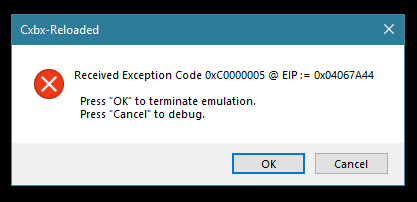
Windows 10 Pro 64bit
i5 4690k
GTX 1060
 ghost
on 27 May 2018
ghost
on 27 May 2018
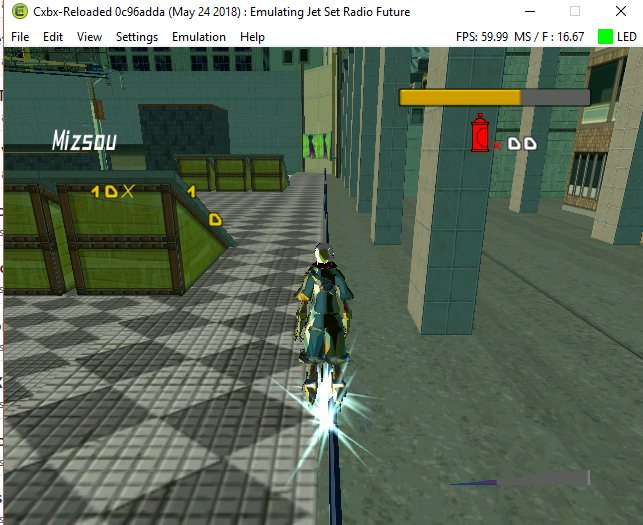
I launch the game fine but character models and animations are missing. While character moves, he lacks textures and does not animate at all. As if I control a wooden statue
It is not like the problem above because here not even the human models are visible in the intro
 petran79
on 28 May 2018
petran79
on 28 May 2018
Well it seems the game improve a bit of 10fps on 99 street only but still slow in to 30fps. Before was 20fps. And the boost dash it seems to be more heavy then usual? Check the original boost dash ingame.
HyperScorpio
on 3 Jun 2018
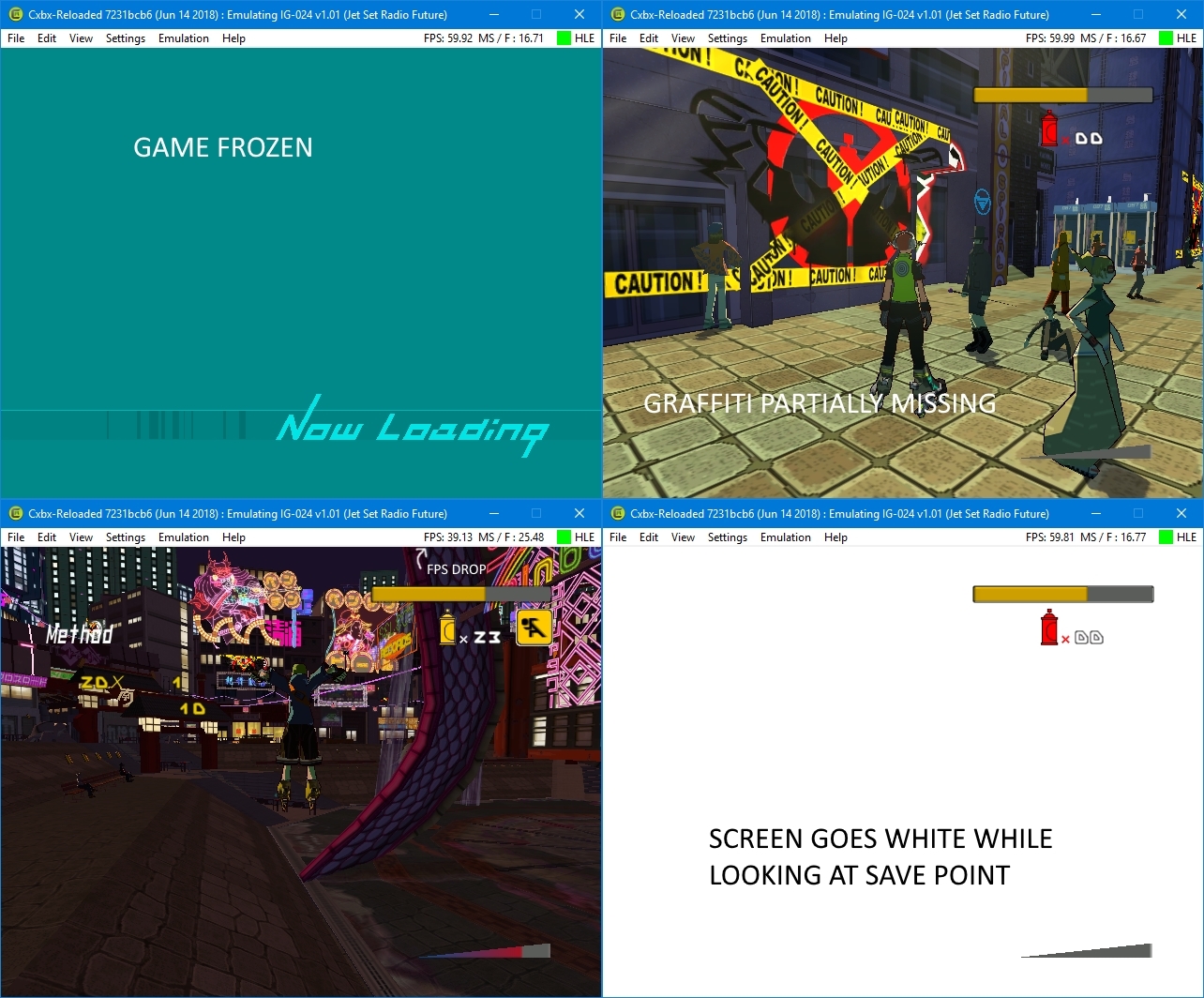
These are a few issues I've found while playing JSRF on the latest build as of yesterday.
Screen goes white while looking in the direction of certain textures such as the save points.
Random flickering while looking at the terror drone in the Rokkaku Expo Statium.
Graffiti is mostly missing but still visible.
Some models / textures are missing, like DJ Professor K and the speakers behind him, also Gouji / AKUMU's model.
Lag in 99th Street.
I'll upload screenshots of the bugs that I can find once I'm home later on.
(Unless someone else can provide some.)
 Zethilix
on 18 Jun 2018
Zethilix
on 18 Jun 2018
I've noticed that in today's build, setting the resolution higher works fine in the title and menu, but once you reach the character select or gameplay the screen turns completely black, while the game continues to play
ghost
on 18 Jun 2018
Zethilix
on 18 Jun 2018
All the issues i could find, i couldnt go back and re fight gouji or the terror drones because i already beat the game. i dont want to re beat the game just for that reason.
Zethilix
on 18 Jun 2018
I can vouch for the weird graffiti issues, it's loading the entire spray as soon as you start spraying, and it's not the right one, as far as I remember.
Screen is indeed enveloped by white when at the save point, I think it's the particle effect from the save point not rendering properly.
As for 99th street frame drops, I remember those happening for sure in the Xbox 360 Backwards Compatibility for JSRF, and maybe even on original hardware, so that's probably not an easy fix.
I can also vouch for the ToppestOfDogs issue, same thing happens to me.
All current as of the v0.1-alpha-2-g2512dd06 (Jun 16 2018) build.
 JacqylFrost
on 18 Jun 2018
JacqylFrost
on 18 Jun 2018
Yeah i totally understand the x360 backwards compatibility issue, I have tested it myself the other day. I suppose it is manageable for now. But in future updates for CXBX-R I believe that games will probably end up running a lot smoother and looking a lot nicer than the og consoles themselves. It just depends on your PC's hardware capabilities.
It seems that the particle effects for the save points were intact as of build b4badcd2 (Mar 19 2018)
Something to do with a change of code i'm guessing.
As for the ToppestOfDogs issue, I tested that last night, and I had the same thing happen to me.
Maybe one day we won't have to hex the game to run at a certain resolution and will be able to change it through the emulator itself. Maybe also have AA and filters?...
Zethilix
on 18 Jun 2018
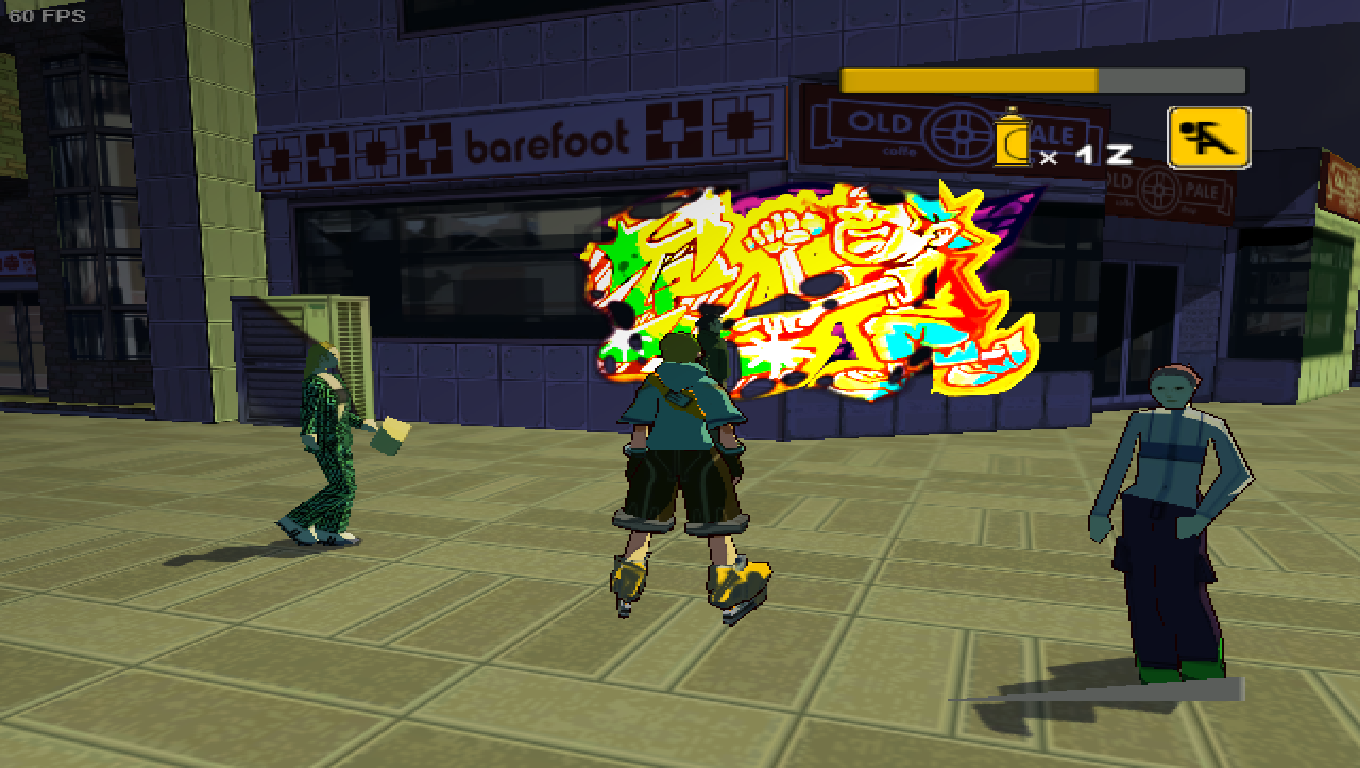
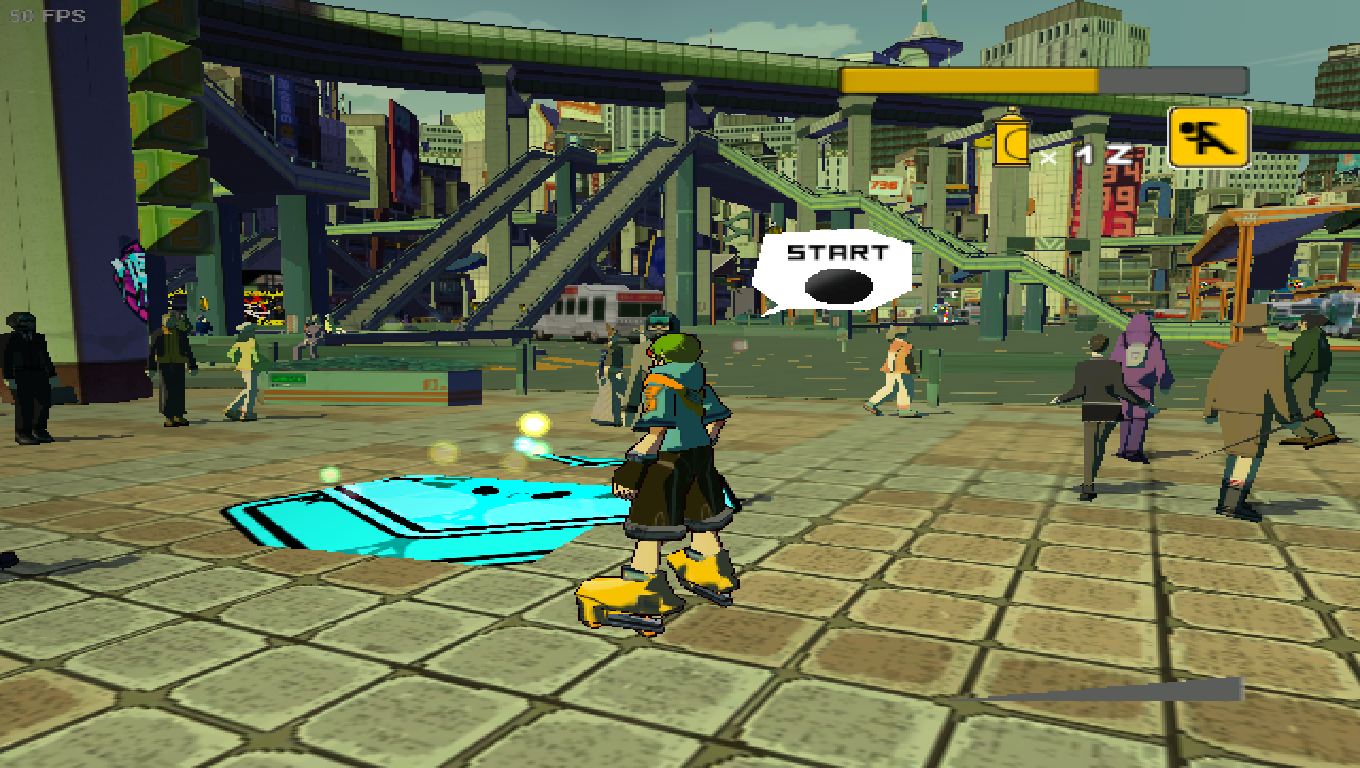
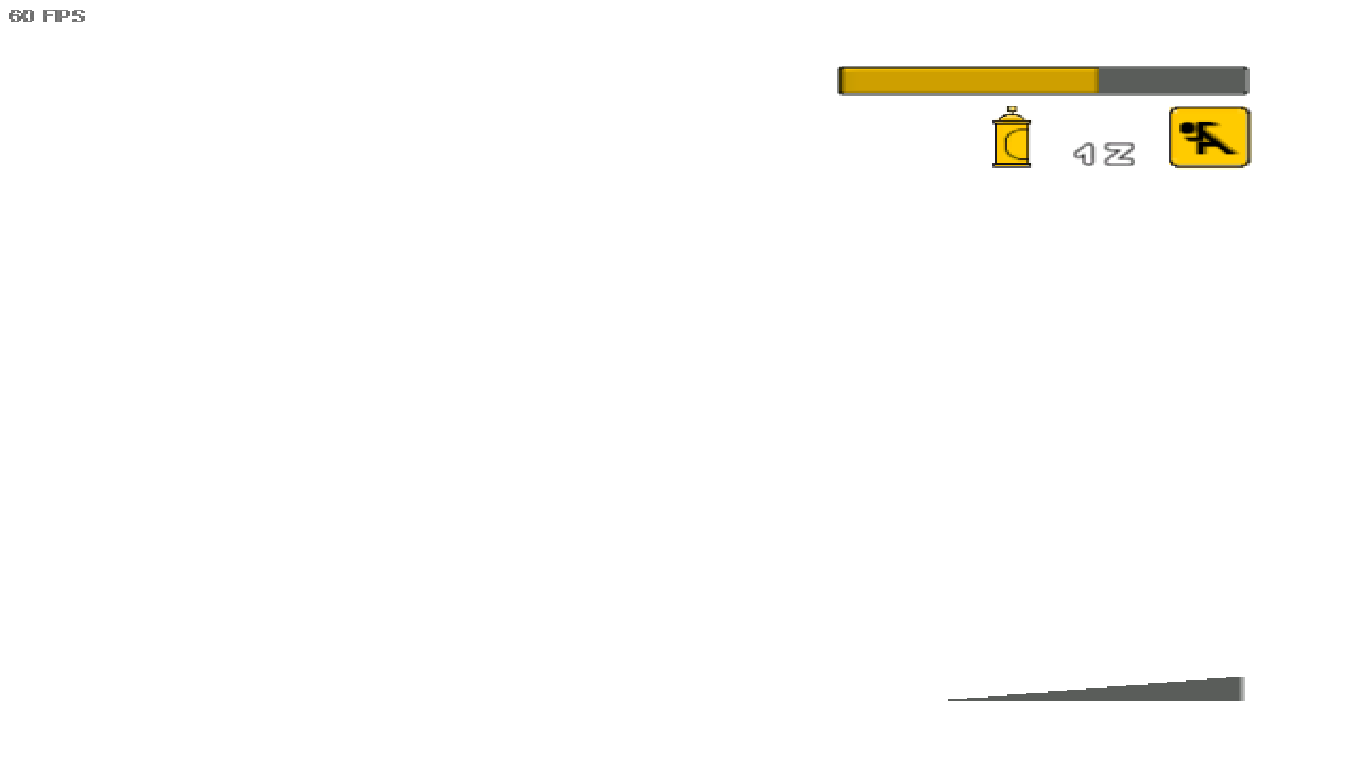
Okay so we are getting closer to having the graffiti fixed, but the particle effects for the save points are still causing the white screen. Game is a bit slower but manageable.
Zethilix
on 22 Jun 2018
@JackalFrost Old versions of CXBX i was able to play nice at 60fps. Something is in there and it's not right. Nothing to do with x360, this is a emulation only for classic xbox.
HyperScorpio
on 22 Jun 2018
@HyperScorpio it's slower because the emulator got more accurate, it's not something that's wrong.
The emulator isn't well optimized yet: It only worked fast before because some functionality didn't work. Now we fixed that (Render Targets) everything is a little bit slower.
It'l get better in the future, but you'll have to wait a few months.
LukeUsher
on 22 Jun 2018
@LukeUsher Thanks Luke is something i just want to hear. Now i'm a bit less worried. For luck i still have the playable version when was fixed the stadium issue.
HyperScorpio
on 23 Jun 2018
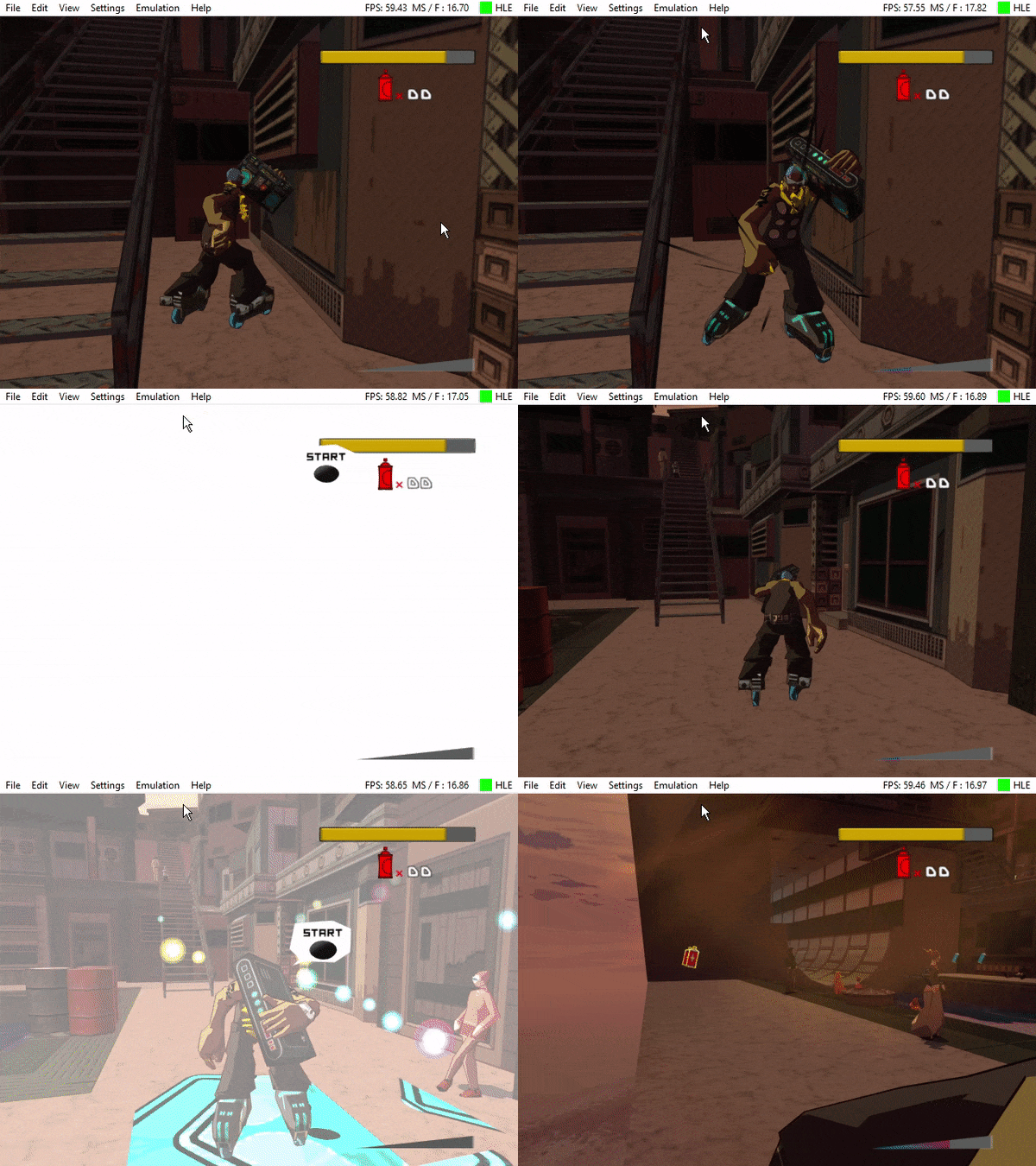
As shown in the gif image above, the screen has tendency to give a blinding white glare. It's behavior varies from lines moving up and down, to flickering(as shown) and a white screen. It mostly happens if the player is near or above a graffiti stop that's sprayed down. Hope this helps the devs fix the issue in a later update
 mamcocob64
on 29 Jun 2018
mamcocob64
on 29 Jun 2018
POST MOVED AS REQUESTED AND REFERENCED BY ERGO720
Multiple issues (screenshots and dumps can be added if requested I'm new here and not so tech savvy):
Blackscreen with audio during for JSRF when set to anything but default resolution with 1050ti as display adapter
speech letters out of place and scaled to default resolution when using Igpu as display adapter
black screen when boost is used on Igpu
black screen after loading on igpu if not set to default resolution
GPU not detected unless d3d8tod9 is put into files
texture issues (white buildings ) when resolution is raised (occurs in intro too and then crashes)
basically the game forces me into default resolution and hands me a fat L if i ever dare to even raise it one resolution size higher.
 Dent115
on 1 Jul 2018
Dent115
on 1 Jul 2018
Most of those are valid bugs, however
- Speech letters out of place when scaled to default resolution, and other scaling bugs are quirks in the game: JSRF was designed with 640x480 resolution in mind, so when we upscale, the game still uses hard-coded co-ordinates for the 2D overlay elements. There's not much we can do about this : This is one of the quirks of HLE, it won't be a problem once we have a working LLE GPU, but until then, this is the best we can do. The same is true for all resolution scaling problems: These games aren't designed for high resolution and can break in weird ways
- GPU not detected unless d3d8to9 is put into files is not our problem either: It's a driver issue. Cxbx-Reloaded still uses DirectX8, modern graphics drivers aren't designed with DirectX8 in mind. Until we either rewrite the HLE to use a newer graphics library, or switch fully to LLE, there is also nothing we can do about this. Blame your graphics card vendors: You'd get the same problem with older PC games (Silent Hill2/3, Final Fantasy XI).
#
Black screen with boost dash is a real issue and shouldn't happen though: This issue was fixed for most users months ago
LukeUsher
on 1 Jul 2018
Dang that depressing so theres nothing i can do for the driver issue? and yeah you want me to like screencapture the boost dash ? happens when i use my Igpu . Also upon opening the debugger when it blackscreened after loading (on gpu at 1366x768 res) i realized there was a warning fail error regarding 'vertex shaders' idk if this info will help .. also the boost dash issue appears to be both on my Igpu and my 1050ti
Dent115
on 1 Jul 2018
@LukeUsher i really don´t care about resolutions, i only care to see the same as the original xbox game roll over at 100% with no problems of speed. The rest is part of work need to be done. Thanks for the infos once more Luke 👍
HyperScorpio
on 5 Jul 2018
Alright been checking here every day for the past month heres some issues im experiencing also so useful info (resolution <3) :
ISSUES -
- The emulator kinda fucks you over if youre on a 1050 or 1050ti (getting the emulator to run at a different resolution from your settings legit wont work , black screen etc)
- The stage the immortals rule (forgot the name but is the first stage where police use choppers) , is a crash haven , crashed probably 30 times already not even getting 10 mins of gameplay in
- 99th street also has high crash probability but is mild compared to the previously mentioned stage
USEFUL INFORMATION - if youre one of the unlucky ones who cant play raise the resolution but wants to play fullscreen without mad pixels everywhere heres the fix !
download 'ogxhd' , and tinker with it for a bit ( i did 16:9 , and 720 aggressive) now that youve done that leave the emulators resolution at default and launch the altered .xbe file . For some odd reason the game runs at 720p literally ignoring the fact that you didnt set the emulator itself to do so . SO THEN PUT IT FULLSCREEN AND BOOM BABY .
NB: Link for ogxhd is in the FAQ of the cxbx github page , im using the july 13th build and lastly im on a dual gpu laptop with a 1050ti . I'll check here often to see if i can help out or if theres progress if not then i'll have understood why it was so hard for me to even get an ounce of help
AND LASTLY : if dev happens to see this , is it normal for my debugger to say ' [0x08C0] WARN: EmuD3DDevice_SetVertexShader : FVF contains unknown flags! Handle = 0x00001118'
Dent115
on 29 Jul 2018
@Dent115 I can´t go back for many reasons, i don´t know why but forces me in to the latest version. I remove Registry Folder, %AppData% Folders and files, not the save game in. And what i need to clean even more CXBX? If you know something just pm me. I want to remove complety any file just trying to run as latest version. And i'm try to use older versions and the bugs continues and can´t go back to fix the slow issue in the map. Cheers 👍
HyperScorpio
on 2 Aug 2018
UPDATE : potential crash fix.
configure youre eprom .. checking to make sure your game is PAL or NTSC is quite overlooked .. theres settings where you can set the emulator to correspond with the rom .. made my jsrf stop crashing entirely
Dent115
on 4 Aug 2018
Hello
i wanted to test jsrf on the emulator but the game crash at start. Here a screenshot of my issue :
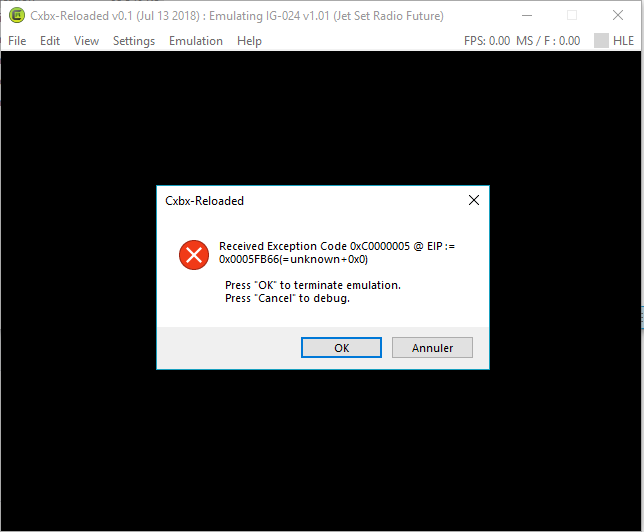
is there a particular setup to do? i let all settings default. I only try to change eeprom settings (put PAL settings) but i have the same result
DUMPS
About computer
Windows 10 64 Bits
Intel i7 6700K 4Ghz
Nvidia GeForce GTX 1080
16Gb RAM
Thank you very much
Edit 08/16 :
I tried dev executable (commit 1e536203) and always same error
Edit 09/11
I still can't play this game .... Always same error. With or not reset settings
i attach debug screen but i don't know how to understand this
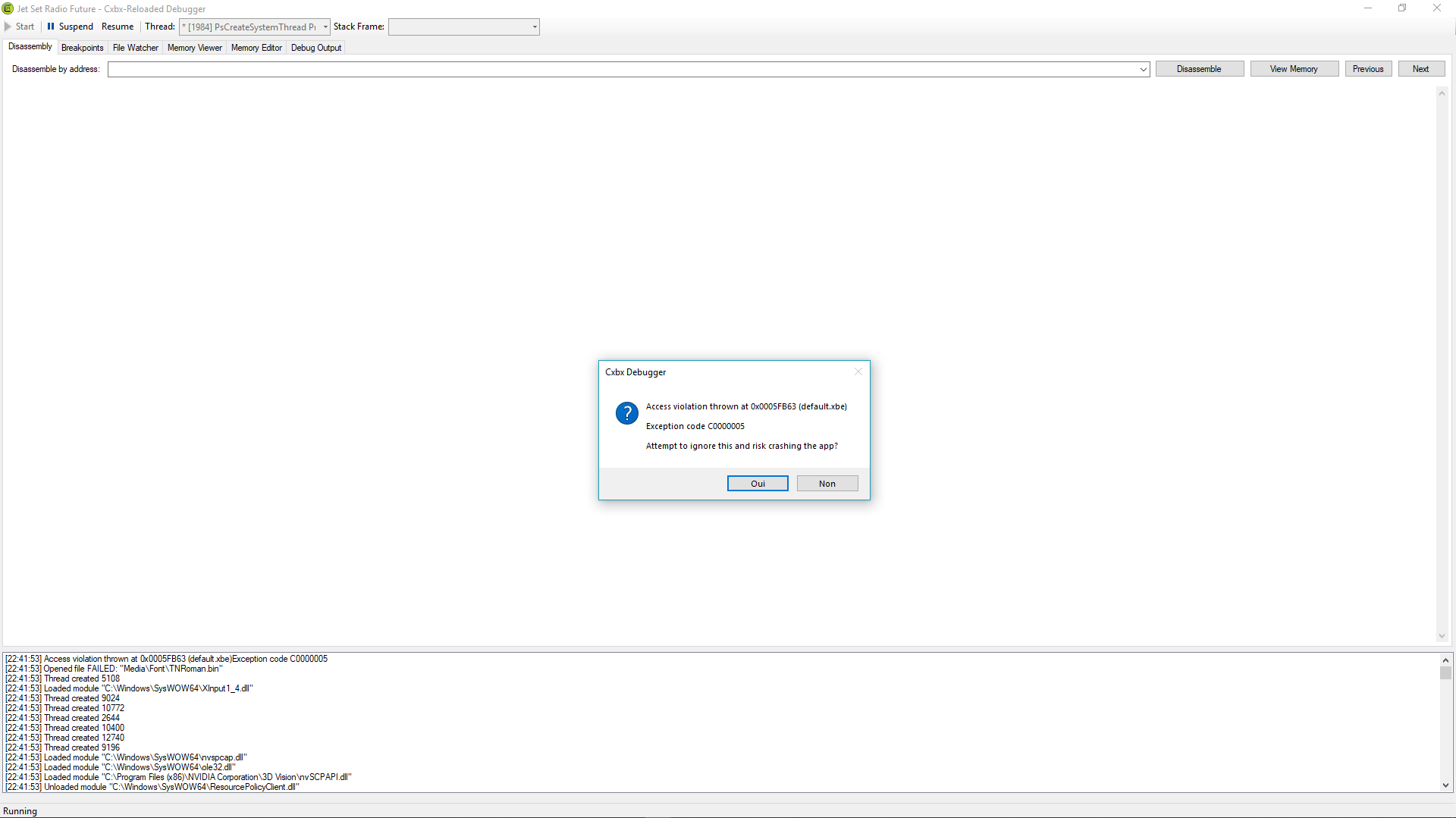
Do you think, the xbe is file the problem ?
NOW IT'S OK!!!! for others: Just care about 'admin rights' during xbe extraction
 vaatileplow
on 10 Aug 2018
vaatileplow
on 10 Aug 2018
Compared to the old directx the game just improve 20fps better instead of 20fps goes to 44fps. Well this emulator will only runs on Directx11 100%. And it needs more work to do it. Anyways... Great job so far.

HyperScorpio
on 16 Aug 2018
I joined just to say... this is finally playable!! Very minor graphical glitches, perfect sound, and a solid framerate. For those experiencing an error, go to Settings -> Config -> Eeprom, and click reset. That worked for me. I have Cxbx-Reloaded Version 0.1, Intel i7-6700K, and GeForce GTX 1070.
 bradye21
on 30 Aug 2018
bradye21
on 30 Aug 2018
@bradye21 The only cities just annoying is 99th Street and Pharaoh Park, because the slow still continues even after being to 44fps. I think is the dam water in the 99th Street just make it slow and unplayable to trying to performance the graffiti souls. I still can get them all, but i need to slow down the button secounds in my controller or just bam, it fails again. 👎 The rest is just fine, need to fix the graffiti in the walls to make it 💯 % completed. I can´t wait to play this with no structure lag in. 👍
HyperScorpio
on 8 Sep 2018
Graffiti menu issues not fixed.
Kernel debug states that "Locking host surface failed". Perhaps that might be the cause?
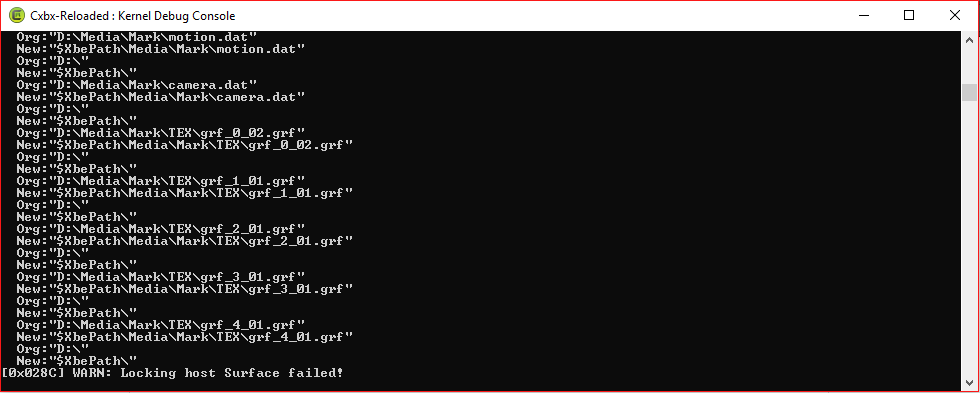
Also, when going to pick your graffiti, only the XL texture can be seen.

Not game-breaking, just somewhat annoying.
 SlimeOfSteel2
on 11 Sep 2018
SlimeOfSteel2
on 11 Sep 2018
I cannot discribe this but i found a nother bug in the site of tokyo line.
When we press boost (B), the screen just zoom in and just hide the screen game in front from the train.
This is the level.
https://www.youtube.com/watch?v=i18Bft47Vzs
Sorry i can´t take a picture because it was so quick.
HyperScorpio
on 27 Sep 2018
in my game of JSRF there is two issues:
- DJ Proffesor k is full brown
- in some darker areas of the game,the game randomly gives whitescreen
 Demir2007
on 29 Oct 2018
Demir2007
on 29 Oct 2018
In the first map of the game, if we go back the game slows down Dramatically, are you sure this as been tested yet? I still having slows in a few maps. The Boost Dash is again fail to watch. I'm testing the game in normal resolution and that will be the original one to play nice.
I remember when we fight with the golden rinos on Shibuya Terminal there is 2 bears in the save stage, before i defeat one the game stops working and appears a error, but it seems that as been fixed, i didn´t had any problems. On the Skyscraper District there is a mission when we fight againt those 3 robots, cube appears to talk and then the ballon speak goes away quickly.
I wish was able to find this copy i think this is a mega prototype from japan check this pictures: https://archive.thegia.com/xbox/jsrf/jsrfmedia6a.html Even the map screen, graffiti are different.
HyperScorpio
on 7 Mar 2019
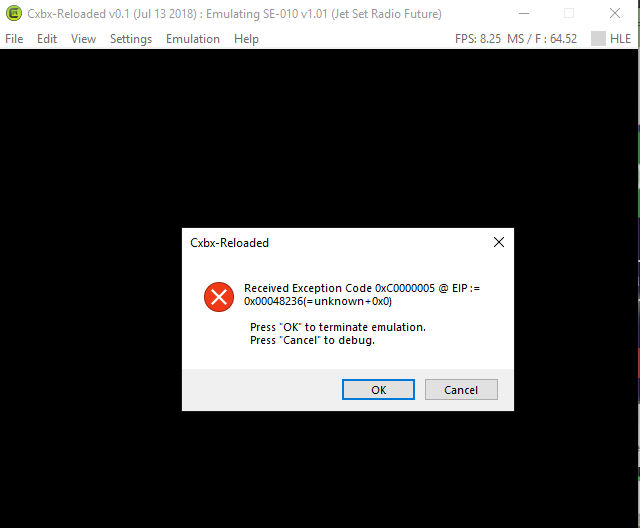
it has ran before but now it doesn't
 dryknucklesfan
on 15 Feb 2020
dryknucklesfan
on 15 Feb 2020
Many screenshots from some older posts above show one title ID of [IG-024] [v1.01]; while some more recent screens show a different ID of [SE-010] [v1.01].
This issue is probably for the international release, not the North American (NTSC) release. So which ID is it?
ObiKKa
on 21 Apr 2020
The title ID of the EU release is IG-024 as it was published by Infogrames.
All other releases were published by Sega and have SE-XXX title IDs
LukeUsher
on 21 Apr 2020
Why delete my comment?
 AutumnAscending
on 21 Sep 2020
AutumnAscending
on 21 Sep 2020
@AutumnAscending Piracy isn't allowed.
 Margen67
on 21 Sep 2020
Margen67
on 21 Sep 2020
So I got this in the newest Build that I got, I do not know how to fix this because the game looks black(both pics will be in this comment). It ran just fine before I updated the build tho it was Hyper slow(7fps lows and 67fps highs) in some areas but playable.

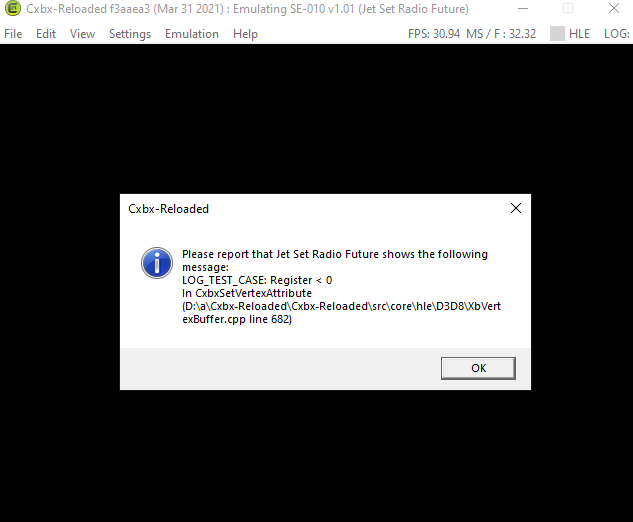
 ShinDoomBot
on 1 Apr 2021
ShinDoomBot
on 1 Apr 2021
Related issues
 NNX3x
·
3Comments
NNX3x
·
3Comments
 Voxel9
·
3Comments
Voxel9
·
3Comments
 PatrickvL
·
3Comments
PatrickvL
·
3Comments
 mnadareski
·
3Comments
ghost
·
3Comments
mnadareski
·
3Comments
ghost
·
3Comments
Most helpful comment
Regarding the shadows, it appears that it draws shadows to the stencil buffer correctly, but when doing a full screen colored quad with a stencil test to darken them, the colors of that draw are somehow uninitialized. Sometimes when I start the game it's white, sometimes nothing, sometimes a gradient.
Some stages barely use shadows at all like 99th Street so would be unaffected.
So my guess is a that the draw is done with vertices that don't specify a vertex color but has a pixel shader/fixed-function-setup using one anyway - and that there's some mechanism to globally set a color for all vertices in a draw, similar to glColor4f, which isn't emulated correctly. (D3DDevice_SetVertexData4f ?)
Some grafitti is partially visible with what looks like garbage vertex colors - could be the same thing there.
Other than this and the boost dash bug, the game plays impressively well.