Game-compatibility: Azurik - Rise of Perathia [MS-007] [1.01]
Description
Azurik: Rize of Perathia (NTSC version; XDK 3911) has been broken since October 4th, it appears. There was a time when it went ingame, now it does nothing but hang and show a black screen. So far, I've been able to track it to a particular commit linked below:
https://github.com/Cxbx-Reloaded/Cxbx-Reloaded/commit/efa51fb91b5ec7e53e67d314c64f8489b1c49533
This is the last commit that I've been able to get it to work with:
https://github.com/Cxbx-Reloaded/Cxbx-Reloaded/commit/761143945c4fff523b298277a4c918ab8f77d554
Since there are several issues with this game, I assume it would be better to create separate smaller issues (since I know what many of them are) and cross link them so they can be referenced.
Dumps
Xbe.txt (NTSC)
Status
Previous behavior:
This game used to go ingame without crashing.
Current behavior:
Hangs on a black screen.
Screenshots
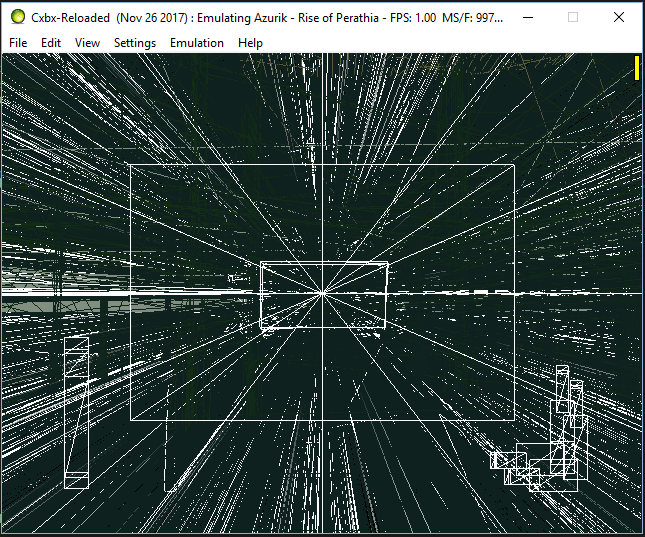
If you do manage to get ingame, you'll see stuff like this (broken pushbuffer emulation is the problem).
Additional Information
If you want to try running Azurik on the build linked above, you will first need to rename the movie folder because Cxbx-R doesn't play the bink videos (at one point Cxbx did playback these videos). Since the pixel shader code is broken, you'll only be able to see geometry in wireframe mode.
Disabling pixel shaders causes some 2D menu textures to work again before going ingame (this is not a game specific issue, I'll need to write an issue regarding pixel shaders in general).
 blueshogun96
All 32 comments
https://github.com/Cxbx-Reloaded/Cxbx-Reloaded/commit/efa51fb91b5ec7e53e67d314c64f8489b1c49533
Re-patch D3DDevice_GetDisplayFieldStatus play the bink videos (Still blackscreen, but not Hangs).
 jarupxx
on 29 Nov 2017
jarupxx
on 29 Nov 2017
I'm going to make this the main issue and close the older one, #131. (There might be some potentially useful info there as well)
 CakeLancelot
on 29 Nov 2017
CakeLancelot
on 29 Nov 2017
Interesting! Just something to help with investigation: Does Azurik support progressive scan on real hardware, or only interlaced: Also, could you try changing your video settings in the dashboard? Check the behavior in master with HDTV modes enabled/disabled. I'd check myself but I don't have this game yet.
Also I guess this is regarding the NTSC version? Can we at least get a Xbe dump so we can add the correct tags and add the Title ID
 LukeUsher
on 29 Nov 2017
LukeUsher
on 29 Nov 2017
Okay, I'll make sure I get an xbe dump of the NTSC version as soon as I can.
In the mean time, I'm investigating a potential solution for the pushbuffers. But what I need to do is confirm it on a real Xbox first so I can test if my theory is valid. I'll keep you all posted.
Shogun
#
Updated the issue with an XBE dump for NTSC-U.
Thanks for the edit. My iPhone wouldn't allow me to edit the comment.
Shogun
blueshogun96
on 29 Nov 2017
Okay, now the latest build manages to boot Azurik again. But this time, the screen is completely white (need to navigate in wireframe mode again), and when you try to get ingame, it hangs on the loading screen.
Shogun
blueshogun96
on 4 Dec 2017
You have set what date to finish it and give it to everyone ??? 2020 Is possible ???
 Elsa-Arendelle
on 4 Dec 2017
Elsa-Arendelle
on 4 Dec 2017
@Elsa-Arendelle I've gone ahead and deleted your comment for linking an illegal source for games. We can not support piracy.
 BenNottelling
on 8 Dec 2017
BenNottelling
on 8 Dec 2017
It must succeed to do that to have a comment from you ??? Or where I have a link to attract attention. Because really nobody answers I do not support it.
#
So have you set a date for the release of the rom and the emulator version ???
Elsa-Arendelle
on 9 Dec 2017
Two things:
1) This is not the place to ask. This section is for discussion I'd but updates, fixes etc.
2) Releasing the ISO is considered piracy and will put the emulator in legal trouble. Please do not discuss this further. Also, the emulator will be released whenever its time. If you cannot build the emulator from source, then I'm sorry...
Shogun
blueshogun96
on 9 Dec 2017
Okay, now the latest build manages to boot Azurik again. But this time, it crashes when you try to go ingame. At least there's a stack trace this time.
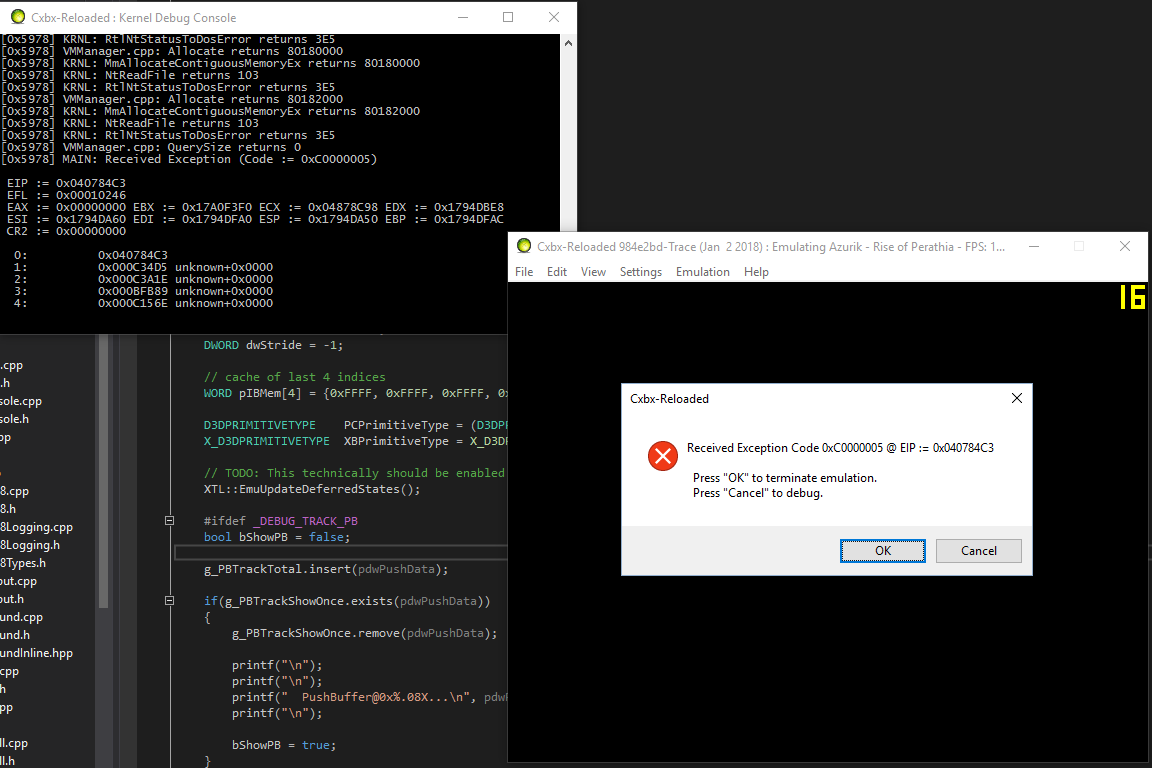
Hopefully the screenshot will suffice for now.
Shogun
blueshogun96
on 2 Jan 2018
Interesting, QuerySize is returning 0, it means that something is querying a free region, probably one of the D3D patches by the looks of it
 ghost
on 2 Jan 2018
ghost
on 2 Jan 2018
Okay, fixed it (well, most of it). Looking MUCH better now! Turns out an implementation of D3DDevice_LoadVertexShaderProgram was all that was needed. Still lots of buggy pushbuffer rendering.
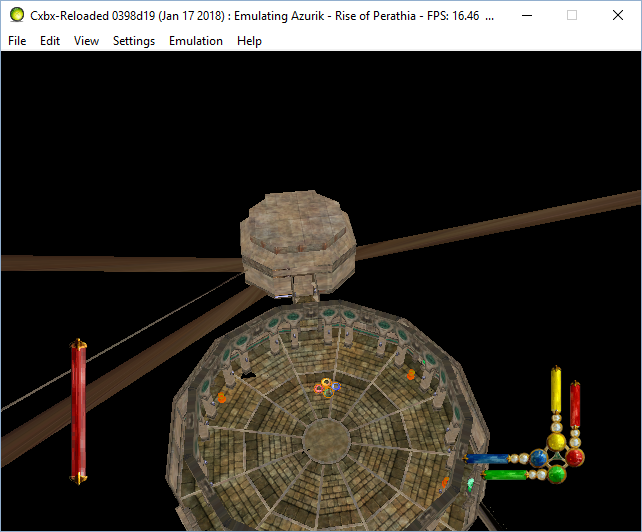
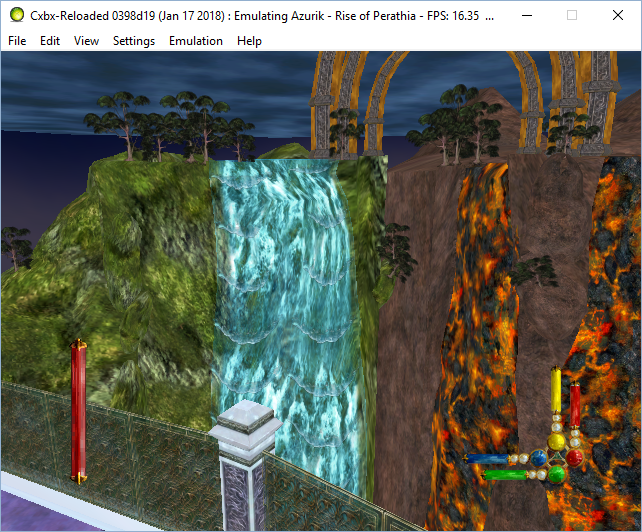
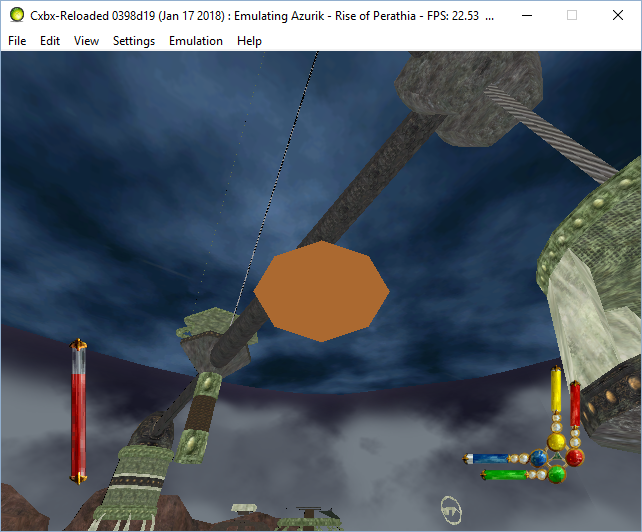
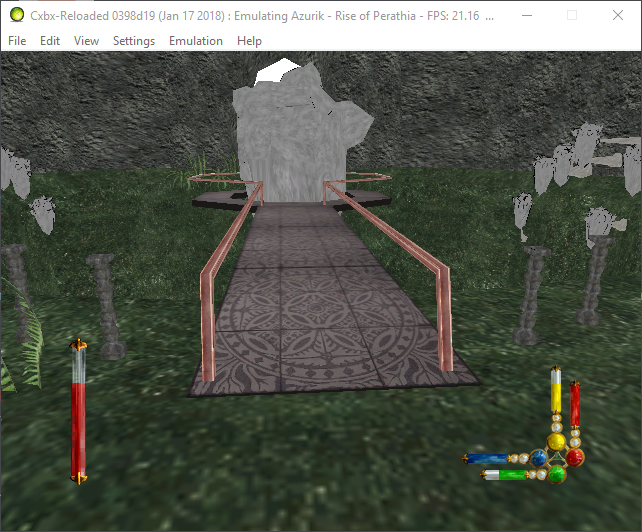
The game still won't load if unless you rename the video folder (put an underscore in it), and there's no sound either. Furthermore, attempting to save will cause a crash. Still loads of stuff this game needs...
Shogun
blueshogun96
on 18 Jan 2018
Fixed the save game crash. The double slash had to be replaced with one slash for it to work. But game saves are still kinda buggy. It will create 10 saves, and only the 10th one works for me.
Shogun
#
Another issue I discovered is that FMVs actually DO work... but only in Debug mode. Attempting to play in release mode causes a crash that does not get caught by Cxbx's exception filter.
Shogun
blueshogun96
on 19 Jan 2018
Please push your changes to github for us all to enjoy
 PatrickvL
on 19 Jan 2018
PatrickvL
on 19 Jan 2018
Release build crash is thought to be caused by a stack overflow.
(PE) Stack Commit is 0x00010000 (65536 byte) so you'll set Stack Commit Size to 65536 by Visual Studio as good solution, I think.
jarupxx
on 19 Jan 2018
Setting the stack commit as well as stack reserve fixes it for release mode. Thanks.
I'll do a pull request as soon as I can, I have to run atm. And there's alot more I want to comment on regarding my discoveries for this game.
Shogun
blueshogun96
on 19 Jan 2018
Okay, just finished my pull request. So it's up if anyone wants to view it for themselves.
The next issue I found is relating to this one vertex shader. Unfortunately, it's a really important one that handles all animations for skinned meshes, items, and particles too afaict. After conversion, the shader can be built without validation just fine, but when trying to use it, D3D8 rejects it outright.
Massive code block
DWORD dwVSHDecl[] =
{
        D3DVSD_STREAM(0),
        D3DVSD_REG(0, D3DVSDT_FLOAT3),
        D3DVSD_REG(1, D3DVSDT_FLOAT4),
        D3DVSD_REG(3, D3DVSDT_FLOAT3),
        D3DVSD_REG(7, D3DVSDT_FLOAT2),
        D3DVSD_REG(8, D3DVSDT_FLOAT2),
        D3DVSD_REG(2, D3DVSDT_PBYTE4 /* xbox ext. */),
NeedPatching: 1
        D3DVSD_END()
};
NbrStreams: 1
-- Before conversion --
xvs.1.1
mul r2.xy, -c17.y, v2
mov r3.w, c15.x
add r4.x, c15.x, -v1.y
mov a0.x, r2.x
dp4 r5.x, v0, c[a0.x]
dp4 r5.y, v0, c[a0.x+1]
dp4 r5.z, v0, c[a0.x+2]
dp3 r6.x, v3, c[a0.x]
mul r7.xyz, r5.xyz, r4.x
dp3 r6.y, v3, c[a0.x+1]
dp3 r6.z, v3, c[a0.x+2]
mov a0.x, r2.y
mul r8.xyz, r6.xyz, r4.x
dp4 r9.x, v0, c[a0.x]
dp4 r9.y, v0, c[a0.x+1]
dp4 r9.z, v0, c[a0.x+2]
dp3 r10.x, v3, c[a0.x]
mad r3.xyz, r9.xyz, v1.y, r7.xyz
dp3 r10.y, v3, c[a0.x+1]
dp3 r10.z, v3, c[a0.x+2]
dp4 oPos.w, r3, c3
mad r11.xyz, r10.xyz, v1.y, r8.xyz
dp4 oPos.x, r3, c0
dp3 r0.w, r11, r11
dp4 oPos.z, r3, c2
dp4 oPos.y, r3, c1
+rsq r1.w, r0.w
mov r2.x, c50.x
mul r4.xyz, r11, r1.w
dp4 r2.y, c49, r3
add r5.xyz, r3, -c10
add r6.x, -r2.y, r2.x
sge r7.xy, r2.yx, c17.w
dp3 r7.w, r5, r5
+rcp r1.x, r6
add r8.xyz, r3, -c10
mul oT0, v7, c13.xxz
+rsq r1.w, r7.w
mul r9.x, r1.x, r2.x
rcp r10.w, r1.w
mad r11.x, -r7.x, r9.x, r7.x
mad r0.y, r9.x, r7.y, r11.x
dp3 r2.w, r8, r8
mov r3.w, c15.x
mul oFog.x, r0.y, r10.w
+rsq r1.w, r2.w
mov r5.x, c17.x
mul r6.xyz, -r8, r1.w
dp3 r7.xyz, r4, r6
mov r8.xyz, c11
add r9.xyz, r7, r7
add r10.x, r5, c17.z
mad r11.xyz, r9, r4, -r6
mov a0.x, r10
dp3 r3.x, r11, c4
dp3 r3.y, r11, c5
dp3 r3.z, r11, c6
dp3 r11.xyw, r4, c[a0.x]
dp4 oT1.y, r3, c38
dp4 oT1.x, r3, c37
+lit r1.y, r11
dp4 oT1.z, r3, c39
dp4 oT1.w, r3, c40
mad r0.xyz, r1.y, c[a0.x+1].xyz, r8.xyz
add r2.x, r10, c17.z
mul oPos.xyz, r12, c-38
+rcc r1.x, r12.w
mov a0.x, r2
dp3 r3.xyw, r4, c[a0.x]
add r5.x, r2, c17.z
lit r1.y, r3
add r6.x, r5, c17.z
mad r7.xyz, r1.y, c[a0.x+1].xyz, r0.xyz
mov a0.x, r5
dp3 r8.xyw, r4, c[a0.x]
mad oPos.xyz, r12, r1.x, c-37
lit r1.y, r8
mad r8.xyz, r1.y, c[a0.x+1].xyz, r7.xyz
mov a0.x, r6
dp3 r9.xyw, r4, c[a0.x]
lit r1.y, r9
mad oD0.xyz, r1.y, c[a0.x+1].xyz, r8.xyz
-----------------------
Deleted mul oPos.xyz, r12, c-38
PosC38 = 65 i = 74
Deleted +rcc r1.x, r12.w
Deleted mad oPos.xyz, r12, r1.x, c-37
-- After conversion ---
vs.1.1
mul r2.xy, -c113.y, v2
mov r3.w, c111.x
add r4.x, c111.x, -v1.y
mov a0.x, r2.x
dp4 r5.x, v0, c[a0.x+96]
dp4 r5.y, v0, c[a0.x+97]
dp4 r5.z, v0, c[a0.x+98]
dp3 r6.x, v3, c[a0.x+96]
mul r7.xyz, r5.xyz, r4.x
dp3 r6.y, v3, c[a0.x+97]
dp3 r6.z, v3, c[a0.x+98]
mov a0.x, r2.y
mul r8.xyz, r6.xyz, r4.x
dp4 r9.x, v0, c[a0.x+96]
dp4 r9.y, v0, c[a0.x+97]
dp4 r9.z, v0, c[a0.x+98]
dp3 r10.x, v3, c[a0.x+96]
mad r3.xyz, r9.xyz, v1.y, r7.xyz
dp3 r10.y, v3, c[a0.x+97]
dp3 r10.z, v3, c[a0.x+98]
dp4 oPos.w, r3, c99
mad r11.xyz, r10.xyz, v1.y, r8.xyz
dp4 oPos.x, r3, c96
dp3 r0.w, r11, r11
dp4 oPos.z, r3, c98
dp4 oPos.y, r3, c97
rsq r1.w, r0.w
mov r2.x, c146.x
mul r4.xyz, r11, r1.w
dp4 r2.y, c145, r3
add r5.xyz, r3, -c106
add r6.x, -r2.y, r2.x
sge r7.xy, r2.yx, c113.w
dp3 r7.w, r5, r5
rcp r1.x, r6
add r8.xyz, r3, -c106
mul oT0, v7, c109.xxz
rsq r1.w, r7.w
mul r9.x, r1.x, r2.x
rcp r10.w, r1.w
mad r11.x, -r7.x, r9.x, r7.x
mad r0.y, r9.x, r7.y, r11.x
dp3 r2.w, r8, r8
mov r3.w, c111.x
mul oFog.x, r0.y, r10.w
rsq r1.w, r2.w
mov r5.x, c113.x
mul r6.xyz, -r8, r1.w
dp3 r7.xyz, r4, r6
mov r8.xyz, c107
add r9.xyz, r7, r7
add r10.x, r5, c113.z
mad r11.xyz, r9, r4, -r6
mov a0.x, r10
dp3 r3.x, r11, c100
dp3 r3.y, r11, c101
dp3 r3.z, r11, c102
dp3 r11.xyw, r4, c[a0.x+96]
dp4 oT1.y, r3, c134
dp4 oT1.x, r3, c133
lit r1.y, r11
dp4 oT1.z, r3, c135
dp4 oT1.w, r3, c136
mad r0.xyz, r1.y, c[a0.x+97].xyz, r8.xyz
add r2.x, r10, c113.z
mov a0.x, r2
dp3 r3.xyw, r4, c[a0.x+96]
add r5.x, r2, c113.z
lit r1.y, r3
add r6.x, r5, c113.z
mad r7.xyz, r1.y, c[a0.x+97].xyz, r0.xyz
mov a0.x, r5
dp3 r8.xyw, r4, c[a0.x+96]
lit r1.y, r8
mad r8.xyz, r1.y, c[a0.x+97].xyz, r7.xyz
mov a0.x, r6
dp3 r9.xyw, r4, c[a0.x+96]
lit r1.y, r9
mad oD0.xyz, r1.y, c[a0.x+97].xyz, r8.xyz
I haven't pinpointed as to why this shader fails (even if I adjusted the constants to a reasonable range). I was able to build it using vsa.exe without validation and D3DX doesn't complain but the driver rejects it. nvasm.exe also complained about the constants. Even trimming it down a bit still doesn't work.
Obviously, vs.1.1 isn't going to cut it, and the need for a more modern shader version is a major requirement. I also probably shouldn't have forced all shaders to add 96 to the desired shader slot since Xbox supports constant numbers between -96 and 96, which is 192 constants max. Windows only supports 96 altogether. So I dunno if it's going to work on our current system (more research is required).
Shogun
#
And one more thing explaining the gfx corruption (this likely belongs in a totally new issue). JayFox explained why there's been issues with matrix precision.
the vertex data is encoding matrix indices in uint8, however GLSL will convert that to a float in the range [0.0, 1.0]. so to get back to an integer you have to multiply it. say matrix index 17 is stored as byte value "17" in the vertex. In order to plug this into OpenGL we have to convert this ourselves or let GL do the conversion which is about 17/255 = ~0.066666666666.... as floating point.
GLSL does not specify a rounding more or exact precisions, so for some people this will become 0.066666 for example (meaningit has been rounded down to a limited precision). when you now try to recover the index to do a matrix lookup in some array this would become: lookup[0.066666 * 255] or lookup[16.99983]. as float to int rounds down in GL, this will mean you suddenly lookup array index 16 (which might be a tottally different matrix or in the middle of some other matrix). with infinite precision or integer math you'd have gotten lookup[17]
the Xbox GPU allows access as float AND integer though, so you can't just do one or the other (unless you add costly conversion). also what makes this worse, is that the GL rounding of the array index does not even matter, because the game itself will already do the floor() operation earlier
this is just one of many many issues in using GL for emulating xbox shaders. other issues are the usage of NaN or -0 an +0 as different values
Shogun
blueshogun96
on 21 Jan 2018
Note: The build in this video below used the un-merged extensive DSound WIP.
This new video shows a couple animated logo sequences and then a nice cutscene. But the sliding function of the main menu's background was broken as it froze the first time. The user reloaded the game again.
When it loaded the gameplay, you only see a few bitmap texture maps (!) and then badly corrupted graphics and a quick hang-up.
- Cxbx-Reloaded Xbox Emulator - Azurik: Rise of Perathia Intro / ingame! (05e08eba + dsound fixes WIP) (John GodGames Emus. Published on Mar 30, 2018.)
Edit (04/04/2018): Hey, it's gotten back in-game! But still the same issues as the above.
However you can see context help windows and several GUI icons in-game. You can even see glimmers of those square columns in the first level. He rebooted the game internally (Quit gameplay and then returned) and a cutscene played good in-game.
Game outputted an external error message a while after that in-game cutscene ended.
Exception Code 0xC0000005 @ EIP := 0x040743BD
- Ingame! (3de58c34 + dsound fixes WIP) (John GodGames Emus. Published on Apr 3, 2018.)
 ObiKKa
on 1 Apr 2018
ObiKKa
on 1 Apr 2018
This game’s progress has steadily been regressing ever since the experimental branch a few months ago. Patrickvl says that the freezing is likely due to the changes in the kernel code causing deadlock. No idea what’s causing the broken gfx as they were working nicely in the old experimental branch.
Shogun
blueshogun96
on 1 Apr 2018
One of my most favorite games growing up I was shocked to see progress being made so recently. I got to the training sequence one time and the graphics were all over the place. Ever since I only get a black screen. I can hear the initial startup music, but just a black screen.
You guys look like you are doing an amazing job, keep up the good work. Let me know if you need a guinea pig for anything.
 gummby8
on 7 Apr 2018
gummby8
on 7 Apr 2018
So have to test milalrds of times. the game shows its texture once launched, but after 5 minutes almost everything disappears to make room for black-screen style bug with trais a little everywhere
I list you with screens defference the beginning works perfectly with the intro. the menu practically, but several defects once the backups are deleted they come back as if by magic. and the backup thumbnails once part of the training area are totally corrupted
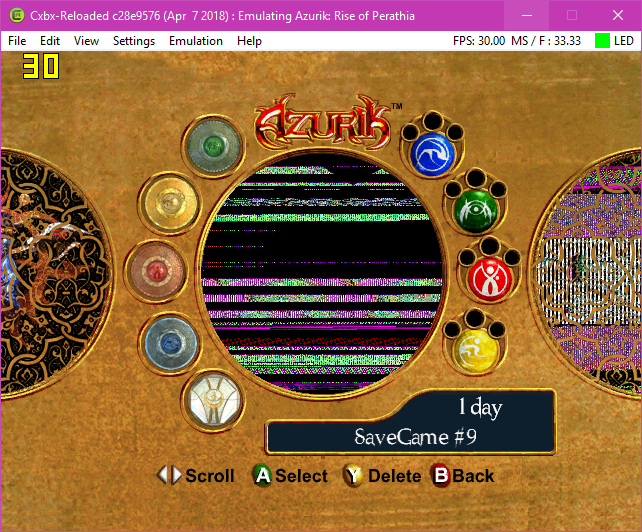
Then the game crash after 5 to 15 minutes of play it depends on where you look or where you are.
Also I pass you 2 screens
the first once the backup launch
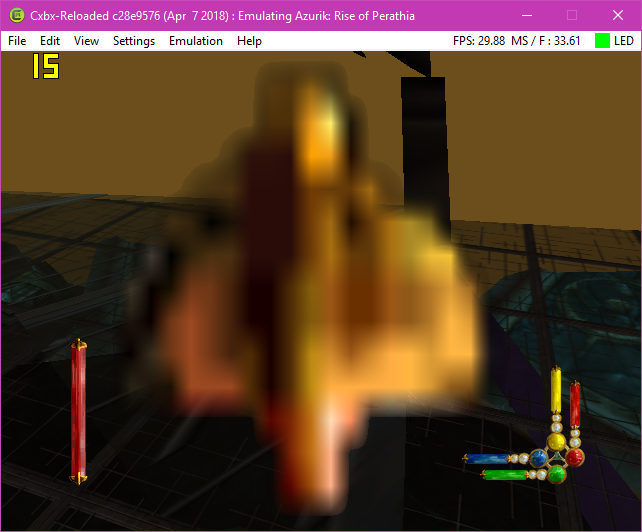
2 after saving throw
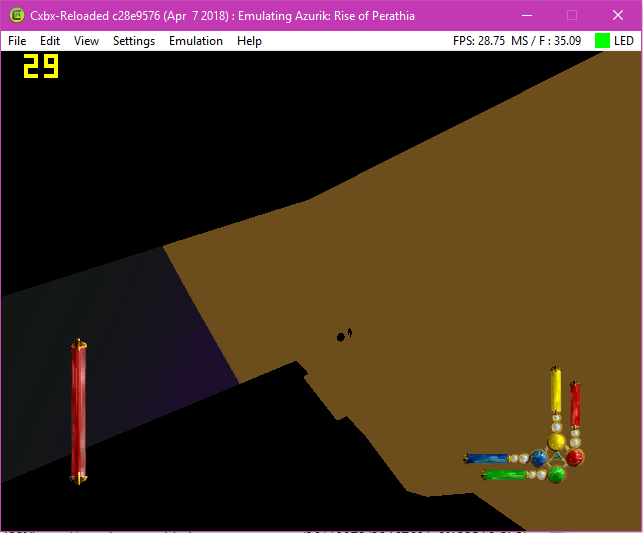
It's the same angle, but at the end of a second it becomes odd strange.
 AzurikRiseOfPerathia
on 8 Apr 2018
AzurikRiseOfPerathia
on 8 Apr 2018
With the help of the Dsound fixed the part 2 the game to now da the audio, but the impossibility to be acceded in the game that this is a new part, or the launch of a newcomer, strangely there has no error message just a black screens, and no audio behind.
AzurikRiseOfPerathia
on 26 Apr 2018
Sadly, my favourite Xbox game no longer goes ingame. After opening a save state, the game screen goes black and hangs.
I haven't had time to look into what's causing it, and if I get a chance, I'll spend some time over the weekend to at least find out where it hangs.
Shogun
blueshogun96
on 16 May 2018
Well, the disks are repaired (finally on the menu anyway) to make the basic simple disc are "gray" once a piece of recovered disc graze and cut into 4 of which 3 gray side and 1 colored side. the ones that are colored are the disks obtained and gray the unrecovered disks, Before started a backup there is no disk present, but once the first backup perform (normally on the training Arena) the game icon that represents the area where we are located a kind of Savegarde Photo remains the same if the backup is done at the training Arena, but once the area leave Build before the black screens, there is plenty of pixel breaking that I have you already present in a video that I myself did
LLE GPU Activate !!!
Also the backup system once deleted is magically recovering it's weird. and last poins the right power elements are in no way affected by any bug.
The video date so another that will replace will come in 2 or 3 days: https://www.youtube.com/watch?v=F9Kq-iETtn8
The Disk Fragment images on the corrected menu:
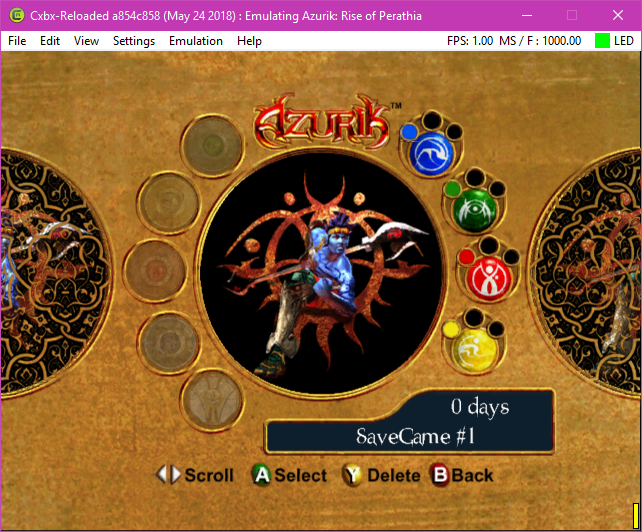
(P.S) That's one less problem, among so many others;) Also the bug of the disk fragments have been fixed in the version including Eeproum, even if it was corrected before, but sometimes it was defaults whereas here it is perfect.
(P.S²) On the other hand once the LLE GPU disable disks are filled as before.
AzurikRiseOfPerathia
on 24 May 2018
After a lot of movement on this game I allow myself to create a dashboard on this game The tasks to be done that will fill, I try in vain with my knowledge of looking for those who miss every day, so here's how
DashBorad: https://trello.com/b/o7DAKOUL/cxbx-realoaded-azurik-rise-of-perthia
You must do it for each game and include it on the future website.
AzurikRiseOfPerathia
on 29 May 2018
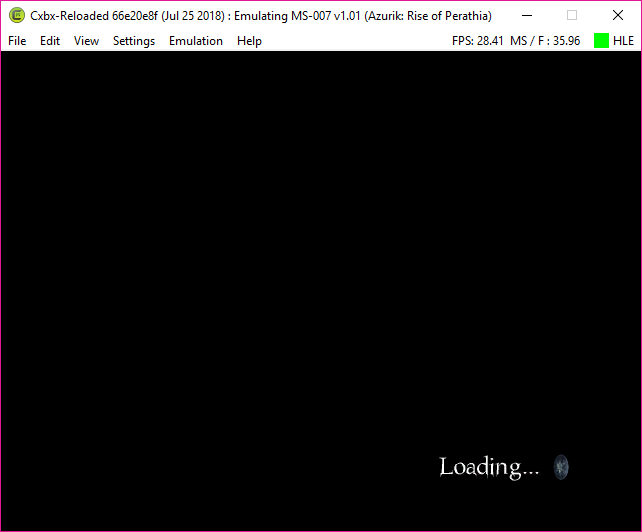
So, I do not know if this is good news because it crashes all the same, but I managed to get it ??? a Loading that crash, I tried only once since the D3D9
  Org:"d:\gamedata\training_room.xbr"
  New:"$XbePath\gamedata\training_room.xbr"
  Org:"z:\scratch\levels\training_room.sav"
  New:"$CxbxPath\Partition4\scratch\levels\training_room.sav"
[0x23A4] WARN: KRNL: IoCreateFile Failed! (STATUS_OBJECT_PATH_NOT_FOUND)

  Org:"\levels\training_room.sav"
  New:"$XbePath\levels\training_room.sav"
[0x23A4] WARN: KRNL: IoCreateFile Failed! (STATUS_INVALID_HANDLE)
Well I have no proof of the direct crash of the emulator, but I managed to debug the version to get a long load, the game as the bottom left loading that lasts forever
It's rare but if you quickly get into the game by quickly opening the menu and selecting a new game the game will go into the game, but there will be a direct crash of the emulation
I managed to see the menu interface where there are 5 basic disks with rubies and everything looks clean on this interface, but we see very few things from the direct crash that makes us almost invisible the map has black opacity
AzurikRiseOfPerathia
on 5 Sep 2018
Good after long months the game always with this damn Black Screens, once the advanced development and resolution of the black screens to the point of making the game playable perfectly, I would do a Let's Play 100% that will be somehow a TEST to check if the game and 100% playable
In the test I would do everything that can check crash or slowdown, or graphical bug
(Retrieved 1538 Gems from 100 Obsidian, 12 Elemental Powers, and 20 Elemental Disc Fractions, ONE COMPLETE)
This Let's Play will be accompanied by one or more episodes devoted to the BUGs of the game like OOB and others, and one or more episodes crushed to the Trick Code activatable with the help of command that makes do in the game.
I would categorize on a list all the problems encountered during the LP (like a slowdown, or crash, or graphic bug) Each episode of the LP will be shared here, to show you with times code the problems (like a slowdown, or crash, or graphic bug)
will have occurred
I would make several backups that I would copy and paste to check if the problem and resolved or not.
AzurikRiseOfPerathia
on 20 Nov 2018
Good after long months the game always with this damn Black Screens, once the advanced development and resolution of the black screens to the point of making the game playable perfectly, I would do a Let's Play 100% that will be somehow a TEST to check if the game and 100% playable
In the test I would do everything that can check crash or slowdown, or graphical bug
(Retrieved 1538 Gems from 100 Obsidian, 12 Elemental Powers, and 20 Elemental Disc Fractions, ONE COMPLETE)
This Let's Play will be accompanied by one or more episodes devoted to the BUGs of the game like OOB and others, and one or more episodes crushed to the Trick Code activatable with the help of command that makes do in the game.
I would categorize on a list all the problems encountered during the LP (like a slowdown, or crash, or graphic bug) Each episode of the LP will be shared here, to show you with times code the problems (like a slowdown, or crash, or graphic bug)
will have occurredI would make several backups that I would copy and paste to check if the problem and resolved or not.
Seems the game still goes to a black screen when trying to start a new game. Did you figure out how to get past that?
gummby8
on 15 Jul 2019
DASHBOARD
Here is a dashboard made of myself from the different problem of this game.
The table will change if other problem are found OR Resolved and images or videos (ALL BY LINK) of various problems will be added over time.
Main Problem
- Black Screens (Refuses to enter any level of the game, and play any cutscenes after the save menu.)
Pictures: https://imgur.com/ywERdv3
Secondary Problem
Powers
- Stream Power [Water & Fire] (Do not appear on axion)
Pictures: https://i.imgur.com/wYBys0R.png - Acid Power [Water & Earth] (Do not appear on axion)
Pictures: https://i.imgur.com/Et3KH7y.png - Lava Power [Fire & Earth] (Appears on the axion, but not in the right way)
Pictures: https://i.imgur.com/ofAzya3.png - Whirlwind Power [Air & Earth] (Do not appear on axion and no visual effect on enemies)
Pictures: https://i.imgur.com/jU5QWDp.png - Lightning Power [Fire & Water & Air] (Appears on the axion, but not in the right way -
The lightning effect that appears at level 2 does not appear)
Pictures: https://i.imgur.com/pLA9rtE.png
Creatures
- Sleeth Babies (No longer spit their acid)
Pictures: https://i.imgur.com/kcO2L3I.png
Level
- Water Realm 1 (Lag & thickness of a red fog)
Pictures: https://i.imgur.com/4gWSPkt.png
Various problem
1) If the camera is found behind foliage or bushes the displayed items will disappear and change texture
Pictures: https://i.imgur.com/OQmC5Wj.png
2) The dialog boxes are not very nice compared to that of the Backup.
Bad - Pictures: https://imgur.com/nsHm5fO
Nice - Pictures: https://imgur.com/wx8gFBC
3) The game crash if the dialogs can not be passed or go back if the voiceover speaks
This also applies if you put the game on the pause menu
Vidéos: https://youtu.be/RI-54ra3ky4?t=1518
4) Azurik is poorly modeled, and some textures become black.*
Pictures: https://imgur.com/9aRXU5g
AzurikRiseOfPerathia
on 14 Oct 2019
Hi all. I know I'm late, but there you go. Azurik ENTERS THE GAME !!!
Be aware that the game has problems, black texture, fairly epyleptic texture and LAGS, on the other hand no crash has been detected.
You will find in the coming week a preview on my channel here: https://www.youtube.com/channel/UC8PKxCHcbamEcoPxXDjOglQ
AzurikRiseOfPerathia
on 8 Feb 2020
Azurik : In-Game : https://www.youtube.com/watch?v=_qDVFnYEBdM
AzurikRiseOfPerathia
on 11 Feb 2020
Related issues
 bryce13950
·
3Comments
ghost
·
3Comments
bryce13950
·
3Comments
ghost
·
3Comments
 kennethedmonds
·
3Comments
kennethedmonds
·
3Comments
 Shideravan
·
3Comments
Shideravan
·
3Comments
 jeltaqq
·
3Comments
jeltaqq
·
3Comments
Most helpful comment
Okay, fixed it (well, most of it). Looking MUCH better now! Turns out an implementation of D3DDevice_LoadVertexShaderProgram was all that was needed. Still lots of buggy pushbuffer rendering.
https://youtu.be/i8GgNkGnUCI
The game still won't load if unless you rename the video folder (put an underscore in it), and there's no sound either. Furthermore, attempting to save will cause a crash. Still loads of stuff this game needs...
Shogun