Gala: "Shutdown"/"Logout" dialog isn't an active window when there are other active windows
Actual behavior

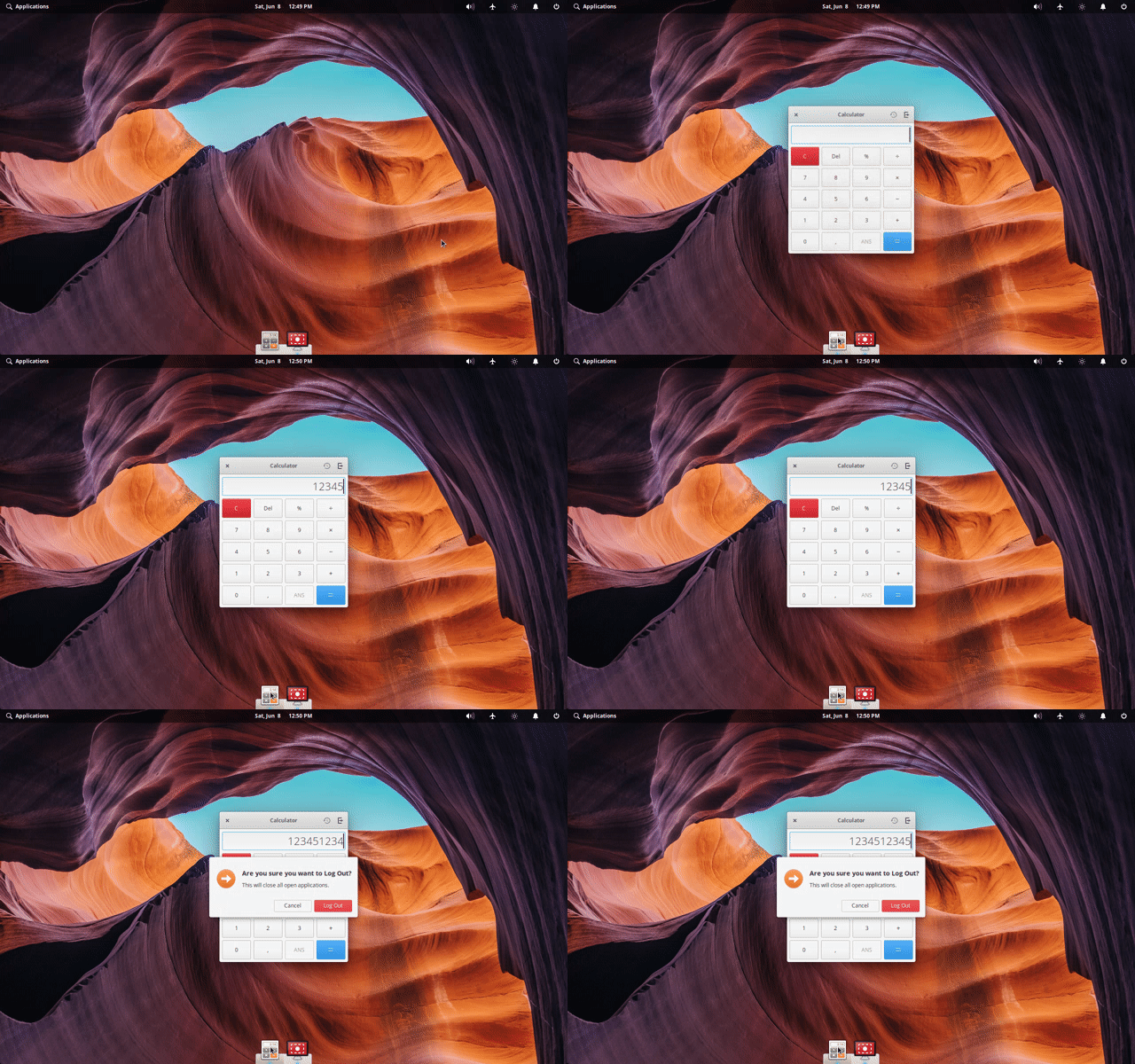
By clicking the power icon on the leftmost of the wing panel and then "Shut Down...", a dialog which confirm that the user will truly shutdown. However, this dialog isn't an active window by defaults, like this screenshot above, when there are other active windows.
Expected behavior

This dialog should be an active window by defaults even if when there are other active windows.
Steps to reproduce the behavior
- Keep one or some apps' windows opened.
- Click the power icon on the leftmost of the Wingpanel and select "Shut Down..."
- Check whether the dialog is active or not, by checking the color of the button, etc.
Want to back this issue? Post a bounty on it! We accept bounties via Bountysource.
 ryonakano
All 9 comments
Hi.
I have the same issue.
Let me add that this also happens when you have an empty workspace and before clicking the shutdown button, you click another of the wingpanel icons.
The logout window works like it should.
Unfortunately i only saw your thread after i posted mine. I someone can, please close mine.
Thanks,
 Blast-City
on 8 Nov 2017
Blast-City
on 8 Nov 2017
Additional Info from #118:
This bug does not happen when the desktop is empty. Also, it does not happen in the case of "Logout" dialog.
ryonakano
on 24 May 2018
This issue also happens in Juno Beta1
ryonakano
on 4 Jul 2018
Closing because I can't reproduce this in Juno at all
ryonakano
on 1 Nov 2018
Hi.
I think that this issue is back.
Could you please test if it's happening on your end?
I'm seeing this on the logout and power-off dialog windows.
Blast-City
on 8 Jun 2019
Yes happens for me on Juno updated. Does not happen on Loki.
 vjr
on 8 Jun 2019
vjr
on 8 Jun 2019
@Blast-City Yes, I can also confirm this on Juno again in the following cases:
- The logout dialog shown by selecting "Logout…" from Wingpanel Session Indicator
- The shutdown dialog shown by selecting "Shutdown…" from Wingpanel Session Indicator
- The logout dialog shown by pressing
Ctrl+Alt+Del
However, interestingly it focus on the dialog by default in the following case:
- The shutdown dialog shown by tapping with 3 fingers on the icon of Wingpanel Session Indicator
Also, it seems now this issue happens even if you don't keep one or some window open.
ryonakano
on 9 Jun 2019
Blast-City
on 9 Jun 2019
Closing in favor of https://github.com/elementary/wingpanel/issues/228 because there are more reasonable reason why session dialogs lose focus is talked:
Filed here and not on the session indicator because this is probably due to the self-unfocusing code of WingPanel?
ryonakano
on 16 Jul 2019
Related issues
 waldyrious
·
4Comments
waldyrious
·
4Comments
 steakscience
·
3Comments
steakscience
·
3Comments
 megatux
·
4Comments
megatux
·
4Comments
 hanaral
·
3Comments
hanaral
·
3Comments
 worldofpeace
·
4Comments
worldofpeace
·
4Comments
Most helpful comment
Hi.
I think that this issue is back.
Could you please test if it's happening on your end?
I'm seeing this on the logout and power-off dialog windows.