Hello, is there any plan to support .net core? Is there any roadmap for this repo?
Btw, nice library.
 abhiranjankumar00
All 40 comments
@abhiranjankumar00 at the moment the main goal is to get it stabilized and release a v1.0 but we can have a look at .net core at the same time, do you have an interesting use case for this library in .net core?
 gusty
on 12 Apr 2017
gusty
on 12 Apr 2017
at the moment the main goal is to get it stabilized and release a v1.0
Agreed.
I'm handling a product written in F# for my company and keen in porting it to .net core (once it's stable), thus making it platform agnostic. With the recent improvements in tooling now it's become easy to develop a software w/o using MS tools (read resource-hogger/tightly-coupled-with-compiler visual studio) and even use non-windows machine.
abhiranjankumar00
on 13 Apr 2017
Ok. I would say let's keep this issue open until me or someone else submit a PR.
gusty
on 13 Apr 2017
@wallymathieu @oscarvarto @abhiranjankumar00 I just released FSharpPlus CI00091
Please try it in all platforms and give feedback. Thanks !!!
gusty
on 1 Dec 2017
You're awesome @gusty !
Thanks a lot for the effort you and others have put into this. This week is very busy for me at my day job (tomorrow is going to be crazy...), and I may have some more time next week.
I promise I will take some time to try on Xamarin.Android. Will be back :)
 oscarvarto
on 1 Dec 2017
oscarvarto
on 1 Dec 2017
@wallymathieu I just realized that the nuget packs twice the .netstandard version.
I mean, even if you go to the net45 dir of the nuget, that dll is in fact the netstandard
gusty
on 18 Dec 2017
Netstandard 2.0 should be somewhat special. But I didn't expect the same binary to be produced from the compilation.
 wallymathieu
on 18 Dec 2017
wallymathieu
on 18 Dec 2017
You are of course correct. After compiling locally I get 2 different binaries for, 1 for netstandard2.0 and one for net45, that are different.
wallymathieu
on 18 Dec 2017
Yes, both binaries are generated but only the netstandard is included (twice) in the nuget.
I'm looking at how other projects are building and saw that some use Paket to generate the nuget. Something like:
Target "NuGet.Pack" (fun _ ->
    Paket.Pack(fun config ->
        { config with
Is the packaging done in MyGet?
wallymathieu
on 19 Dec 2017
Yes. Then from MyGet I upload it to Nuget.
Here's the URL: https://www.myget.org/feed/Packages/gusty-feed
gusty
on 19 Dec 2017
Could be a bug in dotnet core. I will try to reproduce it locally.
wallymathieu
on 19 Dec 2017
On Mac OS X:
msbuild /t:pack "src/FSharpPlus/FSharpPlus.fsproj"
Then after unzipping the deliverable
Bernhard-Riemann:unzipped mathieu$ diff lib/net45/FSharpPlus.dll lib/netstandard2.0/FSharpPlus.dll
Binary files lib/net45/FSharpPlus.dll and lib/netstandard2.0/FSharpPlus.dll differ
The dotnet core version installed:
Bernhard-Riemann:unzipped mathieu$ dotnet --version
2.0.2
I did the same test on Windows and got two different dlls but they are only 1kb different in size.
Have you tried: msbuild /t:pack "src/FSharpPlus/FSharpPlus.fsproj" /p:Configuration=Release
I tried it but I get an error.
gusty
on 19 Dec 2017
I get:
/Users/mathieu/src/FSharpPlus/.paket/Paket.Restore.targets(179,5): error : Directory "/Users/mathieu/src/FSharpPlus/src/FSharpPlus/obj/Release/FSharpPlus.1.0.0-1.0.0-CI00089.nuspec;/Users/mathieu/src/FSharpPlus/src/FSharpPlus/obj/Release/FSharpPlus.1.0.0-CI00091.nuspec;/Users/mathieu/src/FSharpPlus/src/FSharpPlus/obj/Release" not found. [/Users/mathieu/src/FSharpPlus/src/FSharpPlus/FSharpPlus.fsproj]
wallymathieu
on 19 Dec 2017
Yes. I get a very similar message.
gusty
on 19 Dec 2017
It might be due to messing with the version number, see there 1.0.0 but also CI00089 and CI00091.
gusty
on 19 Dec 2017
that's true, didn't see that at all :laughing:
wallymathieu
on 19 Dec 2017
@gusty This seems to be unresolved and closed.
 ShalokShalom
on 23 Jan 2018
ShalokShalom
on 23 Jan 2018
It's in the preview https://www.nuget.org/packages/FSharpPlus/1.0.0-CI00099
wallymathieu
on 23 Jan 2018
So it will be done done in v1
wallymathieu
on 23 Jan 2018
I mean that error, regarding the double standard.
ShalokShalom
on 23 Jan 2018
I mean that error, regarding the double standard.
Sorry I don't get it. Could please expand on which error?
gusty
on 23 Jan 2018
ShalokShalom
on 23 Jan 2018
Well yes, but at this point we know is not an issue in this project. It seems to be an issue in the myget side.
Our build packs properly both libraries and actually I directly upload the packs to nuget, bypassing myget.
At the moment it works fine.
You can open an issue in myget, or another issue here to track the problem with myget.
gusty
on 23 Jan 2018
Is MyGet itself open source? If so, which repo is it?
ShalokShalom
on 23 Jan 2018
Not sure, but I don't think so.
gusty
on 23 Jan 2018
So how to open an issue?
ShalokShalom
on 23 Jan 2018
wallymathieu
on 23 Jan 2018
Sorry, I am not used to proprietary software support. ^-^
ShalokShalom
on 23 Jan 2018
Hehe, you will get there 😉
wallymathieu
on 23 Jan 2018
After a few hours of trying to reproduce the above, all we get when building this repo on MyGet Build Services is assemblies that both target a different version:
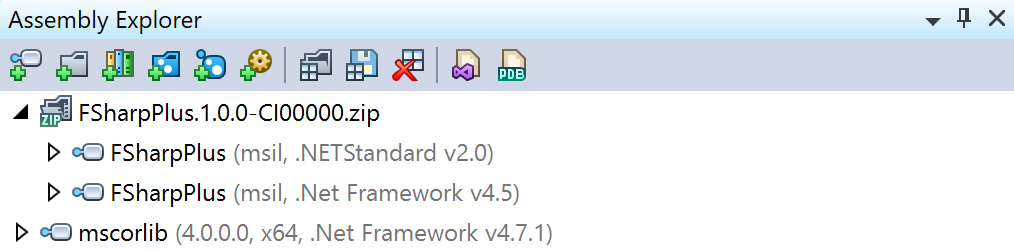
Please let us know if there is anything else we can do, for now considering this as resolved on MyGet side.
 maartenba
on 24 Jan 2018
maartenba
on 24 Jan 2018
Thanks @maartenba I just tried downloading the latest build from myget (from lastnight) and I still get that error:
error FS0193: Could not load file or assembly 'file:///C:\packages\FSharpPlus.1.0.0-CI00131\lib\net45\FSharpPlus.dll' or one of its dependencies. Operation is not supported. (Exception from HRESULT: 0x80131515)
So, probably is not related to the dll being compiled .netcore. It seems to be a problem with a dependency.
When I run the build in my computer I don't get that problem. So the whole build produces different results (here and in myget).
gusty
on 24 Jan 2018
Do you happen to have some info on how to reproduce getting this error? Or a test project that we can use?
maartenba
on 24 Jan 2018
@maartenba yes, just open FSharp Interactive, link the dll, open the namespace and call a function from F#+
Microsoft (R) F# Interactive version 4.1
Copyright (c) Microsoft Corporation. All Rights Reserved.

For help type #help;;

> #r @"C:\packages\FSharpPlus.1.0.0-CI00131\lib\net45\FSharpPlus.dll" ;;

--> Referenced 'C:\packages\FSharpPlus.1.0.0-CI00131\lib\net45\FSharpPlus.dll'

> open FSharpPlus ;;
> let x = map string [1] ;;


error FS0193: Could not load file or assembly 'file:///C:\packages\FSharpPlus.1.0.0-CI00131\lib\net45\FSharpPlus.dll' or one of its dependencies. Operation is not supported. (Exception from HRESULT: 0x80131515)
Ok here is what we did:
- Validated the latest FSharpPlus.1.0.0-CI00132 from your feed and found that it contains 2 assemblies with proper target frameworks. This means MyGet build behaves correctly.
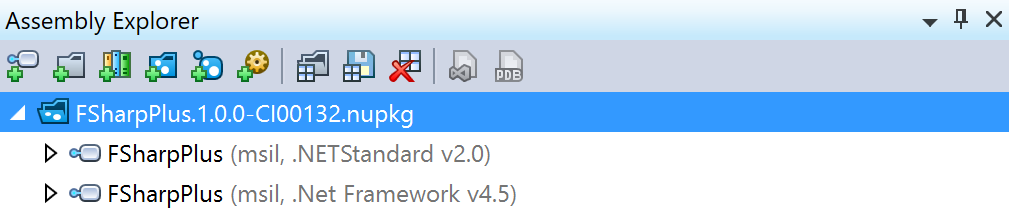
- Your repro above just works in
fsi(latest stable Windows 10). On your machine, can you double check the assembly you are loading is "unblocked"? https://stackoverflow.com/a/21770848/95901
Looks like assembly resolution or something like that is failing. The build/build frameworks are all good.
maartenba
on 25 Jan 2018
Thanks @maartenba indeed it was blocked.
When I tried to download it from Nuget it was throwing the same error, but it could be that by the time I started to upload directly to nuget, the issue of both assemblies being duplicated was solved on our side, but the error message was still the same.
I think it worth adding this link to a troubleshooting section in this project. Thanks again !
gusty
on 25 Jan 2018
One such an example, why the closed button is potentially tricky.
Nice job you three :D
ShalokShalom
on 25 Jan 2018
@ShalokShalom Also thanks to you for pushing !
Just for the records, I uploaded CI-00134 to nuget via myget.
I still get this error, downloading it from Nuget, of course, the issue is that the file is blocked and unblocking it solves the issue.
But then I was wondering why worked when skipping myget. Well the answer seems to be that since the file was build in my machine then it recognizes it when it comes back, even if it's uploaded and downloaded again.
I still don't know why older versions of this library don't get blocked, even when they were not build in this computer, but that's something that's probably only affecting me.
gusty
on 25 Jan 2018
Sure sure
Thanks for doing all here :D
ShalokShalom
on 25 Jan 2018
Related issues
 Shmew
·
9Comments
Shmew
·
9Comments
 NickDarvey
·
3Comments
NickDarvey
·
3Comments
 cmeeren
·
5Comments
cmeeren
·
5Comments
 aammfe
·
10Comments
Shmew
·
5Comments
aammfe
·
10Comments
Shmew
·
5Comments
Most helpful comment
@wallymathieu @oscarvarto @abhiranjankumar00 I just released FSharpPlus CI00091
Please try it in all platforms and give feedback. Thanks !!!