Frontend: Developer Tools "states" entity column width too small
Checklist
- [X] I have updated to the latest available Home Assistant version.
- [X] I have cleared the cache of my browser.
- [X] I have tried a different browser to see if it is related to my browser.
The problem
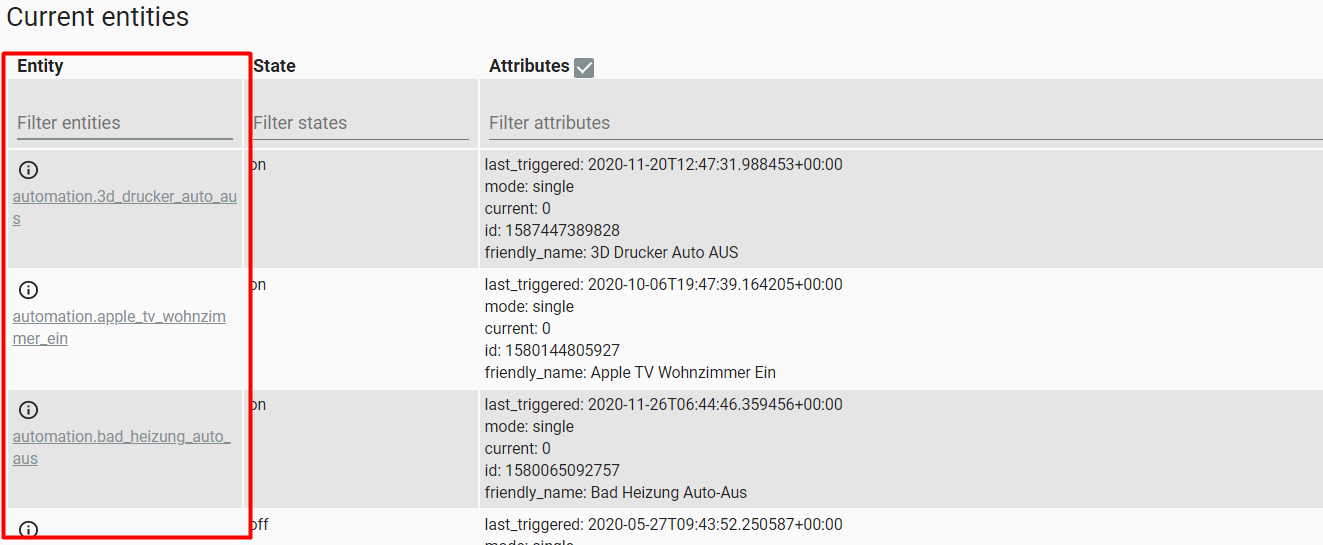
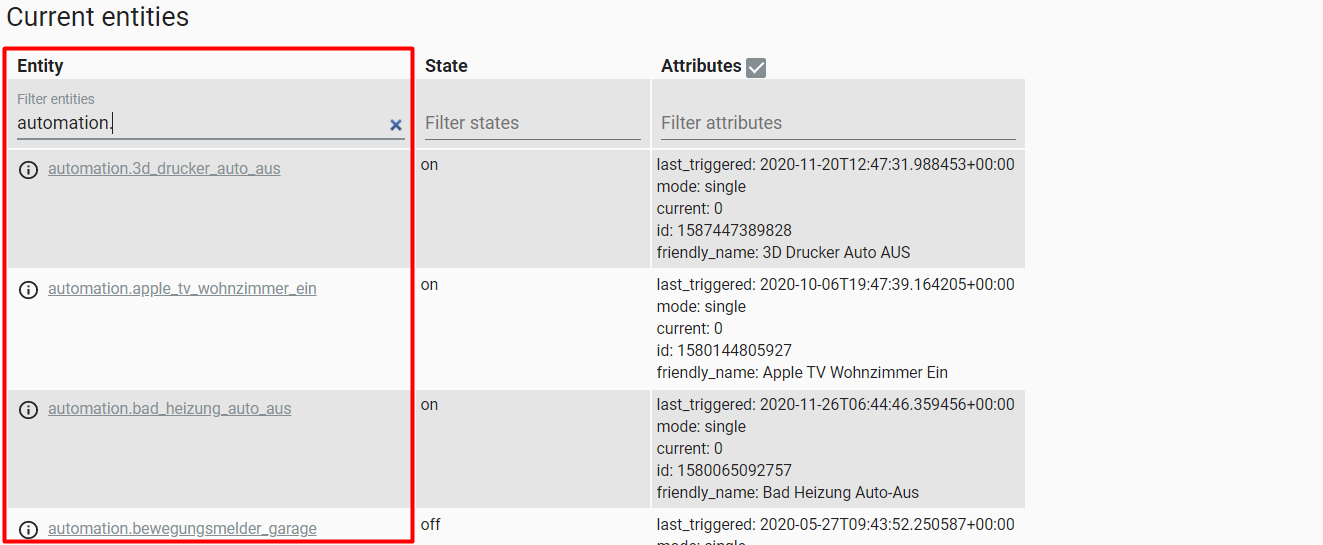
if an entity has a attribute with a really long value, the entity colum in the developer tools states page is too small. If you filter/search so that the entity with the long attribute is filtered out, the entity column is wide enough.

Expected behavior
The entity column should never become that small (not smaller than the longest entity name), also the attributes column should always use the full width (second screenshot). So the width should be calculated/prioritized from left to right.
Steps to reproduce
Developer Tools -> States -> you need an entity with an attribute with a really long value and also entities with a long name
Environment
- Home Assistant release with the issue: 0.118.4 (and prior)
- Last working Home Assistant release (if known): -
- Browser and browser version: tested with Chrome and Edge
- Operating system: Windows 10
 martinhoess
All 3 comments
I don't really agree with that. For me a good overall screen space usage is the higher priority and that means that the element with the most content (attributes) needs some space. If we cannibalize (making entity ID column wider = less width for attributes) that just to not have the entity ID wrap around, I don't think we have a better overall experience.
Since basically all entities have multiple lines of attributes anyway, the wrapping around of the entity ID does not increase the height of a row.
 spacegaier
on 29 Nov 2020
spacegaier
on 29 Nov 2020
I absolutely agree with @martinhoess
Multiple lines for the entity ID might not make the the rows higher, but are way harder to read when scrolling through (and triggers my OCD, because it looks wrong, too). One line per entity ID is much clearer and cleaner.
Also the very long contents of some attributes already have multiple lines, so it doesn't matter that much if they get a little bit longer when the with is reduced by that tiny bit needed for the entity IDs.
 noxhirsch
on 29 Nov 2020
noxhirsch
on 29 Nov 2020
Multiple lines for the entity ID might not make the the rows higher, but are way harder to read when scrolling through (and triggers my OCD, because it looks wrong, too). One line per entity ID is much clearer and cleaner.
Exactly!
Also the very long contents of some attributes already have multiple lines, so it doesn't matter that much if they get a little bit longer when the with is reduced by that tiny bit needed for the entity IDs.
Mostly it is not about the attributes but about the entities. All entities I have, which have one or more long attributes, are either auto-generated or the attribute value is a endless concatenation of strings or JSON, so it does not matter when/where it is wrapped. Also entities with a long name but only one or two attributes are using an extra line, so if you have a lot of those and one with a long attribute value it uses a lot more of vertical space than it should.

martinhoess
on 30 Nov 2020
Related issues
 Lopton
·
4Comments
Lopton
·
4Comments
 GauthamVarmaK
·
3Comments
GauthamVarmaK
·
3Comments
 KennethLavrsen
·
3Comments
KennethLavrsen
·
3Comments
 wangyt123ng
·
3Comments
wangyt123ng
·
3Comments
 aaron9060
·
3Comments
aaron9060
·
3Comments