Frontend: 0.114 Beta - Script and Automation Editors - Entire Choose section switches to YAML mode when typing data for service call
Checklist
- [x] I have updated to the latest available Home Assistant version.
- [x] I have cleared the cache of my browser.
- [x] I have tried a different browser to see if it is related to my browser.
The problem
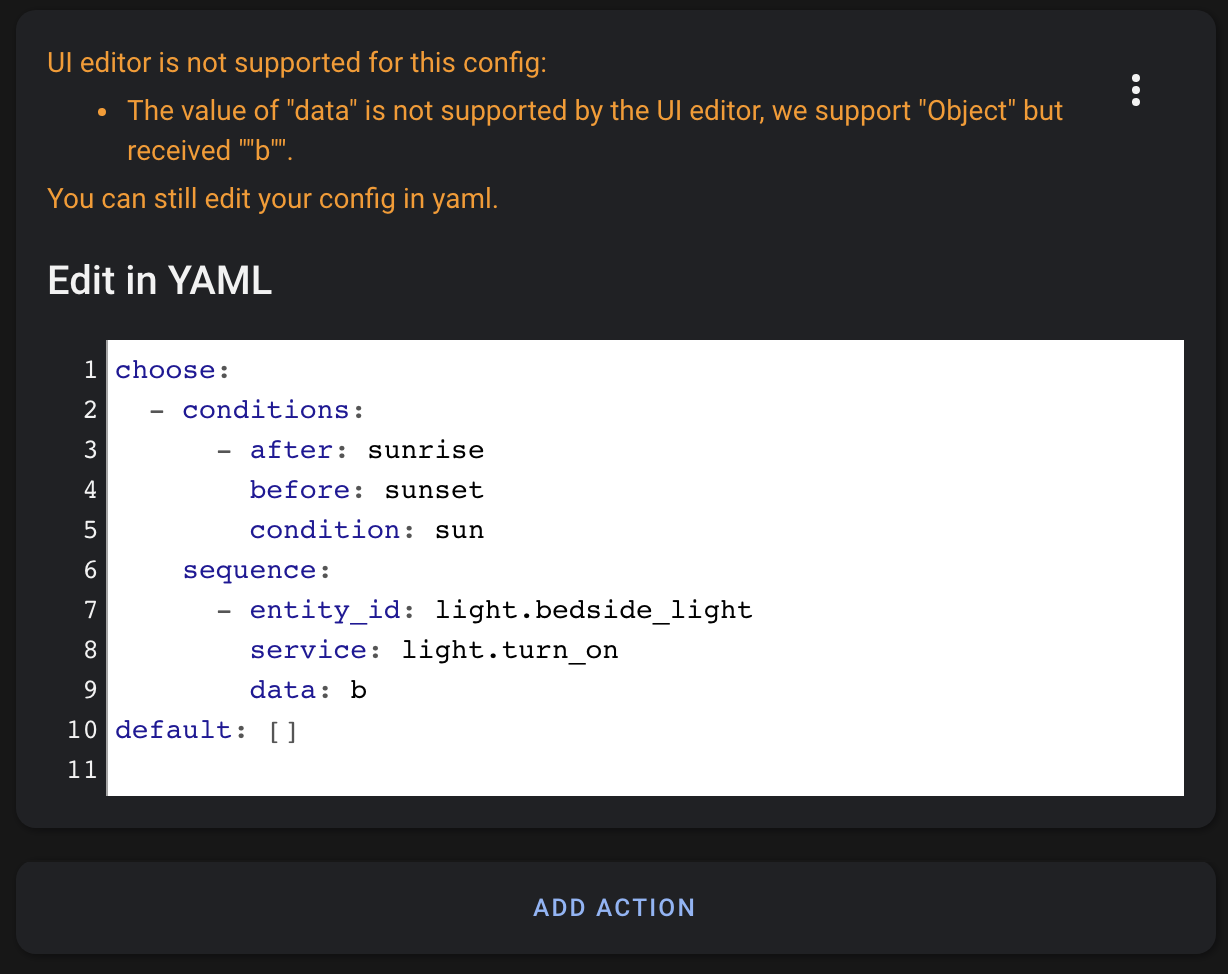
When adding service data to a Call service which has no data, the entire Choose section switches to YAML mode as soon as the first letter of the option name is typed:
Expected behavior
Only the action should switch to YAML mode, looking similar to the mockup below:

Steps to reproduce
- Create a script, like the example below:
choose_test:
  alias: Choose Test
  mode: single
  sequence:
  - choose:
    - conditions:
      - after: sunrise
        before: sunset
        condition: sun
      sequence:
      - entity_id: light.bedside_light
        service: light.turn_on
    default: []
- Edit the script in the UI.
- Add
brightness_pct: 20to the service data for the light.turn_on call. - As soon as "b" is typed the entire Choose section will show as the second screenshot, with the error message:
The value of "data" is not supported by the UI editor, we support "Object" but received ""b"".You can still edit your config in yaml.
Environment
- Home Assistant release with the issue: 0.114.0b3
- Last working Home Assistant release (if known):
- Browser and browser version: Google Chrome 84.0.4147.105
- Operating system: macOS Mojave 10.14.6
State of relevant entities
Problem-relevant configuration
Javascript errors shown in your browser console/inspector
Additional information
 gadgetchnnel
All 7 comments
I get this in all actions, not limited to choose.
An example is a Call service action with light.turn_on.
As soon as a letter is entered in the Service data-field, the editor switches to yaml mode with the error message shown in OP.
Funny thing is that if the correct values are entered in yaml-mode, it is possible to switch back to UI-mode and everything is fine again and editable in UI.
 Skeletorjus
on 14 Aug 2020
Skeletorjus
on 14 Aug 2020
Yes, it is similar in other actions but with those it is only the individual action which changes to YAML mode. With Choose, typing service data in any of of the nested actions within the Choose causes the whole Choose section to switch to YAML mode (not just the individual action).
For example, I have an automation with a Choose which has 4 options each with a condition and an action. Typing service data for any of those caused the whole Choose section to turn to YAML mode and not just the individual action.
The only workaround is to switch that action to YAML mode before entering the service data - you can manually switch an individual action to YAML mode, it's just that the error doesn't do this.
gadgetchnnel
on 14 Aug 2020
I have the same in 0.114.3 (in 0.113.3 it works OK)
looks like regresion bug after https://github.com/home-assistant/frontend/pull/6436
 asystentka-jolka
on 25 Aug 2020
asystentka-jolka
on 25 Aug 2020
I get this error also, as already said the scripts aspect is irrelevant.
To replicate all I need to do is create a new automation in the UI, create an action to call a service, for example media_player.volume_set and then in the "Service data" section if I attempt to type volume_level: I get the error as soon as I type the first letter (ie. "v")
Service and entity selected, all that's left to do is type in volume_level: x into the circled Service Data section

This image then shows the error as soon as the first letter has been typed: 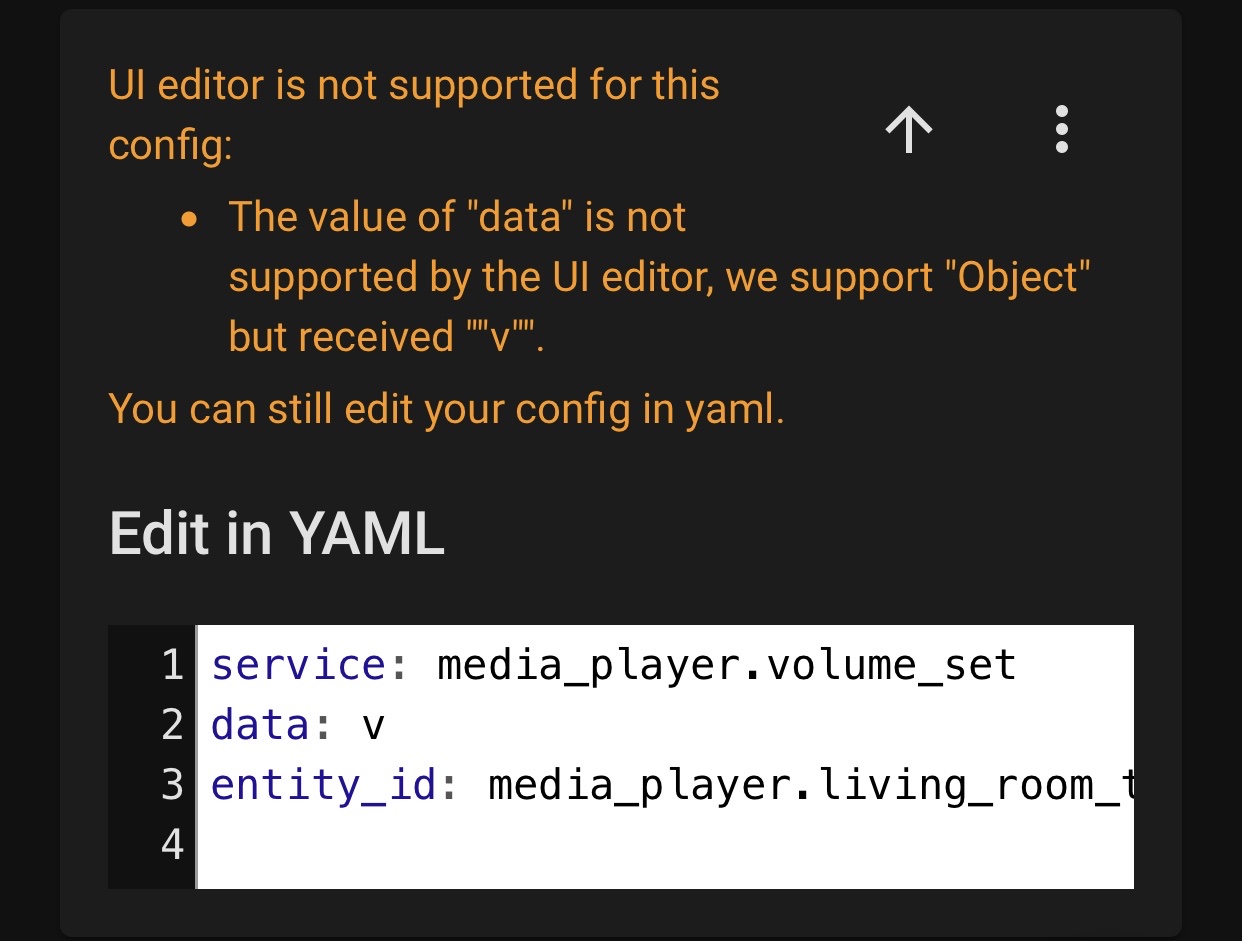
I can get around this issue by pasting the data into the "Service Data" box (I'm assuming some validation is done and by doing it this way, all text is there instantly so no error can occur). This can also technically be "fixed" by formatting the data in the UI with correct YAML and then selecting the three dots in the corner and selecting "Edit with UI" so that the error doesn't persist.
 ZuluWhiskey
on 1 Sep 2020
ZuluWhiskey
on 1 Sep 2020
I came here to make sure this issue has been reported, and also I can confirm a second work-around exists, for those who might prefer it:
If you're trying to type message: "My message here" into the service data box, you'll run into this issue the moment you type "m". However, if you instead type {message: "My message here"} it'll work just fine. If you need multiple items in that dictionary, you can just separate them via comma, {message: "My message here", title: "My title here"}
Apparently this issue isn't triggered if you use JSON instead of trying to type YAML.
And as soon as you save this JSON, it'll reformat it back to YAML, too.
 DanielWinks
on 2 Sep 2020
DanielWinks
on 2 Sep 2020
I came here to make sure this issue has been reported, and also I can confirm a second work-around exists, for those who might prefer it:
If you're trying to type
message: "My message here"into the service data box, you'll run into this issue the moment you type "m". However, if you instead type{message: "My message here"}it'll work just fine. If you need multiple items in that dictionary, you can just separate them via comma,{message: "My message here", title: "My title here"}Apparently this issue isn't triggered if you use JSON instead of trying to type YAML.
And as soon as you save this JSON, it'll reformat it back to YAML, too.
This really helps, I don't leave the curly brackets in but instead I write {message: and then delete the { as message: is valid. Obviously not a fix but a very useful work around until it is fixed!
ZuluWhiskey
on 15 Sep 2020
This is fixed in 0.115
 bramkragten
on 15 Sep 2020
bramkragten
on 15 Sep 2020
Related issues
 jer78
·
29Comments
jer78
·
29Comments
 emlove
·
30Comments
emlove
·
30Comments
 jlpouffier
·
30Comments
jlpouffier
·
30Comments
![move[bot] picture](https://avatars1.githubusercontent.com/in/6673?v=4&s=40) move[bot]
·
29Comments
move[bot]
·
29Comments
 VDRainer
·
26Comments
VDRainer
·
26Comments
Most helpful comment
This is fixed in 0.115