Frontend: Size of icons in 0.110.x
Checklist
- [x] I have updated to the latest available Home Assistant version.
- [x] I have cleared the cache of my browser.
- [x] I have tried a different browser to see if it is related to my browser.
The problem
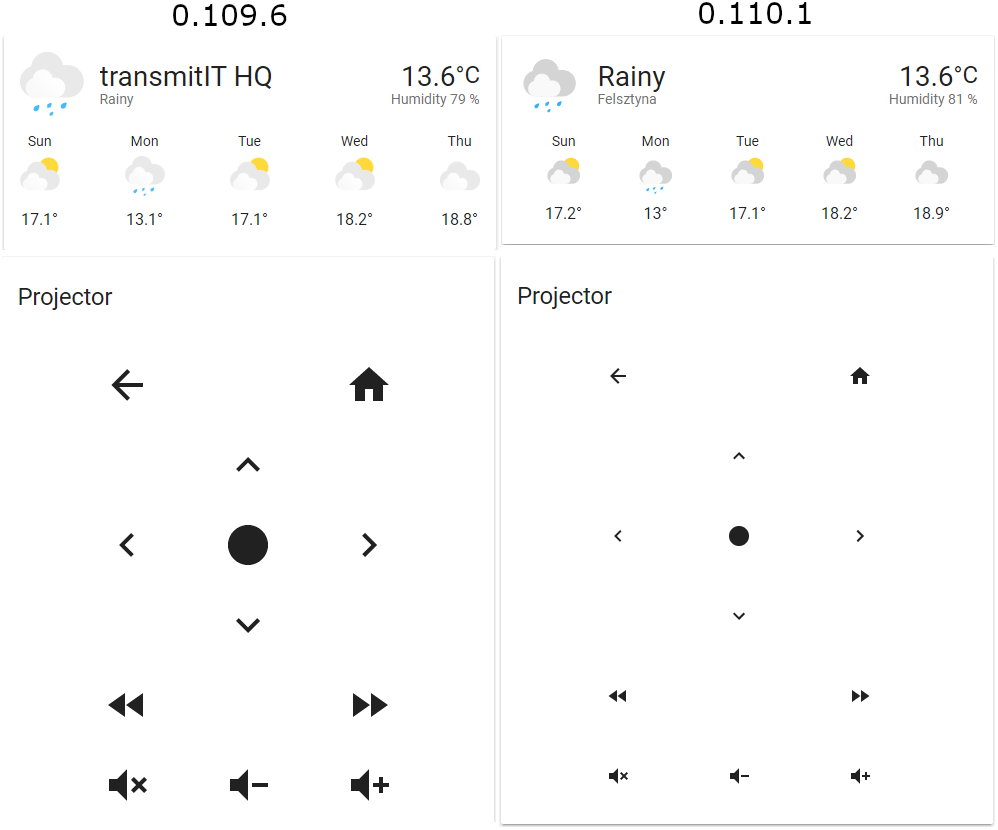
After big change in handling icons in 0.110.x, some icon seems to be smaller than they used to be. You can see this for example in weather card, which may not necessarily be bad but it's problematic in other cases like tv-card (I did manually change paper-icon-button to ha-icon-button to even get this to work).
You can see the difference here:
Expected behavior
I don't now if this is a bug at all, but I feel it is worth mentioning to be discussed in a wider group of people. It just may as well be a it's-not-a-bug-it's-a-feature.
Steps to reproduce
Just update to the latest version ;)
Environment
- Home Assistant release with the issue: 0.110.1
- Last working Home Assistant release (if known): 0.109.6
- Browser and browser version: Chrome 83.0.4103.61, Firefox 76.0.1
- Operating system: Windows 10 1909 18363.836
State of relevant entities
not applicable
Problem-relevant configuration
not applicable
Javascript errors shown in your browser console/inspector
not applicable
Additional information
None
 wojtek14a
All 2 comments
You can set the size of icons with --mdc-icon-size
 bramkragten
on 23 May 2020
bramkragten
on 23 May 2020
As the answer of @bramkragten helped me I will put there where I get similar issue
type: picture-elements
image: /local/assets/card_minimal.png
elements:
  - title: Wifi state
    type: state-icon
    tap_action:
      action: toggle
    entity: switch.wifi_all
    style:
      '--paper-item-icon-color': red
      '--paper-item-icon-active-color': darkgreen
      '--iron-icon-width': 100px
      '--iron-icon-height': 100px
--iron-icon-width and --iron-icon-height need to be replaced by --mdc-icon-size
 jingl3s
on 24 May 2020
jingl3s
on 24 May 2020
Related issues
 VDRainer
·
26Comments
VDRainer
·
26Comments
 Mariusthvdb
·
27Comments
Mariusthvdb
·
27Comments
 jlpouffier
·
30Comments
jlpouffier
·
30Comments
 deluxestyle
·
25Comments
deluxestyle
·
25Comments
 TheJulianJES
·
28Comments
TheJulianJES
·
28Comments
Most helpful comment
You can set the size of icons with
--mdc-icon-size