Frontend: Entities Card slider for number does not show for conditional rows
Checklist
- [x] I have updated to the latest available Home Assistant version.
- [x] I have cleared the cache of my browser.
- [x] I have tried a different browser to see if it is related to my browser.
The problem
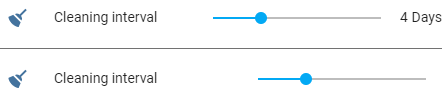
If an entity row (slider input) is contained within a conditional row then the value & unit is not shown:
Expected behavior
The value and unit should be shown
Steps to reproduce
1. Add the following to the configuration.yaml:
input_number:
  cleaning_interval:
    name: Cleaning interval
    min: 0
    max: 14
    step: 1
    icon: 'mdi:broom'
    unit_of_measurement: Days
- Restart the HA server
- Add the following card to lovelace:
entities:
  - entity: input_number.cleaning_interval
  - type: divider
  - type: conditional
    conditions:
      - entity: input_number.cleaning_interval
        state_not: '0.0'
    row:
      entity: input_number.cleaning_interval
type: entities
- notice that the numbers do not show next to the second slider
Environment
- Home Assistant release with the issue: 0.105.4
- Last working Home Assistant release (if known):
- UI Type (States or Lovelace): Lovelace
- Browser and browser version: Opera & Chrome
- Operating system: Windows 10
Problem-relevant configuration
# listed in Steps to reproduce ... since this is a step to produce the issue
Javascript errors shown in your browser console/inspector
N/A
Additional information
 i00
i00
All 7 comments
probably not getting the true value of the column width if in the conditional row
 iantrich
on 18 Feb 2020
iantrich
on 18 Feb 2020
any chance of looking into it?
 akasma74
on 25 Mar 2020
akasma74
on 25 Mar 2020
There hasn't been any activity on this issue recently. Due to the high number of incoming GitHub notifications, we have to clean some of the old issues, as many of them have already been resolved with the latest updates.
Please make sure to update to the latest Home Assistant version and check if that solves the issue. Let us know if that works for you by adding a comment 👍
This issue now has been marked as stale and will be closed if no further activity occurs. Thank you for your contributions.
![stale[bot] picture](https://avatars3.githubusercontent.com/in/1724?v=4&s=40) stale[bot]
on 23 Jun 2020
stale[bot]
on 23 Jun 2020
Not sure if this is still an issue or not since I removed the conditional slider from the interface (as it was not showing correctly)...
Did anyone look into this? as @akasma74 asked?
i00
on 3 Jul 2020
I'm putting together my first lovelace dashboard and this is indeed still a problem.
 mew1033
on 22 Sep 2020
mew1033
on 22 Sep 2020
Confirming this is still an issues as of HA 0.116.4
 electrickite
on 25 Oct 2020
electrickite
on 25 Oct 2020
If not closed, it is still issue. No need to +1 with a comment
iantrich
on 25 Oct 2020
Related issues
 Mariusthvdb
·
27Comments
Mariusthvdb
·
27Comments
![move[bot] picture](https://avatars1.githubusercontent.com/in/6673?v=4&s=40) move[bot]
·
29Comments
move[bot]
·
29Comments
 mrsnyds
·
42Comments
mrsnyds
·
42Comments
 jlpouffier
·
30Comments
jlpouffier
·
30Comments
 mnoorenberghe
·
34Comments
mnoorenberghe
·
34Comments
Most helpful comment
I'm putting together my first lovelace dashboard and this is indeed still a problem.