Frontend: Ability to show the temperature/humidity state value in a picture-glance footer
      - type: picture-glance
        title: Living Room
        camera_image: camera.livingroom
        entities:
          - sensor.living_room_temperature
          - sensor.living_room_humidity
The temperature/humidity entities will show as their icons (🌡 %) but I actually need to click on them to see the current temperature and humidity values. It would be nice if I could just see the values at a glance right in the footer overlay and click on those numbers if I want to see the overlay card. I would also be fine with showing the numbers (with units) beside the icons to it's clear what the percentage is for when there are multiple percentages.
I'm willing to make pull requests if there is agreement that this is more useful than just the icons.
 mnoorenberghe
All 34 comments
The problem is that we are lacking horizontal space in the picture-glance footer. Adding icon + state or state + unit will take up a lot of space. I think that if we want to go down this route, we should move the name to a header that overlays the picture. However, not sure if that looks nice. We could really use a designer around here I guess.
 balloob
on 16 Jul 2018
balloob
on 16 Jul 2018
Yes, I think the concept for picture glance is to show binary states
 c727
on 16 Jul 2018
c727
on 16 Jul 2018
If we allow an option to hide the title (as a picture says a 1000 words), there might be enough space for sensor values. We could limit which sensors can be shown with state to the ones that have the sensor device classes (temp, humidity, battery, illuminance)
balloob
on 17 Jul 2018
Quick and dirty mockup
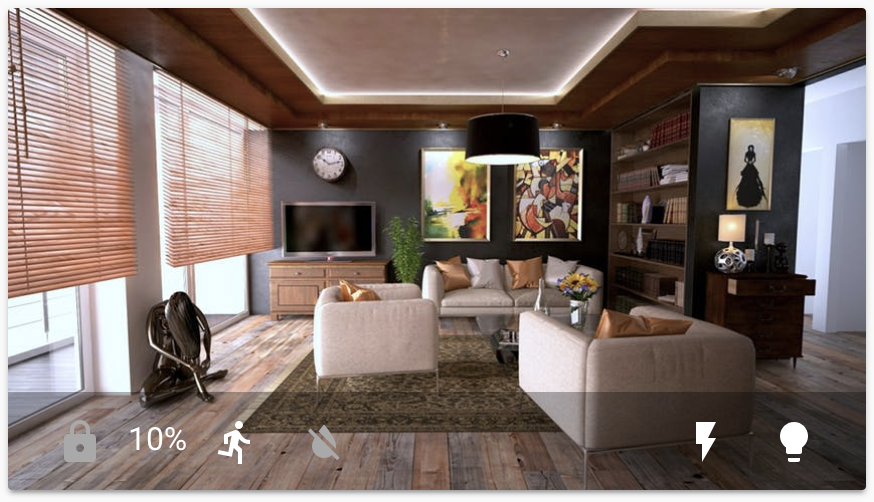
Problem here is that it's unclear to which icon the text belongs. We could have the text and the icon hug each other a bit more. Still it won't allow for much extra data.
@mnoorenberghe you should be able to achieve something very similar as a picture-glance with a picture-elements card, but then also have the ability to render states. Did you look into that?
balloob
on 17 Jul 2018
👍 I think that screenshot looks great and it's what I had in mind. I think for the temp, humidity, and illuminance device classes it would be fine to show the value by default as it'll be more useful than a static icon. Battery icons can already reflect different charge levels (e.g. battery-10, battery-20, etc.) so I would leave it as an icon by default. Shall I submit a PR?
(I agree that percentages can be ambiguous but °C isn't and having a humidity % beside a temperature adds clarity to a standalone humidity % value).
I saw that picture-elements are more flexible but it seemed like what I wanted would be a much better default for everyone so that's why I filed this. Using picture-elements seemed more complex and fragile from my first impression and this didn't seem like a case where that complexity was warranted IMO.
mnoorenberghe
on 18 Jul 2018
So are you suggesting this:
- We would have to add an option to hide the title in picture-glance.
- If title is hidden, temp sensor will show state
For a temp sensor, would we not show the icon, and just the text? As you state, it works for temperature. Humidity as % would only make sense if next to a temp sensor, although that is not a predictable enough experience to enforce. But then adding the icon to humidity also means we need to add the icon to temp for consistency.
balloob
on 18 Jul 2018
So are you suggesting this:
We would have to add an option to hide the title in picture-glance.
That's somewhat orthogonal to the original request… in my case I have room in the card already so don't need that.
If title is hidden, temp sensor will show state
No, I was thinking that for certain device classes where the icon is never useful in a glance but the value would be, show the value (and units) instead.
For a temp sensor, would we not show the icon, and just the text?
I would prefer just the text e.g. "21.5 °C", no icon for these device classes.
As you state, it works for temperature. Humidity as % would only make sense if next to a temp sensor, although that is not a predictable enough experience to enforce.
Right, I wouldn't add logic to enforce that. It's up to the user to make their UI understandable.
But then adding the icon to humidity also means we need to add the icon to temp for consistency.
Right, I wouldn't want to add that complexity.
I think the ideal solution would be to have each entity in the footer rendered with the option to specify a custom element… maybe that actually already works with type on an entity in picture-glance? I can't test now. It still seems like a common enough request that maybe there should be a built-in alternate type to use to render the value instead of the icon in this case.
mnoorenberghe
on 19 Jul 2018
I think that an optional title is important, otherwise there is no space to add any text. I realized that title was already optional but we didn't handle it well, I fixed that in https://github.com/home-assistant/home-assistant-polymer/pull/1474
It gives us more space, which is good. I am however still not convinced that this good looking:
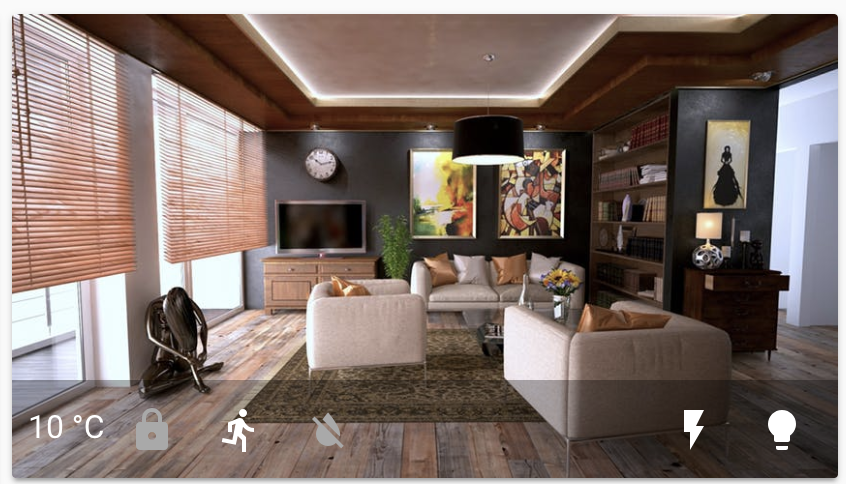
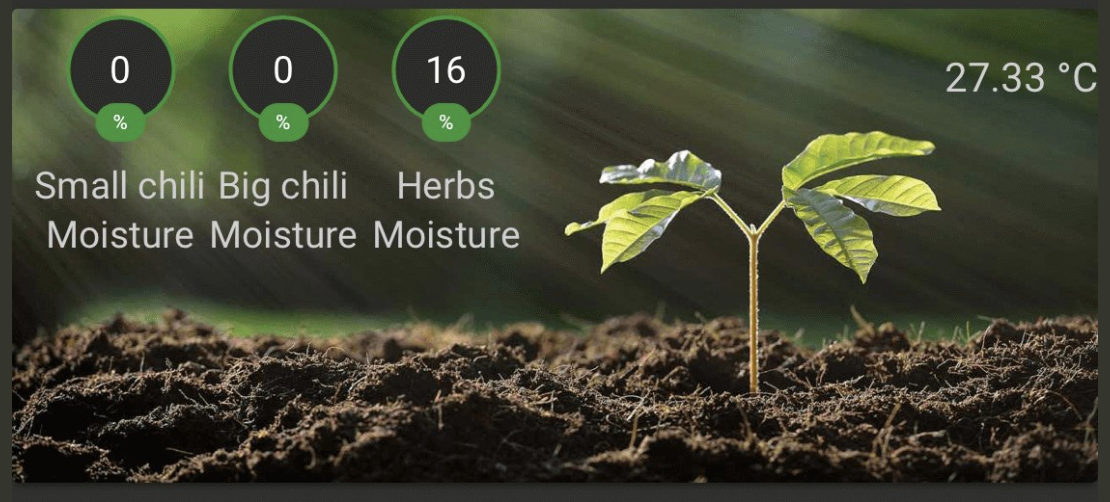
I actually liked the badges on a card that I saw the other day:
balloob
on 19 Jul 2018
I don't like this idea. Picture glance was primary created to show binary states. See what other users create using picture elements, where you also have much less restrictions in styling and positioning
c727
on 19 Jul 2018
I don't like this idea. Picture glance was primary created to show binary states.
If a user doesn't like it then they wouldn't keep non-binary entities to the card. The element should be renamed to picture-binary-glance then if that's all you're going to support. To me "glance" implies that it's to see information at a glance and seeing the temperature seems totally relevant.
mnoorenberghe
on 19 Jul 2018
I am however still not convinced that this good looking
I think if you remove the space before the ° then it will look better… that's how professional typesetters display it and it would keep it more compact like an icon.
mnoorenberghe
on 19 Jul 2018
A user in the discord channel, @isabellaalstrom, had what I think is a good looking design: https://imgur.com/a/CmhAoHU
 iantrich
on 26 Jul 2018
iantrich
on 26 Jul 2018
I like that more.
balloob
on 26 Jul 2018
I also think, an option to show value instead of icon would be really useful
 rgogada
on 19 Aug 2018
rgogada
on 19 Aug 2018
From my point of view more options are better so:
- Optional title
- Either
a) Text only for non-binary and non-battery sensors
b) Text+icon for sensors
c) Only icons (like the current implementation) - For icons only set a threshold value for making the icon greyed out for non-binary sensors
 jaimevisser
on 9 Sep 2018
jaimevisser
on 9 Sep 2018
I think this would be a great addition. This could also let the user show other values like watts if they are using the picture glance card to monitor other things like equipment.
There are multiple of examples of people using the picture-elements card to do this, but that's cumbersome and less functional. That technique adds many more lines of code and complexity to what could be a simple lovelace card, especially when nearly all the data is already in the picture glance card.
Perhaps just give the user the option like this:
      - type: picture-glance
        title: Living Room
        camera_image: camera.livingroom
        entities:
          - sensor.living_room_temperature
            showvalue: true
          - light.livingroom
 bakazm
on 5 Nov 2018
bakazm
on 5 Nov 2018
We're currently in a feature freeze as we're adding config UI, but as I said before, I liked Isabelles screenshot. Just someone has to do it.
balloob
on 5 Nov 2018
Note that adding banners to glance cards could also be an option https://github.com/home-assistant/ui-schema/issues/24#issuecomment-436360256
balloob
on 6 Nov 2018
I really want this, hope you guys end up adding it
 johntdyer
on 6 Jan 2019
johntdyer
on 6 Jan 2019
Came here looking for the same type of thing. Icon, Icon plus value, or just value would be great options.
 bagobones
on 28 Jan 2019
bagobones
on 28 Jan 2019
Thumbs up for the icon + value below
 steinmaerivoet
on 12 Feb 2019
steinmaerivoet
on 12 Feb 2019
I saw this a few days ago but I can´t find it now
 HFsi
on 16 Feb 2019
HFsi
on 16 Feb 2019
@hfsi find what?
iantrich
on 16 Feb 2019
A picture glance card that shows value and unit instead of icon
HFsi
on 16 Feb 2019
You're commenting on a feature request. The feature does not yet exist on core...
iantrich
on 16 Feb 2019
It's now march.. Does anyone have a custom card that replicates this functionality? I am actually surprised there haven't been more cards / card updates in the last few releases since lovelace became the default.
bagobones
on 20 Mar 2019
@bagobones help is always welcome
iantrich
on 20 Mar 2019
@iantrich Not everyone is a programer, network admin, plumber, doctor, or carpenter. Also it looked like a few people agreed with you that isabellaalstrom's mockup looked good, including myself.
I have submitted code to some other projects but since it is more of a hobby for me I often get bogged down in the code review and standards thus resulting in more dangling PRs.
bagobones
on 21 Mar 2019
@bagobones this is a hobby for everyone, we're all volunteering our time. My comment was more so just on the state of the front-end, however. We just don't have many devs contributing and could use more help.
iantrich
on 21 Mar 2019
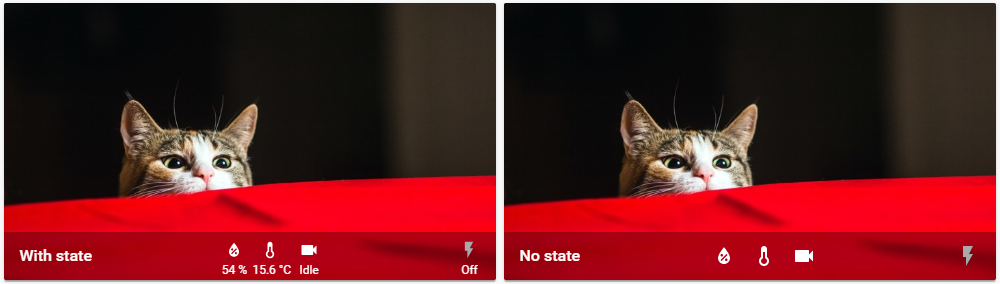
I have now made a first draft of this in the actual picture-glance and was looking for input.
 isabellaalstrom
on 13 Apr 2019
isabellaalstrom
on 13 Apr 2019
Looks good!
bagobones
on 13 Apr 2019
Looks great, any progress on this?
 totalitarian
on 17 Jun 2019
totalitarian
on 17 Jun 2019
yea, this is great... When can we get it ?
johntdyer
on 17 Jun 2019
I have had lots do to and haven't had time and then I forgot. Can see if I have some time for this soon.
isabellaalstrom
on 18 Jun 2019
Related issues
 Lopton
·
4Comments
Lopton
·
4Comments
![move[bot] picture](https://avatars1.githubusercontent.com/in/6673?v=4&s=40) move[bot]
·
3Comments
move[bot]
·
3Comments
 Fusseldieb
·
4Comments
Fusseldieb
·
4Comments
 agneevX
·
3Comments
agneevX
·
3Comments
 SeanPM5
·
3Comments
SeanPM5
·
3Comments
Most helpful comment
If a user doesn't like it then they wouldn't keep non-binary entities to the card. The element should be renamed to picture-binary-glance then if that's all you're going to support. To me "glance" implies that it's to see information at a glance and seeing the temperature seems totally relevant.