Frontend: Unable to confirm card deletion.
Checklist:
- [ ] I updated to the latest version available
- [ ] I cleared the cache of my browser
Home Assistant release with the issue:
Home Assistant 0.103.6
Last working Home Assistant release (if known):
Unknown
UI (States or Lovelace UI?):
Lovelace UI
Browser and Operating System:
Safari and HA app on iOS/iPadOS 13.3.
Works ok on desktop.
Description of problem:
When deleting a card from the UI the confirmation dialog box is unable to be actioned , I cannot click cancel or OK. Dialog will not dismiss leaving the only option to force quick the app.
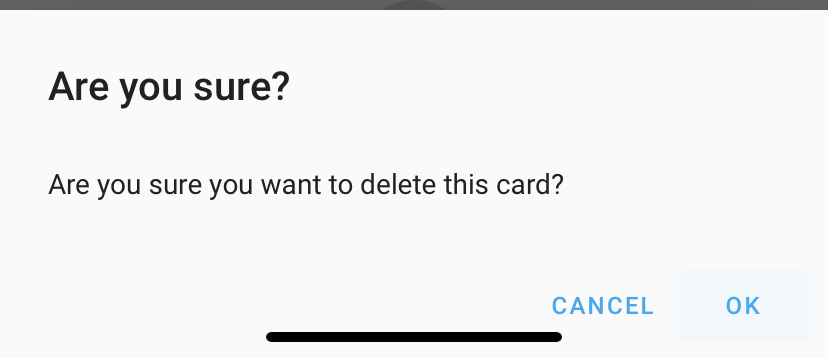
Expected behaviour:
To be able to confirm the deletion.
Relevant config:
Any card, not specific to a config.
Steps to reproduce this problem:
Go into Configure UI
Click the ellipses for the card you want to remove.
Choose delete card
Attempt to confirm
Javascript errors shown in the web inspector (if applicable):
No errors
Additional information:
Cleared cache and tried multiple hardware. Issue remaining.
 aptonline
All 7 comments
I'm also able to reproduce this on the demo site on my iPhone 11 and iOS 13.3.
Other similar confirmation dialogs like deleting a view don't have this issue. So it appears to be an issue with this specific confirmation dialog, and not a general or OS-level issue.
 SeanPM5
on 15 Jan 2020
SeanPM5
on 15 Jan 2020
Issue still present in HA 0.104.0.
aptonline
on 16 Jan 2020
Unless closed, no need to reaffirm
 iantrich
on 16 Jan 2020
iantrich
on 16 Jan 2020
If it was fixed after the update it makes sense that the issue should be closed... surely it also makes sense to update the issue if it wasn’t.
aptonline
on 16 Jan 2020
If someone works on this, they will close the issue
iantrich
on 16 Jan 2020
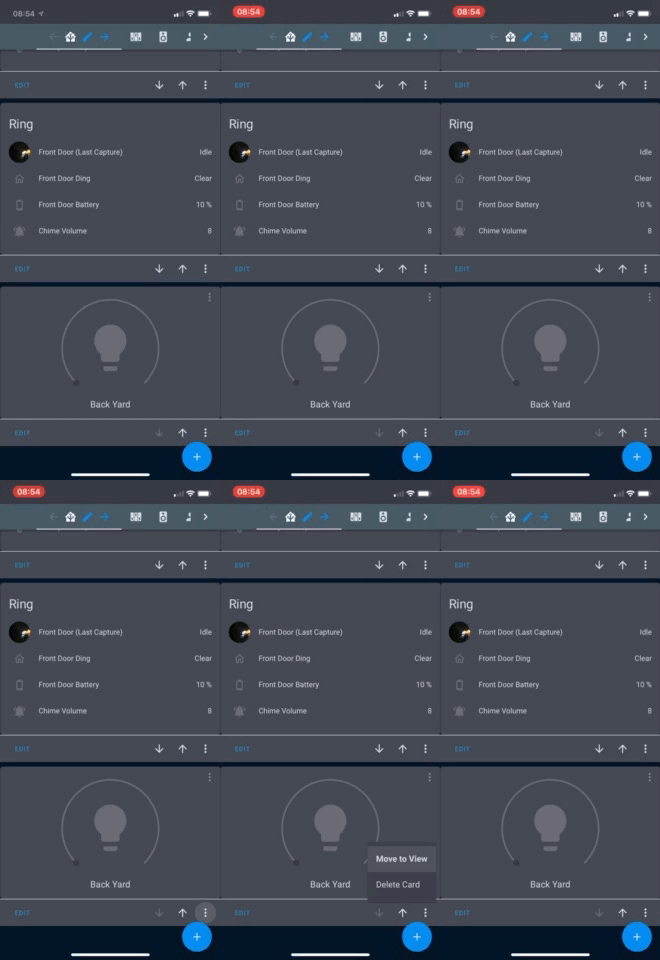
After the update to 0.104.2 which includes this fix I can no longer select ANY of the menu items in edit UI mode on my cards (Move to view, Delete Card) when editing on iOS/iPadOS:
aptonline
on 18 Jan 2020
Raised a separate issues: https://github.com/home-assistant/home-assistant-polymer/issues/4515
aptonline
on 18 Jan 2020
Related issues
 mrsnyds
·
42Comments
mrsnyds
·
42Comments
 benliles
·
32Comments
benliles
·
32Comments
 jlpouffier
·
30Comments
jlpouffier
·
30Comments
 emlove
·
30Comments
emlove
·
30Comments
 andriej
·
64Comments
andriej
·
64Comments