Frontend: Theme not properly applied from User Profile Page.
Checklist:
- [X] I updated to the latest version available
- [X] I cleared the cache of my browser
Home Assistant release with the issue:
0.103.5
Last working Home Assistant release (if known):
Not sure exactly when it stopped working. Around version 0.90 I would say
UI (States or Lovelace UI?):
Lovelace UI
Browser and Operating System:
Hass.io on a Raspberry 3B+
Browser: issue present with all browsers
- Google Chrome Version 79.0.3945.88 (Windows 10 PC)
- Google Chrome Version 79.0.3945.93 (Android Phone)
- Official Home Assistant companion App (1.3.1 (57) for Android)
Description of problem:
I have an issue with themes setting. When my automation for switching day/night theme is enabled, I cannot manually set another theme from the User Profile Page (the dropdown list with all themes). The new theme I select is not properly applied in the main views (but it looks correct in the configuration, developer tools pages). I copied an example when switching from a dark theme to the default one.
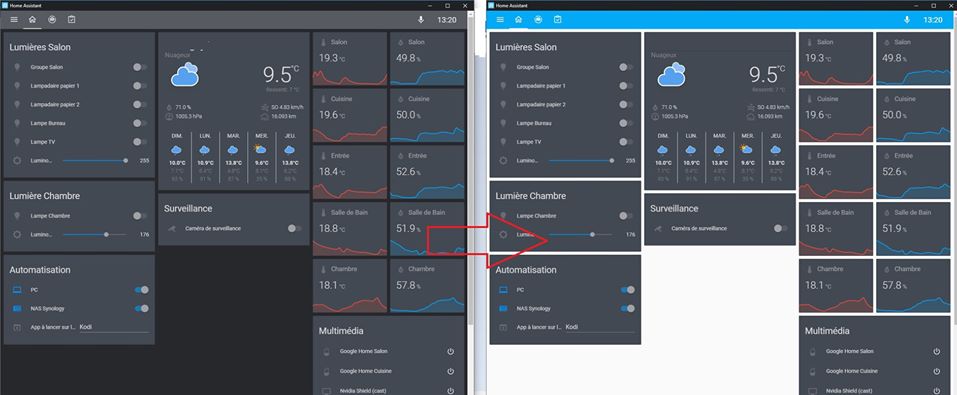
Refreshing the browser or clearing the cache does not solve the issue.
To properly apply another theme - with the automation enabled - I need to explicitly call the frontend.set_theme service. If I disable the day/night theme change automation, I can use the User Profile page again and the theme dropdown list to change the theme.
Expected behaviour:
User should be able to change manually the theme from the User Profile Page dropdown list, regardless of any active theme change automation. At least, it was working properly at the beginning of 2019 with versions 0.8x or 0.9x.
Relevant config:
Here is the theme change automation if it is relevant for the bug analysis:
- alias: Appliquer thème en fonction de l'heure
  hide_entity: true
  initial_state: true
  trigger:
    - platform: homeassistant
      event: start
    - platform: state
      entity_id: sun.sun
      to: above_horizon
    - platform: state
      entity_id: sun.sun
      to: below_horizon
  action:
    - service_template: frontend.set_theme
      data_template:
        name: >
          {% if states.sun.sun.state == "above_horizon" %}
            clear
          {% else %}
            clear-dark
          {% endif %}
Steps to reproduce this problem:
- Add theme change automation to the configuration
- Reload automation
- Navigate to the User Profile Page
- Change the theme for anything different than "Backend-selected"
- Notice the improper theme setting
Javascript errors shown in the web inspector (if applicable):
None
Additional information:
None
 mat4444
All 13 comments
Setting the theme with automation will only work for users that have the "Backend-selected" theme selected.
As for the cache issue, can you try to disable CH/CCH from your lovelace resources then clear your cache one good time, then switch the theme, does it make a difference on how it's applied?
 ludeeus
on 4 Jan 2020
ludeeus
on 4 Jan 2020
My explanation was properly not clear enough : the theme automation works just fine, I have "Backend-selected" theme selected by default. I just sometimes wants to quickly change this for a new XYZ theme, to check if it looks good. However, when the automation is enabled, the new selected theme is not applied properly. It used to work with older version of Hass.io.
Regarding Custom Header, disabling it and clearing cache does not solve the problem.
mat4444
on 4 Jan 2020
Are you saying that if you disable that automation, it works as expected?
ludeeus
on 4 Jan 2020
Only disabling the automation is actually not enough. I need to disable the automation and restart home assistant.
Then I am able to switch from the "backend-selected" theme to any other theme without problem.
mat4444
on 4 Jan 2020
Confirming this issue.
- alias: System - HA default theme
  trigger:
    platform: homeassistant
    event: start
  action:
    service: frontend.set_theme
    data:
      name: Dark - Blue
Had this in the config. Then switching theme on the profile page results in a not fully applied theme, like the badges don't change to the new colour, and the secondary-text-color does not change as well.
 SaturnusDJ
on 1 Feb 2020
SaturnusDJ
on 1 Feb 2020
I think I fixed this yesterday in https://github.com/home-assistant/home-assistant-polymer/pull/4758
 bramkragten
on 5 Feb 2020
bramkragten
on 5 Feb 2020
Thanks! Will we have this fix in the next release of home assistant?
mat4444
on 5 Feb 2020
No, it will be in 0.106
bramkragten
on 5 Feb 2020
This still appears to be an issue for me in 0.106. If the backend theme is set to a dark theme via frontend.set_theme and I then change the theme from "Backend-selected" to "default" from the profile page I get this:


Calling frontend.set_theme to set the theme to "default" fixes it.
 gadgetchnnel
on 26 Feb 2020
gadgetchnnel
on 26 Feb 2020
Same issue for me. The background of the cards do not change when switching from "backend-selected" to any other theme, via the profile page theme selector.
mat4444
on 26 Feb 2020
@bramkragten I can also confirm that this is not fixed in 0.106.2 - please reopen this issue. Setting the backend-selected theme back to default allows the user-specified theme to apply correctly, but if anything other than default is backend-selected (via frontend.set_theme service call), parts of that theme are still applied to Lovelace cards even when a different theme is selected by the user - and there doesn't seem to be any way for the user-selected theme to override these properties. For an example, set the following themes:
frontend:
  themes:
    white_text:
      primary-text-color: 'white'
    red_text:
      primary-text-color: 'red'
Then:
- Call
frontend.reload_themesservice - Select
red_texttheme in your profile (this is easier to do before the next step, so you can read theme names!) - Call
frontend.set_themeservice withname: white_text - Observe that text inside cards is now invisible, as it's white-on-white
- Call
frontend.set_themeservice withname: default - Observe that the text inside cards is now visible and red, as defined by the user-selected theme
In this example, you can see that the primary-text-color from the user-selected theme is applied to the UI in general, as the text in the sidebar goes red - but the text in the cards is white, with no way to change it as long as the white_text theme is backend-selected.
backend-selected theme: white_text

backend-selected theme: default
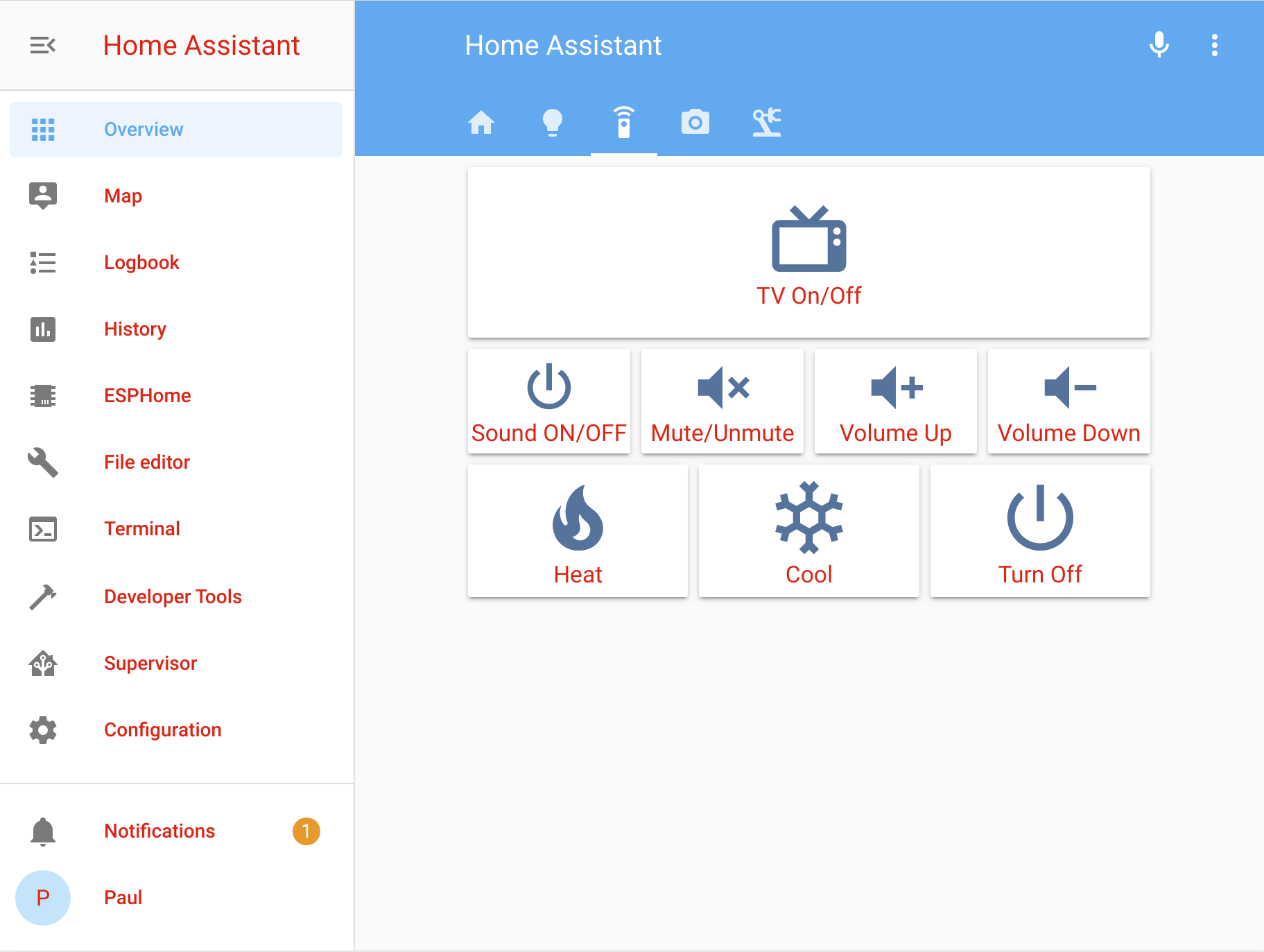
 pauln
on 1 Mar 2020
pauln
on 1 Mar 2020
Can you please reopen the issue ? It is still not fixed in 0.107.3
Here is the default theme:

And after applying the "Google Light Theme" from the User Profile page. The background of the card is not updated ...

Thanks!
mat4444
on 21 Mar 2020
This is now fixed and will be in 0.108
bramkragten
on 21 Mar 2020
Related issues
 deluxestyle
·
25Comments
deluxestyle
·
25Comments
![move[bot] picture](https://avatars1.githubusercontent.com/in/6673?v=4&s=40) move[bot]
·
25Comments
move[bot]
·
25Comments
 eliseomartelli
·
26Comments
eliseomartelli
·
26Comments
 VDRainer
·
26Comments
VDRainer
·
26Comments
 jlpouffier
·
30Comments
jlpouffier
·
30Comments