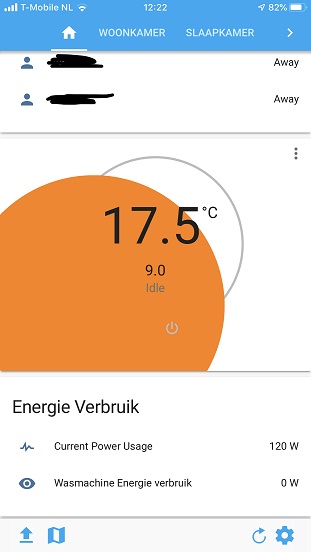
Frontend: Lovelace Thermostat card UI slider dot not showing correct when set to lowest temp
Checklist:
- [x] I updated to the latest version available
- [x] I cleared the cache of my browser
Home Assistant release with the issue:
Home Assistant 0.102.1
Last working Home Assistant release (if known):
I think it was working correct on Home Assistant 0.102.0
I am sure it was working correct on Home Assistant 0.101.3
UI (States or Lovelace UI?):
Lovelace
Browser and Operating System:
Safari, Chrome and iOS App.
On iOS 13.1.3
On windows desktop (Chrome, Firefox and Edge) this issue is not there.
Description of problem:
The thermostat card does not show correct on mobile (test on iOS app, Safari and Chrome)
This issue only occurs when the thermostaat temperature slider is set to the lowest value, or set to away/eco mode.
Screenshot:
Javascript errors shown in the web inspector (if applicable):
-
Additional information:
-
 pinquin87
All 8 comments
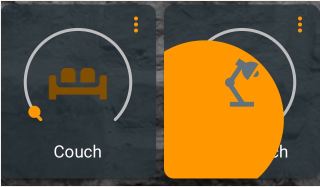
Can confirm, same with the light card in iOS.
If light is off, the 'Handle' is big.
 VDRainer
on 22 Nov 2019
VDRainer
on 22 Nov 2019
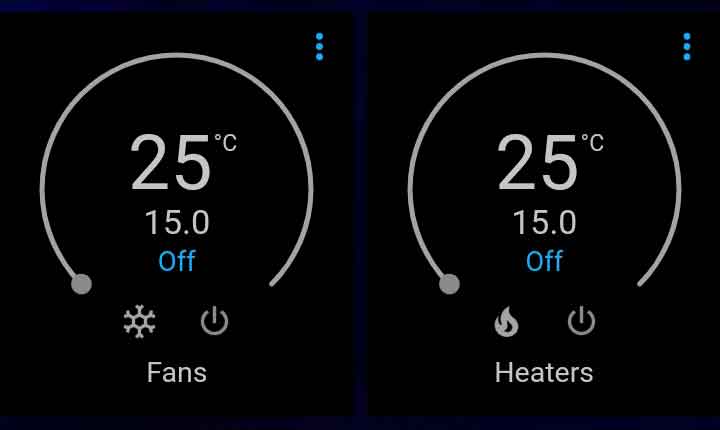
Hmmm... It must be an IOS 'thing'
Looks _AOK_ on Android (Chrome)
 3ative
on 22 Nov 2019
3ative
on 22 Nov 2019
@thomasloven
 bramkragten
on 22 Nov 2019
bramkragten
on 22 Nov 2019
I'm aware. It's a problem with the component.
Will start debugging as soon as I get home.
 thomasloven
on 22 Nov 2019
thomasloven
on 22 Nov 2019
It seems safari doesn't like arcs with no length...
For reference, this applies to desktop safari too.
thomasloven
on 22 Nov 2019
It seems fine in Firefox. I checked it there. So far I only see the problem in Safari on the Mac and on iOS.
 P-Verbrugge
on 23 Nov 2019
P-Verbrugge
on 23 Nov 2019
Sorry, I am new to Home Assistant and github. Does the closed mean it has been resolved or that a solution has been submitted and it will be corrected on next release?
 olddawgpowers
on 24 Nov 2019
olddawgpowers
on 24 Nov 2019
@olddawgpowers it will be in 0.102.2
bramkragten
on 24 Nov 2019
Related issues
 aaron9060
·
3Comments
aaron9060
·
3Comments
 SeanPM5
·
3Comments
SeanPM5
·
3Comments
 Fusseldieb
·
4Comments
Fusseldieb
·
4Comments
 casperklein
·
4Comments
casperklein
·
4Comments
 GauthamVarmaK
·
3Comments
GauthamVarmaK
·
3Comments
Most helpful comment
I'm aware. It's a problem with the component.
Will start debugging as soon as I get home.