Freshrss: docker: freshrss install wizard ends with error about do-install.txt
I'm a new user, trying out FreshRSS. I installed using the official docker-compose.yml file. The FreshRSS install wizard started with some health checks, and everything passed. After entering my database connection info, the wizard went to a page that said:
"Blast! Something went wrong; you must delete the file /var/www/FreshRSS/data/do-install.txt manually."
Ideally, the official docker version of FreshRSS should have the permissions and things configured automatically to avoid this error and extra manual step.
 Germs2004
All 24 comments
same with a normal install:

 360fun
on 13 Jul 2020
360fun
on 13 Jul 2020
Hello,
Especially when new to FreshRSS, please favour our official releases, e.g. 1.16.2 at the moment, both for Docker and for more manual install https://github.com/FreshRSS/FreshRSS/releases
But thank you for testing the development version / rolling release. I am looking into it.
 Alkarex
on 13 Jul 2020
Alkarex
on 13 Jul 2020
I can confirm the bug in the development branch (:latest on Docker Hub) but it works fine with our newest release (:1.16.2)
Alkarex
on 13 Jul 2020
oh...just realised that I'm on dev 🙄 how can I change the channel without reinstalling it?
360fun
on 13 Jul 2020
@marienfressinaud This seems to be a regression due to https://github.com/FreshRSS/FreshRSS/pull/2760 Could you please have a look?
Alkarex
on 13 Jul 2020
@360fun How did you install? Docker, git, ZIP...
Alkarex
on 13 Jul 2020
@Germs2004 For now, you can edit the docker-compose.yml compose file with something like:
...
  freshrss:
    image: freshrss/freshrss:1.16.2
...
Thank you. I just fixed it manually with the below command, but I wanted to let you know about the issue so you could fix it in the official image for everyone.
docker run -it --rm -v freshrss_freshrss_data:/vol busybox rm /vol/do-install.txt
Germs2004
on 13 Jul 2020
Yes, thanks for the feedback @Germs2004 👍
Alkarex
on 13 Jul 2020
I can confirm the bug in the development branch (
:lateston Docker Hub) but it works fine with our newest release (:1.16.2)
May I share a tip I noticed from other dockerhub projects? They have a "latest" tag, which is the most recent tested release. They also offer a "dev" tag, which is the latest alpha release or daily build. Making your "latest" tag work this way lets us safely automate the updates of our docker containers using WatchTower, so we'll always have your latest tested code. Thank you!
Germs2004
on 13 Jul 2020
Indeed @Germs2004 , we should maybe adopt something like that. Could you please open a new ticker for that?
Alkarex
on 13 Jul 2020
@360fun How did you install? Docker, git, ZIP...
I followed the guide, using * git clone* 🙄
That's how I've got the "dev" version...but seems you found the problem ;)
360fun
on 13 Jul 2020
@360fun From the state you are in, you can go back to the latest release 1.16.2 using for instance this command:
git reset --hard 1.16.2
P.S. and to jump forward again to the latest commit:
git fetch
git reset --hard FETCH_HEAD
@360fun From the state you are in, you can go back to the latest release 1.16.2 using for instance this command:
git reset --hard 1.16.2P.S. and to jump forward again to the latest commit:
git fetch
git reset --hard FETCH_HEAD
Thank you, I did it:
root@host:~# cd /usr/share/FreshRSS/
root@host:/usr/share/FreshRSS# git reset --hard 1.16.2
HEAD is now at 38802f6f Release FreshRSS 1.16.2
root@host:/usr/share/FreshRSS# git fetch
root@host:/usr/share/FreshRSS# git reset --hard FETCH_HEAD
HEAD is now at b7fd6d2d Show feed name inside the article (#3081)
when I finished I've got the wizard, so I deleted again the do-install.txt to be able to login...but the version is still "dev" :(
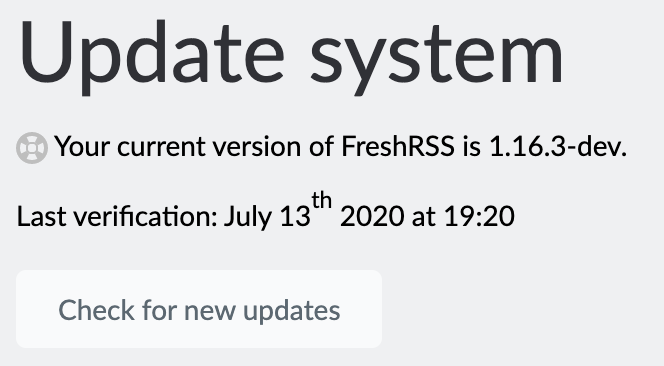
360fun
on 14 Jul 2020
Ok I've found the bug, it was indeed due to the new migration system. We test the value returned by setupMigrations() which is actually 0 because we have no migrations yet and there is nothing to write in the applied_migrations.txt file yet.
 marienfressinaud
on 14 Jul 2020
marienfressinaud
on 14 Jul 2020
@360fun To check your version, please look in the About section instead
Alkarex
on 14 Jul 2020
@360fun To check your version, please look in the _About_ section instead
same 🤔
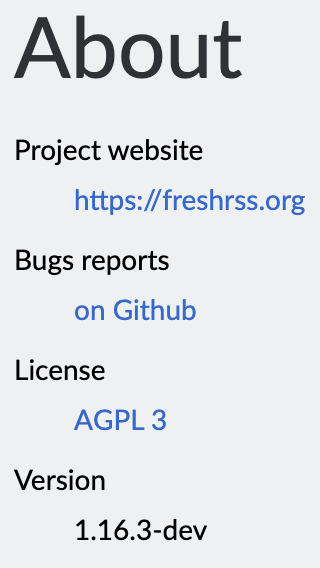
360fun
on 14 Jul 2020
A, well, sure, you ran a git reset --hard FETCH_HEAD apparently, which moves back to the most recent commit.
Alkarex
on 14 Jul 2020
A, well, sure, you ran a
git reset --hard FETCH_HEADapparently, which moves back to the most recent commit.
I followed the instructions you gave me, what I should do instead?
360fun
on 14 Jul 2020
@360fun Please see https://github.com/FreshRSS/FreshRSS/issues/3104#issuecomment-657800827
The first part is to go back to a stable release. The second part is to jump forward again to the latest development point :-)
Alkarex
on 14 Jul 2020
@360fun Please see #3104 (comment)
The first part is to go back to a stable release. The second part is to jump forward again to the latest development point :-)
Thank you, it's a long time that I don't use git commands 😅 now works! 😸
360fun
on 14 Jul 2020
No worries :-)
Just for the record, going forward (including to the latest /master) is always fine, while going backwards is not always supported, for instance in case of change of database structure (which has not been the case recently, but happens).
Furthermore, since the latest /master has just been fixed, it is fine to pick the very latest again:
git fetch
git reset --hard FETCH_HEAD
But I would advise you to always stay on the latest stable (git reset --hard 1.16.2 ) if you don't like surprises (such this one ;))
marienfressinaud
on 14 Jul 2020
But I would advise you to always stay on the latest stable (
git reset --hard 1.16.2) if you don't like surprises (such this one ;))
I'll stay on stable and wait the next version on the update system! ;)
360fun
on 14 Jul 2020
Related issues
 Aasemoon
·
6Comments
Aasemoon
·
6Comments
 Tealk
·
5Comments
Tealk
·
5Comments
 uncovery
·
4Comments
Alkarex
·
6Comments
uncovery
·
4Comments
Alkarex
·
6Comments
 treyssatvincent
·
5Comments
treyssatvincent
·
5Comments