I've been trying with little success to get my FreshRSS install to sync with the FeedMe app on my Android phone. Things I've done:
- I've gone into the Authentication Settings and enabled Mobile API access.
- I've also gone to the Profile Settings and tested the server configuration and it says, "Pass".
- I've copied the corresponding API address and input it in the FeedMe app together with the default username (admin) and my assigned API password.
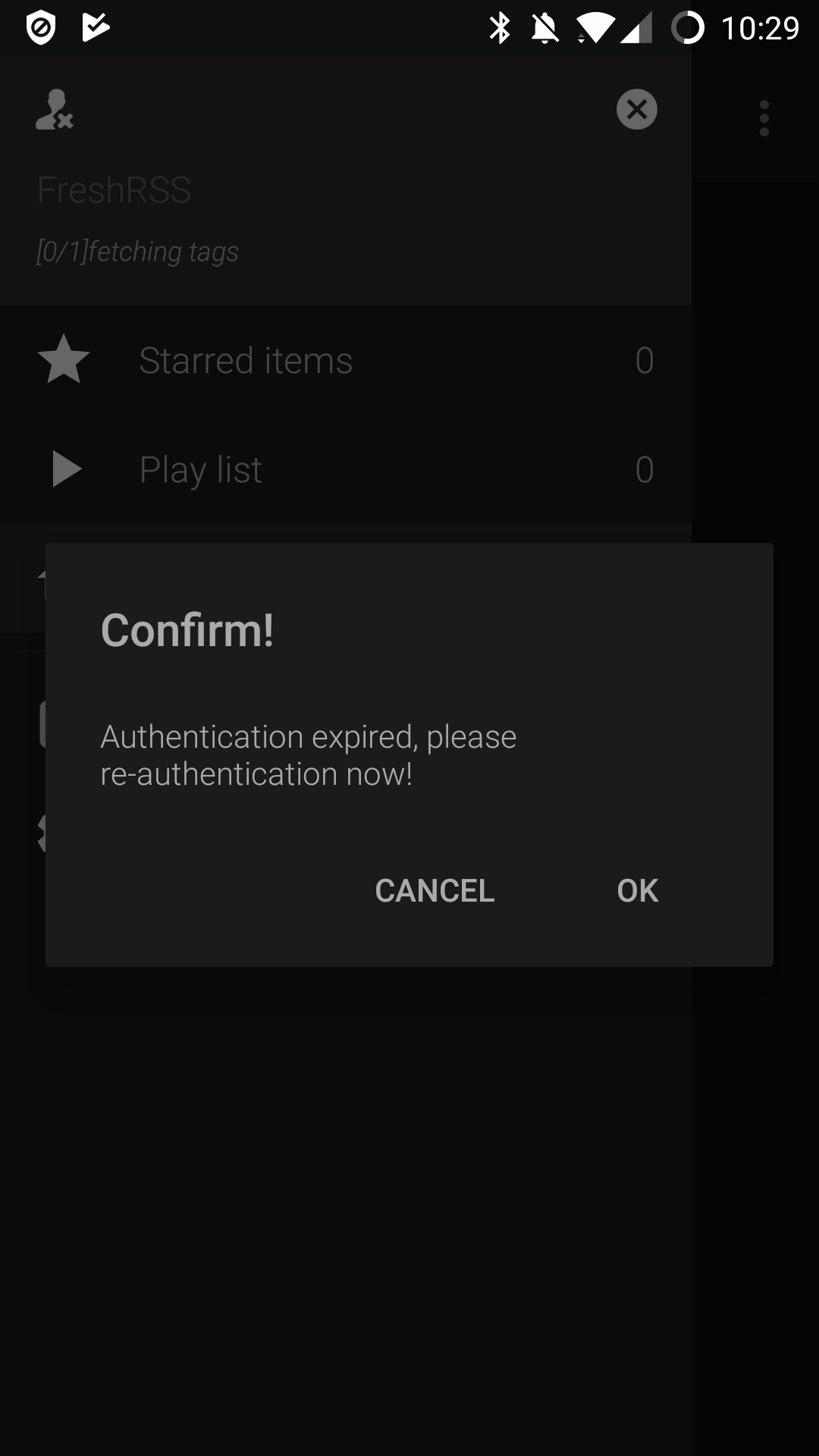
When I click the login button in the FeedMe app after inputting the above info, everything appears to work just fine. I get no error messages. However, none of my feeds/subscriptions ever show up and when click the sync button I get the following error, "Authentication expired, please, re-authenticate now!" I've tried to re-authenticate over and over and over again, but the same thing keeps happening.
What am I doing wrong?
 ahelton
All 13 comments
Have you updated to 1.13.0 (which just came out today), or are you on 1.12.0?
*edit: There was some greader API stuff that changed in 1.13.0. If you're on the new version, it may be related to that; I can't seem to replicate your issue on 1.12.0, in any case.
*edit the second: I've now tested on 1.13.0, and still can't replicate your issue, so it doesn't appear to be an API issue.
 pattems
on 23 Dec 2018
pattems
on 23 Dec 2018
Hello,
I cannot reproduce the problem either. Work for me with FeedMe v3.9, FreshRSS 1.13.0.
How did you install FreshRSS (git, Docker, ZIP...) and on what platform?
Please make sure that the address you type in FeedMe ends with greader.php, like http://freshrss.example.net/api/greader.php.
Suggestions:
- Update your
data/config.phpwith the following, to get more debugging information:
'environment' => 'development',
- Check your logs:
- Web server / PHP logs
- FreshRSS API log in
./data/users/_/log_api.txt - FreshRSS logs in
./data/users/you/log.txt
If you want, you are welcome to send me a temporary account on your FreshRSS instance by e-mail so I can test from my side. Otherwise, you can also test manually by following the examples at the bottom of:
https://freshrss.github.io/FreshRSS/en/users/06_Mobile_access.html
 Alkarex
on 23 Dec 2018
Alkarex
on 23 Dec 2018
I'm still on FreshRSS 1.12.0 and FeedMe v3.8.5. I'm hosting my FreshRSS install on DigitalOcean via Cloudron.
When I initially put everything in, it take my login information just fine, but then nothing actually loads. I just get the little spinning loading icon, but none of my feeds actually show up. I am running this on a HTTPS enabled domain, so do I need to have the HTTPS connection option checked in FeedMe? I've tried enabling it, but doesn't seem to do anything.
I'm busy this morning, but will check my logs here in a bit. If that fails, then I'll set @Alkarex with a temp account to see what he can find. Thanks for the help!
Here's a photo of the error message I receive after logging in, closing the app, and then reopening it:
ahelton
on 23 Dec 2018
Hello again,
I have tested your server manually, and it looks like there is a configuration problem with nginx, which does not pass the HTTP Authorization header to PHP. Could you please post your nginx configuration and/or compare it with https://freshrss.github.io/FreshRSS/en/admins/02_Installation.html ?
Please also post the most recent entries (i.e. the bottom) of ./FreshRSS/data/users/_/log_api.txt
Another detail (unrelated to this issue): Your Web root should be inside ./FreshRSS/p/ so that the /p/ does not appear in the URL. If you change your configuration, remember to adapt your base_url in ./data/config.php accordingly.
Alkarex
on 23 Dec 2018
Other nginx examples:
- https://github.com/FreshRSS/FreshRSS/issues/1515#issuecomment-298258854
- https://github.com/FreshRSS/FreshRSS/issues/1579#issuecomment-308504186
Alternatives include using our Docker deployment, or Apache.
Alkarex
on 23 Dec 2018
@Alkarex Thank you for your help. Since I installed this via the Cloudron App that I have hosted on my VPS (Digital Ocean), I'm unsure how to get the nginx configuration information. I've contacted the Cloudron support team to see if they can advise further. I do have access the log_api.txt file, but it won't let me download it so that I can copy the log entries for you to view.
---Edit----
Got the log_api.txt file. Sent it to you earlier via email.
ahelton
on 27 Dec 2018
@Alkarex Thanks for the info! I have pushed an update for the cloudron app that should fix the problems. I will follow up with @ahelton at https://forum.cloudron.io/topic/1632/issues-with-my-freshrss-install/2. The issue was that mod rewrite was not enabled. I have also made a change so that only the paths below '/p' are exposed for security.
 gramakri
on 4 Jan 2019
gramakri
on 4 Jan 2019
@Alkarex This issue has been resolved and can be closed. Thanks!
ahelton
on 12 Jan 2019
Thanks for the fix @gramakri and for the feedback @ahelton 👍
Alkarex
on 12 Jan 2019
@Alkarex: I'm having the exact same issues using the official docker image. Should I open a new report, and/or send you the log_api.txt?
 bllngr
on 16 Feb 2019
bllngr
on 16 Feb 2019
@sqrt Would you mind trying the freshrss/freshrss:dev version?
Alkarex
on 16 Feb 2019
After updating to freshrss/freshrss:dev, and setting up the account in FeedMe again (had to remove it first), it seems to work correctly. So I guess it's a case of #2235?
bllngr
on 16 Feb 2019
Thanks for the quick test @sqrt . Yes, most likely.
Alkarex
on 16 Feb 2019
Related issues
 deanishe
·
4Comments
deanishe
·
4Comments
 javerous
·
5Comments
javerous
·
5Comments
 Aasemoon
·
6Comments
Aasemoon
·
6Comments
 mbnoimi
·
4Comments
mbnoimi
·
4Comments
 Sp3r4z
·
4Comments
Sp3r4z
·
4Comments