Freshrss: Reconsidering read/unread distinction
Over the years, I realized that people were using the distinction between read and unread articles to keep a list of articles they wanted to read later. I honestly never thought of it this way and I personally use the "favorite" articles as a way to list articles that I want to read later (but I realize that it's also a diversion of functionality).
The problem is that it's very easy to lose all its unread articles (there are two buttons, and the warning is regularly skipped :p). The "favorite" feature is less problematic but might not fit with all the use cases.
It would help a lot if people who don't mark all their articles as read regularly can explain what they try to achieve!
 marienfressinaud
All 20 comments
(special mention to this number 2018 ;)
 lapineige
on 10 Sep 2018
lapineige
on 10 Sep 2018
It would help a lot if people who don't mark all their articles as read regularly can explain what they try to achieve!
For my part, I receive too much articles (it's kind of intended) to read them each day - as I'm not always able to read them on a daily (sometimes weekly) basis. But I often have little time in a day to sort them (without reading too much). Then I have a selection that is ready to be read later.
That's a short/mid-term solution. On the long term, I keep the unread articles (that might be interesting - as explained I sort them before) in case I'm searching something one day, to know if I've read the article (I might remember reading this information somewhere in my RSS feed) or not (that's something new).
lapineige
on 10 Sep 2018
By default, the option mark as read during scroll is enabled, in particular to reduce this behaviour of not marking as read.
 Alkarex
on 10 Sep 2018
Alkarex
on 10 Sep 2018
I think the current behaviour is pretty good. I'm just using it in a different way, it's more a diversion of functionality, and maybe an niche use case.
(I'm also using Wallabag as a read-it-later service, but it's an extra software)
lapineige
on 10 Sep 2018
Hi !
I'm also using the unread status to keep all articles I want to read but do it later ...
I mark as read all articles I already have read and all those I find not interesting.
And I keep the longer ones unread to see them later.
Once read, if an article was really worth it and I want to keep it, I'll mark it as Favorite !
I'm always very super mega careful when I mark a selection of items as read since I'm always afraid to mark my selection of to-read-later items as unread unwillingly !!
Edit : actually, what could be great could be that the articles can be marked as to-read-later ... which would keep them unread until individually marked as read.
This means mark all as read would not affect them ...
Workflow
Article arrives in feed: it is unread.
Then:
- I find it useless, I mark it as read
- I like it and read it : I mark it as read
- I like it but i dont have enough time to read it now & I want to ensure I cannot loose it (i.e. mark it as read by mistake) : I mark it as -to-read-later. : this way it is not marked as read if I use the "mark all as read" buttons. When I later read it, I'll mark it as read
_In addition :_
What would be most useful (and there is an issue for this), is the ability to mark items as read without opening them ... since I'm able to know if I will read them or not based on the title.
 GLLM
on 11 Sep 2018
GLLM
on 11 Sep 2018
@marienfressinaud
It would help a lot if people who don't mark all their articles as read regularly can explain what they try to achieve!
That's pretty simple. The whole purpose for me is not to miss things. For example, I subscribe to several dozen channels on YouTube, and I simultaneously subscribe to a couple of those in FreshRSS because on YouTube blink and you miss them. For most stuff I subscribe to on YT, that's acceptable to me since it's just something I might watch on the side while washing dishes.
I do use MAAR on select feeds occasionally, but if I were actually doing that regularly the feed in question would go on the shortlist for permanent removal.
The problem with the desktop feed readers I used previously is twofold:
- They're bound to my desktop, but unlike in '02/'03ish when I enthusiastically started using feeds, I've now also been reading things on my cellphone for years. But even since a few years before then, since '07, I've had both a laptop and a desktop. Naturally I want all of my progress and configuration to carry over across devices.
- They only collect while my desktop is running.
Out of the dozen or so (self-)hosted alternatives I tried, I thought FreshRSS was easily the best. I didn't just evaluate what I thought of the program out of the box, but also how easily I could hack it to behave the way I wanted something it didn't do. So out of several superficially similar projects I opted for FreshRSS based mainly on my impression of its code and community. Yet there's a minor but real disconnect between this weird Google Reader-style "oh look you didn't read this feed for 30 days so now you're out of luck 'cause it's gone forever" — that's how it felt when I off-handedly tried Google Reader back in the day ('05?) — and my basic more e-mail client-like desires. I set the purge setting to 1200 months (~100 years). ;-)
I can certainly imagine "useless" feeds that can be purged every couple of days (i.e., almost every website that posts more than one thing a day), but I don't subscribe to those in the first place. I just visit those sites when I feel like it. Interestingly, FreshRSS only has a "minimum number of articles to keep" setting, so I'd have to set that to something really high on everything combined with a low default to experiment with this.
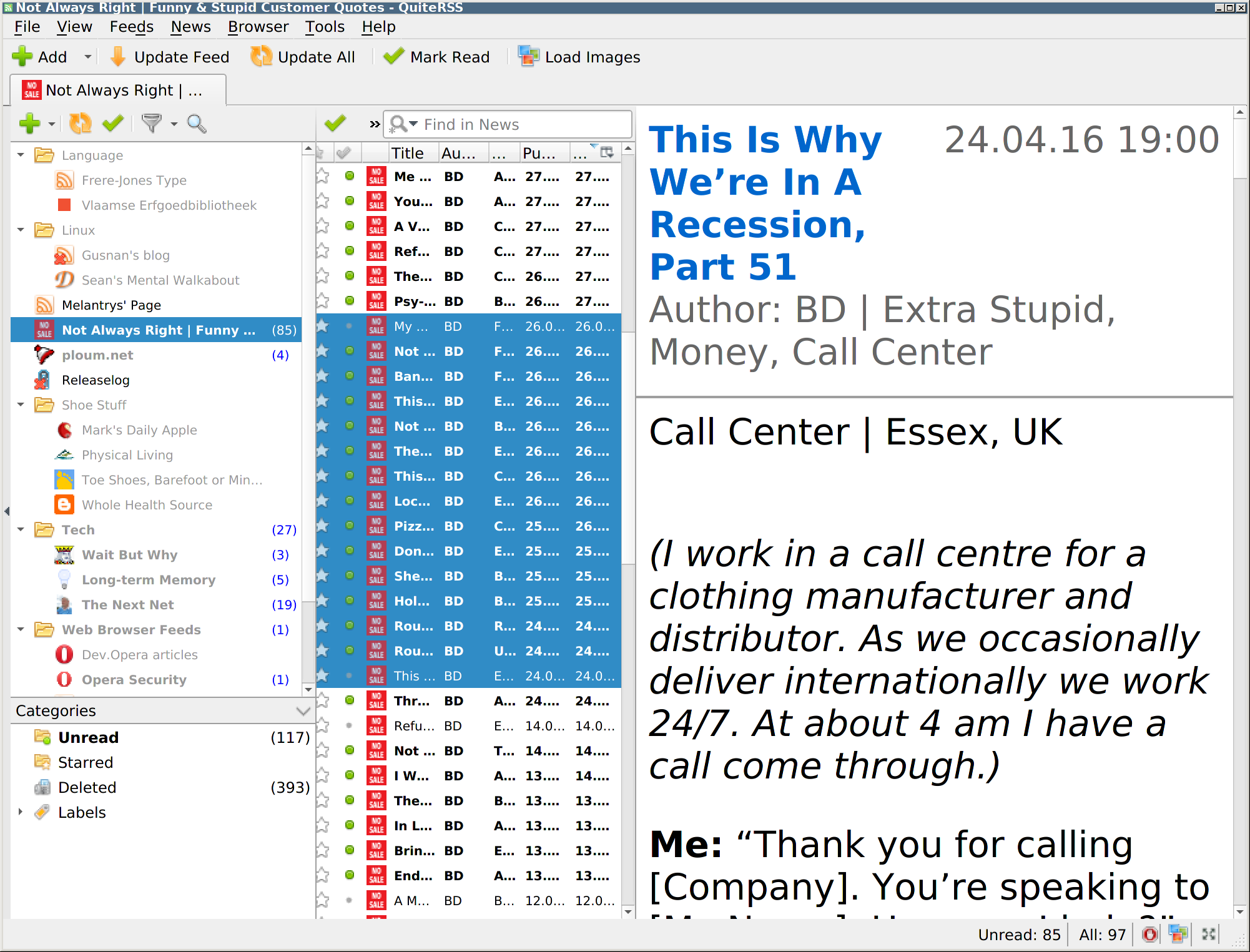
So what am I actually missing, if anything? Deletion, perhaps. In readers like Opera M2 and QuiteRSS, there's favorite, read, unread, and gone. In FreshRSS, I just pressed k five times, because yes, I might still want to read more articles out of that book from last year. But the "read" view is pretty much useless in FreshRSS without adding favorites or using the search function. Whereas in something like QuiteRSS "read" is actually a useful archive all by itself, even without starring anything.
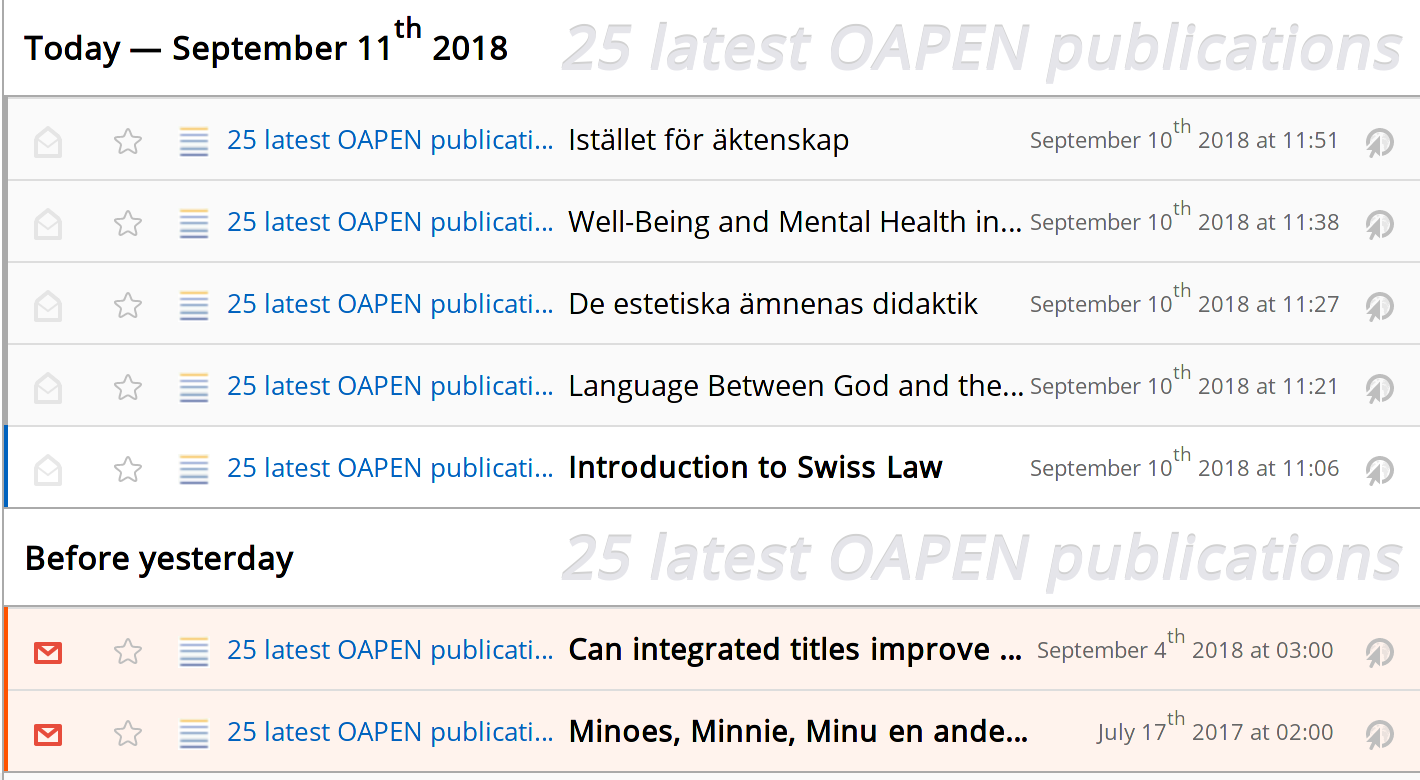
In QuiteRSS, I'd select the same bunch and press Del.
@GLLM
actually, what could be great could be that the articles can be marked as to-read-later ... which would keep them unread until individually marked as read.
I would just want to auto-mark everything as to-read-later until I explicitly dismiss it. :-)
What would be most useful (and there is an issue for this), is the ability to mark items as read without opening them ... since I'm able to know if I will read them or not based on the title.
You can using the icon, and I think we recently added a new shortcut for doing something like that with the keyboard as well.
 Frenzie
on 11 Sep 2018
Frenzie
on 11 Sep 2018
I use a little trick to get an additional state:
- I mark as favourites the articles that seem to be interesting (which I often want to read in details later, and do not want to miss)
- I register by RSS to my own favourites. This makes a feed which contain all the articles I have put in favourites.
- I remove the articles from the favourites when read / processed
- If very interesting, post to my Shaarli
Alkarex
on 11 Sep 2018
@Frenzie : I was indeed talking about a keyboard shortcut to do so. And when I said "there is an issue for this" I meant that someone already logged a Feature request in github issues.
@Alkarex : nice trick, I had not thought about this one :-)
GLLM
on 12 Sep 2018
Hi,
just did a migration from TT-RSS to FreshRSS, and so far really liking this new RSS aggregator.
I'm browsing the issues to find an answer to this use case: When reading new posts and all my feeds are read, I don't want to default to display the already read posts.
I would like to stay with nothing displayed (no unread posts), which seems to be the url options "i/?a=normal&state=2".
Is there a way to obtain this behavior?
Otherwise, I use read/unread/favorite kind of like @Alkarex (except the trick about registering my own favorites as a rss feed, which is a nice trick by the way!).
Another question if I may: TT-RSS allows to export its Favorites (xml file)... any way to import it in FreshRSS?
Thank you
 typhoe
on 24 Oct 2018
typhoe
on 24 Oct 2018
@typhoe Hello and welcome :-),
The option you are asking for is under Reading / Articles to display:
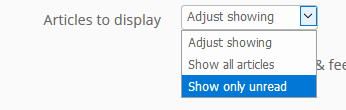
FreshRSS can import standard OPML, but for favourites, it depends on the format. Could you please send me an example from TT-RSS? Either here or by e-mail.
Alkarex
on 24 Oct 2018
Indeed, thank you!
I set my to "adjust showing" and didn't notice the other option.
I'll send an example by email for you to check if the import could be possible.
Thank you again!
typhoe
on 24 Oct 2018
Quoting @Alkarex from https://github.com/FreshRSS/FreshRSS/issues/1167#issuecomment-480574486
With @Frenzie 's example:
- See an article to read later -> star or label
- See an article to keep -> star or label
- Unsure -> mark as unread
- Read / delete -> mark as read
That's the problem in a nutshell. You're suggesting all kinds of actions where there should be none. :-)
- Read later → do nothing (or mark as unread if you accidentally marked it as read)
- Favorite → favorite (rarely used)
- Keep → do nothing
- Delete → delete
Read/unread has nothing to do with deletion. The only deletions that should ever occur are those explicitly mandated by me. No data loss. To be clear, all of this already works fine. The only thing missing is deletions.
Rebranding existing actions is no solution, because you'd still be missing a state:
- read → (soft) delete
- unread → read
- favorite → unread
- super deluxe favorite → favorite.
That being said, I could easily live without integrated favorites. The main problem there is that you'd completely change the way the program works, and it'd definitely make API compatibility harder. By constrast, a soft delete is API-transparent because it simply wouldn't know about it. (Incidentally, the tt-rss API might support it directly.)
PS I vehemently disagree with @lapineige that this is in any way "niche." This is how every newsreader and e-mail client works, except those inspired by "broken by design" Google Reader.
Frenzie
on 7 Apr 2019
I am truly making an effort to understand the details, so please bear with me if I am a bit slow :-)
You do seem to ask for an additional state, right?
Alkarex
on 7 Apr 2019
Yes, the deleted state as described here by @aledeg: https://github.com/FreshRSS/FreshRSS/issues/1167#issuecomment-480534184.
Frenzie
on 7 Apr 2019
Right, then this is not compatible with our APIs and clients, since there is no such concept or action. Am I missing something? How would our clients tell what article is read and to be kept vs. read and for deletion?
I think my confusion comes from the reading of contradictory things :-P
Alkarex
on 7 Apr 2019
It would be completely transparent to clients, but it's indeed an incomprehensible[1] design flaw in Google Reader and its API.
There wouldn't be any discernible change with the current situation for the API. How does the API take care of a setting like Remove articles after X months? It doesn't.
If that setting causes an article to be marked as deleted instead of deleting it straight away, you'd have a few more weeks to notice and undo it. That would be slightly more user-friendly but otherwise it's a difference without distinction. Whatever currently happens API-wise still happens.
[1] I suspect it's a typical Google-centric design, meaning the Google Reader server remembers everything anyway and damn the user.
Frenzie
on 7 Apr 2019
PS I'd want never to be an option for the auto-deletion setting, instead of the workaround of setting it to some impossibly high value, but that aside. Point being that, within the context of the Google Reader API, deletion is a FreshRSS affair no matter the implementation specifics.
Frenzie
on 7 Apr 2019
Related discussion https://github.com/FreshRSS/FreshRSS/issues/493 (old and in French)
Alkarex
on 7 Apr 2019
@Frenzie I am afraid I have still not understood, and I hope you have a bit of patience left :-P
If there is no possibility for marking an article for deletion, how does this additional state makes any difference? Or are you saying that you want this feature only in the Web version? And in the Web version, what would the UI look like?
We already have a setting to keep old articles for a potentially long time before removing them, and the possibility to keep articles forever if they have a star or label. So we do not delete articles straight away.
Alkarex
on 7 Apr 2019
We already have a setting to keep old articles for potentially a long time before removing them, and the possibility to keep articles forever if they have a star or label. So we do not delete articles straight away.
Right, but this is backwards. Nothing should be automatically deleted, yet a variety of items should be manually removable to prevent archive pollution.
Or are you saying that you want this feature only in the Web version?
Well of course not, but that's necessarily how it must be while operating within the constraints of the Google Reader API.
And in the Web version, what would the UI look like?
Del
And yes, there would also have to be an optional red X, a paper shredder or a trash can icon of some sort.
For example, if I search for git workflow, you can see the pollution marked with a red cross. This is the content that after reading or skimming, I know I will never want to see again. (Based in this case mainly on the title, so possibly slightly wrong.) And yet, there's only one must-read reference article among the bunch. The rest is there just in case. It's part search optimization and part memory security. In a few years, half this stuff will probably have disappeared from the web.
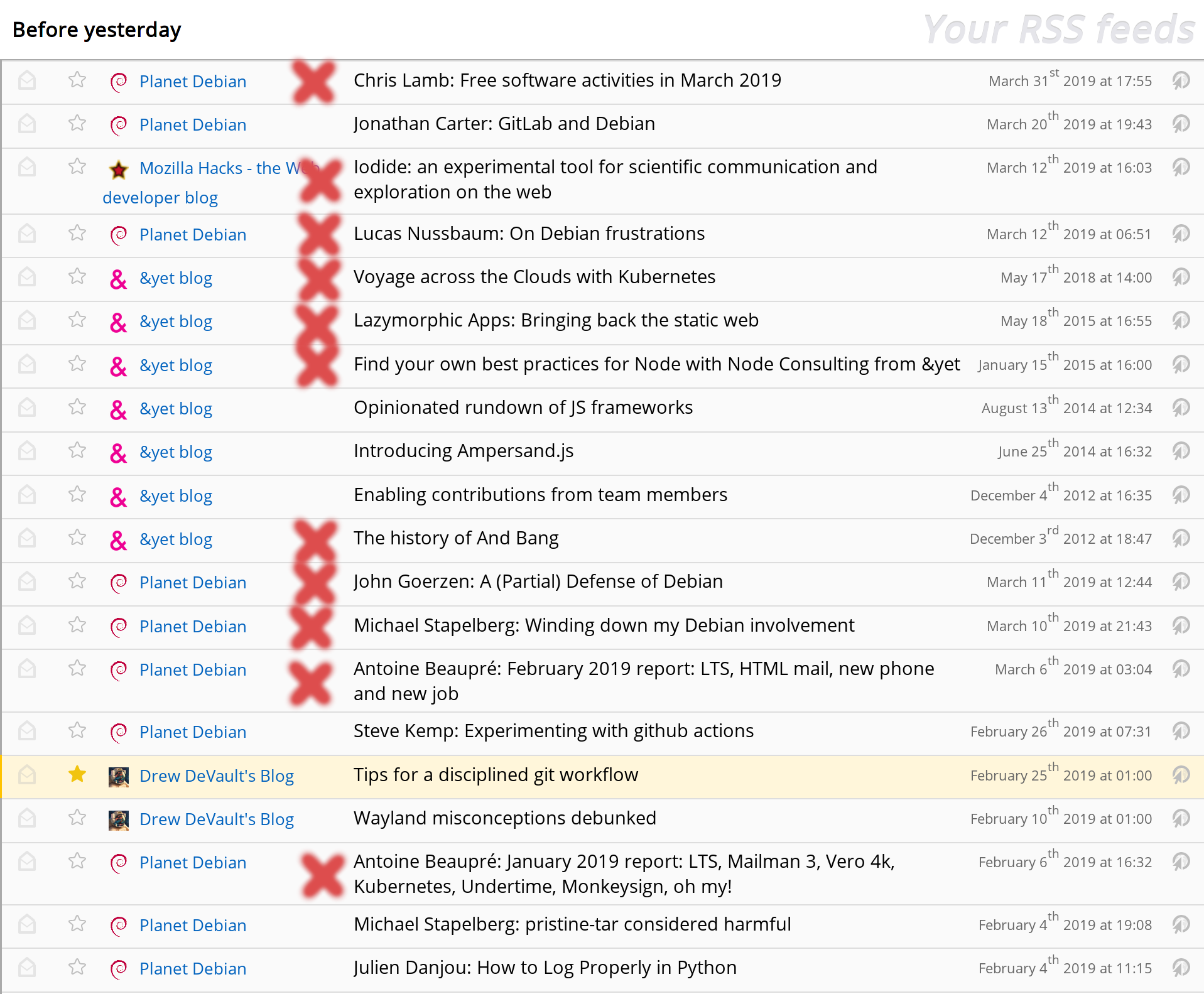
An approximation of the desired behavior can be easily effected through the GUI since #2027 by labeling articles something like delete and letting a cron job torpedo the older ones with a simple SQL query. (Whether the articles are shown in unread view doesn't concern me much, but some JS could take care of that right now as well.) Come to think of it, such an approach might even work with the Google Reader API, although most clients don't seem to implement labels.
Frenzie
on 7 Apr 2019
Related issues
Alkarex
·
5Comments
 uncovery
·
4Comments
uncovery
·
4Comments
 Stegemueller
·
3Comments
Alkarex
·
5Comments
Stegemueller
·
3Comments
Alkarex
·
5Comments
 Aasemoon
·
6Comments
Aasemoon
·
6Comments