Freecodecamp: UI/UX design overhaul
Hey all,
I've thought for some time that while I love FCC's content, the design (both UX and UI( could be better. For context, I used FCC about 18 months ago to learn frontend and have recommended the site to many people interested in learning programming. I recently revisited the site and noticed the potential for improvement.
I've rebuilt the site's main pages (landing page, home, curriculum, settings) in Figma (an awesome free online design tool), and you can check out the original and new designs here.
I've left content mostly the same (copywriting isn't my specialty), but have overhauled the UI and UX, particularly focusing on consistency and visual hierarchy in the UI, and for UX I've focused on improving navigation patterns within pages and helping users to get to relevant actions and information faster.
I'm happy to revise per feedback - I'm pretty new at this myself, so I know I still have a ton to learn. Very open to finding ways to do better!
Figma has a 'clone' feature where you can test whatever changes you want (much like forking a repo) - feel free to then add comments with suggestions on the original.
Look forward to hearing your thoughts!
 SamWoolerton
All 12 comments
@SamWoolerton The designs were all amazing. I think that the night mode could use a few changes. Also in the curriculum page for the topics, maybe we could use the same kind of progress bar you used to show the number of projects, challenges done.
 Nirajn2311
on 7 Feb 2019
Nirajn2311
on 7 Feb 2019
Related issue thread: https://github.com/freeCodeCamp/freeCodeCamp/issues/16445
 raisedadead
on 7 Feb 2019
raisedadead
on 7 Feb 2019
@SamWoolerton I love the designs that you've made,As @Nirajn2311 , the night mode could use some work, the colour of grey isn't particularly 'night' if you get what I mean and maybe just leave this white:

The visual hierarchy is amazing! Overall I love it!
 thecodingaviator
on 7 Feb 2019
thecodingaviator
on 7 Feb 2019
I, for one, think the design looks absolutely beautiful/functional
 thesidbatra
on 7 Feb 2019
thesidbatra
on 7 Feb 2019
Our brand guidelines: https://design-style-guide.freecodecamp.org/
raisedadead
on 7 Feb 2019
Thanks all for the feedback!
@Nirajn2311 Totally agree, curriculum with progress bars was actually one of the first things I tried there. I prefer the version without as it's a bit cleaner visually, but this is a good option too, and it's really nice to see progress at a glance.

@thecodingaviator yeah night mode colours are hard. Currently using background #333, cards #555, brand colour #7DB17D, text #aaa to #ddd depending on how prominent it needs to be. Let me know what your preferred colour palette would be (or better yet, clone Figma and give it a crack yourself, then share the link here)
@raisedadead cheers for the heads up, didn't realise that existed! I kept the brand font throughout, but chose to use a different brand colour - that's my personal preference to have a less dominant colour throughout the UI. I'd be happy to see the style guide updated, or to update the colours used in the design - unfazed which option we end up with.
SamWoolerton
on 7 Feb 2019
Hi @SamWoolerton
Thanks a lot for investing your time and efforts in the UI/UX. First of all these look great! 👏
I really like the way the Challenge map looks.
I guess @QuincyLarson can attest this better but, we do have a brand tone that we adhere to.
Some pointers off the top of my head that we care about:
- We have strong contrasting colors for the sake of simplicity and a11y.
The best example I can give you is of Quora (heavily inspired by their color scheme). - We think white spacing and larger font face make it really clean as well.
- Finally, we also have done quite significant A/B testing on these colors.
- And to stick to our simple/clean look we are not even using the full spectrum of colors.
Just these from the list:
- darkgreen for primary
- white for everything else
- orange for call to action
I am pretty sure we can use your concepts and marry them to certain rules that we have established to achieve a really functional design.
raisedadead
on 7 Feb 2019
@raisedadead Sweet as, fully get the a11y side of things. I'll aim to make some time over the weekend and play around with the colour scheme - will look to swap in the brand dark green and will test the orange.
I do think that the light gray page background with white background for content (kind of a card look) is another form of whitespace and helps to separate out content sections. Without this, the page's different sections tend to blend into each other a bit.
SamWoolerton
on 7 Feb 2019
I given things a knock here .
@raisedadead / @QuincyLarson I really think we should add the color #7DB17D to our styles because I've given different colours a try and none of them really seem to fit in the dark mode
thecodingaviator
on 8 Feb 2019
@SamWoolerton First of all, thanks for taking the time to create these mock-ups and share them with us.
We get these kinds of redesign concepts often.
The main thing that informs our design is accessibility and unambiguity.
Some people say Craigslist is an ugly website. Why haven't they changed it after all these years?
The fact is, it's fast, accessible, and it works.
This said, I think there is some room for incremental improvements in freeCodeCamp's UI, and there may be some ideas here we can incorporate.
What follows are my notes in screenshots for the sake of time and clarity (my apologies to anyone reading this with a screen reader).

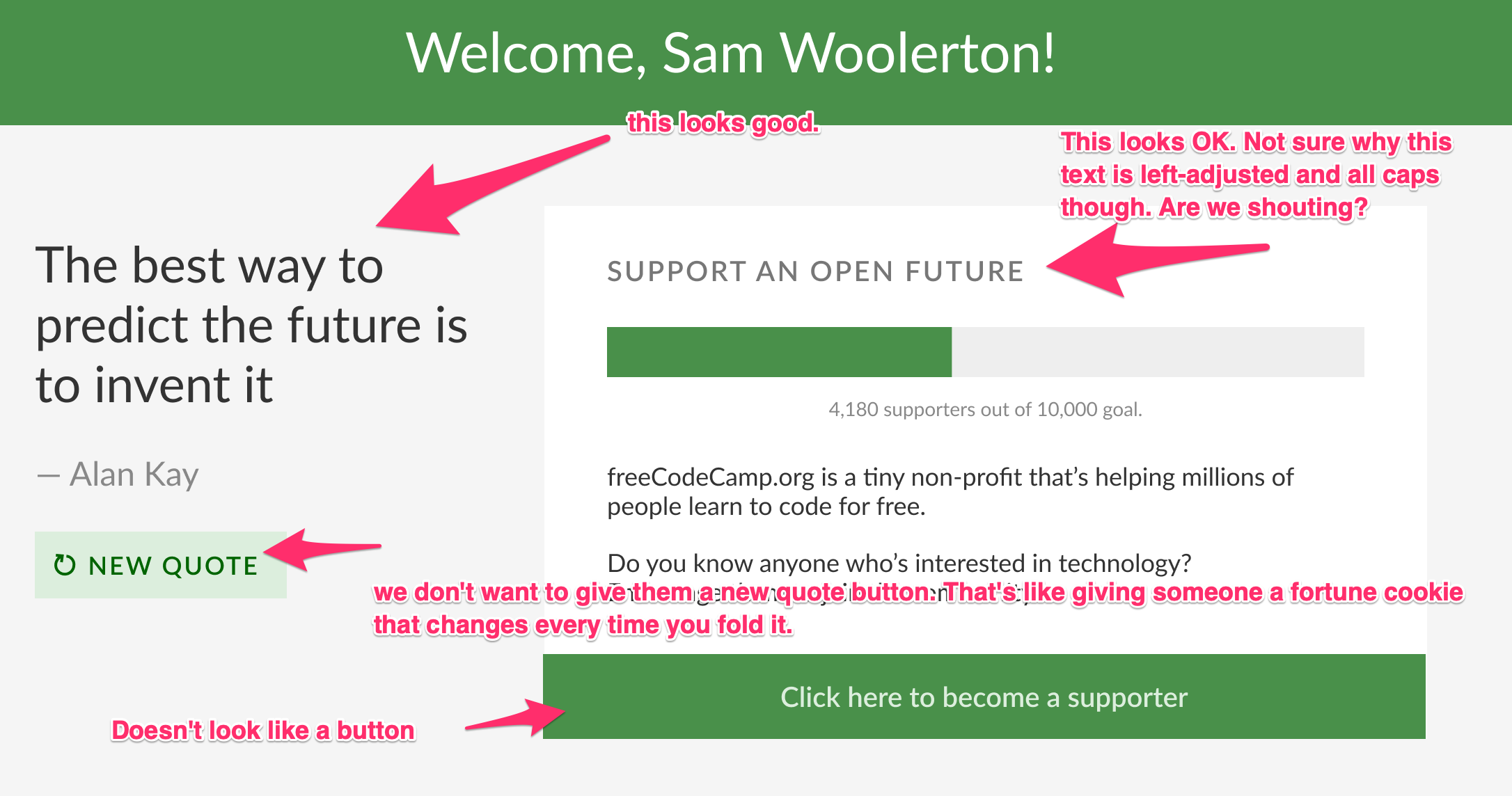
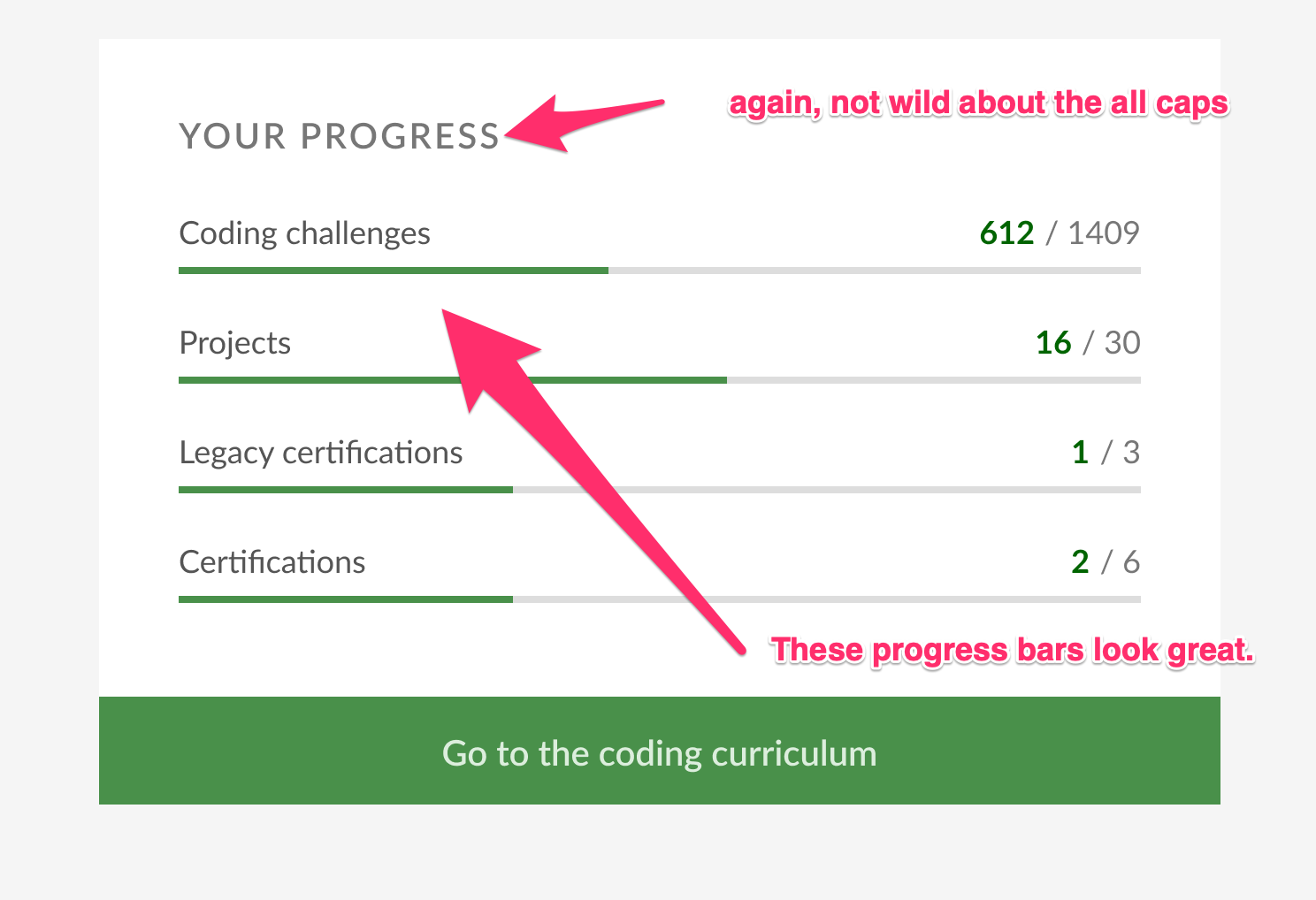
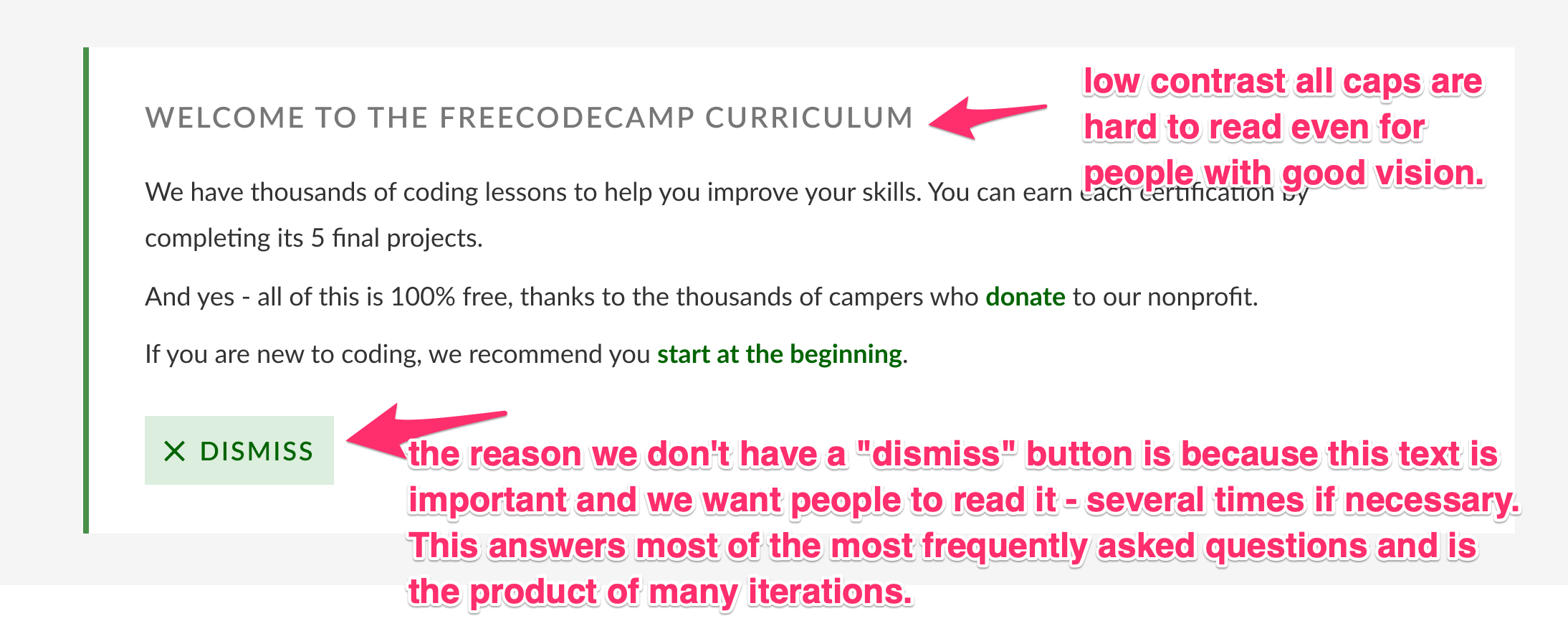

Link about scrolling (a strong argument for not worrying about saving vertical space and just keeping everything single-column): https://uxmyths.com/post/654047943/myth-people-dont-scroll
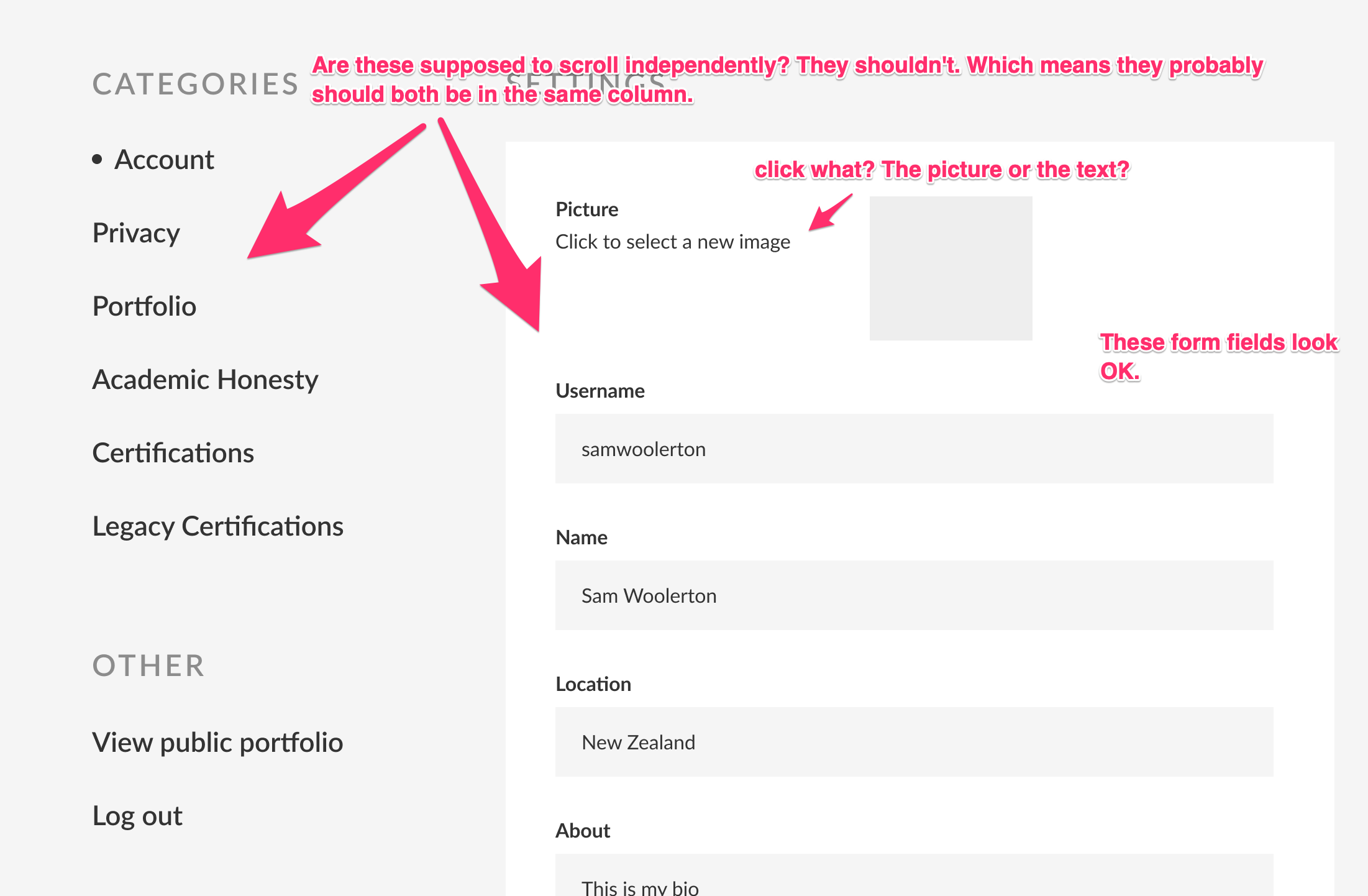
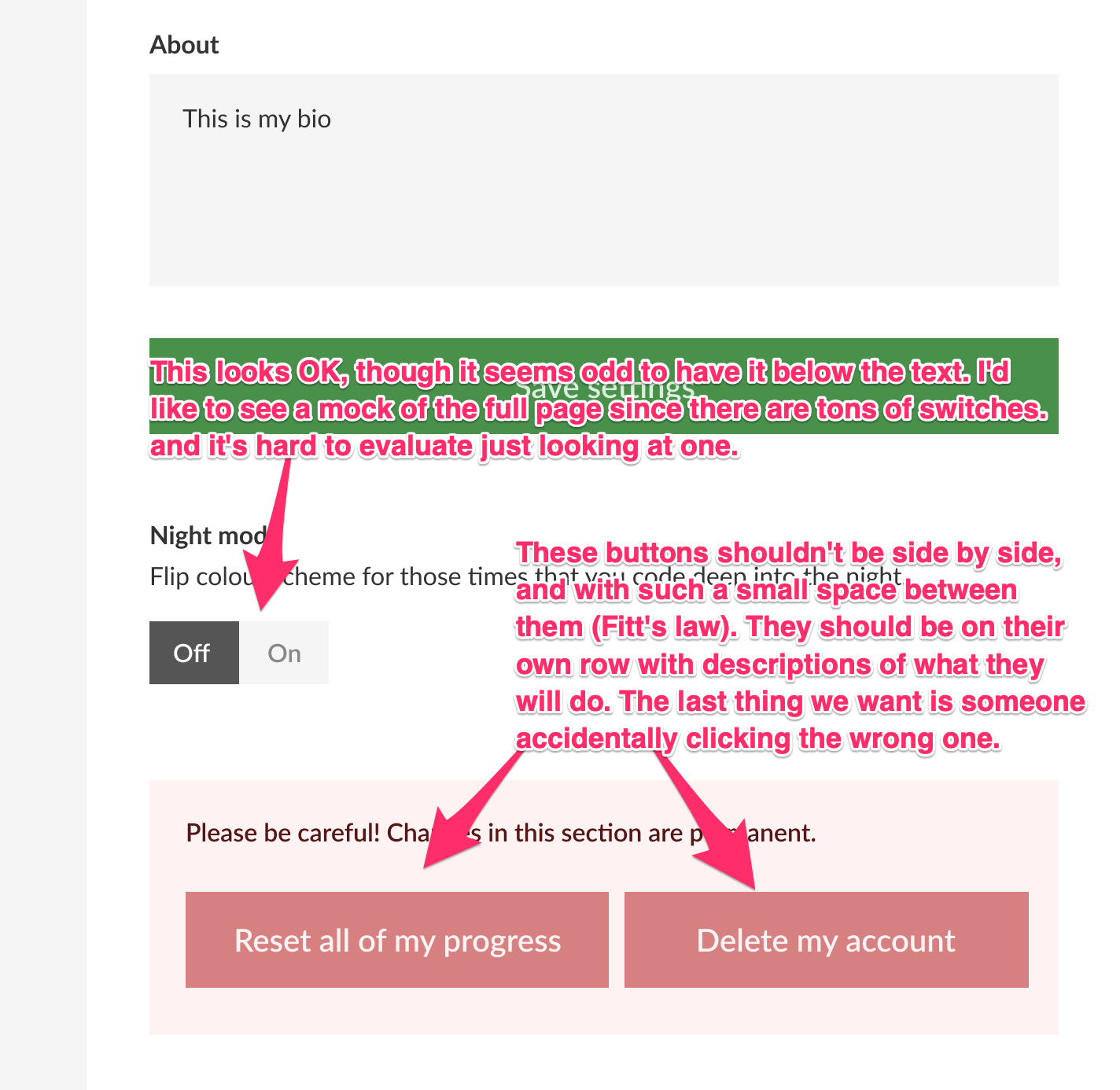
Rather than focusing on how things look, I encourage you to focus on how things use. Are there ways we can use space and hierarchy to better convey what the user should be doing and how to do it?
Could you get freeCodeCamp running locally and implement some of these ideas with our existing CSS?
 QuincyLarson
on 8 Feb 2019
QuincyLarson
on 8 Feb 2019
@QuincyLarson Thanks for the detailed feedback, much appreciated!
There were probably 3 key UX prompts that started me on the redesign
- Curriculum page dropdowns have been a pain point for me, as you can't tell if you've completed all lessons in a sub-course (say Applied CSS), without opening it and checking every lesson is green. A clear indication for if all lessons in a subcourse are complete, say green + tick, would be fantastic (also should be easy to implement)
- Settings page is unbelievably long and I think the tabs concept makes it much easier to navigate (and more accessible!)
- On the homepage for logged-in users, the progress bars make it easier to visualise progress at a glance.
I still think these are worth addressing, and should be doable within the existing FCC brand guidelines and current visual design. I'd be happy to look at implementing this at some point in the next month or so if you guys would accept a PR on them.
As for my proposed UI changes, happy to write those off. Once I'd made the above UX improvements I redesigned the rest in my preferred design style, thought it would be nice to have a facelift on a few things - I fully understand FCC having a focus on accessibility, and the current design clearly isn't holding you back. Unfazed either way.
SamWoolerton
on 8 Feb 2019
@SamWoolerton
Curriculum page dropdowns have been a pain point for me, as you can't tell if you've completed all lessons in a sub-course (say Applied CSS), without opening it and checking every lesson is green. A clear indication for if all lessons in a subcourse are complete, say green + tick, would be fantastic (also should be easy to implement)
Sure - we could definitely implement these to the right of the carets. Would you be interested in doing this?
Settings page is unbelievably long and I think the tabs concept makes it much easier to navigate (and more accessible!)
I don't think it's so long that it necessitates a tabbed approach. If anything we could have a "Jump to certifications" button at the top.
My philosophy has been - instead of adding more complicated interfaces, simplify the amount of elements you have to begin with. We may be able to pair back or simplify some of the content here.
On the homepage for logged-in users, the progress bars make it easier to visualise progress at a glance.
Agreed. Would you be interested in implementing these?
Once I'd made the above UX improvements I redesigned the rest in my preferred design style, thought it would be nice to have a facelift on a few things
We're open to this. We just want to make sure every change has sound reasoning behind it. We are not interested in chasing ephemeral design trends, but if they're changes that don't hurt usability, we can definitely consider them.
QuincyLarson
on 9 Feb 2019
Related issues
 danielonodje
·
3Comments
danielonodje
·
3Comments
 imhuyqn
·
3Comments
imhuyqn
·
3Comments
 EthanDavis
·
3Comments
EthanDavis
·
3Comments
 cmal
·
3Comments
cmal
·
3Comments
 vaibsharma
·
3Comments
vaibsharma
·
3Comments
Most helpful comment
@SamWoolerton First of all, thanks for taking the time to create these mock-ups and share them with us.
We get these kinds of redesign concepts often.
The main thing that informs our design is accessibility and unambiguity.
Some people say Craigslist is an ugly website. Why haven't they changed it after all these years?
The fact is, it's fast, accessible, and it works.
This said, I think there is some room for incremental improvements in freeCodeCamp's UI, and there may be some ideas here we can incorporate.
What follows are my notes in screenshots for the sake of time and clarity (my apologies to anyone reading this with a screen reader).
Link about scrolling (a strong argument for not worrying about saving vertical space and just keeping everything single-column): https://uxmyths.com/post/654047943/myth-people-dont-scroll
Rather than focusing on how things look, I encourage you to focus on how things use. Are there ways we can use space and hierarchy to better convey what the user should be doing and how to do it?
Could you get freeCodeCamp running locally and implement some of these ideas with our existing CSS?