Franz: Unable to connect to my Gmail account on Franz
Dear all,
I am unable to connect to Gmail on Franz whatever the laptop (I tried on a few).
When I enter my ID, then my password, this message appears :
_You are trying to sign in from a browser or app that doesn't allow us to keep your account secure. Try using a different browser. Learn more_
When I try with another account, there is no issue.
How to solve it ?
Thank you so much for your help & answers !
Best,
 maxleprof
All 23 comments
I have found the same issue with Google calendar too.
 anglisc
on 29 Aug 2019
anglisc
on 29 Aug 2019
I have found the same issue with Google calendar too.
@anglisc : for how long have you met the issue ? No solution, I guess ?
maxleprof
on 1 Sep 2019
This is a duplicate of #1573, still no word from the devs...
 eugeneromero
on 5 Sep 2019
eugeneromero
on 5 Sep 2019
Hello @eugeneromero ,
Funny that you answered the post.
I just tried to connect my Gmail account again and it seems that everything is alright.
I think that this is a matter of time ...
In my situation, I have been blocked around two weeks.
Good luck !
Best,
maxleprof
on 5 Sep 2019
Hey @maxleprof, yep, after reading your comment I can confirm it now works again... very odd indeed. Lets see how long this lasts :stuck_out_tongue:
eugeneromero
on 5 Sep 2019
I noticed it about 7 days ago when I commented on the issue. I can confirm that google services are letting me log in again.
I noticed after I changed my password it wouldnt let me authenticate with the error message reported above by @maxleprof.
anglisc
on 5 Sep 2019
Nope. I only get the register/login page. If I click on login, Browser opens and Franz stays on the page.
No way to use Gmail from within Franz currently.
 DasJott
on 11 Mar 2020
DasJott
on 11 Mar 2020
Still not logging on Gmail! Hope to solve this issue.
 yaser-alazem
on 11 Mar 2020
yaser-alazem
on 11 Mar 2020
Dunno if it was solved in the past, but it is complaining about the browser considered to be unsafe. SO can not connect gmail.
 fjandrad
on 23 Mar 2020
fjandrad
on 23 Mar 2020
Same issue. Franz considered as unsafe, no connection on any gmail service
 SMile61
on 23 Mar 2020
SMile61
on 23 Mar 2020
Please see workaround at #1771 or #1800
 asymetricbalance
on 27 Mar 2020
asymetricbalance
on 27 Mar 2020
Please see workaround at #1771 or #1800
Doesn't work anymore (W10, 2 factor authentication disabled)
After modifying the file, The recipe loads a "create account page":
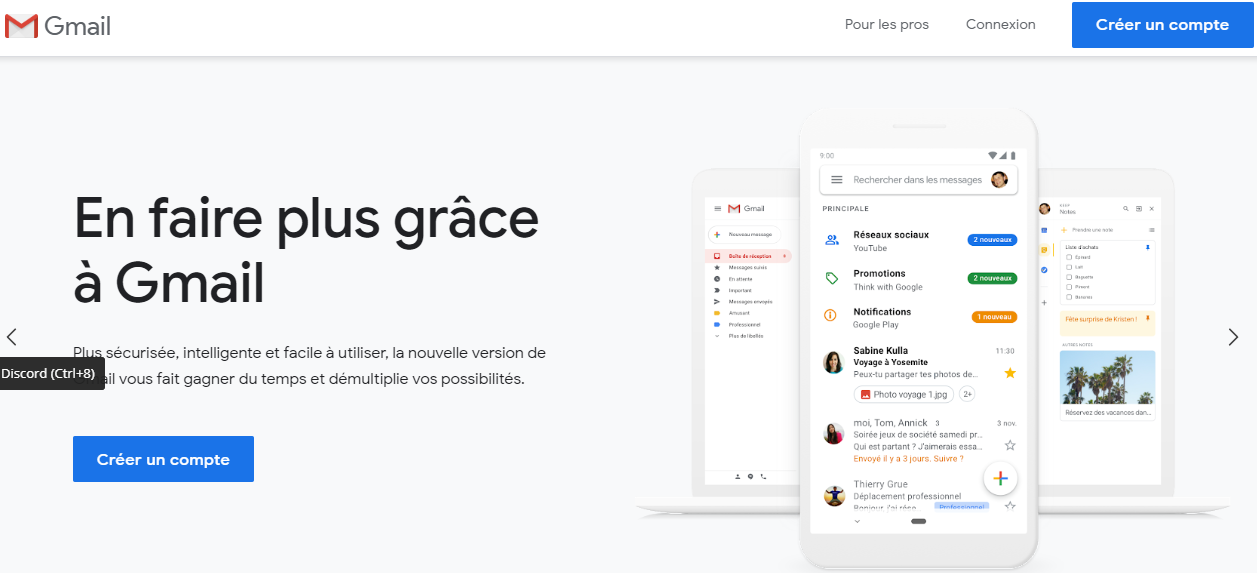
Any clic (connexion, create account,...) loads in the navigator and not inside Ferdi
SMile61
on 27 Mar 2020
SMile61 - I just added one gmail account to Franz using a modified index.js file in
C:\Users[username]\AppData\Roaming\Franz\recipes\gmail
Worked on Win 10, v1909
Franz v5.4.0
Gmail - no 2FA
Did you restart Franz after making the change?
I was asked to use chrome after the initial set up, but declining that "offer" it went straight to the inbox.
What could be different in your setup?
Attaching my file here as txt.
asymetricbalance
on 27 Mar 2020
@asymetricbalance: Thanks for your support, and please forgive my questions if they are too silly, I'm a complete newbee here
- I reloaded each time I tried a change
I first thought that I had to change "useragent" with "Gmail", then I tried to directly paste your file with/without the sourcemappingUrl part (what does that stand for?). No change, I load the same page each time.
Didn't understand your reference to "declining chrome's offer": I d
on't see any possibility to decline on the loaded page
SMile61
on 27 Mar 2020
First - There are no silly questions.
Second - this how it goes...
- download the file to your Desktop and rename it from index.js.txt to index.js (remove the "txt" portion.)
- open the folder C:[your_username]\AppData\Roaming\Franz\recipes\gmail and rename the index.js file to index.js.bak (so you have a backup in case something does wrong.)
- move or copy the file from the Desktop into that folder.
- quit Franz completely (not only reload)
- Then restart and hopefully it works.
I just copied the file directly from my folder without any changes. You can remove lines starting with "//" - they are not executed.)
Also - open the index.js.txt file to verify there is no weird code in there. I know I didn't tamper with anything, but always be on the safe side.
asymetricbalance
on 28 Mar 2020
Seems that the problem comes from 5.3.4 upgrade, it's finally working after reinstalling ferdi.
What I did exactly:
- using your recipe =>no change
- Move defaut navigator from opera to google =>no change
- Uninstalling Franz, just keeping Ferdi => no change
- uninstalling ferdi, then reinstalling 5.3.3 => WORKING
- upgrading Ferdi by clicking on the update banner => Not working any more
- uninstalling ferdi, then reinstalling 5.3.3 => WORKING again
So I stay on 5.3.3. for the moment ;-)
Any chance to hide the update banner?
SMile61
on 28 Mar 2020
update my post
looks like it's not an update from Ferdi but from Franz. Maybe I didn't correctly move my account?

SMile61
on 28 Mar 2020
I am using 5.4.0, but always update by downloading from the web page, not using the internal upadte function. Is it possible that the upgrade overwrites the index.js file?
asymetricbalance
on 28 Mar 2020
I first tried Franz 5.4.0 but didn't manage to use Gmail, then went to Ferdi wich was 5.3.3 by the internal update button, and didn't manage better. The update banner simply loads a 5.3.4 release version, I didn't completely pay attention to the changes but I'm pretty sure that the index.js file wasn't changed.
Anyway, It looks like the latest releases are 5.4.1 on Franz and 5.4.3 on Ferdi. I'll try the 5.4 later
Thanks a lot for your help
SMile61
on 28 Mar 2020
Please see workaround at #1771 or #1800
Doesn't work anymore (W10, 2 factor authentication disabled)
After modifying the file, The recipe loads a "create account page":
Any clic (connexion, create account,...) loads in the navigator and not inside Ferdi
I've find a solution that worked for me:
- Open Franz app
- Find Gmail service ID : activate devtools and search
partitionattribute (ex:partition="persist:service-a7f0a998-be50-4f61-a18b-002f19df120f") of webview tagis-active. - Close Franz app
- Go to Franz Partitions folder (on Windows: %APPDATA%\Franz\Partitions), backup first before delete folder corresponding of service ID (ex:
\service-a7f0a998-be50-4f61-a18b-002f19df120f) - Restart Franz
- Connect to gmail
- That's all :)
 seyhajin
on 1 May 2020
seyhajin
on 1 May 2020
Hi there,
I am using macOS Mojave Version 10.14.6 and having the same problem. Any idea on how to fix it on Mac? I already messaged the support a couple of times but I did not receive any answer even though I am on a paid plan. -.-
Any help would be very appreciated
 jmandt
on 29 Jul 2020
jmandt
on 29 Jul 2020
Problem not solved after more than a year !!!
Franz Team please come with solution or announce officially Franz is not supporting gmail anymore.
P.S. Everyone tying to resolve problem with file-editing-hacks can not be called a solution !!!
Thank you !
 riprop
on 15 Nov 2020
riprop
on 15 Nov 2020
@riprop Problem seems to be solved. The solution for me was to install the newest update of Franz.
jmandt
on 24 Nov 2020
Related issues
 gregoralbrecht
·
3Comments
gregoralbrecht
·
3Comments
 dbfin
·
4Comments
dbfin
·
4Comments
 m2kk
·
4Comments
m2kk
·
4Comments
 agodlydeciple
·
4Comments
agodlydeciple
·
4Comments
 hello-jason
·
4Comments
hello-jason
·
4Comments
Most helpful comment
Nope. I only get the register/login page. If I click on login, Browser opens and Franz stays on the page.
No way to use Gmail from within Franz currently.