Franz: WhatsApp works with Google Chrome 49+ (on Mac OSX after last update to 10.14.6)
After the last update on my Mac OSX 10.14.6, starting Franz the service WhatsApp doesen't work. The service shows the following alert:
"WhatsApp works with Google Chrome 49+"
followed by a button UPDATE GOOGLE CHROME
My Google Chrome is updated, so the problem is inside Franz.
I suppose that the problem is the update of OSX because before of that everything worked fine.
Desktop (please complete the following information):
- OS: OSX
- Browser: Chrome
- Version 75.0.3770.142

 moremarc
All 20 comments
This problem is also observed with windows, the cache removal instruction did not help.
 MichaelT2000
on 25 Jul 2019
MichaelT2000
on 25 Jul 2019
same problem on: osx 10.13.6, chorme version 75.0.3770.142 (Build ufficiale) (a 64 bit)
 kampiamodikuesto
on 25 Jul 2019
kampiamodikuesto
on 25 Jul 2019
Disabling & enabling the service appears to clear the message allowing WhatsApp to be used - though it comes back whenever Franz is restarted.
 ThatGuyinIT
on 25 Jul 2019
ThatGuyinIT
on 25 Jul 2019
I tried @ThatGuyinITs suggestion and got it to work, but after disabling the service, I had to switch to another tab and right click -> enable service. Clicking the "Enable Service" button in the tab did not work for me.
 Gaibhne
on 25 Jul 2019
Gaibhne
on 25 Jul 2019
I fix:
- delete whatsapp service
- close and restart franz
- add new whatsapp service
kampiamodikuesto
on 25 Jul 2019
I confirm that after the service is restarted, WhatsApp starts to work, but after restarting the FRANZ service stops working again.
MichaelT2000
on 25 Jul 2019
I confirm that after the service is restarted, WhatsApp starts to work, but after restarting the FRANZ service stops working again.
Same here. Some info about setup:
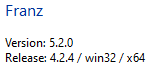
Google Chrome: 75.0.3770.142 (Official Build) (64-bit) (cohort: Stable)
OS: Windows 10 OS Version 1903 (Build 18362.239)
 mariomaric
on 25 Jul 2019
mariomaric
on 25 Jul 2019
Same problem on Linux: Ubuntu 18.04 LTS, Franz: version 5.2.0 release 4.2.4/linux/x64, Chrome: Version 75.0.3770.142 (Official Build) (64-bit).
The fix of removing the Whatsapp service (removing the whatsapp folder from .config/franz/recipes) and adding the Whatsapp service again does not work in this case.
 usr
on 25 Jul 2019
usr
on 25 Jul 2019
Windows 10 OS Version 1903 Win64 (Build 18362.239) and Franz version 5.2.0 (Release 4.2.4/win32/x64)
Service restart = working fine
Franz restart = stop again
 Everlight
on 25 Jul 2019
Everlight
on 25 Jul 2019
Downgrade back to 5.1, seems to be working fine, even after restarting franz
 rmflom
on 26 Jul 2019
rmflom
on 26 Jul 2019
downgrading fixed it for me - how do I hide the upgrade notice?
 starchild
on 29 Jul 2019
starchild
on 29 Jul 2019
https://github.com/meetfranz/franz/issues/1540#issuecomment-517118405
The above was my solution for Windows, try it on Mac and see if it works...
Good luck!
 sv1266
on 1 Aug 2019
sv1266
on 1 Aug 2019
@sv1266 The solution also works on mac. Thanks!
 yesjoar
on 6 Aug 2019
yesjoar
on 6 Aug 2019
All I had to do to fix this was do a refresh (command + R). Worth trying the simplest thing first
 austingayler
on 26 Nov 2019
austingayler
on 26 Nov 2019
From what I understand, this still requires you to do that every time Franz
starts up, meaning that you will not see notifications until you have
opened Franz and refreshed manually. Changing the refresh time will
automate this process.
I'm all for simple solutions, but I didn't want to have to refresh manually
every time...
On Tue, Nov 26, 2019, 4:39 AM AJ Gayler notifications@github.com wrote:
All I had to do to fix this was do a refresh (command + R). Worth trying
the simplest thing first—
You are receiving this because you were mentioned.
Reply to this email directly, view it on GitHub
https://github.com/meetfranz/franz/issues/1543?email_source=notifications&email_token=AKGZKDBIGDKJNPFUIKPVKKTQVTVEXA5CNFSM4IGXSZA2YY3PNVWWK3TUL52HS4DFVREXG43VMVBW63LNMVXHJKTDN5WW2ZLOORPWSZGOEFFL44Y#issuecomment-558546547,
or unsubscribe
https://github.com/notifications/unsubscribe-auth/AKGZKDCJNAS3OSRUMQXCQR3QVTVEXANCNFSM4IGXSZAQ
.
sv1266
on 26 Nov 2019
I have the same problem. I am running Franz 5.4.1.1703 on Mac OSX 10.15.3 (in both cases, the latest versions).
I use 9 different messaging services and they are all fine except WhatsApp. Sometimes it works, but mostly it tells me to upgrade Chrome to 49+ or use Firefox etc. -- screenshot as at the start of this thread. I am using Firefox as my default browser (but also have Chrome, Safari and Opera, in all cases the current version). I updated Chrome anyway just to make sure, but it did not fix the problem with Franz. Anyway I thought Franz acts as a browser itself rather than using mine?
Deleting and reinstalling WhatsApp works initially as others have said, but reloading Franz breaks it again. I am not going to keep fixing it! My WhatsApp still works on the web or with the Mac WhatsApp app, but that rather defeats the point of having Franz!
 AndySymons
on 19 Feb 2020
AndySymons
on 19 Feb 2020
I suggest you move to the community fork of Franz which is called Ferdi. I
have not had the same issues with that platform.
On Wed, Feb 19, 2020, 12:00 PM AndySymons notifications@github.com wrote:
I have the same problem. I am running Franz 5.4.1.1703 on Mac OSX 10.15.3
(in both cases, the latest versions).I use 9 different messaging services and they are all fine except
WhatsApp. Sometimes it works, but mostly it tells me to upgrade Chrome to
49+ or use Firefox etc. -- screenshot as at the start of this thread. I am
using Firefox as my default browser (but also have Chrome, Safari and
Opera, in all cases the current version). I updated Chrome anyway just to
make sure, but it did not fix the problem with Franz. Anyway I thought
Franz acts as a browser itself rather than using mine?Deleting and reinstalling WhatsApp works initially as others have said,
but reloading Franz breaks it again. I am not going to keep fixing it! My
WhatsApp still works on the web or with the Mac WhatsApp app, but that
rather defeats the point of having Franz!—
You are receiving this because you were mentioned.
Reply to this email directly, view it on GitHub
https://github.com/meetfranz/franz/issues/1543?email_source=notifications&email_token=AKGZKDDNABYPXOT6WGWDYRTRDVQRVA5CNFSM4IGXSZA2YY3PNVWWK3TUL52HS4DFVREXG43VMVBW63LNMVXHJKTDN5WW2ZLOORPWSZGOEMISSVI#issuecomment-588327253,
or unsubscribe
https://github.com/notifications/unsubscribe-auth/AKGZKDGNKNZJ2CAXYTQ3IKLRDVQRVANCNFSM4IGXSZAQ
.
sv1266
on 19 Feb 2020
sv1266 you are right! I had not come across Ferdi before. For any others reading it is dead easy. You just download from https://getferdi.com/download then you can import your existing Franz account and get the same setup in Ferdi. You just need to log into everything again first time. WhatsApp does indeed work reliably, as does everything else I use.
It also make more sense because Franz is only free up to 3 services, and you have to pay the "Professional" price to get beyond 6. Who has fewer than 6 personally these days? Besides, it's just a tidier way of doing what you can alternatively do with a bookmark folder in your browser (open all tabs) or a folder of aliases to the desktop clients, so I wasn't going to pay much for it!
Ferdi even has a better logo; the Franz one looks like a pair of tusks on a vicious beast! :-)
AndySymons
on 19 Feb 2020
same here
disabled & enabled whatsapp works great again
 SergioSuarezDev
on 20 Feb 2020
SergioSuarezDev
on 20 Feb 2020
same here
disabled & enabled whatsapp works great again
Yes, I know, but I am not prepared to do that every time I start Franz! It's easier to open the WhatsApp app. Anyway I am fine with Ferdi now. :-)
AndySymons
on 20 Feb 2020
Related issues
 G419
·
3Comments
G419
·
3Comments
 PackElend
·
4Comments
PackElend
·
4Comments
 kingjr
·
3Comments
kingjr
·
3Comments
 ArmeF97
·
4Comments
ArmeF97
·
4Comments
 agodlydeciple
·
4Comments
agodlydeciple
·
4Comments
Most helpful comment
Disabling & enabling the service appears to clear the message allowing WhatsApp to be used - though it comes back whenever Franz is restarted.