Franz: New context menu problems after updating to v5.0.0-beta.19
After updating to v5.0.0-beta.19 featuring new context menus, I see new issues. Listing them all out, together with preexisting context menu isseus:
- The only context menu item I've been able to see is
Copyfor text. - When right-clicking selected text,
Copyappears as a second item in the list, with the first item being empty and unclickable (sorry, I can't make a screenshot of a context menu). Copy Imageis missing. Note: previously the item existed, but image copying didn't work. See #792, #956.Copy Image URLis missing.Save Image asis missing.Open Imageis missing.Backis missing, see #385.- It should be possible to enable the
Inspectitem from global preferences. Could be part of a large "Enable Debugging" or "Development Mode" feature.
Your Environment
- Franz Version used: v5.0.0-beta.19
- Operating System and version: Windows 10 Pro x64 (1809 17758.1).
Notes
Franz devs, please tell me if you want to create a separate issue for each item on this list.
 lolmaus
All 15 comments
What is the new context menu actually supposed to be like? Just so we know what we're missing.
 Gaboris
on 3 Dec 2018
Gaboris
on 3 Dec 2018
Here's the relevant commit featured in beta 19: 3d87c0e feat(App): Improved spell checker & context menu. That's all I know.
lolmaus
on 3 Dec 2018
In general
I've started to replace the context menu as I needed to break out of the previous implementation (electron-spellchecker -> contextMenuProvider). The overall plan is to extend the new (and custom) context menu over time to control Franz settings like spellchecker, spellchecker language and so on.
- Copy Image URL is missing.
- Save Image as is missing.
- Open Image is missing.
All 3 items are available. I'd need detailed guides to reproduce this if it isn't working.
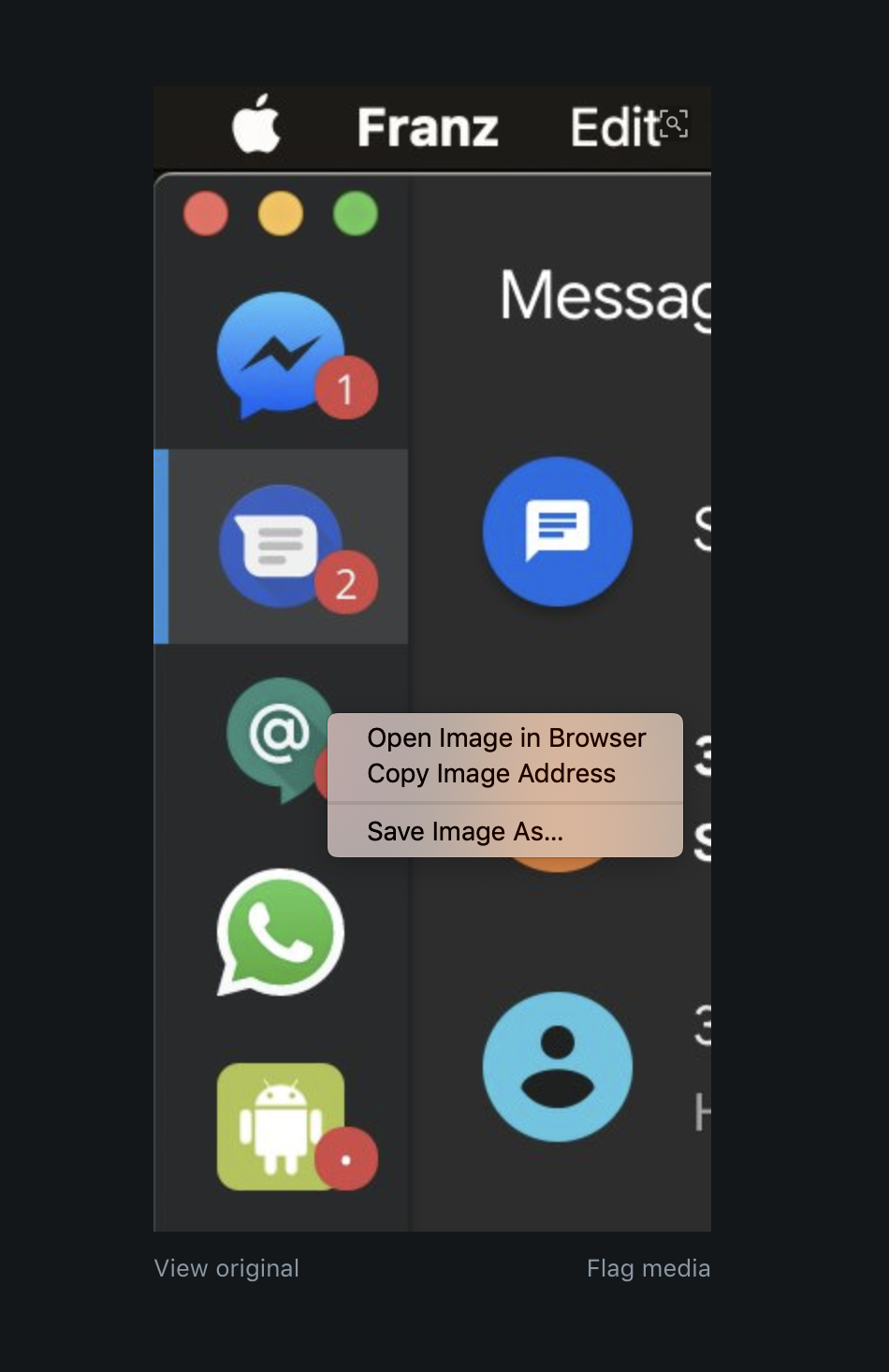
Copy Image is missing.
I've removed this as it never worked reliable. As trivial as it sounds, this is the most complex feature for the context menu to get right. I'd rather leave this out as to keep it in a broken state. I'm however more than happy to accept community contributions.
Back is missing, see #385.
This was never implemented but maybe it's about time that this will be added.
When right-clicking selected text, Copy appears as a second item in the list, with the first item being empty and unclickable (sorry, I can't make a screenshot of a context menu).
👍 The first one is "cut" but should be completely removed if the context menu is triggered outside of an input
It should be possible to enable the Inspect item from global preferences. Could be part of a large "Enable Debugging" or "Development Mode" feature.
This is already available in development mode.
Franz devs, please tell me if you want to create a separate issue for each item on this list.
It's ok as it is, thanks for your support!
 adlk
on 3 Dec 2018
adlk
on 3 Dec 2018
Okay I tried it.
IF the image within a client doesn't have its own context menu like how Discord brings up its own when clicking on a user's avatar it brings up said three options and they work just as described.
Now I'm not sure if this is a bug or not, but in some clients like Skype, Messenger and IRCCloud if I click on a "non-valid" location like empty space it just pops up as (empty), probably since it couldn't find anything to do, but in Discord's case it's probably being denied by its own context menu so it doesn't show up.
Gaboris
on 3 Dec 2018
OH! I also just noticed that "Search with Google" was also part of Franz's context menu. I hope that can be re-created.
Also IF it's possible it would be pretty cool to have custom search options like Qwant. :)
Gaboris
on 3 Dec 2018
Also IF it's possible it would be pretty cool to have custom search options like Qwant. :)
I'm aware that not everyone wants to use Google but I fear that something like this isn't mainstream enough. Short to mid-term, I can however imagine having a config file in your Franz folder where things like this can be setup.
I've implemented the missing context menu items (I forgot to tag 5d5aa0c5bc3602fdf4deec4d0046ce02ddf70090). The changes will ship with b20.
Closing this for now.
adlk
on 4 Dec 2018
Even just the basic Google search option will be a godsend so thanks in advance. :)
Gaboris
on 4 Dec 2018
@adlk sad, just found the copy option is gone, used it almost daily :(
what are the specific challenges here and how can we as a community help?
 SporeTec
on 19 Dec 2018
SporeTec
on 19 Dec 2018
Have you updated to the latest beta yet @SporeTec? On my side this problem's been fixed by b.21 so we should see what might be the actual problem.
Gaboris
on 19 Dec 2018
I tried beta 22 a few mins ago, but didnt have the copy option in allo so i didnt check further. (yes only person using allo i know)
Will check the other chats now
SporeTec
on 19 Dec 2018
OH! Maybe it's a service specific problem then?
If it works in other chats you'd better open a new issue so it can be tracked properly.
Gaboris
on 19 Dec 2018
Nope not having the copy image option, in whatsapp, allo, discord or telegram unfortunately
SporeTec
on 19 Dec 2018
OH! You mean copy IMAGE! Yeah that one was taken out due to "complications". You'd be better off opening the image in a browser and copying/downloading it there.
Personally that's what I do all the time, never even thought about using image copy, but I can understand if that's a problem.
Maybe create a feature request since this was intended, but maybe it can be implemented if the need arises.
Gaboris
on 19 Dec 2018
hmm but when i do open in browser its trying to open a link with the blob protocol where i cant omit the blob part.
guess i will stay on an old version for now...
SporeTec
on 19 Dec 2018
Also suffering from the lack of Copy Image context menu item.
PS On beta 18 the item existed but didn't actually copy the image.
lolmaus
on 19 Dec 2018
Related issues
 ajason08
·
48Comments
ajason08
·
48Comments
 ylluminate
·
69Comments
adlk
·
30Comments
ylluminate
·
69Comments
adlk
·
30Comments
 CCRDude
·
31Comments
CCRDude
·
31Comments
 virgiliomsilva
·
76Comments
virgiliomsilva
·
76Comments