Franz: NOTICE: WhatsApp works with Google Chrome 36+
We are aware of the WhatsApp issue that says "_WhatsApp works with Google Chrome 36+_". Unfortunately, this is _not_ an issue with Franz and can't be fixed that easily.
We are looking for ways to work around this but in the end, we are dependent of what WhatsApp is providing us.
Updating your local Chrome Browser does _not_ help and is completely unrelated.
Known work arounds
- Reloading WhatsApp (Cmd/Ctrl+R)
- Reloading Franz (Cmd/Ctrl+Shift+R)
- Enable/disable the service
- Delete and re-add the service
- Go to the Service Developer Tools and delete the cache (especially service workers)
We are sorry for the inconvenience!
Please do not comment to this issue unless it is another work around!
Off topic comments as well as "happens to me as well" or similar will be deleted.
Please check this testing guide from below:
https://github.com/meetfranz/franz/issues/1185#issuecomment-447792894
 adlk
adlk
All 30 comments
Actually, I make a service like you do, but It is focusing on Whatsapp.
What I did is that, Everytime the user open the apps, the apps automated clearing the cache of the partition (partitions)..
I know it will be ugly for the user because they have to re-login to whatsapp.. But, for now, it is the only way, I guess.
 abdulahkam
on 15 Dec 2018
abdulahkam
on 15 Dec 2018
@abdulahkam This is actually already part of the latest version for WhatsApp
https://github.com/meetfranz/recipe-whatsapp/blob/a20779e35d7dfb0fa6567888c0c190f68c998ffa/webview.js#L7-L18
adlk
on 15 Dec 2018
@adlk I solved this issue on an app of mine by calling the unregister method of the WhatsApp service worker, right after the page starts loading. I would expect WhatsApp to stop working, but actually everything is working fine! So, you should do something similar to this:
navigator.serviceWorker.getRegistrations().then(registrations => {
   for(let registration of registrations) {
      registration.unregister();
   }
});
For reference: Unregister method
 pluralism
on 15 Dec 2018
pluralism
on 15 Dec 2018
I was using the unregister function and it was working just fine until Wednesday or Thursday.
I guess WA has quite a lot of different versions out there which makes this even harder to get around.
adlk
on 15 Dec 2018
I also develop an app just like Franz, but privately.
As it seems, this is a problem with WPP's service worker trying to detect if the browser is compatible or not. And it seems to happen only with Electron distributions, and potentially nw.js too, but I didn't have the time to test it.
Did anyone got a not-automated, non-bull** answer from WhatsApp support? I tried to contact them in many ways, gave them a lot of background information of the problem, but it seems their support is for users only, and not for developers, as all responses I got were frustrating, to say the least.
Could it be related to some feature bundled by Chrome, but disabled when within Electron? Like something media-related, maybe? I'll test if this happens on Chromium too.
 BloodShura
on 15 Dec 2018
BloodShura
on 15 Dec 2018
@BloodShura I'm sure they're filtering out Electron apps. I tried to use Fiddler and modified the request by editing the OnBeforeRequest method. I removed Electron/2.0 from the user agent and as soon as I did it WhatsApp started working again.
pluralism
on 15 Dec 2018
@pluralism That's interesting. The first solution I tried was changing the webview's user agent to also remove custom identifiers added by Electron (Electron/VERSION and {my app name}/VERSION), but it surprisingly didn't work...
BloodShura
on 15 Dec 2018
@BloodShura Yes, you're right. If you open the chrome console and run navigator.userAgent in the service worker context you'll notice that it still includes Electron/VERSION. Hence, the only solutions that I found so far are to use Fiddler or unregister the service worker.
pluralism
on 15 Dec 2018
I am making a WhatsApp client using electron as well.. I tried unregistering the service workers, trying to change the user agent but nothing worked. It could be that WhatsApp is trying to stop developers from creating third-party WhatsApp apps.
 amanharwara
on 16 Dec 2018
amanharwara
on 16 Dec 2018
I can confirm that it has something to do with parsing the user agent. I'm using Chromium 70 on Ubuntu and I get the same error message in the browser. When spoofing the user agent to Chrome 70 (either using the developer tools or the user agent switcher) it works flawlessly.
 WGierke
on 17 Dec 2018
WGierke
on 17 Dec 2018
I haven't been able to change the user agent in the service worker context yet.
In the meantime, can you please check if this version works for all of you?
You need to manually install it.
How to manually install WhatsApp
- To install a new integration, download the integration folder e.g whatsapp.
Open the Franz Plugins folder on your machine:
- Mac:
~/Library/Application Support/Franz/recipes/ - Windows:
%appdata%/Franz/recipes/ - Linux:
~/.config/Franz/recipes/
- Mac:
Replace the whatsapp folder with the downloaded folder in the
recipesdirectory- Reload Franz
How to test
If you are able to use WhatsApp then please try to reload a few times. Is it still working?
It can happen that the error message is displayed. In this case, an automatic reload should happen and WhatsApp should work again.
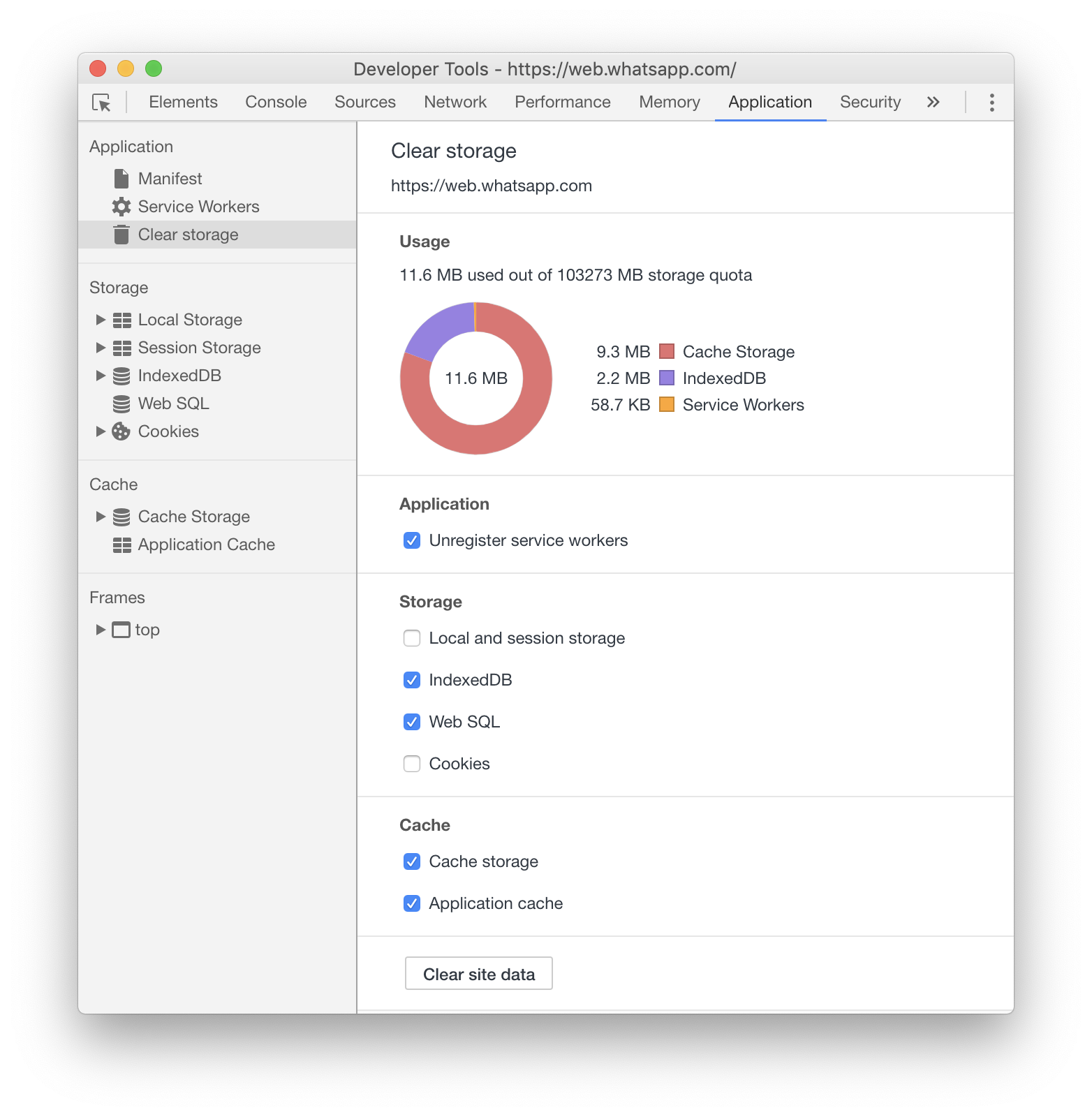
Clear WhatsApp cache
It could be that you need to manually clear your WhatsApp cache before it starts to work.
To do that:
- Activate the WhatsApp tab
- Open the Service Developer Tools (Ctrl/Cmd+Shift+Alt+I)
- In the Developer Tools, go to "Application"
- Go to "Clear storage" and select
- Unregister service workers
- IndexDB
- Web SQL
- Cache Storage
- Application Cache
- Reload the page with Ctrl+Cmd+R
adlk
on 17 Dec 2018
I haven't been able to change the user agent in the service worker context yet.
In the meantime, can you please check if this version works for all of you?
@adlk WhatsApp seems to be working fine on Franz. At least, it did for me.
How did you get it working though? I tried changing the user agent and also clearing storage/cache in my app but wasn't able to get it to work.
amanharwara
on 17 Dec 2018
Found this fix on https://community.linuxmint.com/software/view/whatsapp-desktop
Another user has confirmed it to work for that electron wrapped app:
@jpmunix:
To get it working again we must go to "/opt/whatsapp-desktop/resources/app" and edit the file "main.js" as root and look for the line that says whatsApp.window.loadURL('https://web.whatsapp.com'); Just above this line we add this other whatsApp.window.webContents.setUserAgent("Mozilla/5.0 (X11; Linux x86_64) AppleWebKit/537.36 (KHTML, like Gecko) Chrome/71.0.3578.98 Safari/537.36"); And we save the file Then we go to "/home/myuser/.config/whatsapp-desktop/Service Worker" directory and empty it completely. Close Wathsapp application if we have it open and open a super user console and execute the command "chmod -w /home/myuser/.config/whatsapp-desktop/Service Worker/ -R" with the application closed and the directory empty. Start Whatsapp desktop and pair again. I hope it serves you. Sorry for my English. I use a translator
 brybalicious
on 17 Dec 2018
brybalicious
on 17 Dec 2018
I seem to have sort of a fix by using the user agent string provided by @brybalicious and by modifying some of the cache/storage-clearing code by @adlk. Have a look:
This is what my _webview_ element looks like:
<webview preload="init.js" src="https://web.whatsapp.com/" useragent="Mozilla/5.0 (X11; Linux x86_64) AppleWebKit/537.36 (KHTML, like Gecko) Chrome/71.0.3578.98 Safari/537.36"></webview>
Using the _webview_'s useragent property worked for me. However, I did find that it didn't seem to work if the string was modified. It could just be that I modified it incorrectly, but I can't say for sure. This is the user agent string that seems to be the one working: "Mozilla/5.0 (X11; Linux x86_64) AppleWebKit/537.36 (KHTML, like Gecko) Chrome/71.0.3578.98 Safari/537.36"
Then I am preloading an init.js file where I have used @adlk's code by modifying it to work from the webview.
const {remote} = electron; //Imports the remote module to use session inside webview
var ses = remote.session.defaultSession; //Gets the default session
ses.flushStorageData(); //Writes any unwritten DOMStorage data to disk
ses.clearStorageData({ //Clears the specified storages in the session
    storages: ['appcache', 'serviceworkers', 'cachestorage', 'websql', 'indexdb'],
});
window.navigator.serviceWorker.getRegistrations().then(registrations => {
    for (let registration of registrations) {
        registration.unregister(); //Unregisters all the service workers
    }
});
const titleEl = document.querySelector('.window-title');
if (titleEl && titleEl.innerHTML.includes('Google Chrome 36+')) {
    window.location.reload(); //Reloads the page if the page shows the error
}
However, it does sometimes require to reload the page for it to work again. This fix seems to be sort of consistent for me (not much, though).
amanharwara
on 17 Dec 2018
putting the useragent in the webview worked for me, thanks @ShadyThGod
 roccomuso
on 18 Dec 2018
roccomuso
on 18 Dec 2018
I don't have a WhatsApp folder in ~/.config/Franz/recipes/ (on Ubuntu 16..04). There's only a temp folder. Is there any other place I could search for the WhatsApp folder?
 Michael-E-Rose
on 4 Jan 2019
Michael-E-Rose
on 4 Jan 2019
Really I don't have any recipes folder in ~/.config/Franz/ in Ubuntu 16.04, I only have these files:
Cache Cookies Cookies-journal error.log GPUCache Local Storage Partitions Plugins settings SingletonCookie SingletonLock SS user.log
 samuelsolis
on 8 Jan 2019
samuelsolis
on 8 Jan 2019
Hello @Michael-E-Rose @samuelsolis ,
This is not the right place to speak about this. Also, is "Please do not comment to this issue unless it is another work around!" hard to understand ? :slightly_smiling_face:
PS: Don't reply to me please, keep this thread clean.
 closingin
on 8 Jan 2019
closingin
on 8 Jan 2019
@closingin If an oficial workaround doesn't work (published on the main website) we suppose that report the error can be a nice information.
The kindly is an ability too that I know that you doesn't have. Don't worry I won't contribute anymore.
samuelsolis
on 8 Jan 2019
The kindly is an ability too that I know that you doesn't have. Don't worry I won't contribute anymore.
Please excuse me for being rude. There are hundreds of issues "we" have to deal with because of the forced pause Franz encountered, so sometimes I don't take much time to reply, my apologies.
The problem you're reporting is not related to this thread (which is already long to read), so that would be better if you could look somewhere else for this problem, or I'd be glad to investigate this with you two on slack directly ! :slightly_smiling_face:
closingin
on 8 Jan 2019
Hey @has7eem
I think this is it? https://meetfranz.com/support
 Gaboris
on 25 Feb 2019
Gaboris
on 25 Feb 2019
Hi, my workaround is almost too easy, but it worked for me. By pressing the Alt key, the menu appears at the top. Edit --> clear App Data
taadaaa!!!!
best regards
Schmand666
 Schmand666
on 14 May 2019
Schmand666
on 14 May 2019
No problem before, but now with version 5.2.0 i get something similar but with info about Google Chrome 49+. Reloading the service does help though.
 Jendker
on 24 Jul 2019
Jendker
on 24 Jul 2019
It does work better currently, after the error is being shown the page reloads automatically. Nice!
Jendker
on 26 Jul 2019
I'm stuck with this issue on 5.2.0, deleting the whatsapp recipe and readding the app also only seems to fix it for a couple of hours
 raybotha
on 22 Aug 2019
raybotha
on 22 Aug 2019
Just got this message but referencing chrome 49+
 jazir5
on 16 Jan 2020
jazir5
on 16 Jan 2020
My Solution:
webview.getWebContents().session.clearStorageData();
webview.reload();
 remymatheus
on 16 Jan 2020
remymatheus
on 16 Jan 2020
My Solution:
webview.getWebContents().session.clearStorageData();
webview.reload();
I accomplished the same thing by just pressing ctrl+r to refresh whatsapp, seems to be working now
jazir5
on 16 Jan 2020
My Solution:
webview.getWebContents().session.clearStorageData();
webview.reload();I accomplished the same thing by just pressing ctrl+r to refresh whatsapp, seems to be working now
Ok, the only thing is that you must log in every time you start it. But it works.
remymatheus
on 16 Jan 2020
This is still occuring
 bchooxg
on 25 Nov 2020
bchooxg
on 25 Nov 2020
Related issues
 BinaryBen
·
4Comments
BinaryBen
·
4Comments
 Sigri44
·
4Comments
Sigri44
·
4Comments
 sach160
·
4Comments
sach160
·
4Comments
 hello-jason
·
4Comments
hello-jason
·
4Comments
 Guredaniel
·
3Comments
Guredaniel
·
3Comments
Most helpful comment
I haven't been able to change the user agent in the service worker context yet.
In the meantime, can you please check if this version works for all of you?
You need to manually install it.
How to manually install WhatsApp
Open the Franz Plugins folder on your machine:
~/Library/Application Support/Franz/recipes/%appdata%/Franz/recipes/~/.config/Franz/recipes/Replace the whatsapp folder with the downloaded folder in the
recipesdirectoryHow to test
If you are able to use WhatsApp then please try to reload a few times. Is it still working?
It can happen that the error message is displayed. In this case, an automatic reload should happen and WhatsApp should work again.
Clear WhatsApp cache
It could be that you need to manually clear your WhatsApp cache before it starts to work.
To do that: