Franz: Franz Won't Open With Most Recent Update
Cannot open Franz on Windows Desktop as of today's recent update. I tried to restart, open different ways (including run as admin) and it just won't open.
- Franz Version used: newest version (update today)
- Operating System and version: Windows 10 Pro - 1709
 dcendum
All 15 comments
@dcendum Pleased try reinstalling Franz from the homepage...
 haraldox
on 20 Mar 2018
haraldox
on 20 Mar 2018
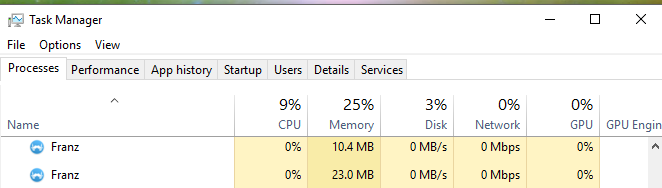
Have same issue on Windows 10. with franz 5.0-beta 18. And try reinatalling Franz from website homepage still not opening. I noticed on Task manager two process running for Franz. I have tried to uninstall and reinstall, tried running CCleaner, and killed the process running for Franz but as if beta 18 cannot run on Windows 10.
 jaycaetano
on 12 Apr 2018
jaycaetano
on 12 Apr 2018
Exactly the same problem here.
 iONinja
on 26 Jun 2018
iONinja
on 26 Jun 2018
@dcendum @jaycaetano I rolled back to 5.0.0-beta.17 which is working. Link: https://github.com/meetfranz/franz/releases/tag/v5.0.0-beta.17
iONinja
on 26 Jun 2018
Same problem here, when upgrading from 5.0.0 Beta 24 to 5.0.1 full - Have had to roll back to the beta.
 GrantaLisa
on 23 Apr 2019
GrantaLisa
on 23 Apr 2019
Same issue here. Running background processes but not the actual app
 TheWitcher92
on 30 Apr 2019
TheWitcher92
on 30 Apr 2019
Same problem here... franz 5.1.0
 msommerx
on 18 May 2019
msommerx
on 18 May 2019
Same here with franz 5.1.0
 MathiasRenner
on 27 May 2019
MathiasRenner
on 27 May 2019
Same here with franz 5.1.0
 tecnux
on 28 May 2019
tecnux
on 28 May 2019
@dcendum @jaycaetano I rolled back to 5.0.0-beta.17 which is working. Link: https://github.com/meetfranz/franz/releases/tag/v5.0.0-beta.17
Thanks, that solved it for me too !
 apwnapwn
on 28 Jun 2019
apwnapwn
on 28 Jun 2019
Had the same issue steps I performed to fix.
- Kill all Franz task
- Uninstall Franz entirely
- Delete everything under ~/AppData/Roaming/Franz and ~/AppData/Local/franz-updater.
- Reinstall
- Relaunch
These steps resolved the issues for me. Something must be stored in Roaming folder that we specific users have set that didn't translate well through the newer version(s).
 djowinz
on 23 Aug 2019
djowinz
on 23 Aug 2019
Had the same issue steps I performed to fix.
* Kill all Franz task

* Uninstall Franz entirely

* Delete everything under ~/AppData/Roaming/Franz and ~/AppData/Local/franz-updater.

* Reinstall

* Relaunch
These steps resolved the issues for me. Something must be stored in Roaming folder that we specific users have set that didn't translate well through the newer version(s).
Thank you ! I can confirm this has solved it for me :) I've been running the old beta for 2 months now, thanks for solving this !
apwnapwn
on 23 Aug 2019
Had the same issue steps I performed to fix.
- Kill all Franz task
- Uninstall Franz entirely
- Delete everything under ~/AppData/Roaming/Franz and ~/AppData/Local/franz-updater.
- Reinstall
- Relaunch
These steps resolved the issues for me. Something must be stored in Roaming folder that we specific users have set that didn't translate well through the newer version(s).
Thanks! This fixed it for me. The newest version is running (tested after restart etc.)
TheWitcher92
on 24 Aug 2019
This issue has been automatically marked as stale because it has not had recent activity. It will be closed if no further activity occurs. Thank you for your contributions.
![stale[bot] picture](https://avatars3.githubusercontent.com/in/1724?v=4&s=40) stale[bot]
on 23 Aug 2020
stale[bot]
on 23 Aug 2020
See https://github.com/meetfranz/franz/issues/1404#issuecomment-537591242 for an easier and less intrusive way to repair the broken Application Data.
 bountin
on 2 Oct 2020
bountin
on 2 Oct 2020
Related issues
 cyChop
·
34Comments
cyChop
·
34Comments
 arlenn
·
65Comments
arlenn
·
65Comments
 Pk13055
·
46Comments
Pk13055
·
46Comments
 adlk
·
30Comments
adlk
·
30Comments
 ElectricWarr
·
56Comments
ElectricWarr
·
56Comments