It would be nice to see alfred integration.
ex:
Open Slack
Open Messenger
Slack: open a channel
Slack: open a private message
Easy integration could be command line commands. So we can use it in Alfred Workflows.
 vanlooverenkoen
All 8 comments
Hey, I build a simple Alfred workflow for myself that allows to jump to Alfred tabs directly. It works like this: I added an keyword input (e.g. "whatsapp") and connected it to an "Run NSAppleScript" action. The AppleScript opens Franz and presses cmd+1 (1 for the first tab. You have to input the right tab number here).
Download: Franz Shortcut.alfredworkflow.zip
I also started working on a workflow that pulls the data form the (inoffical) Franz API (I hope that's ok?!). I got the API-url and the authorization key via the developer tools in Franz. So it's a wonky implementation, but I hope an official API will be released soon. The workflow is based on the helper library by Dean Jackson Link.
Setup Script:
- pull service data from https://api.franzinfra.com/v1/me/services and save it locally
- download icons from Franz API (Whatsapp for example: https://api.franzinfra.com/v1/recipes/whatsapp)
Alfred Trigger:
- press "f " and it shows the enabled services:
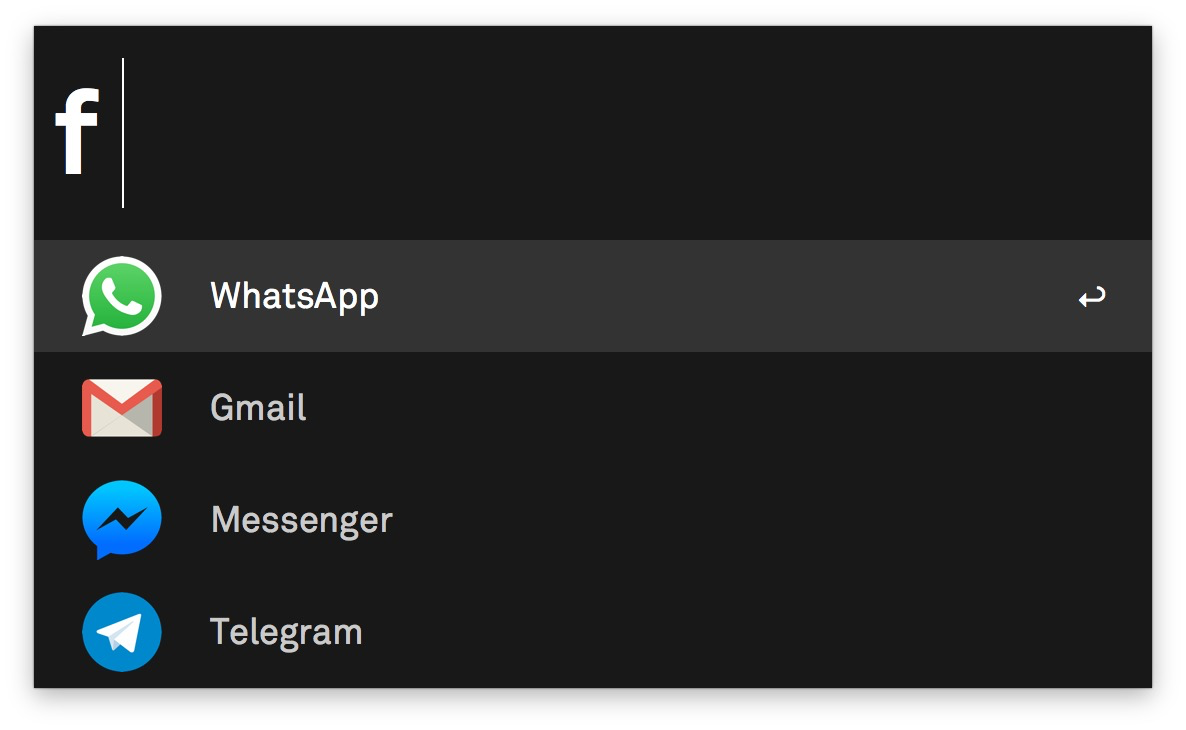
- Enter and you jump to the appropriate tab in Franz.
Downsides:
- You can't simple write "whatsapp", you have to use the trigger ("f"). Has anyone an idea if you can implement keyword triggers dynamically in Alfred (like in the simple workflow above)?
- You have to input the API Key. Currently only attainable via developer tools in Franz.
Upsides:
- you don't have to build the workflow manuelly
- up to date services when you execute the setup script
Feature ideas:
- I'd love to implement the ability to pass a search term to a service, but I'm waiting for this: https://github.com/meetfranz/franz/issues/193. It could work like this: Type "whatsapp Lukas" and it jumps directly to the right conversation.
- Fuzzy search
If anyone is interested I could publish the status quo, but actually the code is really messy.
 tobiasdueser
on 13 Mar 2018
tobiasdueser
on 13 Mar 2018
Thank you so much. I just added some extra features for my needs.
Open slack channel, private message from alfred.
vanlooverenkoen
on 14 Mar 2018
Hi everyone,
thanks a lot for the great franz/alfred integrations! Did someone of you manage to jump directly to a whatsapp conversation via alfred? E.g. "whatsapp Lukas" to jump directly to the right conversation?
Would love to be able to do that :)
 dangerousn
on 3 Dec 2018
dangerousn
on 3 Dec 2018
@tobiasdueser I'd love to see what you have so far! kyle at designanddevelop dot io. Are you still working on it?
 KyleAtDND
on 8 Dec 2018
KyleAtDND
on 8 Dec 2018
E.g. "whatsapp Lukas" to jump directly to the right conversation?
Would love to be able to do that :)
I would love to do that too, but I haven't found a way to focus the search box in WhatsApp, otherwise it would be doable.
Alfred: "whatsapp lukas"
Process: Open Franz -> Press cmd+X to open WhatsApp -> focus search box -> paste "lukas" -> press enter -> done
tobiasdueser
on 7 Jan 2019
@tobiasdueser Thanks for your workflow :)
By the way, I think you can achieve what you want on WhatsApp by pressing Tab key, which brings focus to search box (in my tests). Hope that can help you :)
 AnthoPakPak
on 15 Jan 2019
AnthoPakPak
on 15 Jan 2019
@tobiasdueser thanks for the workflow! It was easy to modify and works like a charm. 👍
And @AnthoPakPak thank you for the idea with the "tab" key.
My script to search WhatsApp looks like this:
on alfred_script(q)

tell application "Franz"
activate
end tell

tell application "System Events"
    keystroke "1" using command down
    delay 0.5
    key code 48     # Tab
end tell

end alfred_script
Upon this script it is also possible to manually create shortcuts for most frequented (group-)chats, given that the contact name or group description stays the same.
After the search box in Franz WhatsApp view is focused the name/search string can be passed and the key command sequence "arrow down", "return", "ESC" will close the search results, but leave the text message box of the desired chat focused.
    keystroke "group/chat name"
    delay 0.5
    key code 125        # Arrow Down
    key code 36     # Return
    key code 53     # ESC
(insert this between key code 48 and end tell and alter "group/chat name" accordingly 👌)
 boettges
on 8 Aug 2019
boettges
on 8 Aug 2019
This issue has been automatically marked as stale because it has not had recent activity. It will be closed if no further activity occurs. Thank you for your contributions.
![stale[bot] picture](https://avatars3.githubusercontent.com/in/1724?v=4&s=40) stale[bot]
on 8 Aug 2020
stale[bot]
on 8 Aug 2020
Related issues
 sach160
·
4Comments
sach160
·
4Comments
 agodlydeciple
·
4Comments
agodlydeciple
·
4Comments
 hello-jason
·
4Comments
hello-jason
·
4Comments
 dbfin
·
4Comments
dbfin
·
4Comments
 Sigri44
·
4Comments
Sigri44
·
4Comments
Most helpful comment
Hey, I build a simple Alfred workflow for myself that allows to jump to Alfred tabs directly. It works like this: I added an keyword input (e.g. "whatsapp") and connected it to an "Run NSAppleScript" action. The AppleScript opens Franz and presses cmd+1 (1 for the first tab. You have to input the right tab number here).
Download: Franz Shortcut.alfredworkflow.zip
I also started working on a workflow that pulls the data form the (inoffical) Franz API (I hope that's ok?!). I got the API-url and the authorization key via the developer tools in Franz. So it's a wonky implementation, but I hope an official API will be released soon. The workflow is based on the helper library by Dean Jackson Link.
Setup Script:
Alfred Trigger:
Downsides:
Upsides:
Feature ideas:
If anyone is interested I could publish the status quo, but actually the code is really messy.