Franz: Spellcheck no longer working in other languages
Expected Behavior
When writing a full sentence in a language other than english, spellcheck should kick in and recognize the written language, then provide spell suggestions for that language. (this worked in all prior versions of Franz and was the main reason me and many in our office used Franz for instead of slack)
Current Behavior
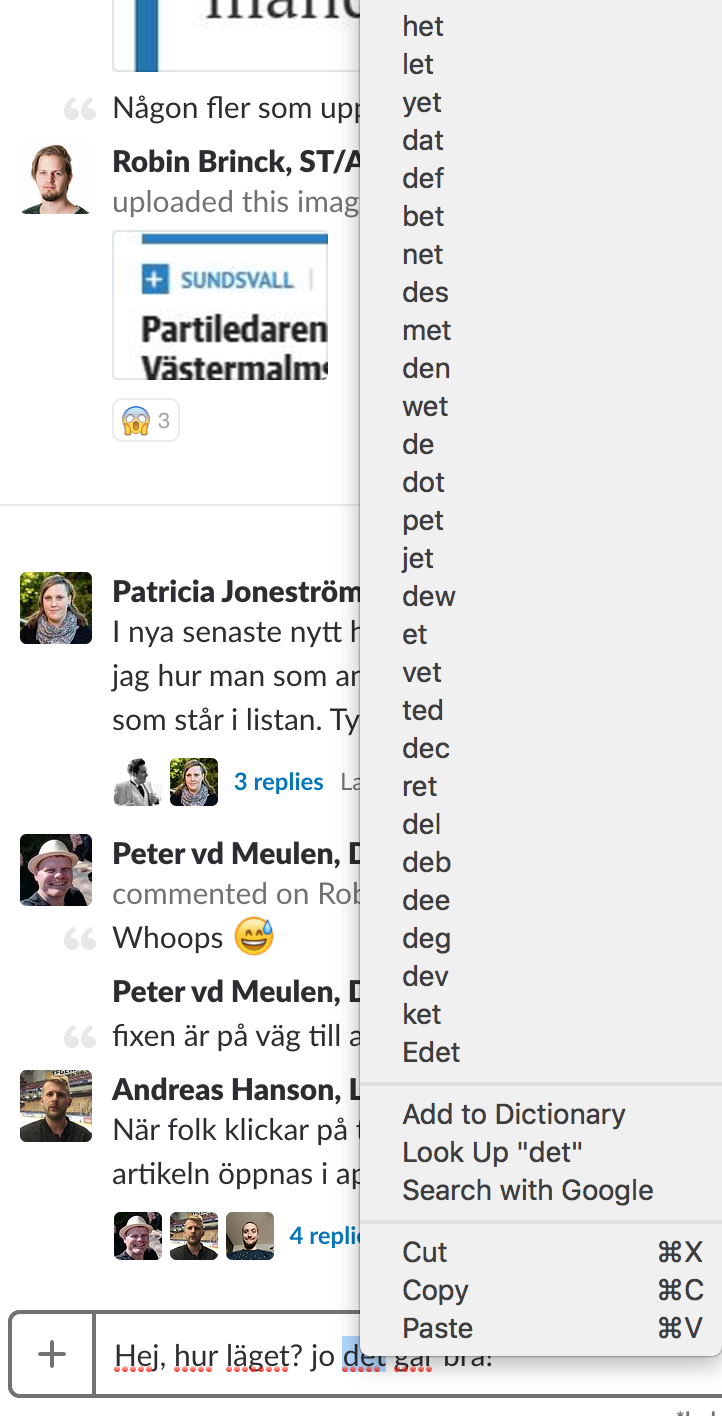
When writing a full line, franz sticks to English spellcheck and does not switch. apart from engilsh spelling suggestions it suggests a list of gibberish words that don't really make sense.
Screenshots (if appropriate):
Possible Solution
Use the standard system libraries or the appropriate webkit library for spellcheck.
Steps to Reproduce (for bugs)
- Write non-english sentence, Swedish example: "Hej där hur läget?"
- All words get red marking
- Right click with cursor over word
- See list of english suggestions and random gibberish
Context
This (for me) is the unique selling point for Franz. Slack has had horrible spell check so far that only supports American English. As someone that switches between Icelandic, Norwegian, Swedish, Dutch and English, Spelling and grammar check is an awesome thing to have. Franz now seems moving into the same direction as slack.
Spellcheck worked like it does in Google Chrome in all older versions of Franz which was perfect
Your Environment
- Franz Version used: 5.0.0.beta.10
- Operating System and version: Mac OSX Sierra 10.12.6
 HendrikPetertje
All 18 comments
I encountered the exact same thing when switching to version 5. This used to work like a charm in previous versions.
 mfeltscher
on 2 Nov 2017
mfeltscher
on 2 Nov 2017
In my case (Beta 13), there's no spell check at all, not even in the language Franz is, nor English, nothing. No SpellCheck. Do I need to do anything to activate the Spell Check? And to select the multiple languages to check?
Thanks.
 AGonLen
on 22 Nov 2017
AGonLen
on 22 Nov 2017
I have same problem here. I was on beta 13 and sticks with beta 14. Spellcheck only work in english.
 kecinzer
on 24 Nov 2017
kecinzer
on 24 Nov 2017
@AGonLen, @kecinzer Please always add your OS to your comment. Otherwise it's impossible for me to test the issues.
Also, what is the language you want to write?
 adlk
on 24 Nov 2017
adlk
on 24 Nov 2017
Sure!!!
When I wrote the message:
Franz Version used when wrote message: 5.0.0.beta.13
Operating System and version: Windows 10 Pro Fall Creators Update
Now:
Franz Version used now: 5.0.0.beta.14
And spell checker is working in my language (Spanish), and although I have Franz setup with English language, it does not correct.
Is it possible to select the "active" languages?
Can the same message/text have multiple languages?
Does it detect and change automatically from one language to another?
AGonLen
on 24 Nov 2017
Right now the spellchecker selects the system language, not the Franz language. While Franz has support for a few languages. People might want to write in their native language even though Franz might not be available in that language.
I have started a test to do manual and automatic language selection. Unfortunately this is working so incredibly unreliable that I had to disable it for beta 14.
adlk
on 24 Nov 2017
That explains, and it's quite some progress, many thanks BTW!!!! At least it will correct when I speak in my language, but would be good to be able to select 2-3 languages for people that might speak different languages on their chats/conversations.
The manual selection or languages (or even automatic if it could be done, similar to what Chrome does) would be awesome!!! :)
AGonLen
on 24 Nov 2017
Also, would be good and great to create your know dictionary and add words that you use (specially names and things like that...)
AGonLen
on 24 Nov 2017
I'm sorry. I'm on macOS 10.12.6 and Franz 5.0.0-beta.14. I'm using czech language. And even if I set czech language as system default for spell check, Franz keep checking in English.
kecinzer
on 29 Nov 2017
Now the spellcheck menu is not showing when right clicking...
Sometimes it happened, but after a Franz close and restart was working, but now not working at all. For a fraction of a second I see the menu but then it's gone.
Franz Version used: 5.0.0.beta.14
Operating System and version: Windows 10 Pro Fall Creators Update
AGonLen
on 30 Nov 2017
Same here.
Ubuntu 16.04
Version: 5.0.0-beta.14
Release: 1.7.9 / linux / x64
Brazilian Portuguese.
EDIT: I think the app needed some time to understand the language. It's now working fine in Brazilian Portuguese.
 gionaufal
on 5 Dec 2017
gionaufal
on 5 Dec 2017
I would like to see the manual selection of a language for spellcheck independent on the Franz UI language.
 libora
on 19 Jan 2018
libora
on 19 Jan 2018
Same Here
Ubuntu 18.04
Version 5.0.0-beta.18
Release: 1.8.4 / linux / x64
Brazilian Portuguese
 morcegon
on 11 May 2018
morcegon
on 11 May 2018
MacOS 10.13.6
Franz 5.0.0-beta.18.903
+1 for multi-language spellcheck. I live in Spain, but write daily in both English and Spanish. My system language and Franz language are set to English.
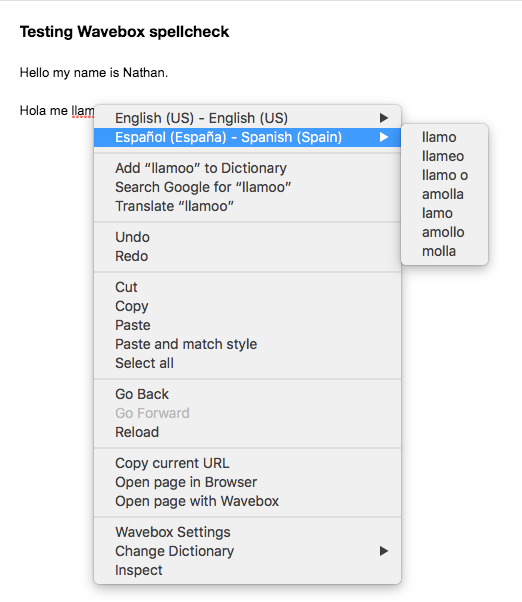
Very few Electron apps support multi-language spellcheck, I'm assuming it's difficult to implement. A few do however. Wavebox provides spellcheck for up to two languages. Not perfect, but better than being limited to just one.
Here's how they handle spellcheck configuration:

And here it is in use:
Glad to see Franz back in action! 👍
 nlenkowski
on 31 Jul 2018
nlenkowski
on 31 Jul 2018
Any news about this "bug"?
I really enjoy Franz, and using only as a Gmail "client"; however, the very fact that it does not support any other language than English is really annoying. I speak Portuguese and most of my emails are in my native language.. I tried to change gmail language.. Franz language...gmail "check spelling".... and nothing appears to work...the worst is the red underline.... That's a shame because I would really like to keep using the app..
Btw,
Ubuntu 18.04
Version 5.0.0-beta.18
 pinheirof
on 23 Aug 2018
pinheirof
on 23 Aug 2018
@pinheirof You can set your Ubuntu main language to Portuguese so you don't have your native language underlined.
In my case, I use 50/50 two different languages, so Franz is anoying to use, underlining 50% of my writings.
We need to have this "disable spellcheck" working, it sound like an easy thing to fix.
Also Ubuntu 18.04
Version 5.0.0-beta.18
 bastien-wink
on 29 Aug 2018
bastien-wink
on 29 Aug 2018
MacOS 10.14, Slack Desktop app 3.3.2: Spell checker works only for English, doesn't work for Russian language, even if I manually select it.
 iromeo
on 8 Oct 2018
iromeo
on 8 Oct 2018
It'd be great to be able to add languages like browsers can, or to use something native on certain platforms so you could extend it that way. My issue isn't as bad as users of other languages, I just want en_AU, but it is annoying.
 ruscur
on 14 May 2019
ruscur
on 14 May 2019
Related issues
 seanford
·
4Comments
seanford
·
4Comments
 larissaales
·
3Comments
larissaales
·
3Comments
 hello-jason
·
4Comments
hello-jason
·
4Comments
 sach160
·
4Comments
sach160
·
4Comments
 agodlydeciple
·
4Comments
agodlydeciple
·
4Comments
Most helpful comment
MacOS 10.14, Slack Desktop app 3.3.2: Spell checker works only for English, doesn't work for Russian language, even if I manually select it.